
This page is not an official page of the app or its developer, but an independent editorial publication created for informational and commentary purposes. Unless expressly stated otherwise, neither the app nor its developer is affiliated with, endorsed by, sponsored by, authorized by, or otherwise officially connected with MWM, Apple, Google Play, the app publisher, or the app's developer, and nothing on this page implies that the app was developed using MWM's services. Any trademarks, logos, screenshots, and other content remain the property of their respective owners.


Synthesia
Learning piano used to be a chore; this app transforms it into an addiction. Synthesia delivers the power to master the keys on your terms, with or without sheet music.
Downloads
2.5M+User Rating
Total Ratings
6.0KPublisher
Category
MusicLocales
1Latest Version
10.9.2Size
20.0 MBFirst Released
Dec 10, 2012Evaluating key functionalities for interactive piano learning.
Synthesia: Core Features Analysis
Falling Notes Visual Learning
It allows users to learn piano visually without needing to read sheet music, highly suitable for beginners and visual learners.
Extensive Song Library
It offers access to a vast library of 150 included songs and compatibility with any MIDI file, providing endless learning and practice opportunities.
Guided Melody Practice
This tool features a practice mode that waits for the user to play the correct note, ensuring accuracy and building confidence for beginners.
Multiple Notation Views
It allows users to choose between falling note blocks, traditional sheet music, or a combination of both, adapting to various learning preferences and skill levels.
Flexible Input Methods
The app provides versatility, allowing practice on a touchscreen or with an external digital piano/MIDI keyboard, catering to different user setups.
Finger Hint Guidance
The app provides helpful finger hints for each song, guiding users on proper technique and improving their playing posture and efficiency.
Lighted Keyboard Support
The app integrates with lighted keyboards, providing visual cues directly on the instrument for an immersive and intuitive learning experience.
Hand-Specific Practice
It offers the flexibility to practice each hand independently or together, supporting progressive learning and mastering complex pieces.
Frequently Asked Questions
Everything you need to know about Synthesia
What is Synthesia?
Synthesia is an app that teaches users to play the piano using falling notes, supporting both touchscreen play and external digital keyboards. It works for beginners and experienced players.
How does Synthesia teach piano?
Synthesia teaches piano by using falling note blocks. It offers a Melody Practice mode that waits for the user to hit the correct note. Users can also view traditional sheet music.
Can I connect a real piano keyboard to Synthesia?
Yes, Synthesia allows users to connect their own digital piano keyboard. The app is also compatible with the lights in most lighted keyboards for an interactive learning experience.
Does Synthesia use a subscription model?
No, Synthesia does not use a monthly subscription. Users unlock the full app features with a single, one-time purchase, which includes all future upgrades forever.
What features are included in the free version of Synthesia?
The free version of Synthesia allows users to try more than 20 songs. It includes features like playing with falling notes, touchscreen or digital keyboard input, and finger hints.
What do I get with the full unlocked version of Synthesia?
The full unlocked version of Synthesia provides access to all 150 included songs and any MIDI song ever created. It also features a multi-track recorder and includes all future upgrades.
Does Synthesia provide finger guidance for playing piano?
Yes, Synthesia provides hints for learning the correct fingers to use with every song. These hints are visually integrated into the learning interface to guide the user.
Can I view traditional sheet music in Synthesia?
Yes, Synthesia allows users to choose between traditional sheet music, falling note blocks, or display both simultaneously for learning.
The following screenshots and description are sourced directly from the app's official store listing and are the property of the app developer.
App Store
Screenshots

This app presents a dynamic learning experience with falling note blocks clearly indicating upcoming notes and a virtual piano keyboard highlighting the keys to press.
Interactive Note Display
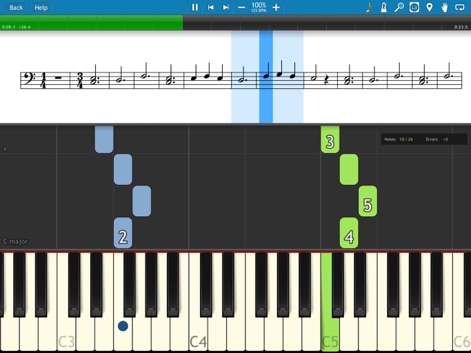
Users can choose to learn with the familiar traditional sheet music notation simultaneously displayed above the innovative falling note blocks for comprehensive visual guidance.
Dual Notation View
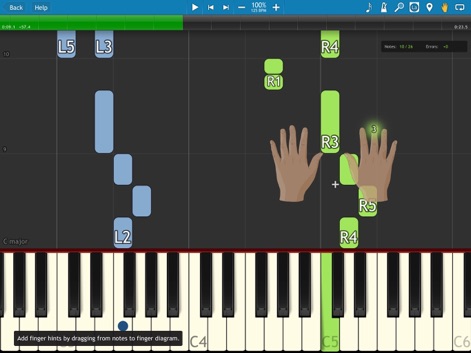
The app provides intuitive hand diagrams demonstrating correct finger placement for each note, enhancing learning alongside the visual guidance of falling note blocks.
Master Fingering Techniques
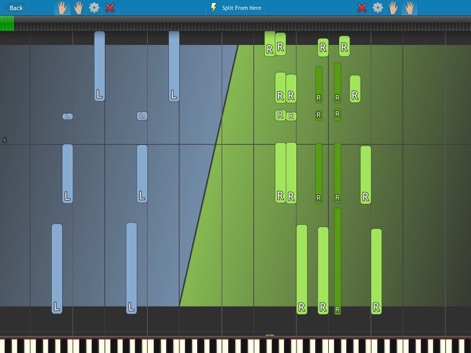
This tool offers a clear split-hand note display, visually separating left and right-hand parts, further supported by dedicated hand icons in the interface for focused practice.
Hand Separation Practice
Description
Download
More Like This
Apps with similar features and user experience

Artie: Learn Piano with AI
Art Master Academy s.r.o.
Piano - Piano keyboard, Learn
梦莹 张

InstaPiano - Easy and Fun
Xiaoyezi Beijing Technology Co., Ltd.
Simply Piano: Learn Piano Fast
Simply Ltd

flowkey – Learn to Play Piano
flowkey GmbH

Perfect Piano - Learn to Play
Revontulet Soft Inc.
Skoove: Learn to Play Piano
Learnfield GmbH
Piano Academy by Yokee Music
Yokee Music LTD
Simpia – Learn piano by songs
SMULIE COMPANY LIMITED
This page is not an official page of the app or its developer, but an independent editorial publication created for informational and commentary purposes. Unless expressly stated otherwise, neither the app nor its developer is affiliated with, endorsed by, sponsored by, authorized by, or otherwise officially connected with MWM, Apple, Google Play, the app publisher, or the app's developer, and nothing on this page implies that the app was developed using MWM's services. Any trademarks, logos, screenshots, and other content remain the property of their respective owners.