
This page is not an official page of the app or its developer, but an independent editorial publication created for informational and commentary purposes. Unless expressly stated otherwise, neither the app nor its developer is affiliated with, endorsed by, sponsored by, authorized by, or otherwise officially connected with MWM, Apple, Google Play, the app publisher, or the app's developer, and nothing on this page implies that the app was developed using MWM's services. Any trademarks, logos, screenshots, and other content remain the property of their respective owners.


TeamSpeak 3
Lag-free voice means every callout hits. TeamSpeak 3 grants users absolute command over their comms, essential for competitive play.
Downloads
1M+User Rating
Total Ratings
5.5KPublisher
Category
Social NetworkingLocales
4Latest Version
3.8.1Size
32.8 MBFirst Released
Dec 10, 2012Evaluating key features for competitive gaming and secure community collaboration.
TeamSpeak 3: An Analytical Overview for High-Performance Communication
Robust Access Control
The app provides granular control over user roles and channel permissions, essential for competitive gaming communities, esports teams, and businesses to maintain order, security, and structured communication.
Optimized Performance & Low Latency
This tool features minimal CPU and data usage, ensuring seamless, low-latency voice communication critical for competitive gaming where responsiveness is key. It prevents performance impact on gaming.
Private Server Hosting & Scalability
It allows users to host their own private servers, offering unparalleled control, security, and customization options for dedicated communities, guilds, or businesses who demand a bespoke communication environment.
Flexible Voice Activation Modes
The app supports both Push-To-Talk for precise control during intense moments and voice activation for hands-free communication, catering to diverse user preferences and preventing unwanted background noise.
Ad-Free & Uninterrupted Communication
It provides an ad-free environment, ensuring focus and professional communication without distractions, which is crucial for competitive gaming and business use cases.
Comprehensive User & Channel Overview
This tool features detailed information about channels and connected players, including status notifications, enabling effective team coordination and community management for administrators and team leaders.
Frequently Asked Questions
Everything you need to know about TeamSpeak 3
What is TeamSpeak 3?
TeamSpeak 3 is an advanced voice chat and communication app. It enables groups to communicate via internet or private networks, primarily used by professional gamers and small businesses.
Is TeamSpeak 3 ad-free?
Yes, TeamSpeak 3 is completely ad and spam free. It ensures a clean and uninterrupted communication experience for all users.
Does TeamSpeak 3 support text messaging?
Yes, TeamSpeak 3 supports sending and receiving group and direct messages. Users can initiate text chat with individuals directly within the app.
Can TeamSpeak 3 users communicate anonymously?
Yes, TeamSpeak 3 allows users to communicate anonymously. This feature enhances user privacy and control within the application.
How do I join a TeamSpeak 3 server?
To join, connect to a TeamSpeak 3 server. For public servers, use the desktop client's server list. For private servers, obtain connection information from your group's administrator.
Does TeamSpeak 3 have Push-To-Talk (PTT)?
Yes, TeamSpeak 3 features both Push-To-Talk (PTT) and voice activation. Users can select their preferred method for speaking during communication.
On what devices can I use TeamSpeak 3?
TeamSpeak 3 is available on smartphones, desktop PCs, and Macs. The iOS version is a universal app optimized for iPhone, iPod, and iPad devices.
Is TeamSpeak 3 optimized for gaming communication?
Yes, TeamSpeak 3 is a preferred voice chat solution for online gamers. It enables real-time strategy discussions and team communication during gameplay.
Does TeamSpeak 3 provide user management controls?
Yes, TeamSpeak 3 includes advanced permission controls. Users can manage contacts, mute, kick from channels/servers, and assign priority speaker status directly.
Can TeamSpeak 3 operate on private networks or servers?
Yes, TeamSpeak 3 supports communication via private networks and allows use on private servers. This ensures secure interaction for guilds, clans, or colleagues.
The following screenshots and description are sourced directly from the app's official store listing and are the property of the app developer.
App Store
Screenshots

The app greets users with its iconic headset and profile logo, clearly displaying the brand name for instant recognition upon launch.
Welcome to TeamSpeak
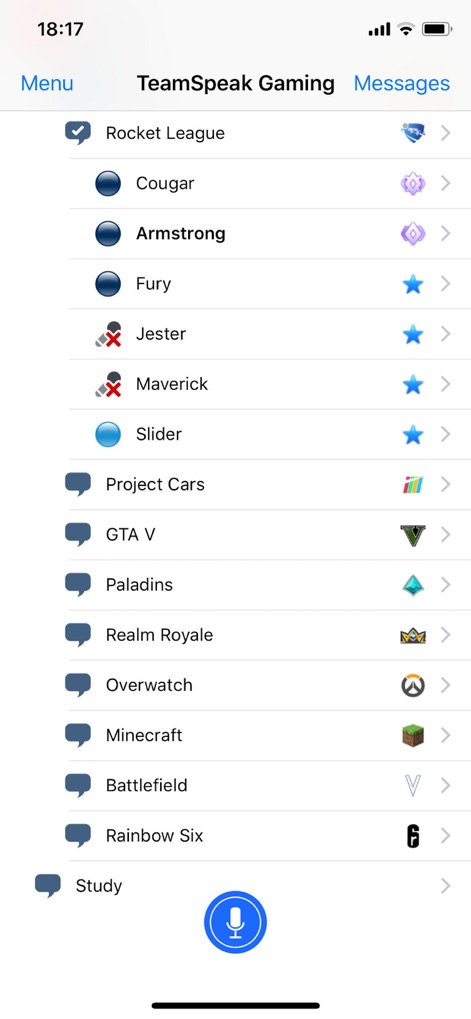
Users can effortlessly browse a detailed list of game-specific channels, each represented by a distinct game icon, and easily activate voice communication with the prominent microphone button.
Seamless Channel Access

This tool provides comprehensive options for managing individual participants, allowing administrators to access specific actions like 'Mute' or 'Kick From Channel' and view detailed 'Client Connection Info'.
Granular User Controls
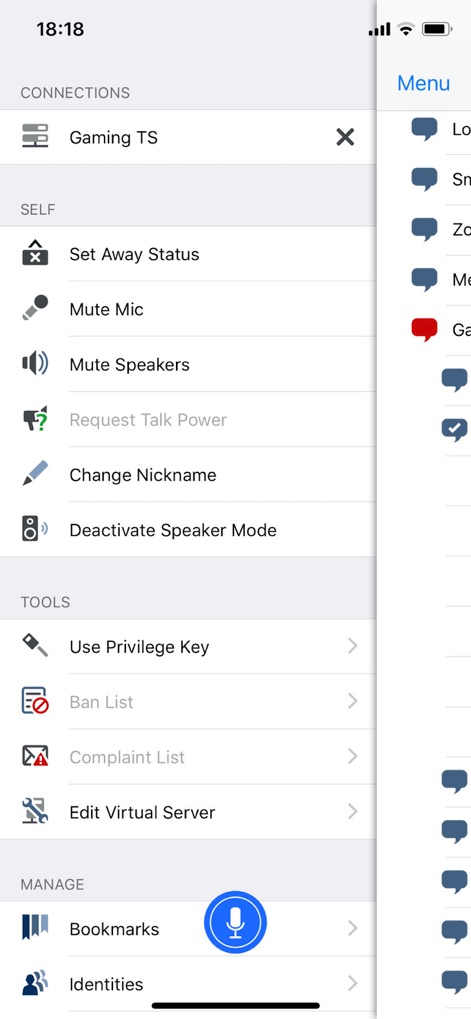
The side menu reveals robust administrative features, including access to a 'Ban List' for moderation and the ability to 'Edit Virtual Server' settings for complete control over the communication environment.
Advanced Management Tools
Description
Download
More Like This
Apps with similar features and user experience

buz - voice connects
BUZ TECHNOLOGY PTE. LTD.

Marco Polo - Video Messenger
Joya Communications, Inc.
Walkie Talkie - Push to Talk
友海 张

Zello Walkie Talkie
Zello Inc

Walkie Talkie - All Talk App
Picslo Corp

ten ten - your friends, on tap
Ten Ten

Voxer Walkie Talkie Messenger
Voxer Inc.
Online Walkie Talkie Pro
SENIOR ELECTRON LLC
南山对讲 - 手机APP对讲机
文文 那
This page is not an official page of the app or its developer, but an independent editorial publication created for informational and commentary purposes. Unless expressly stated otherwise, neither the app nor its developer is affiliated with, endorsed by, sponsored by, authorized by, or otherwise officially connected with MWM, Apple, Google Play, the app publisher, or the app's developer, and nothing on this page implies that the app was developed using MWM's services. Any trademarks, logos, screenshots, and other content remain the property of their respective owners.