
This page is not an official page of the app or its developer, but an independent editorial publication created for informational and commentary purposes. Unless expressly stated otherwise, neither the app nor its developer is affiliated with, endorsed by, sponsored by, authorized by, or otherwise officially connected with MWM, Apple, Google Play, the app publisher, or the app's developer, and nothing on this page implies that the app was developed using MWM's services. Any trademarks, logos, screenshots, and other content remain the property of their respective owners.


TED Talks: Watch and Learn
Opinion formation is no longer a passive activity; this app arms users with ideas, direct from the source.
Downloads
12.5M+User Rating
Total Ratings
40.5KPublisher
Category
EducationLocales
1Latest Version
7590Size
162.4 MBFirst Released
Oct 14, 2010An analytical overview of features catering to intellectually curious and lifelong learners.
Key Features of TED Talks: Watch and Learn
Diverse Content Library & Curated Discovery
The app provides access to a vast library of thousands of inspiring and informative videos. It allows users to browse by topic, view trending content, or explore curator-selected talks, facilitating exploration and discovery for intellectually curious individuals seeking new perspectives.
Personalized Content Recommendations & Sync
The app provides tailored video suggestions based on user interests, significantly enhancing content discovery relevant to individual learning paths. It also ensures a consistent and seamless viewing experience across multiple devices.
Multilingual Subtitles for Global Accessibility
This tool features subtitles in over 100 languages, making TED talks universally accessible and enabling a broader global audience to engage with and comprehend complex ideas, fostering inclusive knowledge sharing.
Offline Access to Content
It allows users to download videos for offline playback, providing uninterrupted access to profound insights and educational content even without an internet connection, which is ideal for continuous learning on the go.
"Surprise Me!" for Serendipitous Discovery
The app provides a "Surprise Me!" feature that delivers instant, unexpected talks, encouraging serendipitous discovery of new topics and fostering a broader intellectual curiosity beyond usual preferences.
Curated "Watch Later" List
The app enables users to save talks to a 'watch later' list, helping them organize their viewing queue and ensure they can return to compelling content when they have dedicated time for focused learning.
Enhanced Viewing via AirPlay
It allows users to stream videos directly to their Apple TV via AirPlay, facilitating a more immersive and comfortable viewing experience on a larger screen, suitable for group discussions or deeper engagement.
Customizable Dark/Light Modes
This tool offers the flexibility to switch between dark and light display modes, enhancing viewing comfort and reducing eye strain during extended periods of content consumption, which supports sustained learning.
Frequently Asked Questions
Everything you need to know about TED Talks: Watch and Learn
Is the TED Talks: Watch and Learn app free to use?
Yes, the TED Talks: Watch and Learn app offers thousands of inspiring, informative, and transformational videos available for free viewing to all users.
Does the TED Talks app offer personalized video recommendations?
The TED Talks app provides personalized video recommendations. Users can sign in to receive tailored suggestions based on their unique interests and viewing history.
Can I download videos for offline viewing in the TED Talks app?
Yes, the TED Talks: Watch and Learn app allows users to download videos. This feature enables offline viewing of content without an internet connection.
How many languages do TED Talks: Watch and Learn app subtitles support?
The TED Talks app supports subtitles in over 100 languages. This extensive language support enhances accessibility for a global audience.
Does the TED Talks app have a 'Surprise Me!' feature?
Yes, the TED Talks app includes a 'Surprise Me!' feature. This allows users to discover instant inspiration by playing a randomly selected talk with a single tap.
Can I save TED Talks videos to watch later?
The TED Talks app allows users to save talks to a 'watch later' list. This helps users organize and access preferred content efficiently within their library.
Does the TED Talks: Watch and Learn app support AirPlay for Apple TV?
Yes, the TED Talks app supports streaming videos to Apple TV using AirPlay. This allows users to enjoy talks on a larger screen.
Can I use dark mode in the TED Talks app?
Yes, the TED Talks app supports both dark and light modes. Users can toggle between these display settings to suit their viewing preference or environment.
Does the TED Talks app sync video progress across multiple devices?
Yes, the TED Talks app syncs videos across all your devices when you sign in. This ensures a consistent viewing experience on iPhone, iPad, and iPod touch.
Does the TED Talks: Watch and Learn app include podcasts?
Yes, the TED Talks app offers podcasts in addition to videos. Users can play award-winning podcasts and listen to them in the background.
The following screenshots and description are sourced directly from the app's official store listing and are the property of the app developer.
App Store
Screenshots

This app delivers a personalized home feed with "Your latest recommendation" and offers quick access to "More recommendations" for continuous learning.
Curated Content Discovery

Users can refine their learning journey by selecting from diverse topics like "Science" and "Personal growth" to receive content perfectly aligned with their intellectual curiosities.
Tailored Interest Exploration
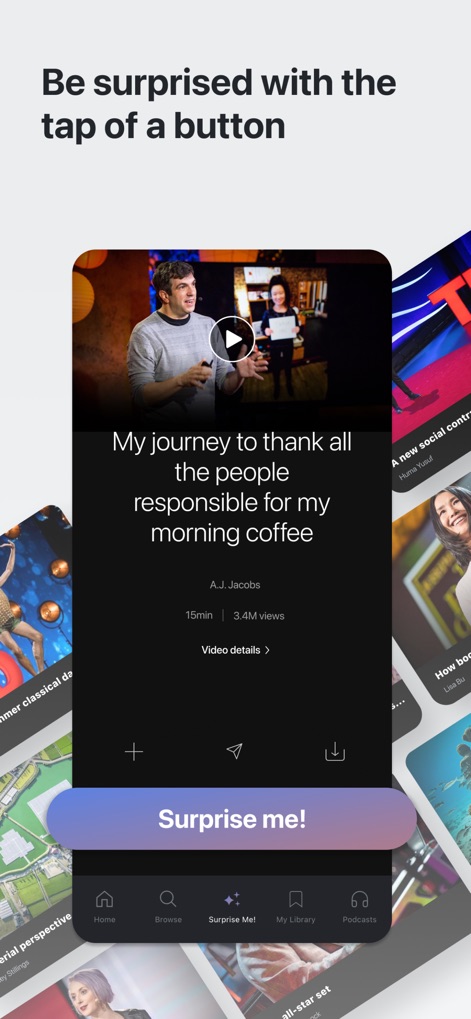
The "Surprise Me!" feature provides immediate access to an unexpected talk, while also offering essential functions like playing the video and viewing "Video details".
Instant Inspiration Delivered
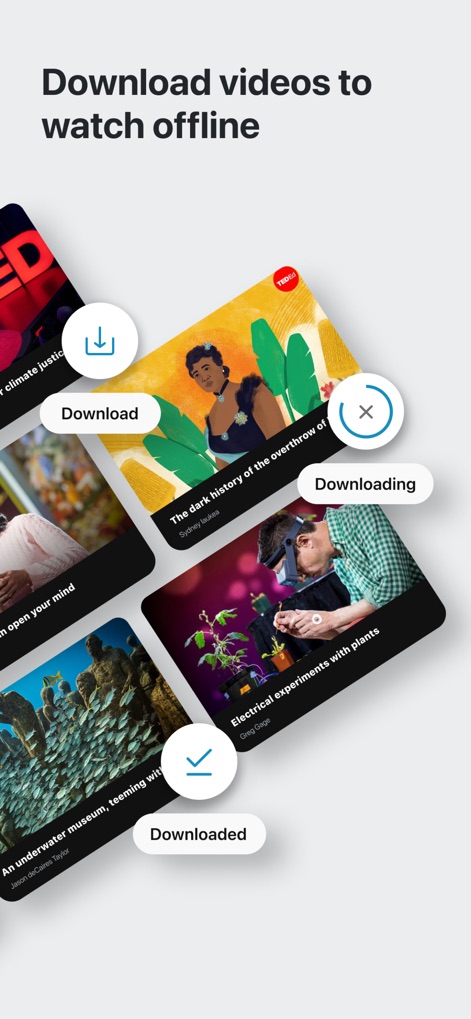
This tool empowers users to learn anywhere by easily "Downloading" talks for offline viewing, with clear indicators for content that has been successfully "Downloaded".
Offline Learning Access
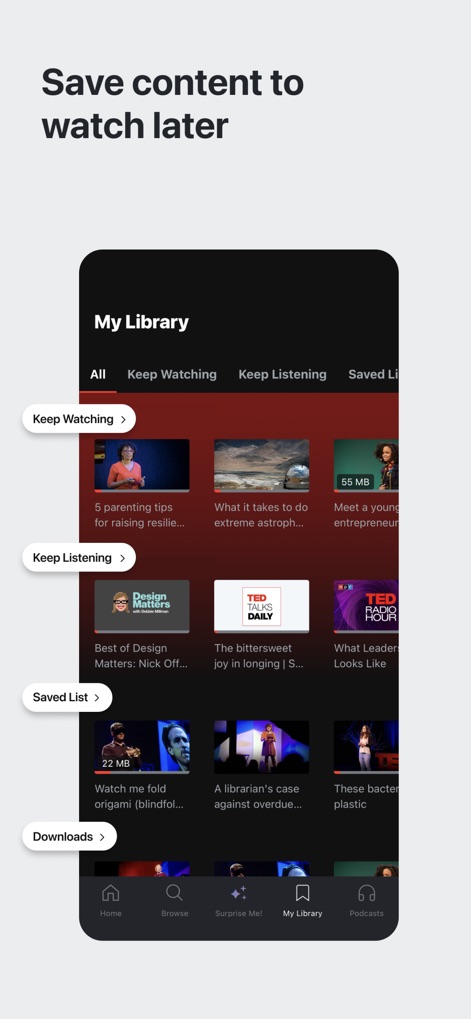
The app's "My Library" organizes saved content into convenient categories like "Keep Watching" for ongoing talks and a "Saved List" for future engagement.
Organized Learning Library

This platform ensures broad inclusivity by offering "subtitles in over 100 languages" and allowing users to easily select their preferred language, such as "Arabic", from a comprehensive list.
Global Accessibility Features
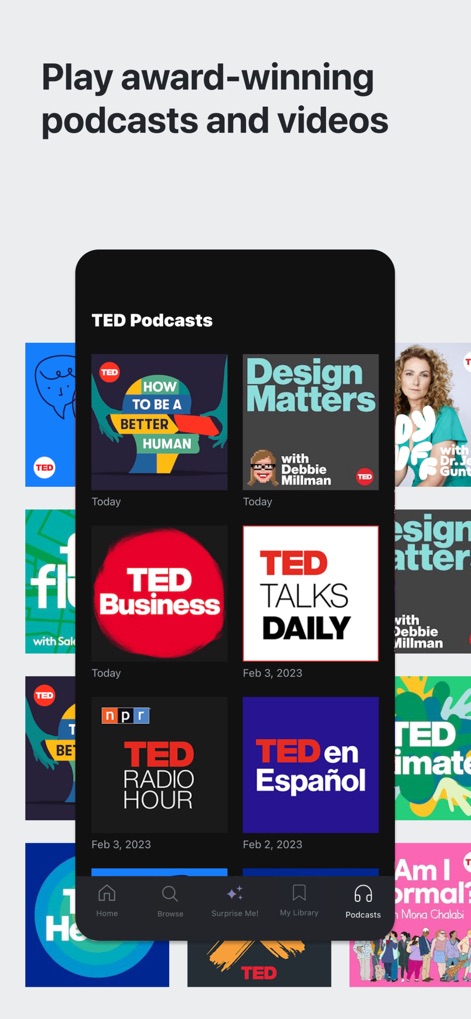
Beyond video talks, the app expands its offering to include a dedicated "TED Podcasts" section, showcasing a range of audio content like "TED Talks Daily" and "How to Be a Better Human".
Diverse Media Formats
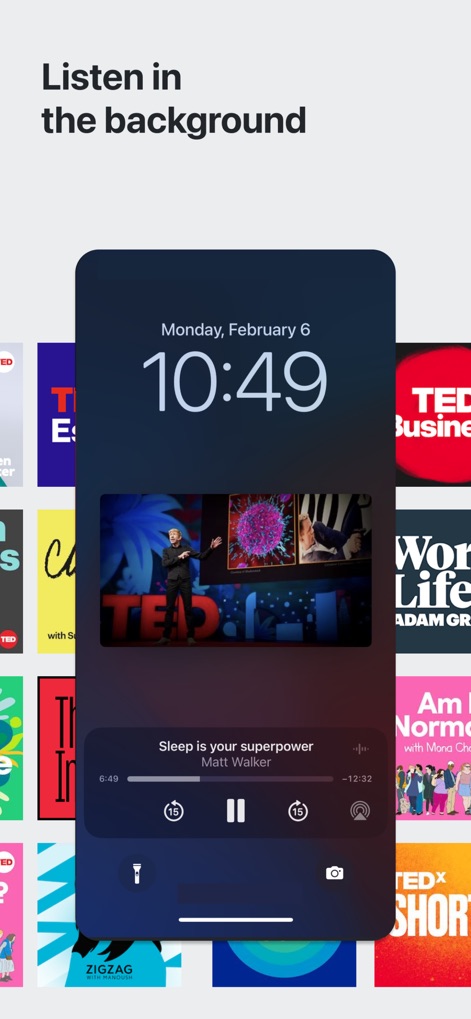
The app supports continuous learning through background playback, allowing users to listen to talks like "Sleep is your superpower" even when the device is locked, with full playback "controls" accessible.
Seamless Background Listening
Description
Download
More Like This
Apps with similar features and user experience





This page is not an official page of the app or its developer, but an independent editorial publication created for informational and commentary purposes. Unless expressly stated otherwise, neither the app nor its developer is affiliated with, endorsed by, sponsored by, authorized by, or otherwise officially connected with MWM, Apple, Google Play, the app publisher, or the app's developer, and nothing on this page implies that the app was developed using MWM's services. Any trademarks, logos, screenshots, and other content remain the property of their respective owners.