
This page is not an official page of the app or its developer, but an independent editorial publication created for informational and commentary purposes. Unless expressly stated otherwise, neither the app nor its developer is affiliated with, endorsed by, sponsored by, authorized by, or otherwise officially connected with MWM, Apple, Google Play, the app publisher, or the app's developer, and nothing on this page implies that the app was developed using MWM's services. Any trademarks, logos, screenshots, and other content remain the property of their respective owners.


TGV
No more fumbling. This app puts the cinema experience squarely in the user's pocket.
Downloads
1M+User Rating
Total Ratings
1.2KPublisher
Category
EntertainmentLocales
1Latest Version
1.1.27Size
80.7 MBFirst Released
Jan 21, 2024An evaluation of TGV's core functionalities for the discerning cinema-goer.
Key Features Analysis: TGV App
Manage MovieClub Rewards
It allows users to efficiently track MovieMoney and redeem exclusive rewards, directly enhancing the value for loyal patrons.
Showtimes
The app provides comprehensive showtime listings for preferred and nearby cinemas, enabling efficient movie planning.
Notifications
It ensures users receive timely alerts before their movie, significantly reducing the chance of missing a show.
Biometric ID
This tool features a biometric authentication option, providing a faster, safer, and more convenient sign-in experience.
Navigation
The app integrates one-tap navigation to cinema locations via popular map services, streamlining the journey for users.
Favourite Cinemas
It allows users to designate their preferred cinemas for quick access to booking pages, enhancing convenience for frequent visitors.
Sync Calendar
This tool enables syncing movie bookings with personal calendars, helping users avoid conflicts and remember their movie schedules.
Parking Recommendations
The app provides parking suggestions to help users find closer parking spots, improving the overall pre-movie experience.
Quick View
It offers a quick overview of past and upcoming orders, facilitating efficient management of movie tickets and bookings.
Reminders
The app allows users to set reminders for upcoming new movies, aiding in discovery and planning for new releases.
Frequently Asked Questions
Everything you need to know about TGV
Does the TGV app support biometric login for faster sign-in?
Yes, the TGV app supports Biometric ID for safer, faster, and easier sign-in. Users can set up Biometric ID directly within the app for quick access to their account without needing to type passwords.
Can I save my preferred cinemas in the TGV app for quick booking?
Yes, the TGV app allows users to set their favorite cinemas. This feature creates a shortcut directly to the ticket booking page for those specific locations, streamlining the movie selection process for convenience.
How can I check movie showtimes using the TGV app?
The TGV app displays showtimes for movies. Users can view showtimes at their favorite cinema locations and also explore showtimes at nearby cinemas, ensuring they find a convenient screening time.
Does the TGV app have a quick view feature for movie orders?
Yes, the TGV app includes a Quick View feature. It allows users to quickly see their movie orders, displaying essential details like the QR code, cinema location, date, and seat numbers for easy access.
Does the TGV app provide parking recommendations for cinemas?
Yes, the TGV app offers parking recommendations. It helps users find parking closer to the cinema by suggesting specific parking zones, making their visit more convenient and stress-free.
Can I get directions to TGV cinema locations through the app?
Yes, the TGV app provides navigation directly to cinema locations. Users can get directions with a single tap, utilizing external apps like Google Maps or Waze for convenient and accurate routing.
How do I add my TGV movie bookings to my calendar?
The TGV app allows users to sync their movie bookings with their personal calendar. This feature helps prevent forgetting or double-booking movies, ensuring users stay organized with their movie plans.
Does the TGV app send alerts before a movie starts?
Yes, the TGV app sends notifications. Users receive alerts before their movie screenings, ensuring they are reminded of their upcoming shows and do not miss the start time.
Can I set reminders for new movies within the TGV app?
Yes, the TGV app allows users to set reminders for upcoming new movies. This feature ensures users are notified when new films are released or tickets become available, keeping them updated.
How do I manage my MovieClub rewards and MovieMoney with the TGV app?
The TGV app provides tools to manage MovieClub Rewards. Users can track their MovieMoney balance and easily redeem available rewards, simplifying the process of utilizing loyalty benefits directly from the app.
The following screenshots and description are sourced directly from the app's official store listing and are the property of the app developer.
App Store
Screenshots
Discover the brand-new TGV app, prominently featuring its distinctive logo and a welcoming introductory message for users.
Welcome Screen Unveiled
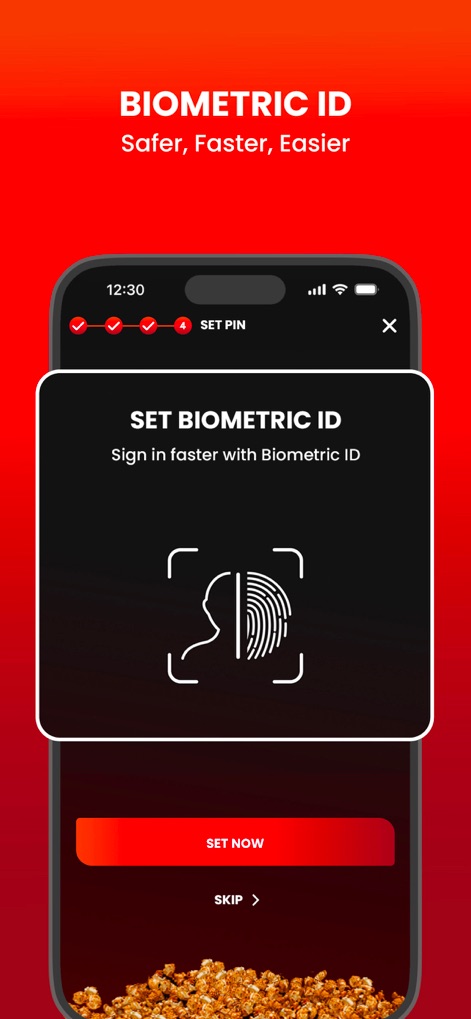
Experience enhanced security and convenience with the Biometric ID setup, clearly indicated by the fingerprint icon and step-by-step pin configuration.
Secure Login Optimized

Users can easily set their favourite cinemas as shortcuts, with specific locations like Pavilion Bukit Jalil and Sunway Pyramid highlighted for quick access.
Preferred Cinemas Streamlined
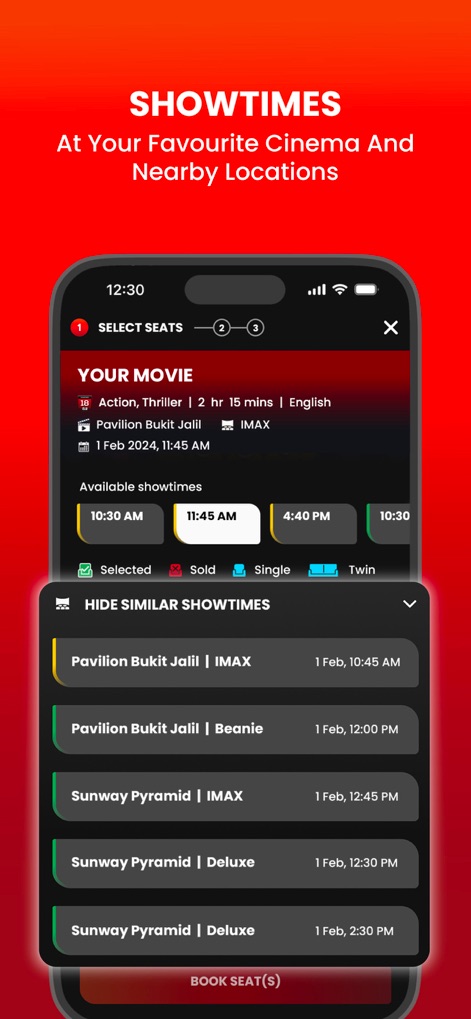
Explore comprehensive showtimes for chosen movies, presented with clear time slots and a detailed list of available screenings across multiple cinemas.
Showtime Selection Simplified
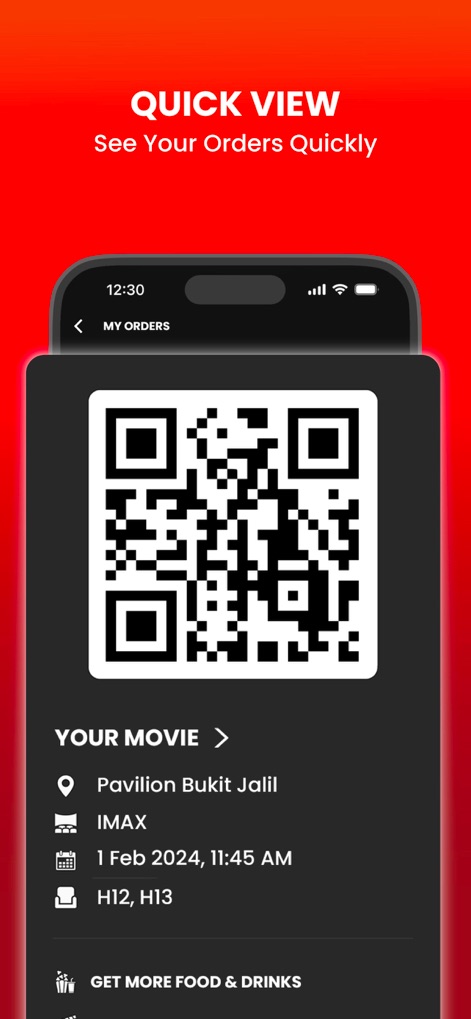
Access your movie orders swiftly with the quick view feature, displaying a large scannable QR code and essential movie details for seamless entry.
Rapid Order Access

The app provides smart parking recommendations, suggesting specific zones like Level 2M, Orange Zone, and integrates a direct 'GET DIRECTIONS' button for effortless navigation.
Smart Travel Guidance
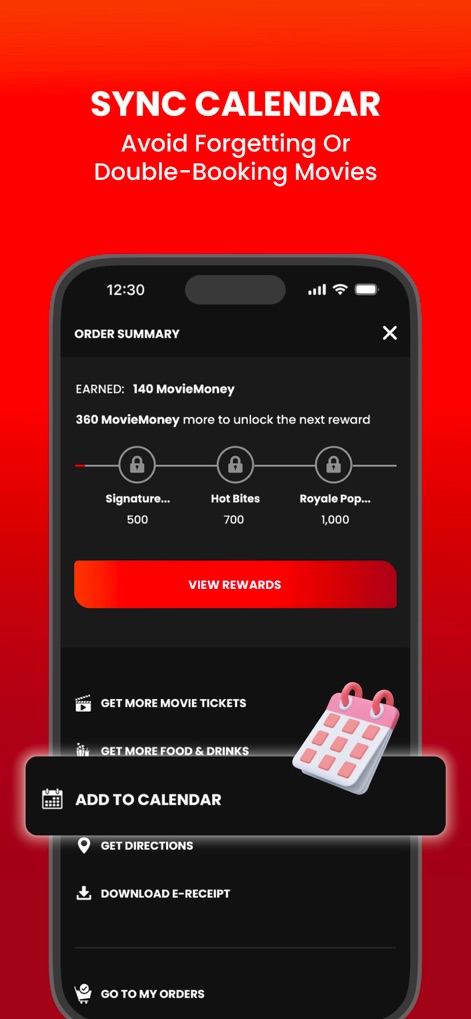
Effortlessly manage your movie schedule by syncing bookings directly to your calendar, activated by the 'ADD TO CALENDAR' button, shown within the order summary.
Calendar Sync Seamless

Stay informed with timely notifications about movie ticket availability, like the 'Tickets for Avatar' alert, and set future reminders using the 'REMIND ME' button.
Timely Alerts, Reminders
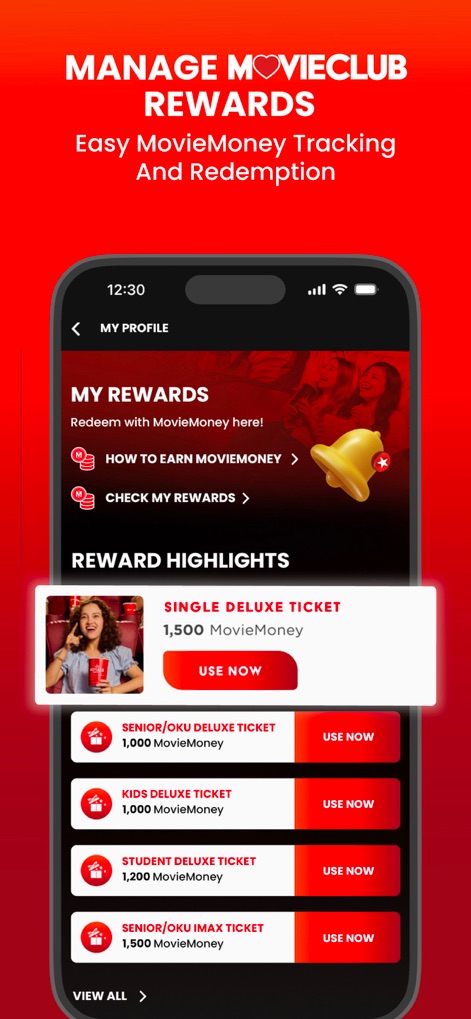
Track and redeem your MovieClub Rewards with ease, viewing accumulated MovieMoney and options for redeeming various tickets like the 'SINGLE DELUXE TICKET'.
Loyalty Rewards Management
Description
Download
More Like This
Apps with similar features and user experience

AMC Theatres: Movies & More
American Multi-Cinema, Inc

Cinépolis Go
BowEight Technologies LLC

Cinemark Theatres
Cinemark Holdings, Inc.

ODEON
Odeon Cinemas Ltd
m.tix - XXI
Nusantara Sejahtera Raya, Pt

Multiplex - Movies Offline
Multipleks-kholdyng Pat

Cineplanet Perú
Cineplex S.A. (PE)

Kino Helios
Helios S.A.

BHD Star Cineplex VN
BHD STAR CINEPLEX VIETNAM ONE MEMBER COMPANY LIMITED
This page is not an official page of the app or its developer, but an independent editorial publication created for informational and commentary purposes. Unless expressly stated otherwise, neither the app nor its developer is affiliated with, endorsed by, sponsored by, authorized by, or otherwise officially connected with MWM, Apple, Google Play, the app publisher, or the app's developer, and nothing on this page implies that the app was developed using MWM's services. Any trademarks, logos, screenshots, and other content remain the property of their respective owners.