
This page is not an official page of the app or its developer, but an independent editorial publication created for informational and commentary purposes. Unless expressly stated otherwise, neither the app nor its developer is affiliated with, endorsed by, sponsored by, authorized by, or otherwise officially connected with MWM, Apple, Google Play, the app publisher, or the app's developer, and nothing on this page implies that the app was developed using MWM's services. Any trademarks, logos, screenshots, and other content remain the property of their respective owners.


Thunderstorm Simulator
Transform your bedroom into a cozy sanctuary with the world's most customizable storm experience. Fall asleep faster using immersive high-fidelity audio and synchronized lightning flashes tailored to your exact preference.
Downloads
7K+User Rating
Total Ratings
0Publisher
Category
EntertainmentLocales
1Latest Version
3.4.0Size
72.1 MBFirst Released
Feb 1, 2017Master Your Sleep Environment
Transform your bedroom into a deep-sleep sanctuary with the world's most customizable thunderstorm simulator, designed to mask city noise and calm an overactive mind.
Hyper-Realistic Immersion
Go beyond audio. Sync your room with the storm using camera flash or screen lightning effects that perfectly match the rumble of thunder for a true sensory experience.
Total Atmospheric Control
Tailor the intensity from a gentle passing rain to a powerful midnight storm. Adjust lightning frequency, rain volume, and even the sound of rain on a tin roof.
Frequently Asked Questions
Everything you need to know about Thunderstorm Simulator
What is the Thunderstorm Simulator app?
Thunderstorm Simulator is an app that provides realistic thunderstorm sounds and visual lightning effects on smart devices. It helps users relax and fall asleep.
What types of thunderstorms does Thunderstorm Simulator offer?
Thunderstorm Simulator offers four types: Strong, Normal, Weak, and Passing Thunderstorms. Each type features different intensities of rain, lightning, and thunder.
Can I customize the rain audio in Thunderstorm Simulator?
Yes, Thunderstorm Simulator allows customization of rain audio. Users can select from options like heavy, steady, light rain, or rain on a tin roof, and adjust the volume.
Does Thunderstorm Simulator include lightning light effects?
Yes, Thunderstorm Simulator features lightning light effects. These visuals can be generated using the device's screen or camera flash, with options to customize delay and transition effects.
How does Thunderstorm Simulator compensate for wireless audio delay?
Thunderstorm Simulator features a "Delay Lightning" setting. This compensates for wireless audio delays from Bluetooth and AirPlay, ensuring synchronized lightning visuals with thunder sounds.
Can Thunderstorm Simulator prevent my device from going to sleep?
Yes, Thunderstorm Simulator includes a "Keep Awake" setting. This feature prevents your mobile device from automatically entering sleep mode, ensuring continuous display of lightning effects.
What is the purpose of the "Turn Screen Black" button in Thunderstorm Simulator?
The "Turn Screen Black" button in Thunderstorm Simulator applies a black overlay and sets the mobile device to minimum brightness. It optimizes the screen for visible lightning light effects.
Does Thunderstorm Simulator offer additional background sounds?
Yes, Thunderstorm Simulator offers supplementary background sounds. Users can enable and adjust volumes for birds, cicadas, crickets, and frogs to complement the thunderstorm audio.
Can Thunderstorm Simulator automate storm playback?
Yes, Thunderstorm Simulator supports automatic storm playback with auto-start, auto-stop, and auto-restart features. Auto-restart integrates both auto-start and auto-stop functionalities.
How do I set a sleep timer in Thunderstorm Simulator?
Thunderstorm Simulator provides a Sleep Timer feature accessible from the main screen. It includes an audio fade-out function, allowing for a gradual reduction of sound as you fall asleep.
Is there an alternative ad-supported version of Thunderstorm Simulator?
Yes, an ad-supported version of Thunderstorm Simulator is available. The app description provides a direct link to this alternative version on the App Store.
How can I contact support for Thunderstorm Simulator?
To contact support for Thunderstorm Simulator, email support@thunderstorm.scottdodson.dev. The developer welcomes user feedback and addresses any issues.
Can I customize the color of lightning effects in Thunderstorm Simulator?
Yes, Thunderstorm Simulator enables users to change the color and maximum brightness of lightning effects when using the screen output. This is controlled via dedicated sliders.
The following screenshots and description are sourced directly from the app's official store listing and are the property of the app developer.
App Store
Screenshots
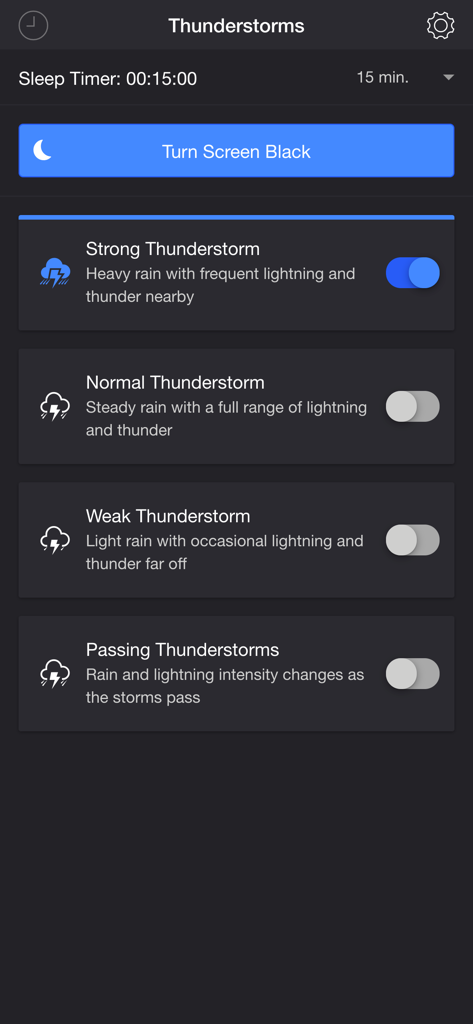
Main menu of the Thunderstorm Simulator app showing different storm intensity settings and a sleep timer
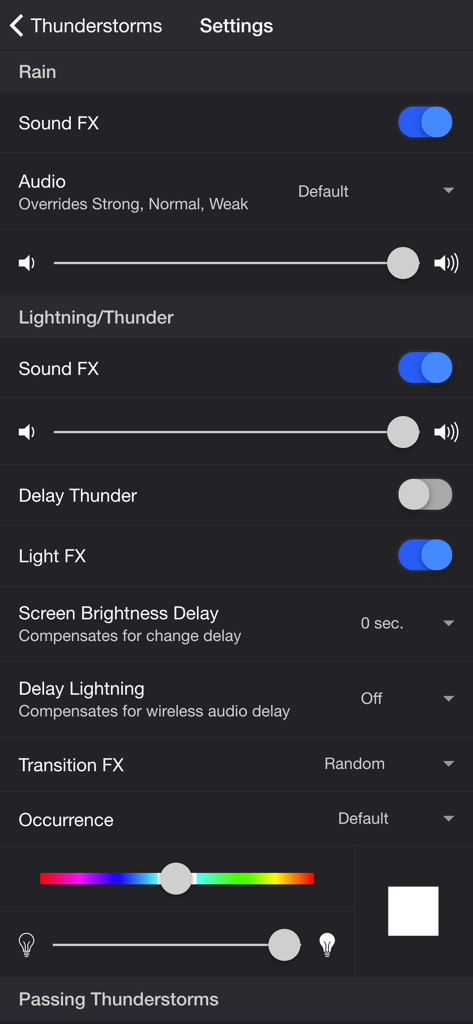
Settings screen of the Thunderstorm Simulator app showing audio and lightning customization options
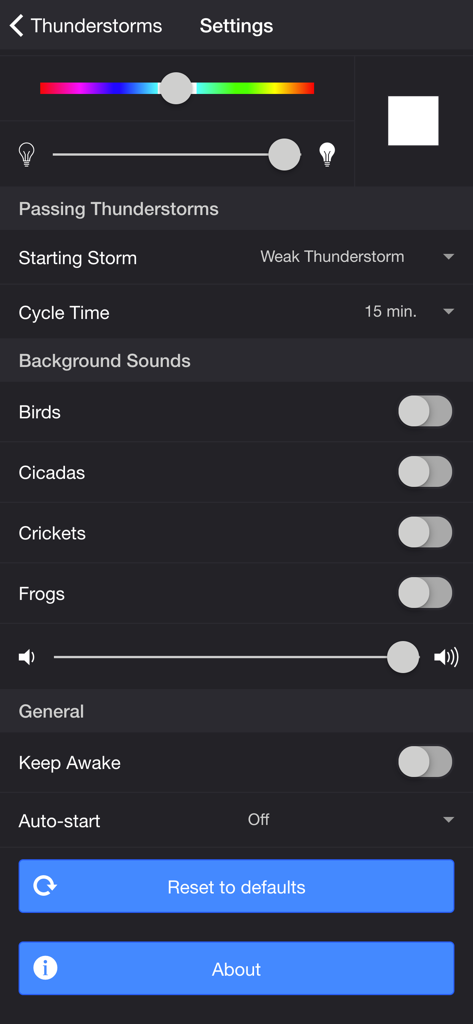
Settings screen of the Thunderstorm Simulator app showing options for passing thunderstorms background sounds and general app preferences
Description
Download
More Like This
Top-ranked apps in the same category

TikTok - Videos, Shop & LIVE
TIKTOK PTE. LTD.

Netflix
Netflix, Inc.

Freecash - Get Paid Real Money
256 REWARDS LTD

DramaBox - Stream Drama Shorts
STORYMATRIX PTE. LTD

HBO Max: Stream Movies & TV
WarnerMedia Global Digital Services, LLC

Amazon Prime Video
AMZN Mobile LLC

NetShort - Popular Dramas & TV
NETSTORY PTE. LTD.

ReelShort - Stream Drama & TV
New Leaf Publishing, Inc.

Disney+
Disney Electronic Content, Inc.
This page is not an official page of the app or its developer, but an independent editorial publication created for informational and commentary purposes. Unless expressly stated otherwise, neither the app nor its developer is affiliated with, endorsed by, sponsored by, authorized by, or otherwise officially connected with MWM, Apple, Google Play, the app publisher, or the app's developer, and nothing on this page implies that the app was developed using MWM's services. Any trademarks, logos, screenshots, and other content remain the property of their respective owners.