
This page is not an official page of the app or its developer, but an independent editorial publication created for informational and commentary purposes. Unless expressly stated otherwise, neither the app nor its developer is affiliated with, endorsed by, sponsored by, authorized by, or otherwise officially connected with MWM, Apple, Google Play, the app publisher, or the app's developer, and nothing on this page implies that the app was developed using MWM's services. Any trademarks, logos, screenshots, and other content remain the property of their respective owners.


TweetSave: Twitter Video Saver
Stop losing viral moments and creative inspiration in a fast-moving feed. Effortlessly bookmark videos, GIFs, and photos into organized collections for instant access whenever you need them.
Downloads
513K+User Rating
Total Ratings
7K+Publisher
Category
Social NetworkingLocales
1Latest Version
1.1.5Size
153.1 MBFirst Released
Jun 21, 2023Curate Your Digital Universe
Transform the way you interact with X. Save high-quality videos and photos into organized collections for instant access, anytime.
Lightning-Fast Saves
Copy a link and secure your favorite videos or GIFs in seconds. No more losing content to deleted tweets or messy feeds.
Custom Collections
Organize your media into tailored folders. Whether it is design inspiration or viral memes, find exactly what you need instantly.
Frequently Asked Questions
Everything you need to know about TweetSave: Twitter Video Saver
What is TweetSave - Tweet Video Saver?
TweetSave is an application designed to save Twitter content, including photos, videos, and GIFs, as bookmarks. It helps users protect their sources of inspiration by organizing them into personalized collections.
How do I save tweets using TweetSave?
To save tweets with TweetSave, copy the tweet's URL, paste it into the application, and press "Find." Then, add the content as a bookmark to your chosen collection within the app.
Can TweetSave save Twitter videos and photos?
Yes, TweetSave - Tweet Video Saver saves Twitter videos, photos, and GIFs. The app enables users to bookmark various types of Twitter content for later access and organization.
Does TweetSave support creating content collections?
Yes, TweetSave supports creating collections. Users can add saved Twitter content as bookmarks to specific collections, which helps in organizing various sources of inspiration efficiently.
Where can I find the TweetSave privacy policy?
The TweetSave - Tweet Video Saver privacy policy is located at https://tweetbookmarker.netlify.app/privacy-policy.html. This link provides complete information on the application's data handling practices.
How can users get support for TweetSave?
Users seeking support for TweetSave can contact the development team via email at tweetbookmarker.team@gmail.com. This dedicated address ensures direct assistance for application-related inquiries.
Does TweetSave - Tweet Video Saver offer a premium option?
Yes, TweetSave - Tweet Video Saver offers a premium option. This feature is directly accessible from the application's main menu, as indicated by the "Premium" entry.
Are there instructions within TweetSave on how to add bookmarks?
Yes, TweetSave provides in-app instructions on how to add bookmarks. The main menu includes a specific entry titled "How to Add Bookmark?" for user guidance.
The following screenshots and description are sourced directly from the app's official store listing and are the property of the app developer.
App Store
Screenshots

TweetSave app interface to paste Twitter video links
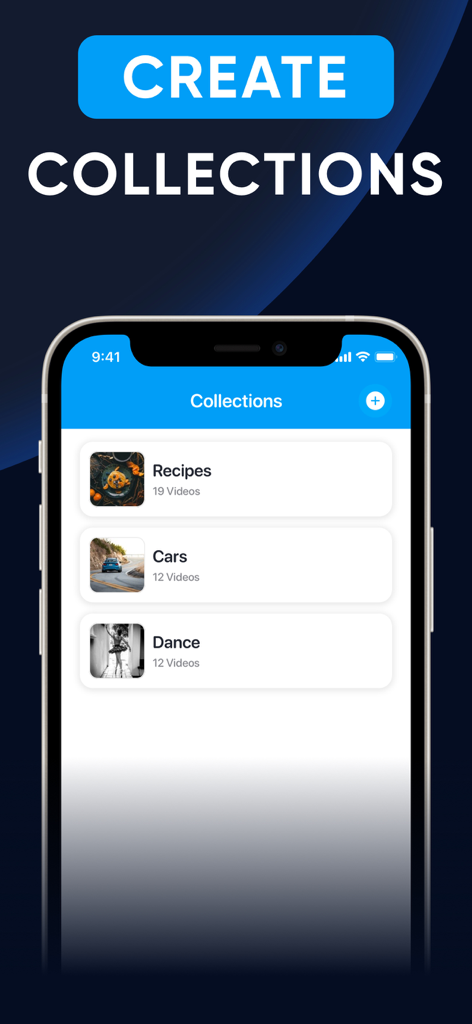
TweetSave app interface showing organized video collections on an iPhone

TweetSave app interface showing a curated collection of bookmarked recipe images on an iPhone
Description
Download
More Like This
Apps with similar features and user experience

PinGrab: Save & Organize
Abdellatif Bagui

Space Player: Your Video World
MAKING M COMPANY LIMITED

Bookmark manager - CentralSave
Adrien Cens

InSaver - Save Reel & Video
YASEMIN ERTEN

SaveTk - Save Videos
Bilal Sen

Story Saver : Save & Repost
Delron Coetzee

PinSaver : Video Saver
Szegedi Aron

TicDown: Tic Video Saver
Meryem Ercan

InstantSave: Story Reel Video
Turbofast Unlimited Super Internet Apps LLP
This page is not an official page of the app or its developer, but an independent editorial publication created for informational and commentary purposes. Unless expressly stated otherwise, neither the app nor its developer is affiliated with, endorsed by, sponsored by, authorized by, or otherwise officially connected with MWM, Apple, Google Play, the app publisher, or the app's developer, and nothing on this page implies that the app was developed using MWM's services. Any trademarks, logos, screenshots, and other content remain the property of their respective owners.