
This page is not an official page of the app or its developer, but an independent editorial publication created for informational and commentary purposes. Unless expressly stated otherwise, neither the app nor its developer is affiliated with, endorsed by, sponsored by, authorized by, or otherwise officially connected with MWM, Apple, Google Play, the app publisher, or the app's developer, and nothing on this page implies that the app was developed using MWM's services. Any trademarks, logos, screenshots, and other content remain the property of their respective owners.


UBCАRD
No more fumbling for fares or guessing your bus's arrival. UBCARD puts the city's transit in your pocket, making every trip smarter.
Downloads
100k+User Rating
Total Ratings
24Publisher
Category
TravelLocales
1Latest Version
1.1.36Size
82.7 MBFirst Released
Nov 13, 2024An evaluation of core functionalities for Ulaanbaatar's public transport users.
Key Features Analysis: UBCARD
Real-time Bus Tracking
This tool provides real-time tracking of buses, offering accurate arrival predictions to minimize waiting times and enhance trip efficiency.
Route Planning
The app enables comprehensive route planning, guiding users on the most efficient way to travel between desired locations using the public transport network.
Nearest Bus Stations
It identifies and displays the closest bus stations to the user's current location, facilitating spontaneous travel or navigation in unfamiliar areas.
UBCARD Management
The app allows users to manage their UBCARD, including checking balances, topping up funds, and reviewing transaction history for seamless fare management.
Route and Station Search
This tool features robust search capabilities for locating specific bus routes and station stops, simplifying the initial steps of journey planning.
Interactive Map (IMap)
The app integrates an interactive map, enabling users to visually explore the entire bus network, view route paths, and identify points of interest.
QR Code Generation
It supports the generation of QR codes, streamlining fare payment and ticket validation processes for a modern and contactless travel experience.
Favorite Routes and Stations
This tool provides the functionality to save frequently used routes and stations as favorites, allowing for quick access and personalized navigation.
Frequently Asked Questions
Everything you need to know about UBCАRD
What is the UBCARD app?
The UBCARD app is a transit solution for searching routes, finding nearest bus stations, and planning journeys. It also features QR code generation for travel and manages digital card balances.
Does UBCARD support QR code payments for transit?
Yes, UBCARD supports QR code payments. The app generates QR codes for travel, allowing users to pay fares directly from their digital card balance shown in the interface.
How can I check my balance in the UBC_ARD app?
Users check their balance in the UBCARD app by navigating to the card or wallet section. The current card balance is clearly displayed, alongside the cost per ride.
Does UBCARD offer real-time bus tracking?
Yes, UBCARD offers real-time bus tracking. This feature helps users monitor bus locations and plan their trips efficiently, integrating with route search and mapping functionalities.
Can I review my past rides and transactions with UBCARD?
Yes, UBCARD provides a detailed transaction history. Users can review past rides, charges, and other card activities within the dedicated history section of the app.
The following screenshots and description are sourced directly from the app's official store listing and are the property of the app developer.
App Store
Screenshots
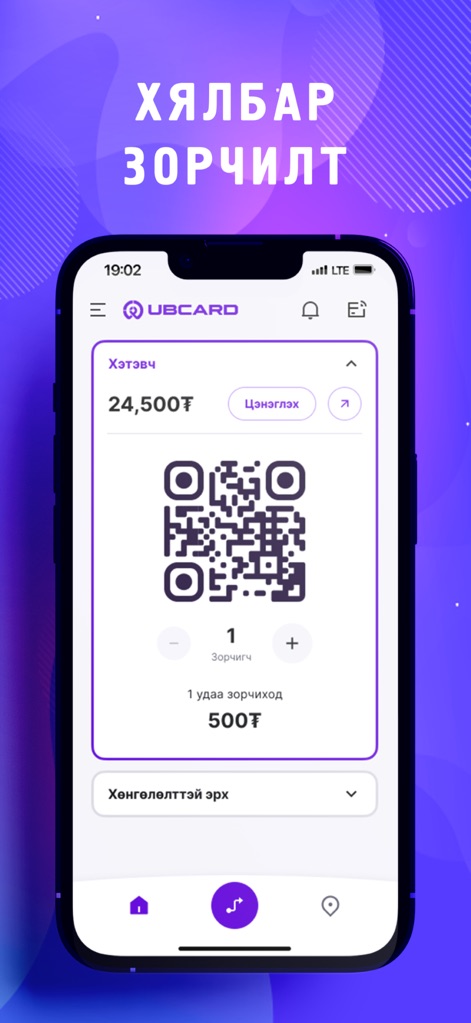
See how UBCARD facilitates quick boardings with its prominent QR code for payments and the clearly displayed current wallet balance.
Instant Fare Payment

Explore how the app's interactive map highlights nearby bus stations with distinct icons and provides a convenient search bar for route planning.
Effortless Route Discovery
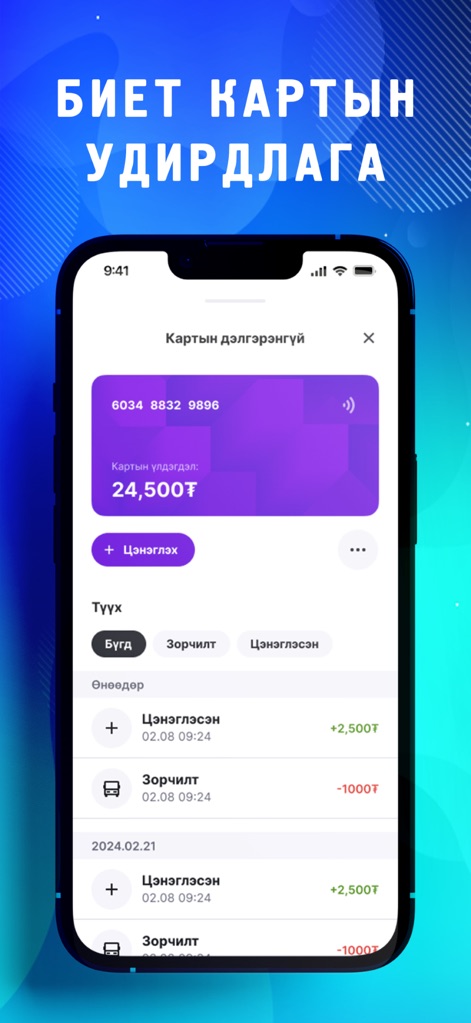
Discover how users can effortlessly manage their digital card balance and review a comprehensive overview of recent transactions.
Digital Card Management

Understand how the tool provides a clear transaction history with intuitive filtering options for both rides and top-ups.
Fare History Insight
Description
Download
More Like This
Apps with similar features and user experience

Buson: Passagens de ônibus
GUICHE VIRTUAL SERVICOS DE INTERNET LTDA

London & UK Live Bus Countdown
Mobicia Limited

Bustime: Transport online
BUSTIME, UNIPESSOAL LDA

NextThere
AppJourney Pty Ltd

HKBUS - Hong Kong Bus
Wei Hsiang Chen

TTC Watch for Toronto
Barum Rho

Bus Tracker Taiwan
Mozy Ltd.

Bus is Coming
Yuri Schmitz

北京公交-实时公交查询
永超 侯
This page is not an official page of the app or its developer, but an independent editorial publication created for informational and commentary purposes. Unless expressly stated otherwise, neither the app nor its developer is affiliated with, endorsed by, sponsored by, authorized by, or otherwise officially connected with MWM, Apple, Google Play, the app publisher, or the app's developer, and nothing on this page implies that the app was developed using MWM's services. Any trademarks, logos, screenshots, and other content remain the property of their respective owners.