
This page is not an official page of the app or its developer, but an independent editorial publication created for informational and commentary purposes. Unless expressly stated otherwise, neither the app nor its developer is affiliated with, endorsed by, sponsored by, authorized by, or otherwise officially connected with MWM, Apple, Google Play, the app publisher, or the app's developer, and nothing on this page implies that the app was developed using MWM's services. Any trademarks, logos, screenshots, and other content remain the property of their respective owners.


Virtual Piano Keyboard
Unleash your inner maestro. This app transforms your device into a dynamic music studio, putting performance and learning directly in your hands.
Downloads
2.5M+User Rating
Total Ratings
2.4KPublisher
Category
GamesLocales
34Latest Version
2.48(29)Size
29.4 MBFirst Released
Mar 26, 2015An Analytical Overview for Aspiring Musicians and Hobbyists
Key Features of Virtual Piano Keyboard
Interactive Learning Modes
It allows users to learn piano through interactive lessons and guided play, making it accessible for absolute beginners and those wishing to improve.
Performance Recording & Playback
The app provides robust options to record and play back user performances, fostering creative expression and progress tracking.
Extensive Playback Customization
This tool features comprehensive customization options for sound, touch sensitivity, and keyboard layout, allowing for a personalized and optimized playing experience.
Diverse Instrument Sounds
It offers a variety of realistic piano and organ sounds, enhancing the musical experience and versatility for different genres.
User-Friendly Interface
The app provides an intuitive and user-friendly interface with essential controls easily accessible, ensuring ease of navigation and playability for all skill levels.
Customizable Keyboard Display
It offers customizable visual aids like key labels and haptic feedback, assisting learners and enhancing the tactile experience.
Frequently Asked Questions
Everything you need to know about Virtual Piano Keyboard
How does Virtual Piano Keyboard help users learn to play the piano?
The Virtual Piano Keyboard app offers a "Learn to Play Mode" that guides users with yellow keys for selected songs. It includes auto-play options and adjustable note speed for practice.
Can I record my piano performances in the Virtual Piano Keyboard app?
Yes, the Virtual Piano Keyboard app allows users to record their piano performances in "Play Mode". Users can choose to record audio only or video with audio.
What different piano sounds are available in Virtual Piano Keyboard?
Virtual Piano Keyboard offers five distinct piano sounds. These include Grand Piano, Pianino (Upright Piano), Electronic Piano, Digital Piano, and Organ for diverse musical styles.
Is the Virtual Piano Keyboard app free to download and use?
Yes, the Virtual Piano Keyboard app is free to download. An in-app purchase is available to upgrade to an ads-free version with unlimited recordings.
How can I share my recorded music from the Virtual Piano Keyboard app?
The Virtual Piano Keyboard app allows users to share recorded music files. Sharing options include Email and Bluetooth after recording in "Play Mode".
Does Virtual Piano Keyboard offer adjustable settings for playing?
Yes, Virtual Piano Keyboard provides various adjustable settings. Users can modify tough pressure ratio, sustain sound ratio, show labels on keys, and enable vibration for keys.
Can I customize the number of keys visible on the Virtual Piano Keyboard?
Yes, the Virtual Piano Keyboard app allows users to adjust the view and number of keys displayed on the virtual keyboard. This provides a customizable playing experience.
What are the system requirements for Virtual Piano Keyboard?
The Virtual Piano Keyboard app is compatible with all iPhones and adapted for iPad devices. It offers HD graphics optimized for user experience on these platforms.
The following screenshots and description are sourced directly from the app's official store listing and are the property of the app developer.
App Store
Screenshots

See how this tool provides a realistic piano keyboard layout and easily accessible sound selection options for immediate play.
Intuitive Piano Interface
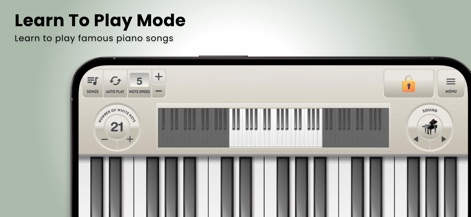
Explore the "Learn to Play Mode" featuring adjustable note speed and a dedicated song selection interface for guided practice.
Interactive Learning Journey
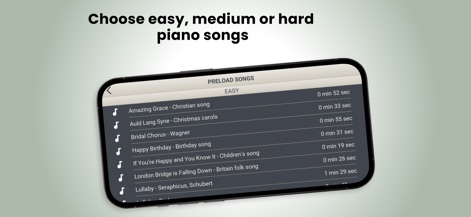
Discover a comprehensive song library organized by difficulty, offering titles like "Amazing Grace" and "Happy Birthday" for varied skill levels.
Diverse Song Library

The "Play Mode" allows users to record their performances with clear options for both audio and video recording.
Expressive Performance & Record
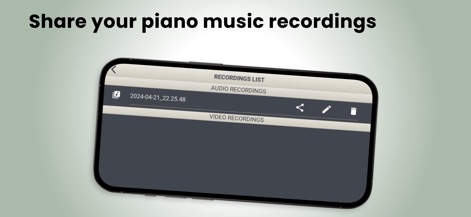
Easily manage recorded performances within the "Recordings List" and utilize the sharing options for effortless distribution.
Manage & Share Creations
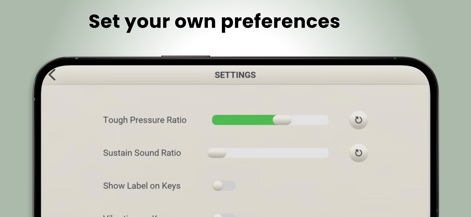
Customize the playing experience through adjustable settings like the "Tough Pressure Ratio" and the option to "Show Label on Keys."
Personalized Playing Experience
Description
Download
More Like This
Top-ranked apps in the same category

Block Blast!
ARETIS LIMITED

Heartopia
XD Entertainment Co., Ltd.

Solitaire Associations Journey
Hitapps Games LTD

Roblox
Roblox Corporation

Gossip Harbor®: Merge & Story
Microfun Limited

Arrows – Puzzle Escape
Lessmore UG haftungsbeschraenkt

Township
PLR Worldwide Sales Limited

Last War:Survival
FUNFLY PTE. LTD.

Vita Mahjong
VITA STUDIO PTE. LTD.
This page is not an official page of the app or its developer, but an independent editorial publication created for informational and commentary purposes. Unless expressly stated otherwise, neither the app nor its developer is affiliated with, endorsed by, sponsored by, authorized by, or otherwise officially connected with MWM, Apple, Google Play, the app publisher, or the app's developer, and nothing on this page implies that the app was developed using MWM's services. Any trademarks, logos, screenshots, and other content remain the property of their respective owners.