
This page is not an official page of the app or its developer, but an independent editorial publication created for informational and commentary purposes. Unless expressly stated otherwise, neither the app nor its developer is affiliated with, endorsed by, sponsored by, authorized by, or otherwise officially connected with MWM, Apple, Google Play, the app publisher, or the app's developer, and nothing on this page implies that the app was developed using MWM's services. Any trademarks, logos, screenshots, and other content remain the property of their respective owners.


WIFI & Internet Speed Test
Stop guessing. This app empowers users to instantly see if their internet is truly delivering, exposing weak links and performance bottlenecks with unapologetic clarity.
Downloads
2.5M+User Rating
Total Ratings
26.9KPublisher
Category
ProductivityLocales
7Latest Version
2.8Size
73.4 MBFirst Released
Mar 1, 2019An analytical overview of core functionalities designed for comprehensive network assessment and optimization.
Key Features of WIFI & Internet Speed Test
Comprehensive Speed Metrics
The app provides essential metrics including download speed, upload speed, and ping, offering a complete picture of internet performance.
ISP Performance Comparison
It allows users to compare their test results directly against their Internet Service Provider's average speeds and latency, aiding in performance validation.
Real-Time Graphical Analysis
This tool features real-time graphs that display connection grade, download and upload charts, and comparison with ISP average speeds, enhancing data interpretation.
Historical Test Tracking
The app offers detailed reporting that tracks past test results, enabling users to monitor their internet performance history.
One-Touch Testing
It allows users to initiate a speed test with a single tap, providing quick and accessible performance checks.
Data Usage Monitor
This tool features a data usage monitor, helping users keep track of their internet consumption.
Frequently Asked Questions
Everything you need to know about WIFI & Internet Speed Test
What does the WIFI & Internet Speed Test app do?
The WIFI & Internet Speed Test app evaluates cellular (3G, 4G, LTE) and Wi-Fi connection speeds. It performs expert internet speed tests to provide information about your connection.
Can the WIFI & Internet Speed Test app measure both cellular and Wi-Fi speeds?
Yes, the WIFI & Internet Speed Test app measures both cellular (3G, 4G, LTE) and Wi-Fi connection speeds. It provides a comprehensive evaluation of your internet performance.
What data does the WIFI & Internet Speed Test app display after a speed test?
After a speed test, the WIFI & Internet Speed Test app displays download, upload, and ping results. It also shows connection grade, ISP average speed, and real-time graphs.
Does the WIFI & Internet Speed Test app keep a history of past test results?
Yes, the WIFI & Internet Speed Test app tracks past tests with detailed reporting. Users can view a list of all previous tests and their detailed statistics.
How long does a speed test take with the WIFI & Internet Speed Test app?
A speed test with the WIFI & Internet Speed Test app takes under 30 seconds. It offers one-touch testing for quick and efficient results.
What are the benefits of a premium subscription for WIFI & Internet Speed Test?
A premium subscription for WIFI & Internet Speed Test removes ads, unlocks all cool themes, and provides an unlimited number of speed tests.
How much does a weekly subscription to WIFI & Internet Speed Test cost?
A weekly paid subscription to the WIFI & Internet Speed Test app costs $7.99. Other options include monthly for $19.99 and yearly for $99.99.
Is there a free trial available for the WIFI & Internet Speed Test app's premium features?
Yes, the WIFI & Internet Speed Test app offers a free three-day trial to check premium advantages. After 3 days, it automatically converts to a weekly paid subscription.
How do I cancel my subscription for WIFI & Internet Speed Test?
You can cancel your WIFI & Internet Speed Test subscription or free trial at any time, but at least 24 hours before the current period ends. Manage auto-renewal in your Account Settings.
Where can I find the privacy policy for the WIFI & Internet Speed Test app?
The privacy policy for the WIFI & Internet Speed Test app is available at http://mushtrip.com/privacy.html. This document outlines how your data is handled.
The following screenshots and description are sourced directly from the app's official store listing and are the property of the app developer.
App Store
Screenshots

This tool instantly displays crucial internet performance with a dynamic speed gauge and precise download/upload figures.
Instant Speed Metrics
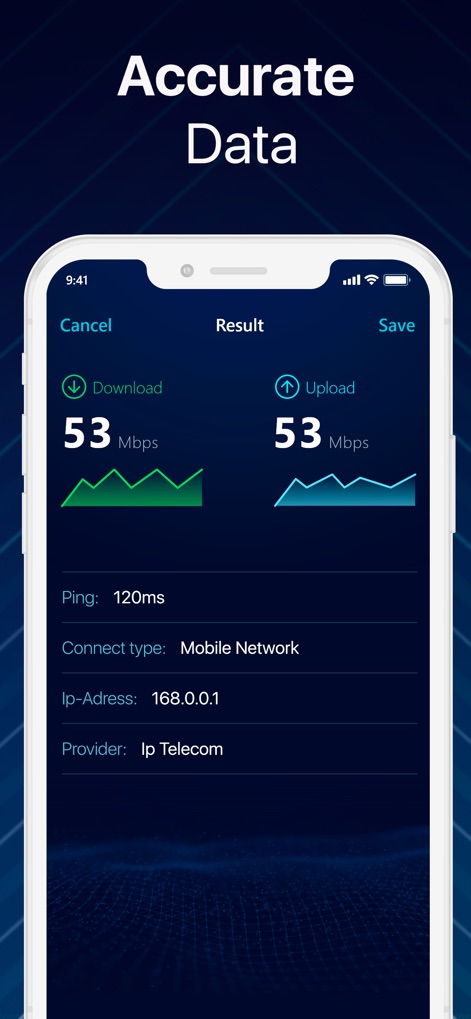
Users can delve into detailed test results, including visual download and upload graphs, alongside critical network details like connection type and provider.
Comprehensive Test Results

The app meticulously records all past speed tests, offering an organized history list with individual download and upload speeds for each entry.
Track Past Performance

Explore granular details of each test, providing extensive statistics like network signal strength and specific download/upload metrics for a complete overview.
In-Depth Connection Insights
Description
Download
More Like This
Apps with similar features and user experience

Internet Speed Test Speedcheck
Etrality GmbH

测速网
Magnate Network Technology Co. Ltd

nPerf internet speed test
nPerf SAS

Speed Test SpeedSmart Internet
Donovan Lewis

SpeedTest•
Unicom TOV

Opensignal Speed Test Ad Free
Opensignal Inc.

FAST Speed Test
Netflix, Inc.

Speed Test Internet Wifi Scan
WarthogLab
This page is not an official page of the app or its developer, but an independent editorial publication created for informational and commentary purposes. Unless expressly stated otherwise, neither the app nor its developer is affiliated with, endorsed by, sponsored by, authorized by, or otherwise officially connected with MWM, Apple, Google Play, the app publisher, or the app's developer, and nothing on this page implies that the app was developed using MWM's services. Any trademarks, logos, screenshots, and other content remain the property of their respective owners.