WorkOutDoors

WorkOutDoors

Download on App Store
Logo of WorkOutDoors

WorkOutDoors: The Professional-Grade Sports Computer for Your Apple Watch

Turn your watch into a powerful navigation and data tool with offline vector maps, 800+ customizable data fields, and advanced route guidance. No subscriptions, no limits—just the ultimate performance for runners, hikers, and cyclists.

Publisher

Ian Muriss

Category

Health & Fitness

Downloads

479K+

User Rating

4.7/5

Total Ratings

8K+

Locales

1

Precision in Every Pixel

Discover the interface used by 479K+ users.
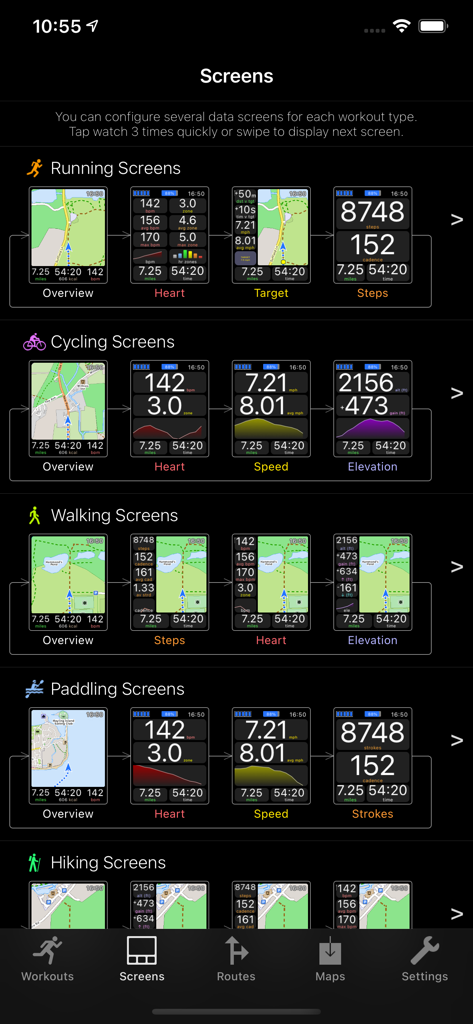
Interface of the WorkOutDoors app showing customizable data screens for various activities like running cycling and hiking

Interface of the WorkOutDoors app showing customizable data screens for various activities like running cycling and hiking

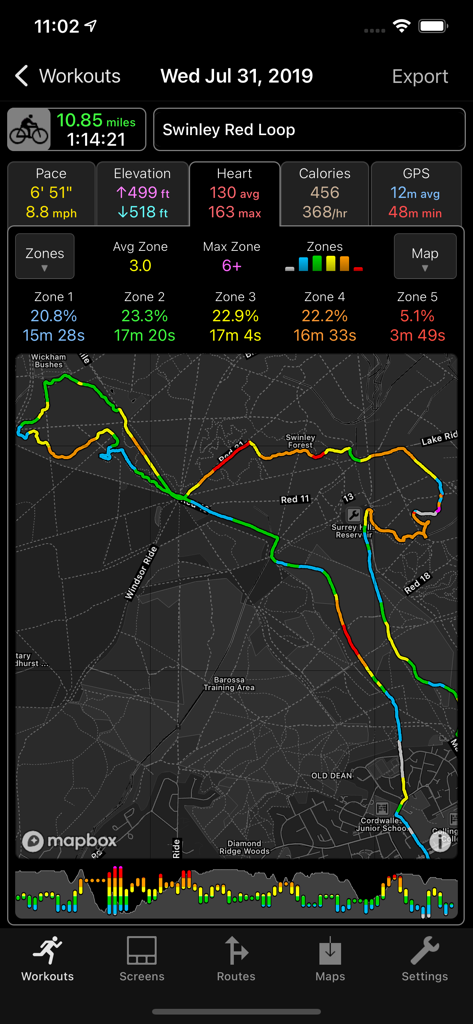
Detailed cycling workout summary in the WorkOutDoors app showing route map and heart rate zones

Detailed cycling workout summary in the WorkOutDoors app showing route map and heart rate zones

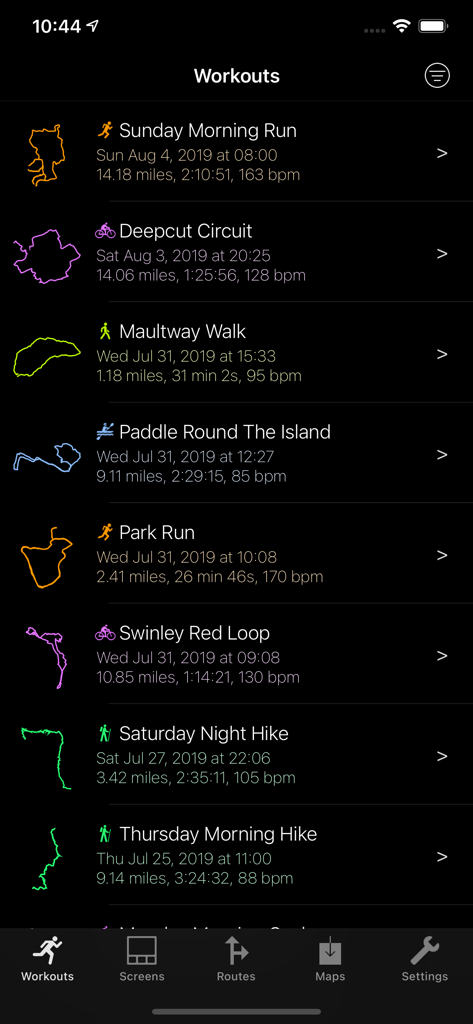
List of completed workouts in the WorkOutDoors app showing distance, time, heart rate, and GPS tracks.

List of completed workouts in the WorkOutDoors app showing distance, time, heart rate, and GPS tracks.

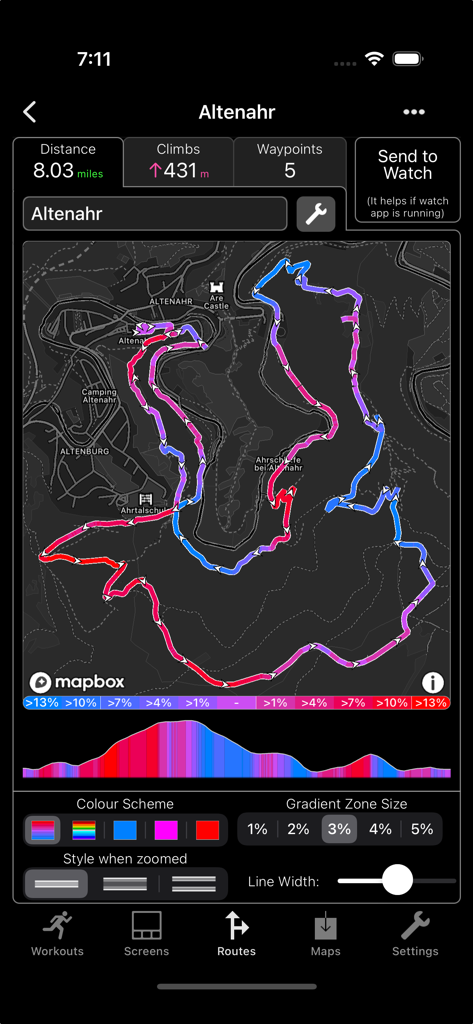
WorkOutDoors app screen showing a detailed topographic route map with elevation profile and gradient color coding

WorkOutDoors app screen showing a detailed topographic route map with elevation profile and gradient color coding

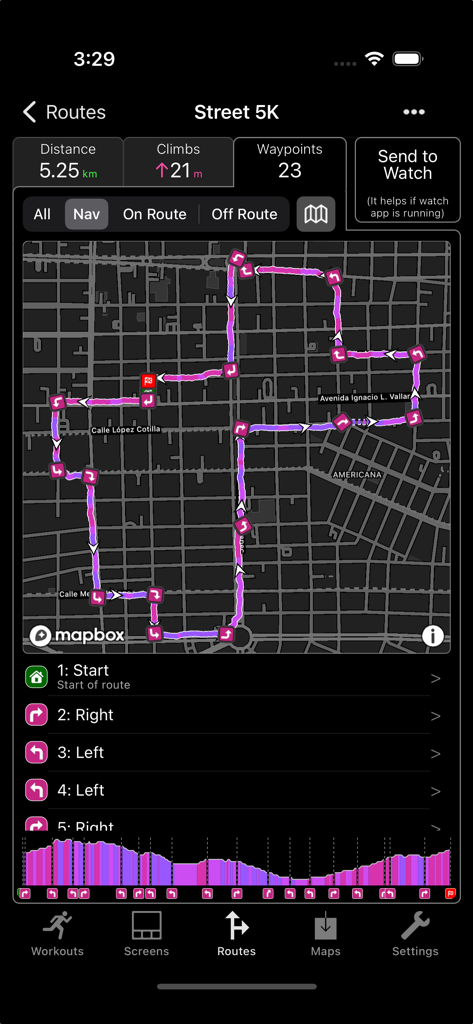
WorkOutDoors app showing a detailed 5K route map with turn-by-turn directions and elevation profile

WorkOutDoors app showing a detailed 5K route map with turn-by-turn directions and elevation profile

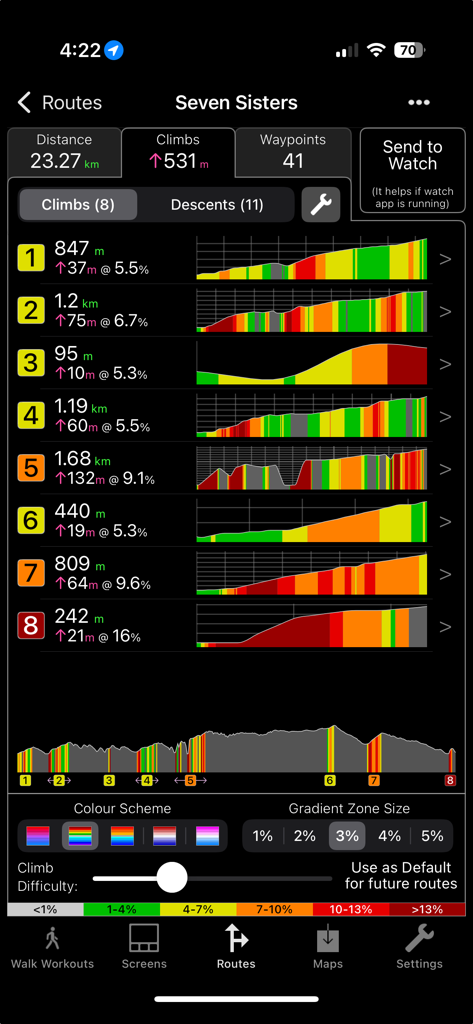
Detailed elevation profile and climb statistics for a hiking route in the WorkOutDoors app.

Detailed elevation profile and climb statistics for a hiking route in the WorkOutDoors app.

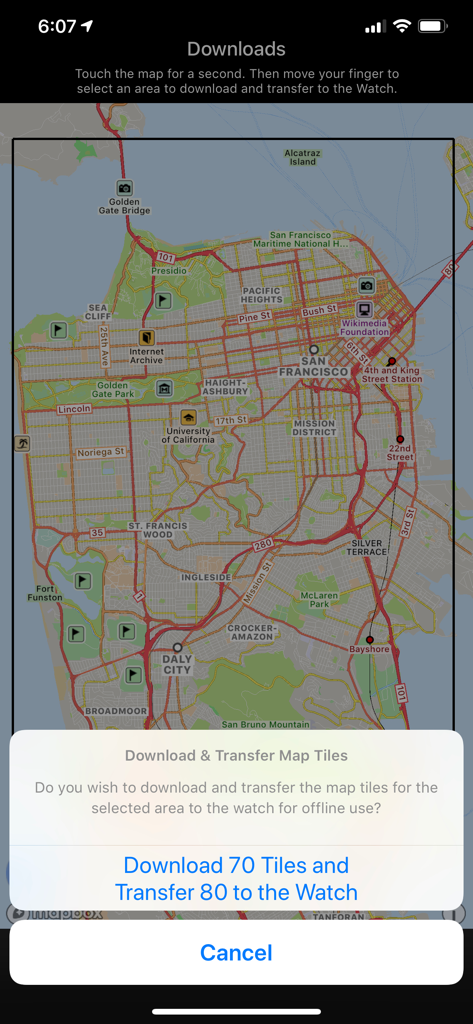
Downloading offline map tiles for Apple Watch in WorkOutDoors app

Downloading offline map tiles for Apple Watch in WorkOutDoors app

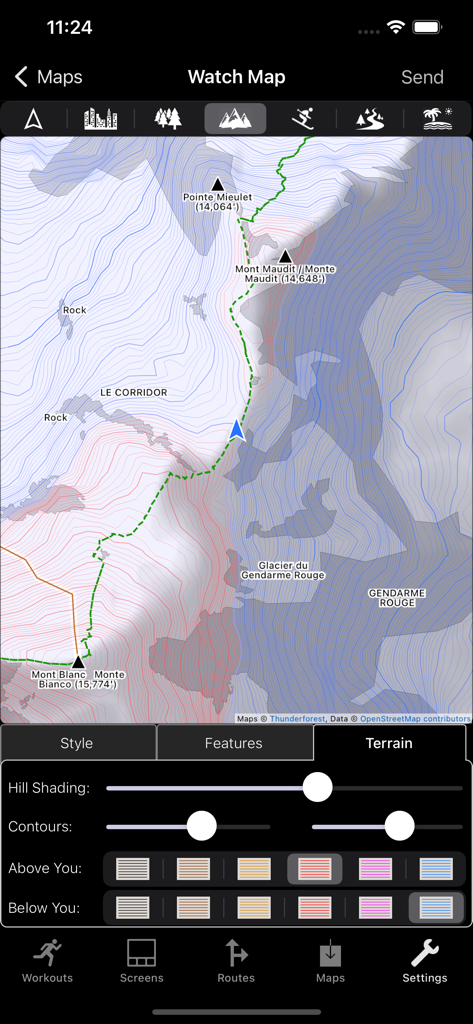
WorkOutDoors app interface for customizing topographic map terrain features including hill shading and contour colors

WorkOutDoors app interface for customizing topographic map terrain features including hill shading and contour colors

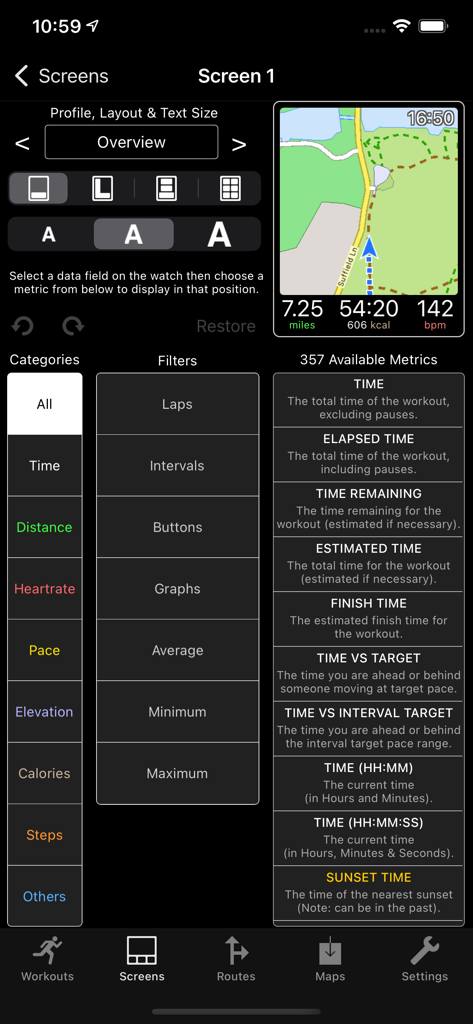
Interface for customizing Apple Watch workout screens and data fields in the WorkOutDoors iPhone app

Interface for customizing Apple Watch workout screens and data fields in the WorkOutDoors iPhone app

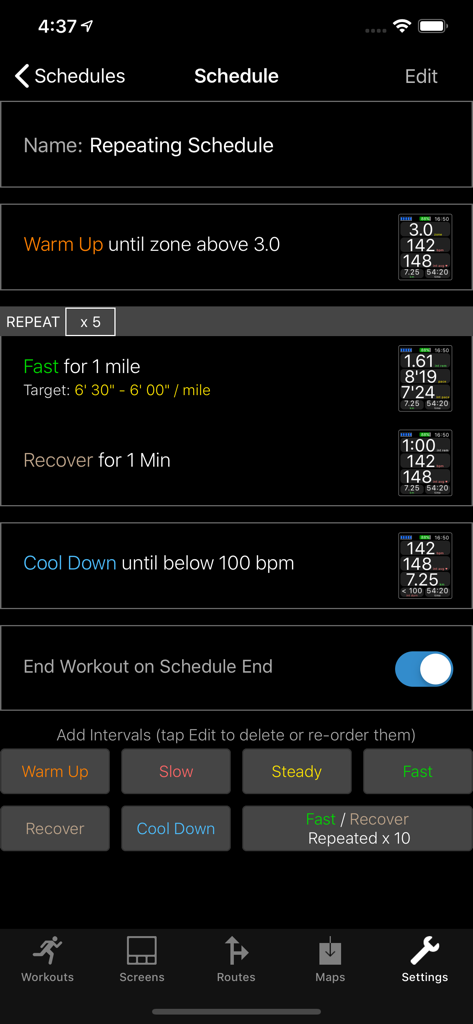
WorkOutDoors app interval training schedule editor for Apple Watch workouts

WorkOutDoors app interval training schedule editor for Apple Watch workouts

Turn Your Apple Watch Into a Pro Sports Computer

The tools that make this app stand out, trusted by 479K+ users.

🗺️

Advanced Offline Mapping

Navigate backcountry trails with smooth vector maps, topographic contours, and breadcrumb trails that work perfectly even without a cellular signal.

📊

Ultimate Data Customization

Choose from over 800 data fields to create the perfect display. Monitor heart rate zones, power, and pace with real-time graphs directly on your wrist.

🏷️

No Monthly Subscriptions

Ditch the SaaS fatigue. Access every professional feature and future update for a single one-off payment. No hidden costs, just pure performance.

About the app

Everything you need to know about WorkOutDoors.

Description

WorkOutDoors is the most advanced and most configurable workout app for the Apple Watch. It's perfect for running, cycling, hiking and any other indoor or outdoor activity. Note: WorkOutDoors requires an Apple Watch Series 3 or later. It is not necessary to have your iPhone with you during a workout. The app uses Apple’s workout system, so all workouts are saved to the Health system. However it also provides many extra features over Apple's app, such as: - a super-smooth vector map that can be shown during a workout; - multiple configurable screens with metrics and graphs from a pool of 800+ data fields; - route files can be imported and used for navigation (including turn by turn directions); - dozens of configurable alerts (e.g. every mile; high heart rate; low pace; off-route etc); - interval schedules can be created using the larger screen of the phone app; - climbs and descents are supported with notifications and on-screen data and graphs; - waypoints can be created, navigated to, and exported; - use shortcuts to associate operations with gestures (e.g. double tap to hear configurable metrics); - compare pace against a target or a previous workout (using metrics and a dot on the map); - show zones for pace and power as well as heart rate (with optional coloured backgrounds); - auto-pause is available for all outdoor activities; - shows GPS and heart rate before starting a workout, so that you can wait for good signals; - configure distance and pace for running / walking to come from Apple’s pedometer or from GPS; - workouts can be exported in FIT / TCX / GPX files, or automatically sent to Strava; - workouts created by the app can be analysed in great depth in the iPhone app. The app also has many more features. The map is a particular highlight. It uses OpenStreetMap, which provides worldwide coverage and includes the trails necessary for outdoor workouts. It also has several features that help you navigate during a workout: - maps can be smoothly panned and zoomed, and can rotate according to the compass; - a breadcrumb trail of your whole route is displayed on the map during the workout; - topographic data can be shown, with configurable contour colours and hill shading; - map-only mode is provided for when you don't want to start a workout and just need a map; - a circular scale is shown when you zoom, making it easy to see the distance to features; - maps can be stored on the watch for use when offline (they are downloaded as required if online); - a red compass points north and a green compass points to the start; - choose a waypoint to see a compass and distance to it in the corner of the map; - you can also navigate to waypoints on the map, such as hospitals, sights, cafes etc. If you load a route from a GPX / TCX / FIT file then navigation is even easier: - your position is shown on an elevation profile of the route; - the remaining distance, time and ascent can also be displayed; - you can get alerted when you go off-route; - when off-route then a compass is shown which points to the nearest part of the route; - if the route contains turn by turn directions then these can be used like a sat nav; - if there are no directions then the app can use “bend detection” to generate them; - the next direction is shown as an icon and distance in the corner of the map; - the map can automatically zoom in when you are approaching a turn; - you can use shake gestures to hear the distance to the next turn or the end of the route; - routes are coloured by gradient: from red for steep uphill to blue for steep downhill; - you can configure what information is displayed during a climb or descent. All this is included for a single one-off payment. No extra in-app purchases or subscriptions are required (although there is a completely optional in-app tip jar which was requested by long-term users). If you own an Apple Watch and do any form of exercise, then WorkOutDoors is the app for you. Give it a go!

Latest Version

6.1

Size

45.8 MB

First Released

Jul 13, 2017

Turn Your Apple Watch Into a Pro Sports Computer

Join 479,000+ power users and access 800+ data fields, offline vector maps, and elite navigation—all for a single one-off payment. No subscriptions, ever.

Download on App Store
FAQ

Frequently Asked Questions

Everything you need to know about WorkOutDoors

What is WorkOutDoors?

WorkOutDoors is an advanced and highly configurable workout application for Apple Watch Series 3 or later. It supports various indoor and outdoor activities including running, cycling, and hiking.

Does WorkOutDoors require an iPhone during workouts?

No, WorkOutDoors does not require your iPhone to be present during a workout. The application runs directly on an Apple Watch Series 3 or later.

How does WorkOutDoors integrate with Apple Health?

WorkOutDoors uses Apple’s workout system, ensuring all completed workouts are automatically saved to the Health system. It also provides many extra features for detailed analysis.

Can users customize workout data screens in WorkOutDoors?

Yes, WorkOutDoors allows extensive customization of workout data screens. Users can configure multiple screens with metrics and graphs chosen from a pool of over 800 data fields.

Does WorkOutDoors offer turn-by-turn route navigation?

Yes, WorkOutDoors offers turn-by-turn navigation if route files include directions. The app can also generate directions through "bend detection" if they are not pre-existing.

Is offline map usage supported by WorkOutDoors on Apple Watch?

Yes, WorkOutDoors supports offline map usage. Maps can be stored directly on the Apple Watch, allowing access even without an internet connection during a workout.

What is the pricing model for WorkOutDoors?

WorkOutDoors utilizes a single one-off payment model. It does not require any additional in-app purchases or subscriptions, though a completely optional tip jar is available.

Can WorkOutDoors export workout activity data?

Yes, WorkOutDoors can export workout activity data. Workouts are exportable in FIT, TCX, or GPX file formats, and can also be automatically sent to Strava.

Does WorkOutDoors provide topographic map data?

Yes, WorkOutDoors provides topographic map data. It displays configurable contour colors and hill shading, enhancing navigation for outdoor activities.

Are interval workout schedules available in WorkOutDoors?

Yes, WorkOutDoors includes interval workout schedules. These schedules are created and configured using the larger screen of the associated iPhone app.

Which activities does WorkOutDoors support?

WorkOutDoors supports a wide range of activities including running, cycling, hiking, and other indoor or outdoor exercises. It is designed for comprehensive workout tracking on Apple Watch.

Does WorkOutDoors track climbs and descents during routes?

Yes, WorkOutDoors tracks climbs and descents. It provides notifications, on-screen data, and graphs for elevation changes, and can color routes by gradient.

App information, icons, screenshots, and descriptions displayed on this page are sourced from the Apple App Store and are the property of their respective developers. Download estimates and rankings are based on MWM's proprietary models and may not reflect actual figures. This page is provided for informational and analytical purposes only.

Believe this page infringes your intellectual property? File a dispute