
This page is not an official page of the app or its developer, but an independent editorial publication created for informational and commentary purposes. Unless expressly stated otherwise, neither the app nor its developer is affiliated with, endorsed by, sponsored by, authorized by, or otherwise officially connected with MWM, Apple, Google Play, the app publisher, or the app's developer, and nothing on this page implies that the app was developed using MWM's services. Any trademarks, logos, screenshots, and other content remain the property of their respective owners.


Writing Wizard: Learn to Write
Mastering early writing unlocks a child's educational future. This app equips young learners with precise letter formation, transforming struggle into skill.
Downloads
1M+User Rating
Total Ratings
4.7KPublisher
Category
EducationLocales
8Latest Version
3.3Size
59.9 MBFirst Released
Nov 15, 2017A comprehensive evaluation for foundational handwriting skill development in early childhood.
Key Feature Analysis: Writing Wizard
Advanced Progress Monitoring
This tool provides comprehensive reports that meticulously display and replay a child's tracing activities, allowing parents and educators to track skill development and identify areas needing improvement.
Guided & Customizable Tracing Mechanics
The app enforces correct letter formation and offers extensive customization options for letter size, difficulty, and tracing guides, ensuring children learn proper handwriting technique tailored to their individual needs.
Broad Content & Custom Word Lists
It covers uppercase and lowercase letters, numbers, and offers the unique ability to create personalized word lists with recorded audio, enabling targeted learning for names, sight words, or curriculum-specific vocabulary.
Interactive Gamified Learning
This tool features over 50 animated stickers, sound effects, and interactive games that animate traced letters, transforming handwriting practice into an engaging and motivating experience for young learners.
Multi-User & Granular Customization
The app supports an unlimited number of user profiles and provides numerous settings to customize the learning environment, including sound, game time limits, and educational parameters, making it ideal for families and classrooms.
Printable Worksheets for Offline Practice
It allows users to generate and print PDF worksheets directly from the app, bridging the gap between digital tracing and traditional paper-based handwriting practice.
Diverse Fonts & Phonics Integration
The app provides 16 different fonts, including popular US options, and integrates letter names and phonics support (customizable), aligning with various educational standards and early literacy goals.
Foundational Shape Tracing
This tool includes dedicated tracing activities for shapes, catering to toddlers and very young children by building essential pre-writing motor skills before progressing to letters and numbers.
Frequently Asked Questions
Everything you need to know about Writing Wizard: Learn to Write
What is Writing Wizard: Learn to Write?
Writing Wizard: Learn to Write is an educational app designed to help children learn to trace letters, numbers, and words through a fun and motivating system.
Can I create my own word lists in the Writing Wizard app?
Yes, the Writing Wizard app allows users to create their own word lists and record audio for each word, providing a personalized learning experience.
How many fonts are available in Writing Wizard: Learn to Write?
Writing Wizard offers 16 fonts, including three popular US fonts and 13 international fonts, allowing children to practice with various styles.
Is the Writing Wizard app free to use?
The Writing Wizard app offers free access to all shapes, the first 7 letters, numbers, and words. A one-time purchase unlocks remaining letters and the ability to add custom words.
Does Writing Wizard provide progress reports for children's tracing?
Yes, Writing Wizard provides detailed reports that display what the child has traced, including the ability to replay and export tracings to monitor progress.
Is Writing Wizard suitable for toddlers?
Yes, Writing Wizard includes a shapes tracing activity specifically designed for toddlers, making it suitable for very young children.
Can parents create printable worksheets from the Writing Wizard app?
Yes, Writing Wizard allows users to create PDF Worksheets and print them, enabling children to practice writing on paper.
Does Writing Wizard collect user data or personal information?
No, Writing Wizard does not collect any user information and does not use data collection tools, adhering to privacy best practices for kids' apps.
Can I customize the difficulty in Writing Wizard: Learn to Write?
Yes, Writing Wizard is fully customizable to suit every child’s needs, allowing adjustments for factors such as letter size, difficulty, and tracing speed.
How does Writing Wizard keep children motivated while learning to write?
Writing Wizard keeps children motivated with over 50 animated stickers, sound effects, and interactive games that animate letters after tracing is complete.
The following screenshots and description are sourced directly from the app's official store listing and are the property of the app developer.
App Store
Screenshots
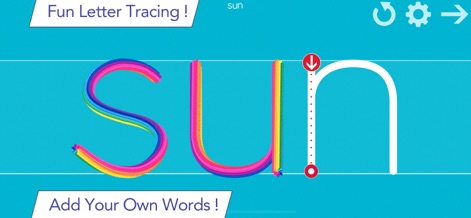
The app makes learning letters and words exciting with colorful tracing paths and the ability to add custom word lists.
Engaging Tracing Fun

Users can select from 15 different fonts to match school curricula and enjoy interactive games that animate letters after tracing.
Customizable Fonts & Play
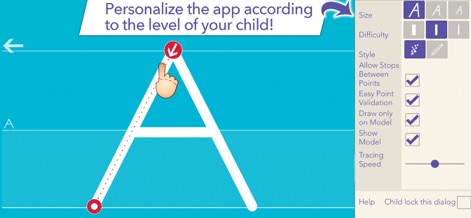
This tool offers extensive customization options, including adjustable difficulty levels and the ability to control tracing speed, to suit each child's needs.
Tailored Learning Paths

Children are motivated by over 50 animated stickers and vibrant colored pencil effects that bring letters to life during tracing practice.
Creative Tracing Effects
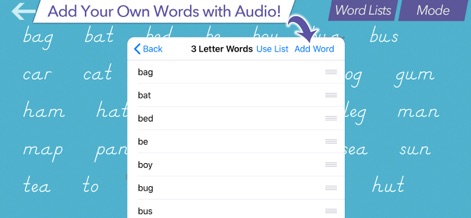
The app empowers parents to create custom word lists and even record audio for each word, enhancing personalized learning experiences.
Personalized Word Practice
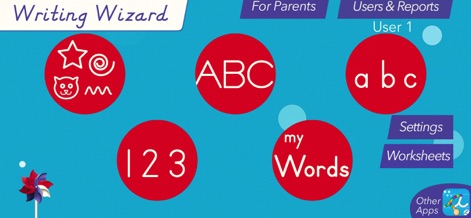
The intuitive dashboard provides easy access to different learning modes and allows parents to manage users and access detailed reports.
Comprehensive User Dashboard
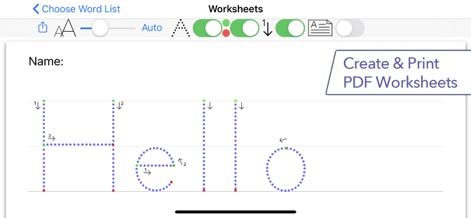
This tool generates customizable PDF worksheets for offline practice, showing clear stroke order with numbered dots and arrows.
Printable Practice Sheets
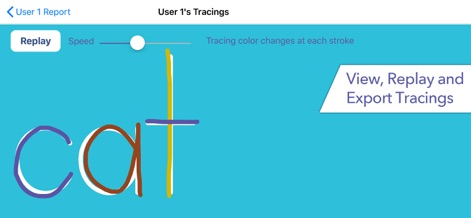
Parents can monitor progress by replaying children's tracings at adjustable speeds and viewing different colored strokes for detailed feedback.
Progress Tracking & Replay

The app provides fun shape tracing activities, exemplified by a cat outline with a vibrant, textured tracing path for toddlers.
Engaging Shape Tracing

Learning uppercase letters is engaging with unique interactive animations, such as this 'E' formed by playful, spherical elements.
Interactive Letter Animations
Description
Download
More Like This
Apps with similar features and user experience

iHuman Chinese
Human and Perfect Future Education co.,Ltd
iHuman Pinyin
Human and Perfect Future Education co.,Ltd
ABC Reading-RAZ原版独家授权绘本阅读全系列
Dr. Panda Ltd

适趣AI中文-阅读识字,适合才有趣
Beijing Zhilehuo Technology Co., Ltd.
Sight Words Reading Games ABC
CFC s.r.o.
帮帮识字-儿童喜爱的认字古诗阅读软件
Guangzhou Polar Future Culture Technology Co., Ltd

Endless Alphabet
Originator Inc.

Kidbee Детские Читай Раскраска
Marat Khanbekov

القاعدة النورانية
Furqan Group for Education& IT
This page is not an official page of the app or its developer, but an independent editorial publication created for informational and commentary purposes. Unless expressly stated otherwise, neither the app nor its developer is affiliated with, endorsed by, sponsored by, authorized by, or otherwise officially connected with MWM, Apple, Google Play, the app publisher, or the app's developer, and nothing on this page implies that the app was developed using MWM's services. Any trademarks, logos, screenshots, and other content remain the property of their respective owners.