Y-TRAC Data Logger
Y-TRAC Data Logger
Download on App Store

This page is not an official page of the app or its developer, but an independent editorial publication created for informational and commentary purposes. Unless expressly stated otherwise, neither the app nor its developer is affiliated with, endorsed by, sponsored by, authorized by, or otherwise officially connected with MWM, Apple, Google Play, the app publisher, or the app's developer, and nothing on this page implies that the app was developed using MWM's services. Any trademarks, logos, screenshots, and other content remain the property of their respective owners.

Logo of Y-TRAC Data Logger
Download on App Store

Y-TRAC Data Logger

Transform your Yamaha YZF-R1 or R1M into a high-performance laboratory. Analyze lean angles, braking points, and throttle response to visualize your ride and shave seconds off your lap times.

Key Figures

Downloads

0

User Rating

4.2/5

Total Ratings

0

Publisher

Yamaha Motor Co. Ltd.

Category

Sports

Locales

1

Latest Version

2.6.8

Size

15.1 MB

First Released

Jun 19, 2015
Features

Analyze Every Second of Your Ride

Transform your Yamaha YZF-R1 or R1M into a professional-grade telemetry lab. Use real-time data to refine your lines, master your braking, and reach your peak performance on the track.

Visual Telemetry Mapping

Overlay 15 types of vehicle data, including throttle position, lean angle, and brake pressure, directly onto your GPS track position.

Side-by-Side Lap Comparison

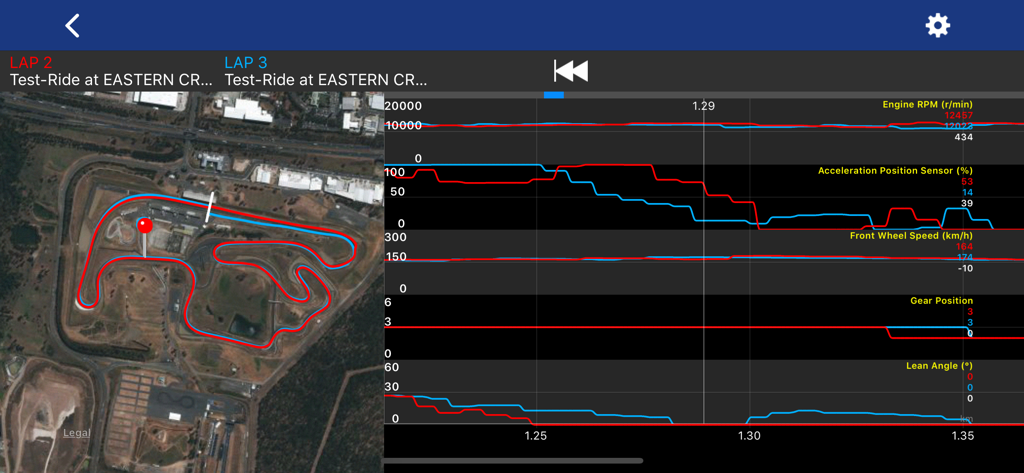
Identify exactly where you are losing time. Sync and compare two laps to visualize speed differentials and optimize your racing line.

The following screenshots and description are sourced directly from the app's official store listing and are the property of the app developer.

App Store

Screenshots
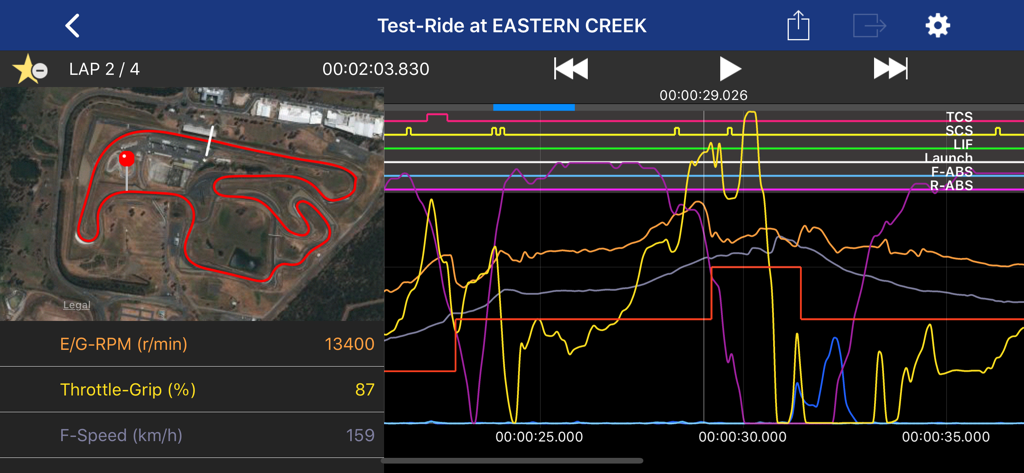
Y-TRAC Data Logger - Yamaha YTRAC app displaying motorcycle engine rpm throttle and speed data synchronized with a track map
Yamaha YTRAC app displaying motorcycle engine rpm throttle and speed data synchronized with a track map

Y-TRAC Data Logger - Y-TRAC app telemetry interface showing racing lines and performance graphs for multiple laps.

Y-TRAC app telemetry interface showing racing lines and performance graphs for multiple laps.

Description

■Brief Description Y-TRAC is an application that collects and analyzes data through the 2015-2020 model YAMAHA YZF-R1 / R1M equipped with CCU. Ride analysis can be performed by matching position information with vehicle condition in real time. ■Detailed Description Let's ride the circuit together! Improve your time by carefully analyzing ride characteristics and vehicle condition! Y-TRAC is a log viewer application for viewing vehicle information collected in the CCU (* 1). Many kinds of vehicle information are displayed visually in an easy-to-understand graph, such as vehicle speed and engine speed, accelerator opening, banking angle and brake pressure, as well as various types of control effects. In addition to vehicle information, position information is recorded simultaneously in the log data stored in the CCU. Due to this synchronization of position information and vehicle condition, you can quickly pick up information such as braking point at corner entry, brake pressure, vehicle speed, line, banking angle at turn, and throttle condition at exit. Since the graph displays each lap, you can easily understand the characteristics of a good line. Find a way to improve your lap time through careful study of the app's features. * To record logs of laps to the CCU, it is necessary to dictate the record line to the CCU in advance. * 1) Communication control unit (2015-2020 model year YAMAHA YZF-R1M equipped with data logger unit) ■How to use Y-TRAC and the CCU 1) Set the record line prior to circuit racing. a) Determine the record line. b) Send the record line to the CCU. *) In recording mode, either "Track" or "Street" can be selected. Select "Track" for circuit racing. That’s it for the preparation. 2) Come on, ride! a) Have a blast while riding safely. *) Ride conditions are being recorded in the CCU as a log. 3) After riding... a) Using Y-TRAC, download the log recorded in the CCU. b) Acquired data will be displayed in a list view. Tapping the data icon displays the graph. ■With Y-TRAC you can... 1) Acquire CCU logging data Download the logging data in the CCU. 2) Display lap times A list of lap times recorded by the CCU's auto lap function is displayed. 3) Display graphs A graph is displayed for each lap. 4) 15 types of vehicle data and 6 types of control data are displayed in a line graph. You can choose which data to display. 5) Compare graphs Two data can be compared per lap unit. For example, 2 laps within the same data set, or other lap data, can be compared. 6) Split laps When comparing different data, you can re-set the lap to fit in one record line. 7) Auto Play Graph display data is played automatically. 8) Bookmarks Regularly viewed data and special data can be accessed immediately by bookmarking the data. 9) Setting Data Export During ride YRC setting data can be captured by the YRC Setting app. 10) Data Sharing Log data can be uploaded to e-mail. ■Supported environment OS: iOS 12 or later ・ This application works on iPhone or iPad. ■Cautions ・ Please use the application safely, and observe traffic rules and precautions. ・ Please use only when the motorcycle is stopped in a safe location. ・ It is not guaranteed that the app will operate in all vehicles. Installation position and the installation method of the CCU may affect its accuracy, sensitivity and operation. ・ To use some functions of this application, you will need an Internet connection via mobile data communication or wireless LAN. ・ It is not guaranteed that the numbers displayed in this application are accurate. ■Inquiry ・ This application is for use with select Yamaha vehicles. For inquiries, please contact your Yamaha dealer.

Download

Download on App Store

This page is not an official page of the app or its developer, but an independent editorial publication created for informational and commentary purposes. Unless expressly stated otherwise, neither the app nor its developer is affiliated with, endorsed by, sponsored by, authorized by, or otherwise officially connected with MWM, Apple, Google Play, the app publisher, or the app's developer, and nothing on this page implies that the app was developed using MWM's services. Any trademarks, logos, screenshots, and other content remain the property of their respective owners.