
This page is not an official page of the app or its developer, but an independent editorial publication created for informational and commentary purposes. Unless expressly stated otherwise, neither the app nor its developer is affiliated with, endorsed by, sponsored by, authorized by, or otherwise officially connected with MWM, Apple, Google Play, the app publisher, or the app's developer, and nothing on this page implies that the app was developed using MWM's services. Any trademarks, logos, screenshots, and other content remain the property of their respective owners.

Zotero
No more lost articles or citation headaches. The app grants its users the ultimate command over their research, transforming chaos into clarity.
Downloads
1M+User Rating
Total Ratings
1.8KPublisher
Category
ProductivityLocales
1Latest Version
2.0.4Size
149.6 MBFirst Released
Mar 17, 2022An Analytical Review of Key Features for Academic and Research Professionals
Zotero: A Core Research Workflow Enabler
Effortless Citation Generation
This tool instantly generates citations and bibliographies in over 10,000 styles, significantly reducing the time and error associated with manual formatting, which is critical for academic integrity and publishing.
Integration with Word Processors
The app allows integration with word processors like Word, LibreOffice, and Google Docs for direct citation insertion and bibliography generation, streamlining the academic writing and publication process.
Robust Research Organization
The app enables efficient management of research items through collections and tags, facilitating quick retrieval and structured organization of extensive academic libraries, crucial for long-term research.
Advanced PDF Annotation
It allows users to read, highlight, and add notes to PDFs, EPUBs, and web snapshots, supporting deep engagement with research content and critical analysis directly within the application.
Seamless Cross-Device Synchronization
It ensures research libraries are accessible across desktop, web, and mobile platforms, providing flexibility and continuity in workflow for researchers working in various environments.
Comprehensive Source Collection
The app provides diverse methods for capturing research materials, including web pages, articles, and physical books via scanning, simplifying the initial stage of research for a comprehensive library.
Frequently Asked Questions
Everything you need to know about Zotero
What is Zotero?
Zotero is a free, easy-to-use research tool. It helps users collect, organize, annotate, cite, and share their academic work across various types of sources like articles, books, and webpages.
Can Zotero organize my research materials?
Yes, Zotero helps organize research. Users can utilize collections and tags to categorize materials and view or edit bibliographic information for each item, as shown with the 'Capybaras' collection.
Does Zotero support PDF annotation?
Yes, Zotero supports PDF annotation. Users read PDFs, add highlights and notes, and use an Apple Pencil for freehand annotations directly within the application, as demonstrated in the PDF viewer.
What citation styles does Zotero support?
Zotero generates citations and bibliographies in over 10,000 formats and journal styles. This includes widely used styles such as APA, Chicago, IEEE, MLA, Turabian, and Vancouver for academic writing.
Is Zotero free to use?
Yes, Zotero is a free research tool. It is provided at no cost to assist users in managing their academic and research materials.
Does Zotero sell user data?
No, Zotero does not sell user data. As an independent, nonprofit organization, Zotero is committed to user privacy and control over personal work.
Can I share my research with colleagues using Zotero?
Yes, Zotero allows users to share research collaboratively. You can collect sources and mark up PDFs in group libraries with colleagues, and synchronize libraries with the desktop app.
How does Zotero help collect research materials?
Zotero helps collect research by saving articles and webpages via the Share button. It also automatically downloads PDFs and allows scanning book barcodes or article DOIs with an iPhone or iPad camera.
The following screenshots and description are sourced directly from the app's official store listing and are the property of the app developer.
App Store
Screenshots
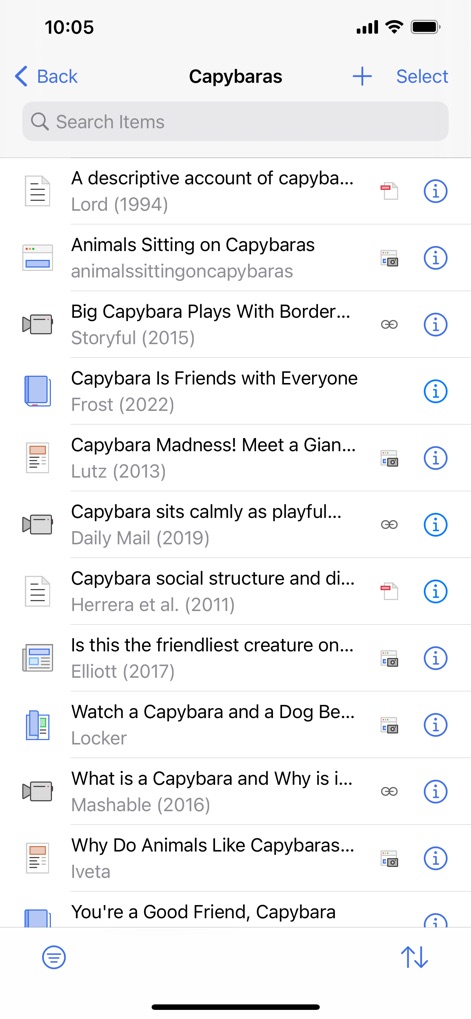
Users can manage their research effortlessly, viewing a comprehensive item list and utilizing the efficient search bar.
Organized Research Hub

This tool enables deep engagement with documents, providing both precise text highlighting and intuitive freehand annotations.
Annotate with Precision
Description
Download
More Like This
Apps with similar features and user experience
ResearchGate
ResearchGate GmbH
Read by QxMD
WebMD Health Corporation

Prime: PubMed Journals & Tools
Unbound Medicine, Inc.

Academia.edu
Academia Inc

PubMed PMC Bookshelf Search
FugaPiyo Inc.
PubMed On Tap
Serhiy Duminskyy
Bohrium
Beijing Shenshi Technology Co., Ltd.

YLMSportScience
YLMSportScience

Liner - AI search assistant
Liner Corp.
This page is not an official page of the app or its developer, but an independent editorial publication created for informational and commentary purposes. Unless expressly stated otherwise, neither the app nor its developer is affiliated with, endorsed by, sponsored by, authorized by, or otherwise officially connected with MWM, Apple, Google Play, the app publisher, or the app's developer, and nothing on this page implies that the app was developed using MWM's services. Any trademarks, logos, screenshots, and other content remain the property of their respective owners.