Brother iPrint&Scan

Brother iPrint&Scan

Herunterladen auf App StoreHerunterladen auf Google Play
Logo von Brother iPrint&Scan

Brother iPrint&Scan: Einfaches kabelloses Drucken und Scannen

Drucken Sie Dokumente, scannen Sie in die Cloud und senden Sie Faxe direkt von Ihrem Mobilgerät aus. Eliminieren Sie den Computer als Zwischenstation mit dem ultimativen Produktivitätstool für Ihren Brother-Drucker.

Herausgeber

Brother Industries, LTD.

Kategorie

Utilities

Downloads

16M+

Bewertung

2.7/5

Bewertungen gesamt

16K+

Sprachen

21

Effizienz in Bewegung

Entdecken Sie die Oberfläche, die von 16M+ Nutzern verwendet wird.
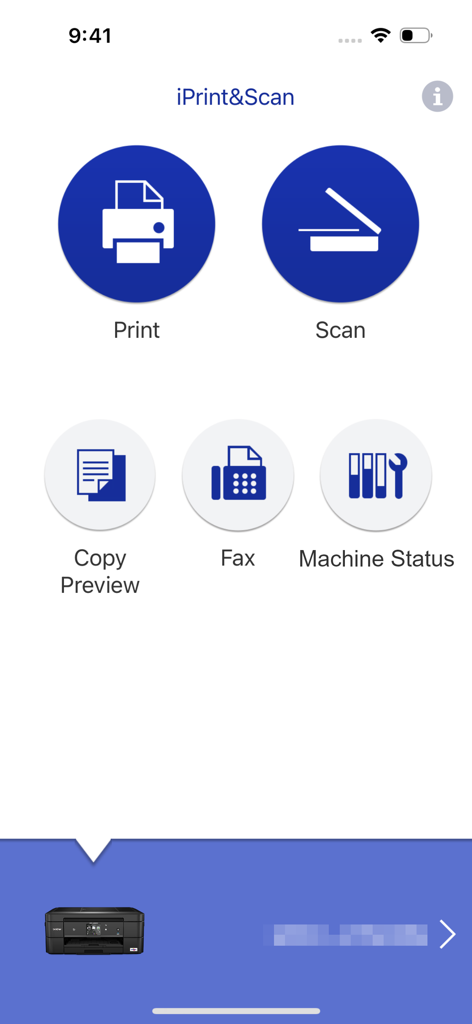
Hauptoberfläche der Brother iPrint and Scan App mit Druck- und Scanoptionen

Hauptoberfläche der Brother iPrint and Scan App mit Druck- und Scanoptionen

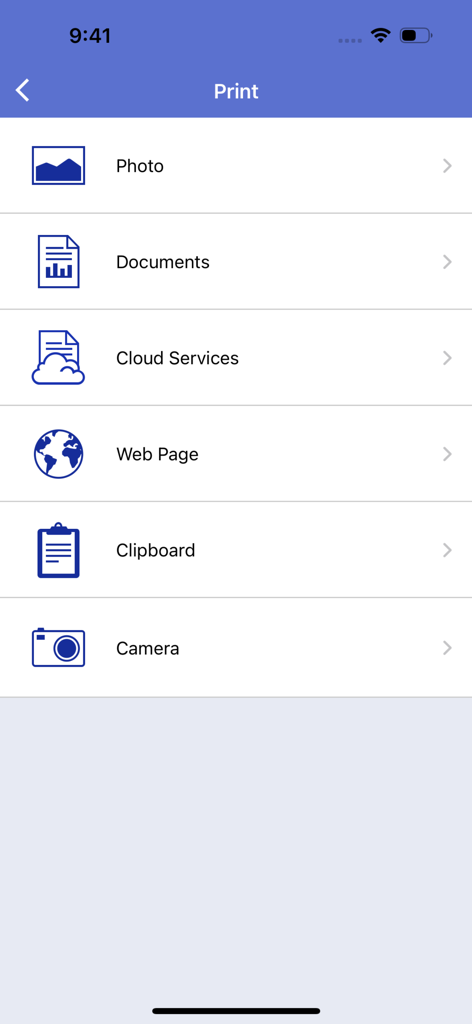
Haupt-Druckmenübildschirm der Brother iPrint and Scan App mit Optionen zum Drucken von Fotos, Dokumenten, Cloud-Dateien, Webseiten und mehr.

Haupt-Druckmenübildschirm der Brother iPrint and Scan App mit Optionen zum Drucken von Fotos, Dokumenten, Cloud-Dateien, Webseiten und mehr.

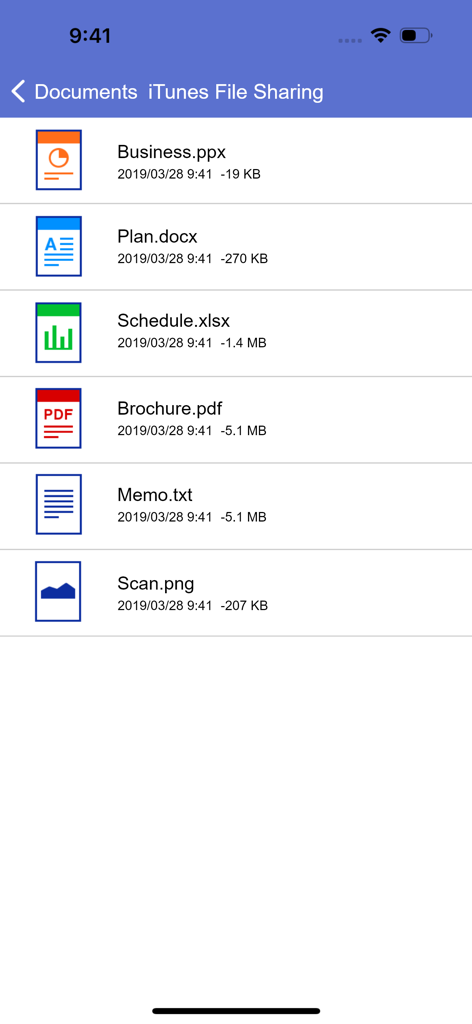
Dokumentenliste in der Brother iPrint and Scan App mit PDF-, Word- und Excel-Dateien für den mobilen Druck

Dokumentenliste in der Brother iPrint and Scan App mit PDF-, Word- und Excel-Dateien für den mobilen Druck

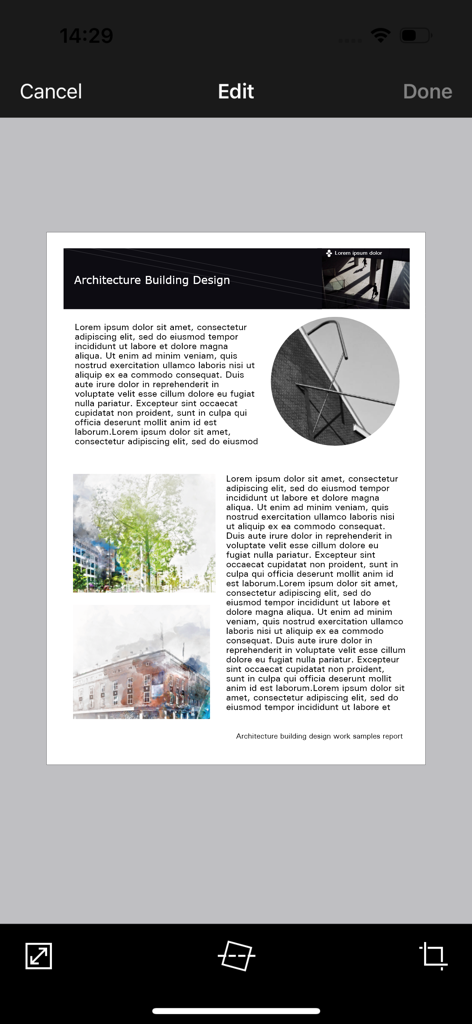
Brother iPrint and Scan mobile App-Oberfläche mit einem bearbeiteten Dokument und Werkzeugen zum Zuschneiden und Begradigen

Brother iPrint and Scan mobile App-Oberfläche mit einem bearbeiteten Dokument und Werkzeugen zum Zuschneiden und Begradigen

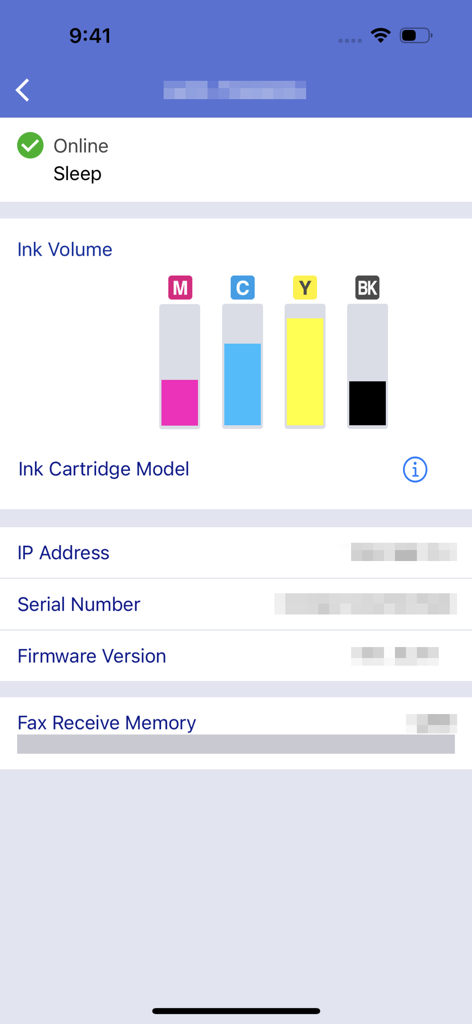
Brother iPrint and Scan App-Oberfläche, die Tintenfüllstände und den Maschinenstatus anzeigt

Brother iPrint and Scan App-Oberfläche, die Tintenfüllstände und den Maschinenstatus anzeigt

Meistern Sie Ihr Büro von Ihrer Hosentasche aus

Die Tools, die diese App auszeichnen, gewählt von 16M+ Nutzern.

📲

Cloud-Druck mit einem Fingertipp

Drucken Sie Verträge, Versandetiketten und Dokumente direkt von iCloud, Dropbox oder OneDrive in Sekundenschnelle.

📄

Intelligentes mobiles Scannen

Digitalisieren Sie Papierkram unterwegs. Scannen Sie direkt auf Ihr Telefon, bearbeiten Sie es zur besseren Lesbarkeit und senden Sie es als PDF per E-Mail, ohne einen Computer zu benötigen.

📠

Fern-Fax und Wartung

Erledigen Sie Faxe für rechtliche Angelegenheiten und überwachen Sie den Tintenstand aus der Ferne, damit Sie immer für Ihr nächstes großes Projekt bereit sind.

Bewertungsanalyse

Erkenntnisse aus Nutzerbewertungen.

Stimmungswert

31%
Negativ

Zusammenfassung

The app receives mixed feedback, with users often praising its ease of use, simple setup, and effective wireless printing capabilities for various document and image types. Many find it convenient for printing remotely, even with older printers. However, a significant number of users report persistent connectivity issues, particularly following iOS updates (e.g., iOS 26), and general unreliability. Frustrations also stem from perceived missing features like comprehensive paper size options, consistent double-sided printing controls, and limitations in scanning functionality, alongside reports of app crashes and version-specific bugs on devices like iPhone 17.

Häufige Themen

Connectivity(4)
Ease of Use & Setup(3)
Wireless Printing(3)
Image Manipulation(2)
Paper Size Options(1)
iOS Compatibility & Bugs(1)

Über die App

Alles, was Sie über wissen müssen Brother iPrint&Scan.

Beschreibung

Brother iPrint&Scan is a free app that enables you to print from and scan to your iOS device (iPhone / iPod touch / iPad). Use your local wireless network to connect your iOS device to your Brother printer or all-in-one. Some new advanced functions have been added, including edit, fax send, fax preview, copy preview, and machine status. Visit your local Brother website for a list of supported models. [Key Features] - Easy to use menu. - Simple steps to print your favorite photos, web pages and documents (PDF, Word, Excel®, PowerPoint®, Text). - Print photos directly from your iPhone camera. - Print PDF files or Microsoft® Office documents or Text files by starting the app from "Open in..." - Print your documents and photos directly from the following cloud services: Dropbox™, OneDrive, Evernote®. - Print what you copied to the clipboard. - Use iTunes File Sharing to send compatible files (PDF, Word, Excel®, PowerPoint®, Text, JPEG, PNG, TIFF) to iPrint&Scan for convenient printing at a later time. - Scan directly to your iPhone/iPod touch/iPad. - Save scanned images to your photo album, iCloud or Facebook / X / Flickr accounts or send them in an E-mail (PDF, JPEG). - Print scanned images saved to iCloud from this app. - Automatically search for supported devices on a local wireless network. - No computer and no driver required. *To save scanned images directly to Facebook / X / Flickr, you must first register your accounts on your mobile device. [Advanced Functions] (Only available on new models.) - Edit previewed images using the editing tools (scale, straighten, crop) if necessary. - Send a fax directly from your mobile device. (This app feature requires access to the address book of your mobile device.) - View received faxes stored on your machine on your mobile device. - The copy preview function enables you to preview an image and edit it if necessary before copying to avoid copy errors. - View the machine’s status such as ink/toner volume and error messages on your mobile device. *Compatible functions will depend on the selected device. [Compatible Print Settings] - Paper Size - 4" x 6" (10 x 15cm) Photo L (3.5" x 5" / 9 x 13 cm) Photo 2L (5" x 7" / 13 x 18 cm) A4 Letter Legal A3 Ledger - Media Type - Glossy Paper Plain Paper - Copies - Up to 5 [Compatible Scan Settings] - Document Size - A4 Letter 4" x 6" (10 x 15cm) Photo L (3.5" x 5" / 9 x 13 cm) Card (2.4" x 3.5" / 60 x 90 mm) Legal A3 Ledger - Scan Type - Color Color (Fast) Black & White [Access Permission Information] You must check and allow the essential access permissions below to use Brother iPrint&Scan service. Essential Permission • Contact information: access to your contact numbers is needed when you use functions like fax, but you can limit access to the specific contact necessary for the service. Optional Permission • Location information: It is requested only when you use device search features like Wi-Fi Direct, Bluetooth, or NFC. Optional data is required to use the corresponding function, and even if permission is not granted, services other than the corresponding function can be used. *Compatible settings will depend on the selected device and function. *Evernote is a trademark of Evernote Corporation and used under a license. *Microsoft, Excel, and PowerPoint are either registered trademarks or trademarks of Microsoft Corporation in the United States and/or other countries. *To help us improve the application, send your feedback to Feedback-mobile-apps-ps@brother.com. Please note that we may not be able to respond to individual emails.

Neueste Version

6.15.4

Größe

37.4 MB

Erstveröffentlichung

29. Juli 2010

Übernehmen Sie die volle Kontrolle über Ihren Brother-Drucker, wo immer Sie sind

Schließen Sie sich über 16 Millionen Fachleuten und Familien an, die den Computer abgeschafft haben. Drucken Sie Dokumente, scannen Sie in die Cloud und senden Sie Faxe direkt von Ihrem Telefon aus für einen nahtlosen, Mobile-First-Workflow.

Herunterladen auf App StoreHerunterladen auf Google Play
FAQ

Häufig gestellte Fragen

Alles, was Sie über wissen müssen Brother iPrint&Scan

Was ist Brother iPrint&Scan?

Brother iPrint&Scan ist eine kostenlose Anwendung, mit der Benutzer von ihren iOS-Geräten aus drucken und darauf scannen können. Sie verbindet sich über ein lokales drahtloses Netzwerk mit kompatiblen Brother-Druckern und All-in-One-Geräten.

Wie drucke ich Dokumente mit Brother iPrint&Scan?

Ja, Brother iPrint&Scan ermöglicht den Druck von Fotos, Webseiten und Dokumenten wie PDF, Word, Excel, PowerPoint und Textdateien. Benutzer können auch von Cloud-Diensten wie Dropbox drucken.

Kann Brother iPrint&Scan Bilder auf mein iOS-Gerät scannen?

Ja, Brother iPrint&Scan ermöglicht das direkte Scannen auf iPhone, iPod touch oder iPad. Gescannte Bilder können im Fotoalbum, in iCloud gespeichert oder per E-Mail, Facebook, X oder Flickr geteilt werden.

Unterstützt Brother iPrint&Scan Cloud-Druck?

Ja, Brother iPrint&Scan unterstützt den direkten Druck von Dokumenten und Fotos aus Cloud-Diensten. Kompatible Dienste sind Dropbox, OneDrive und Evernote.

Welche Dateiformate sind mit Brother iPrint&Scan für den Druck über iTunes File Sharing kompatibel?

Brother iPrint&Scan unterstützt kompatible Dateien wie PDF, Word, Excel, PowerPoint, Text, JPEG, PNG und TIFF für den Druck über iTunes File Sharing.

Kann ich den Status meines Brother-Druckers mit iPrint&Scan überprüfen?

Ja, Brother iPrint&Scan ermöglicht es Benutzern, den Status des Geräts, einschließlich Tinte oder Tonerstand und Fehlermeldungen, direkt auf ihrem mobilen Gerät anzuzeigen.

Ist die Brother iPrint&Scan App kostenlos herunterzuladen und zu verwenden?

Ja, Brother iPrint&Scan ist eine kostenlose Anwendung. Sie ermöglicht das kostenlose Drucken von und Scannen auf iOS-Geräte.

Benötigt Brother iPrint&Scan einen Computer oder Treiber für den Betrieb?

Nein, Brother iPrint&Scan benötigt keinen Computer oder Treiber für seinen Betrieb. Es verbindet sich direkt über das lokale drahtlose Netzwerk mit kompatiblen Brother-Geräten.

Kann ich mit der mobilen App Brother iPrint&Scan Faxe senden?

Ja, Benutzer können mit Brother iPrint&Scan direkt von ihrem mobilen Gerät aus Faxe senden. Diese Funktion ist auf neuen Modellen verfügbar und erfordert Zugriff auf das Adressbuch des Geräts.

Welche erweiterten Bearbeitungsfunktionen sind in Brother iPrint&Scan verfügbar?

Brother iPrint&Scan bietet erweiterte Bearbeitungswerkzeuge für Vorschau-Bilder. Benutzer können Bilder nach Bedarf skalieren, begradigen und zuschneiden, um eine optimale Ausgabe vor dem Drucken oder Kopieren zu gewährleisten.

Welche Zugriffsberechtigungen fordert Brother iPrint&Scan an?

Brother iPrint&Scan benötigt wesentlichen Zugriff auf Kontaktinformationen für Faxfunktionen und optionalen Standortzugriff für Gerätesuchfunktionen wie Wi-Fi Direct oder Bluetooth.

Wie verbindet sich Brother iPrint&Scan mit einem Brother-Drucker?

Brother iPrint&Scan verbindet sich mit einem Brother-Drucker oder All-in-One-Gerät über das lokale drahtlose Netzwerk. Die App sucht automatisch nach unterstützten Geräten im Netzwerk.

App information, icons, screenshots, and descriptions displayed on this page are sourced from the Apple App Store and are the property of their respective developers. Download estimates and rankings are based on MWM's proprietary models and may not reflect actual figures. This page is provided for informational and analytical purposes only.

Believe this page infringes your intellectual property? File a dispute