
Diese Seite ist keine offizielle Seite der App oder ihres Entwicklers, sondern eine unabhängige redaktionelle Veröffentlichung, die zu Informations- und Kommentarzwecken erstellt wurde. Sofern nicht ausdrücklich anders angegeben, sind weder die App noch ihr Entwickler mit MWM, Apple, Google Play, dem App-Herausgeber oder dem Entwickler der App verbunden, von ihnen unterstützt, gesponsert, autorisiert oder anderweitig offiziell verbunden, und nichts auf dieser Seite impliziert, dass die App unter Verwendung der Dienste von MWM entwickelt wurde. Alle Marken, Logos, Screenshots und andere Inhalte bleiben Eigentum ihrer jeweiligen Inhaber.


HP
Dein HP-Imperium, neu geordnet: Diese App gibt dir die Kontrolle zurück, die dir deine Geräte gestohlen haben.
Downloads
100M+Bewertung
Bewertungen gesamt
12.0MHerausgeber
Kategorie
ProductivitySprachen
29Neueste Version
26.0.0Größe
403.8 MBErstveröffentlichung
19. Okt. 2011Analytische Bewertung der HP App Funktionen
Eine detaillierte Übersicht der Kernfunktionen für HP Gerätebesitzer, bewertet nach ihrem Nutzen und Mehrwert.
Zentrale Geräteverwaltung und Materialüberwachung
Die App ermöglicht die zentrale Verwaltung von HP-Geräten sowie die proaktive Überwachung und einfache Nachbestellung von Verbrauchsmaterialien wie Tinte und Papier, um einen unterbrechungsfreien Betrieb sicherzustellen.
Geführte Geräteeinrichtung
Die App bietet eine intuitive, geführte Einrichtung, um neue HP-Geräte schnell und unkompliziert in Betrieb zu nehmen, was den Startprozess erheblich vereinfacht.
Erweiterte Scan-Funktionen
Dieses Tool verfügt über fortschrittliche Scan-Optionen wie automatische Bildkorrektur, Textextraktion und Multi-Seiten-Scanning, die die digitale Dokumentenverwaltung und Produktivität wesentlich verbessern.
Flexibles Drucken und Scannen von überall
Es ermöglicht Nutzern, Dokumente und Fotos jederzeit und von praktisch jedem Ort aus zu drucken und zu scannen, was maximale Flexibilität und Bequemlichkeit im Alltag schafft.
Integrierter Support und schnelle Hilfestellung
Die App bietet direkten Zugriff auf verschiedene Support-Kanäle, einschließlich Telefon, Live-Chat und FAQs, für schnelle Problemlösung und jederzeitige Hilfestellung bei technischen Fragen.
Zugang zu Kreativ-Inhalten (HP Printables)
Dieses Tool schaltet eine Welt der Kreativität frei, indem es Zugang zu einer Fülle von Karten, Ausmalbildern, Lernmaterialien und Bastelprojekten bietet, ideal für Familien und kreative Köpfe.
Dokumentenbearbeitung vor dem Druck
Es ermöglicht Nutzern, Dokumente direkt in der App anzupassen und zu bearbeiten, bevor sie gedruckt werden, was Zeit spart und die Notwendigkeit externer Bearbeitungsprogramme reduziert.
Anpassbare Druck-Verknüpfungen
Die App erlaubt das Erstellen benutzerdefinierter Kurzbefehle für häufig genutzte Druckaufgaben, um wiederkehrende Prozesse zu beschleunigen und die Effizienz zu steigern.
Häufig gestellte Fragen
Alles, was Sie über wissen müssen HP
What is the HP app?
The HP app is a central application for managing HP devices. It allows users to set up printers, personalize experiences, print, scan, and access support all in one place. It was formerly known as HP Smart.
Can I manage multiple HP devices with the HP app?
Yes, the HP app allows users to manage multiple HP devices. It displays various connected HP products, such as printers, laptops, docks, and pens, all within a single interface.
How do I set up a new HP printer using the HP app?
The HP app provides a guided setup process for new HP devices. This process involves steps like finding the printer and configuring it to connect to a Wi-Fi network.
What printing functions does the HP app offer?
The HP app allows users to print documents and images directly from their mobile device. It includes options to select a printer, specify the number of copies, and adjust paper size before printing.
Can the HP app scan documents?
Yes, the HP app includes scanning capabilities. Users can scan documents, preview them, and then choose to print, share, save, or even use mobile fax directly from the app.
Does the HP app provide support for HP devices?
Yes, the HP app offers various support options. Users can access a Virtual Assistant, view manuals, find repair centers, initiate repair orders, and contact support via chat or phone.
Can I check my HP printer's ink levels with the HP app?
Yes, the HP app allows users to stay on top of essentials like checking ink levels for their connected HP printers. It also provides notifications for low ink.
Does the HP app allow me to order HP products?
Yes, the HP app provides recommendations for HP products and allows users to shop for items like ink and photo paper. It notifies users when ink or paper is low.
What are HP Printables in the HP app?
HP Printables unlock creative content within the HP app. They include cards, coloring pages, educational worksheets, and fun crafts projects designed for personal use.
Are there any charges for using the HP app?
The HP app is available for download, but HP reserves the right to introduce charges for the use of select HP app functionality. Some features may require an HP account.
What devices support the HP app?
The HP app is available for download on macOS devices, iOS mobile phones, and iPads. It requires an internet connection for full functionality.
What is required to activate HP+ benefits within the HP app?
To activate HP+ benefits, users must choose HP+ at setup. This requires an HP account, an ongoing internet connection, and the exclusive use of Original HP ink for the printer's lifetime.
Die folgenden Screenshots und die Beschreibung stammen direkt aus dem offiziellen Store-Eintrag der App und sind Eigentum des Entwicklers.
App Store
Screenshots
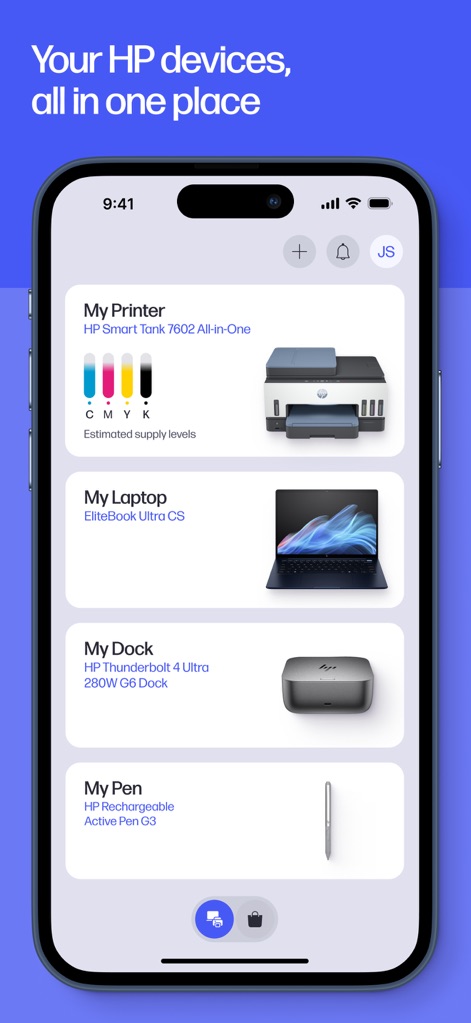
Zentrale Geräteverwaltung
Dieser Screenshot zeigt die zentrale Verwaltung der HP-Geräte, übersichtlich dargestellt mit dem 'HP Smart Tank 7602 All-in-One'-Drucker und dessen aktuellen Tintenfüllständen.
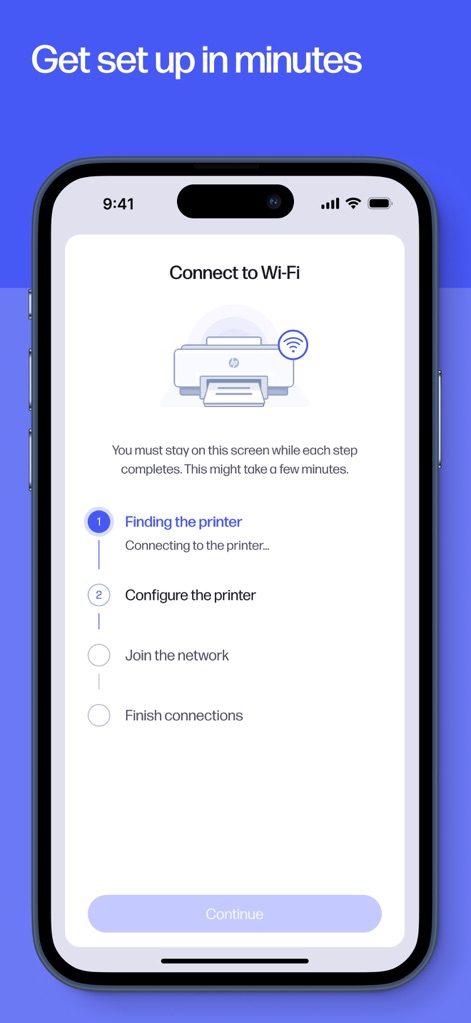
Einfache Einrichtung
Die App führt Nutzer durch den unkomplizierten Einrichtungsassistenten, der die Schritte zum 'Finding the printer' und zum 'Configure the printer' klar aufzeigt.
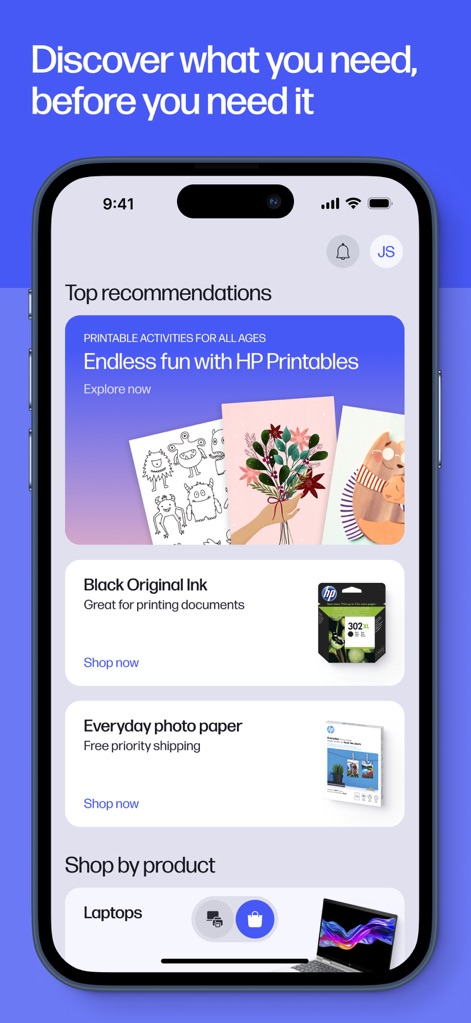
Produkte und Empfehlungen
Hier präsentiert die App personalisierte Empfehlungen, darunter 'Printable activities' für kreative Anwendungen und Vorschläge für 'Black Original Ink' zum Nachbestellen.
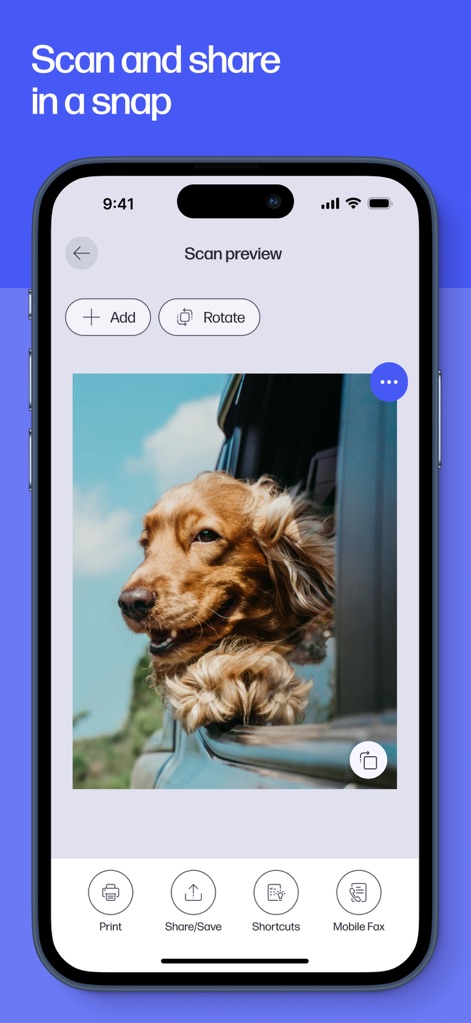
Scannen und Teilen
Dieser Screenshot demonstriert die 'Scan preview' eines Dokuments und bietet intuitive Optionen wie 'Print' und 'Share/Save' für die einfache Weiterverarbeitung.
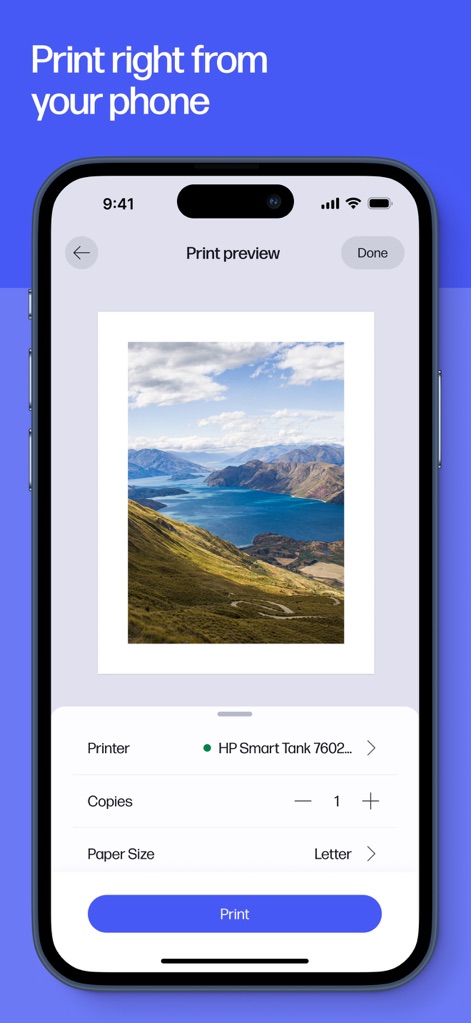
Druckvorschau anpassen
Die 'Print preview' ermöglicht Nutzern die visuelle Überprüfung vor dem Druck und die Anpassung wichtiger Einstellungen wie die 'Copies'-Anzahl und das 'Paper Size'.
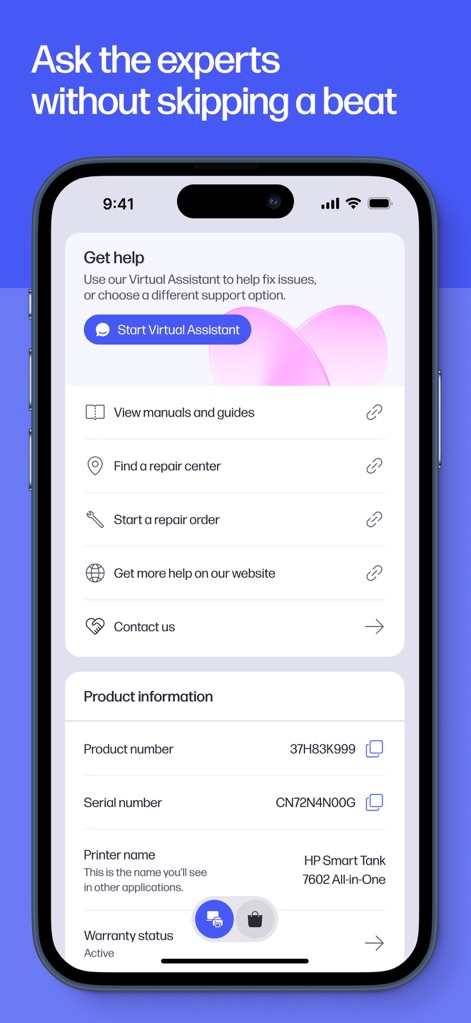
Umfassender Support
Dieser Bereich bietet umfassende Support-Optionen, die den Start eines 'Virtual Assistant' und den Zugriff auf detaillierte 'Product information' zu den Geräten umfassen.
Beschreibung
Download
Ähnliche Apps
Apps mit ähnlichen Funktionen und Nutzererfahrung

Docuslice - Poster Printing
Jeremiah Lachica

Printer Pro: Smart Printer App
Ivan Spyrydonov

Canon PRINT
Canon Inc.

Epson Smart Panel
Seiko Epson Corporation

Brother Mobile Connect
Brother Industries, LTD.

Epson iPrint
Seiko Epson Corporation

Printer App: Smart Print
Netpeak EOOD

Smart Printer App: iPrint
AppFusion OU

小白学习打印-手机打印,教辅试卷错题整理
Nanjing White Box Information Technology Co., Ltd
Diese Seite ist keine offizielle Seite der App oder ihres Entwicklers, sondern eine unabhängige redaktionelle Veröffentlichung, die zu Informations- und Kommentarzwecken erstellt wurde. Sofern nicht ausdrücklich anders angegeben, sind weder die App noch ihr Entwickler mit MWM, Apple, Google Play, dem App-Herausgeber oder dem Entwickler der App verbunden, von ihnen unterstützt, gesponsert, autorisiert oder anderweitig offiziell verbunden, und nichts auf dieser Seite impliziert, dass die App unter Verwendung der Dienste von MWM entwickelt wurde. Alle Marken, Logos, Screenshots und andere Inhalte bleiben Eigentum ihrer jeweiligen Inhaber.