
Diese Seite ist keine offizielle Seite der App oder ihres Entwicklers, sondern eine unabhängige redaktionelle Veröffentlichung, die zu Informations- und Kommentarzwecken erstellt wurde. Sofern nicht ausdrücklich anders angegeben, sind weder die App noch ihr Entwickler mit MWM, Apple, Google Play, dem App-Herausgeber oder dem Entwickler der App verbunden, von ihnen unterstützt, gesponsert, autorisiert oder anderweitig offiziell verbunden, und nichts auf dieser Seite impliziert, dass die App unter Verwendung der Dienste von MWM entwickelt wurde. Alle Marken, Logos, Screenshots und andere Inhalte bleiben Eigentum ihrer jeweiligen Inhaber.


Epson iPrint
Vergiss den Schreibtisch: Die App gibt dir die absolute Hoheit über deinen Epson-Drucker. Dein Mobilgerät dirigiert das Geschehen, ob im selben Raum oder auf einem anderen Kontinent.
Downloads
25M+Bewertung
Bewertungen gesamt
2.6MHerausgeber
Kategorie
Photo & VideoSprachen
13Neueste Version
7.13.2Größe
33.0 MBErstveröffentlichung
14. Dez. 2009Epson iPrint: Mobile Produktivität für Ihren Epson-Drucker
Eine Analyse der Kernfunktionen und deren Bedeutung für mobile Anwender von Epson-Druckern.
Direktes Drucken, Scannen und Teilen von iOS-Geräten
Die App bietet die zentrale Möglichkeit, direkt vom iPhone, iPad oder iPod Touch aus zu drucken, zu scannen und Inhalte zu teilen. Dies optimiert den Workflow und steigert die mobile Produktivität erheblich.
Unterstützung vielfältiger Dokumenttypen
Es ermöglicht Nutzern, eine breite Palette von Dokumenttypen, darunter Fotos, PDFs und Microsoft Office-Dateien wie Word, Excel und PowerPoint, direkt zu drucken. Dies deckt den Großteil der alltäglichen Druckbedürfnisse ab.
Remote-Druck über E-Mail-fähige Drucker
Dieses Tool verfügt über eine Remote-Druckfunktion, die es Nutzern gestattet, von jedem Ort der Welt auf E-Mail-fähigen Epson-Druckern zu drucken. Dies bietet maximale Flexibilität und Ortsunabhängigkeit.
Direktes Scannen von Epson All-in-One-Geräten
Die App ermöglicht das direkte Scannen von Dokumenten über ein Epson All-in-One-Gerät und das anschließende Teilen der gescannten Dateien. Dies vereinfacht das digitale Dokumentenmanagement erheblich.
Dokumentenerfassung mittels Gerätekamera
Es bietet die Funktion, Dokumente mit der Gerätekamera zu erfassen, zu formatieren und zu verbessern, um sie anschließend direkt drucken oder speichern zu können. Ideal für schnelle Digitalisierungen unterwegs.
Überwachung des Druckerstatus und der Tintenfüllstände
Die App ermöglicht die Überprüfung des Druckerstatus und der aktuellen Tintenfüllstände direkt vom Mobilgerät. Dies hilft, Druckunterbrechungen zu vermeiden und eine rechtzeitige Wartung zu gewährleisten.
Umfassende Druckoptionenkonfiguration
Dieses Tool verfügt über umfassende Konfigurationsmöglichkeiten für den Druck, einschließlich Papiergröße und -typ, Anzahl der Kopien, Seitenbereich sowie ein- oder zweiseitigem Druck. Dies erlaubt eine präzise Anpassung an individuelle Druckanforderungen.
Mobile Kopierfunktion
Die App bietet eine mobile Kopierfunktion, mit der Dokumente und Fotos über das Mobilgerät und einen nahegelegenen Epson-Drucker kopiert werden können. Dies erweitert die Funktionalität des Druckers auf das Mobilgerät.
Häufig gestellte Fragen
Alles, was Sie über wissen müssen Epson iPrint
What is Epson iPrint?
Epson iPrint is a mobile application for iPhone, iPad, or iPod Touch that enables direct printing, scanning, and sharing. It supports printing photos, emails, webpages, and files like Microsoft Word, Excel, PowerPoint, and PDF documents.
Can I print documents with Epson iPrint?
Yes, Epson iPrint allows users to print documents, including Microsoft Word, Excel, PowerPoint, and PDF files. It also prints stored files and email attachments directly from a mobile device.
Does Epson iPrint support scanning?
Yes, Epson iPrint supports scanning documents from an Epson all-in-one printer. Users can then save, email, or share the scanned files online directly from their mobile device.
Can I print photos from my iPhone using Epson iPrint?
Yes, Epson iPrint enables printing photos directly from an iPhone, iPad, or iPod Touch. It includes advanced features like automatic backlight and color cast correction for high-quality photo output.
How can I check printer ink levels with Epson iPrint?
Users can check their printer's status and ink levels directly within the Epson iPrint app. This feature provides essential information to ensure the printer is operational for printing tasks.
Can I print remotely using Epson iPrint?
Yes, Epson iPrint includes remote print functionality. Users can print from any location to email-enabled Epson printers, offering convenience for printing tasks away from the immediate area.
Does Epson iPrint require location services for Wi-Fi printing?
Yes, Epson iPrint requires device location services for Wi-Fi connections to search for wireless networks. The application explicitly states it does not collect your actual location data.
Can Epson iPrint copy documents?
Yes, Epson iPrint provides a copy function. Users can copy documents and photos using their mobile device in conjunction with a nearby Epson printer, streamlining the copying process.
What types of files can Epson iPrint print?
Epson iPrint prints various file types, including photos, emails, webpages, and documents such as Microsoft Word, Excel, PowerPoint, and PDF. It also supports printing stored files.
Die folgenden Screenshots und die Beschreibung stammen direkt aus dem offiziellen Store-Eintrag der App und sind Eigentum des Entwicklers.
App Store
Screenshots
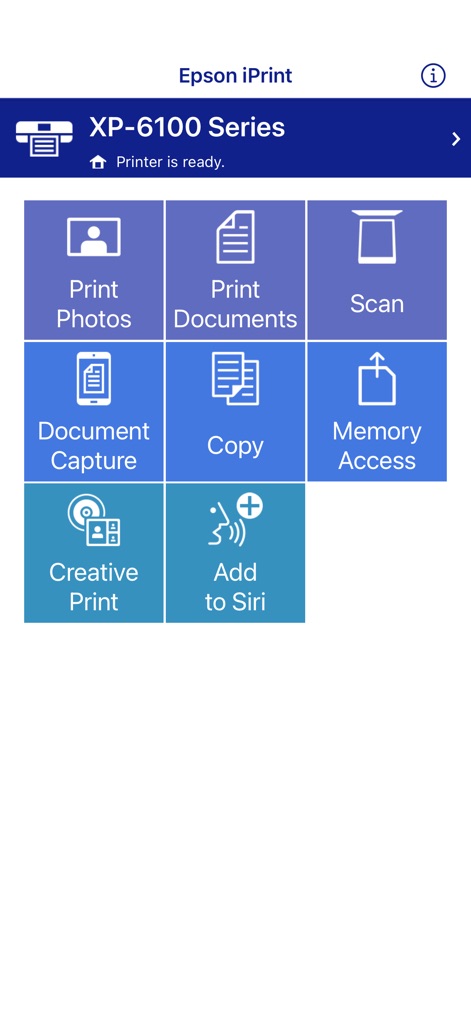
Zentrale Funktionsübersicht
Die App präsentiert eine übersichtliche Startansicht mit intuitiven Kacheln wie "Print Photos" und "Scan", die einen schnellen Zugriff auf alle Hauptfunktionen ermöglichen.

Dokumentenvorschau drucken
Nutzer können eine detaillierte Vorschau des Dokuments anzeigen und dabei wichtige Informationen wie das voreingestellte Papierformat "Letter 8 1/2 x 11 in" im oberen Bereich überprüfen.

Scan-Ergebnisse bearbeiten
Nach einem Scanvorgang wird dem Nutzer eine Vorschau des erfassten Dokuments präsentiert, und am unteren Bildschirmrand stehen praktische Symbole zum Speichern oder Teilen des Scans bereit.

Fotoauswahl Optionen
Diese Ansicht zeigt eine große Vorschau des ausgewählten Fotos und erlaubt die Anpassung des Druckformats, ersichtlich an der Angabe "3.5 x 5 in / 89 x 127 mm" oben rechts.
Beschreibung
Download
Ähnliche Apps
Apps mit ähnlichen Funktionen und Nutzererfahrung

Docuslice - Poster Printing
Jeremiah Lachica

Printer Pro: Smart Printer App
Ivan Spyrydonov

HP
HP Inc.

Canon PRINT
Canon Inc.

Epson Smart Panel
Seiko Epson Corporation

Brother Mobile Connect
Brother Industries, LTD.

Printer App: Smart Print
Netpeak EOOD

Smart Printer App: iPrint
AppFusion OU

小白学习打印-手机打印,教辅试卷错题整理
Nanjing White Box Information Technology Co., Ltd
Diese Seite ist keine offizielle Seite der App oder ihres Entwicklers, sondern eine unabhängige redaktionelle Veröffentlichung, die zu Informations- und Kommentarzwecken erstellt wurde. Sofern nicht ausdrücklich anders angegeben, sind weder die App noch ihr Entwickler mit MWM, Apple, Google Play, dem App-Herausgeber oder dem Entwickler der App verbunden, von ihnen unterstützt, gesponsert, autorisiert oder anderweitig offiziell verbunden, und nichts auf dieser Seite impliziert, dass die App unter Verwendung der Dienste von MWM entwickelt wurde. Alle Marken, Logos, Screenshots und andere Inhalte bleiben Eigentum ihrer jeweiligen Inhaber.