DocReviewPad - Review Docs

DocReviewPad - Review Docs

Herunterladen auf App Store
Logo von DocReviewPad - Review Docs

DocReviewPad — Professionelle Dokumentenprüfung und Prozessunterstützung

Meistern Sie die Beweisaufnahme mit sicherer, lokaler Dokumentenprüfung. Kommentieren, Bates-nummerieren und Sachverhalte codieren Sie Tausende von Seiten auf Ihrem iPad oder Mac – keine Cloud-Verbindung erforderlich.

Herunterladen auf App Store

Herausgeber

LIT SOFTWARE, LLC

Kategorie

Business

Downloads

100

Bewertung

4.4/5

Bewertungen gesamt

100

Sprachen

1

Ihr mobiles War Room

Entdecken Sie die Oberfläche, die von 100 Nutzern verwendet wird.

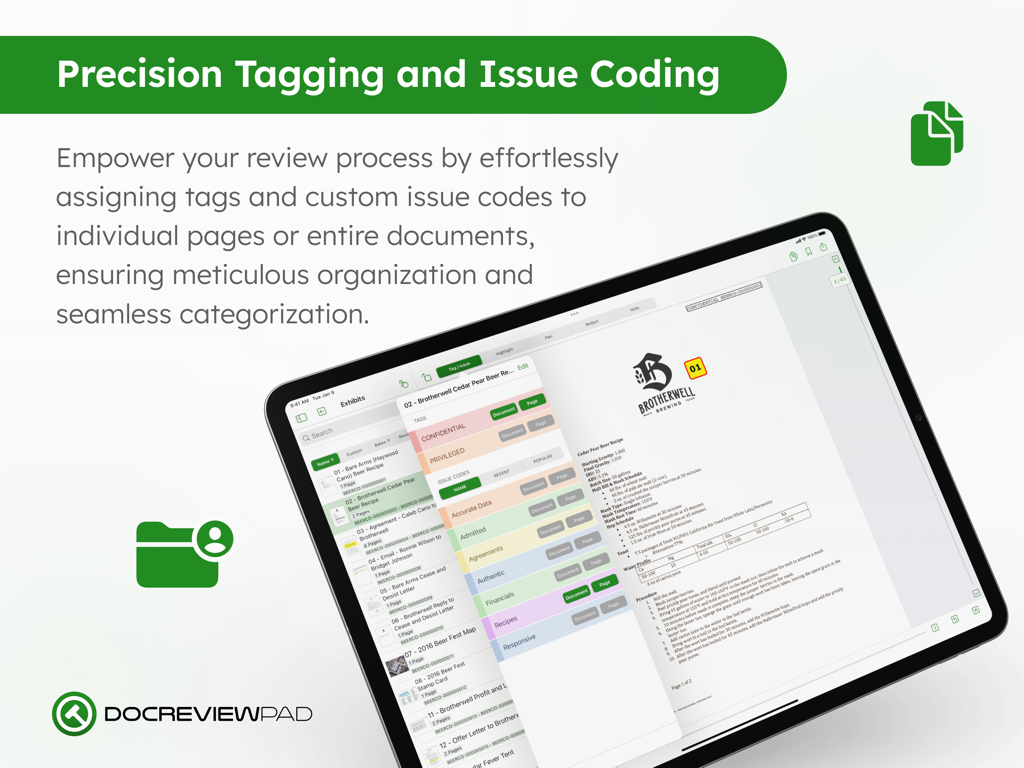
DocReviewPad-Oberfläche auf dem iPad zeigt Optionen zur Markierung und Sachverhaltscodierung von Rechtsdokumenten
DocReviewPad-Oberfläche auf dem iPad zeigt Optionen zur Markierung und Sachverhaltscodierung von Rechtsdokumenten

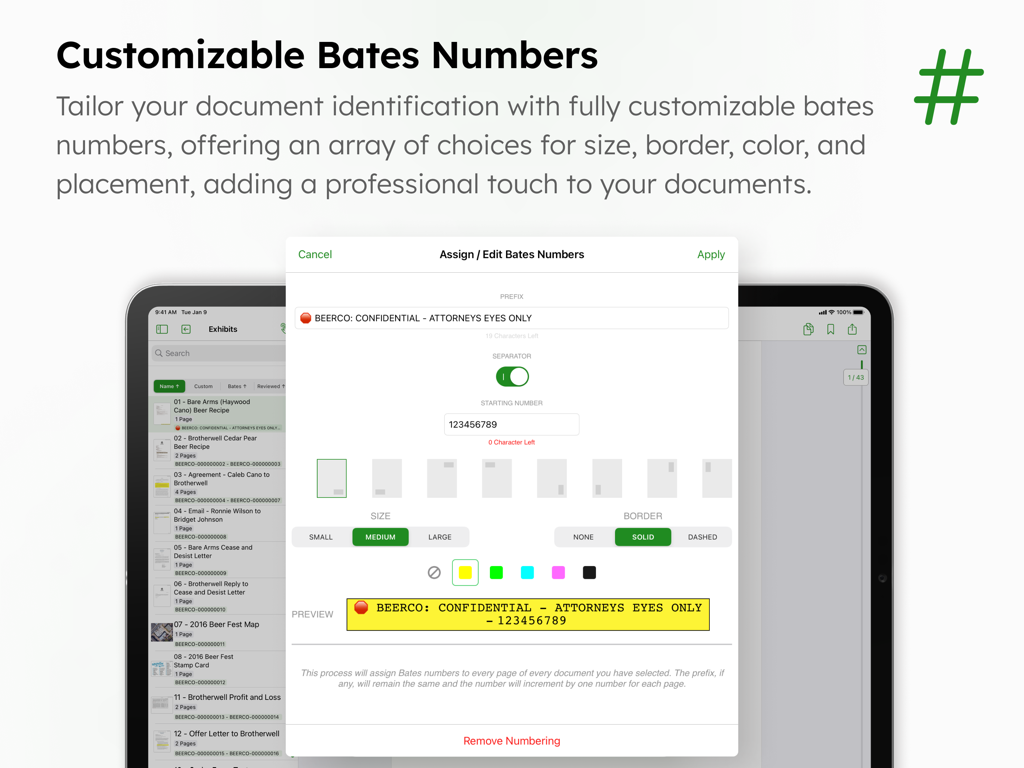
Oberfläche zeigt anpassbare Bates-Nummern zur Identifizierung von Rechtsdokumenten in DocReviewPad.
Oberfläche zeigt anpassbare Bates-Nummern zur Identifizierung von Rechtsdokumenten in DocReviewPad.

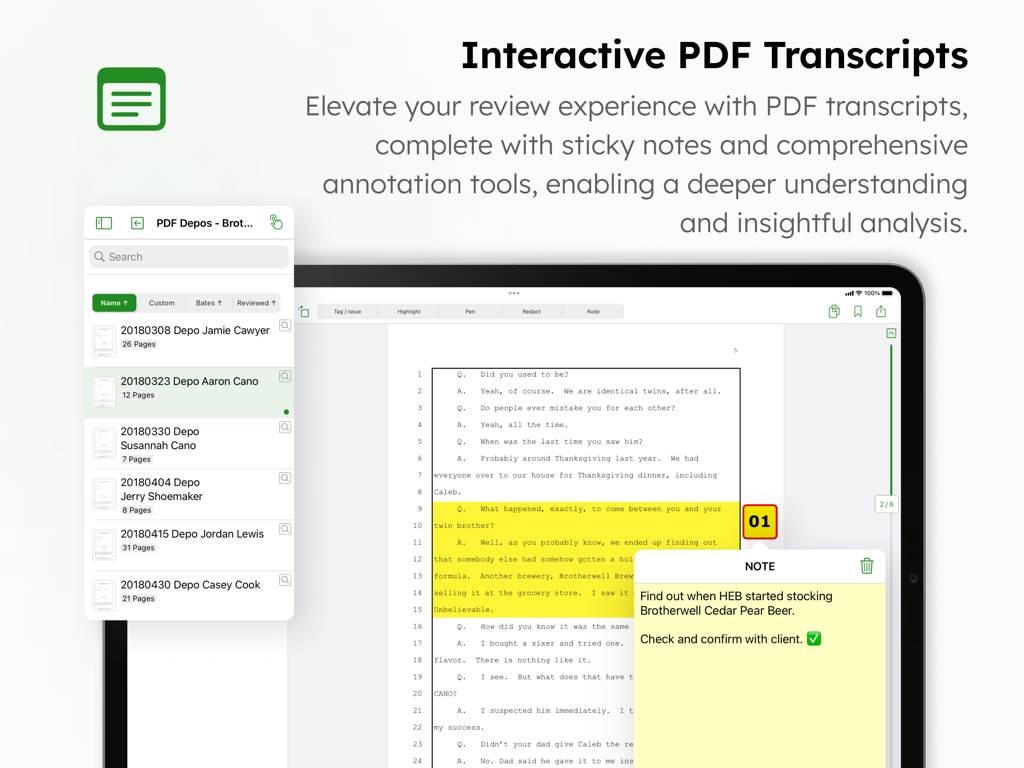
DocReviewPad App-Oberfläche auf einem iPad zeigt ein rechtliches Transkript mit Hervorhebungen und einer digitalen Haftnotiz.
DocReviewPad App-Oberfläche auf einem iPad zeigt ein rechtliches Transkript mit Hervorhebungen und einer digitalen Haftnotiz.

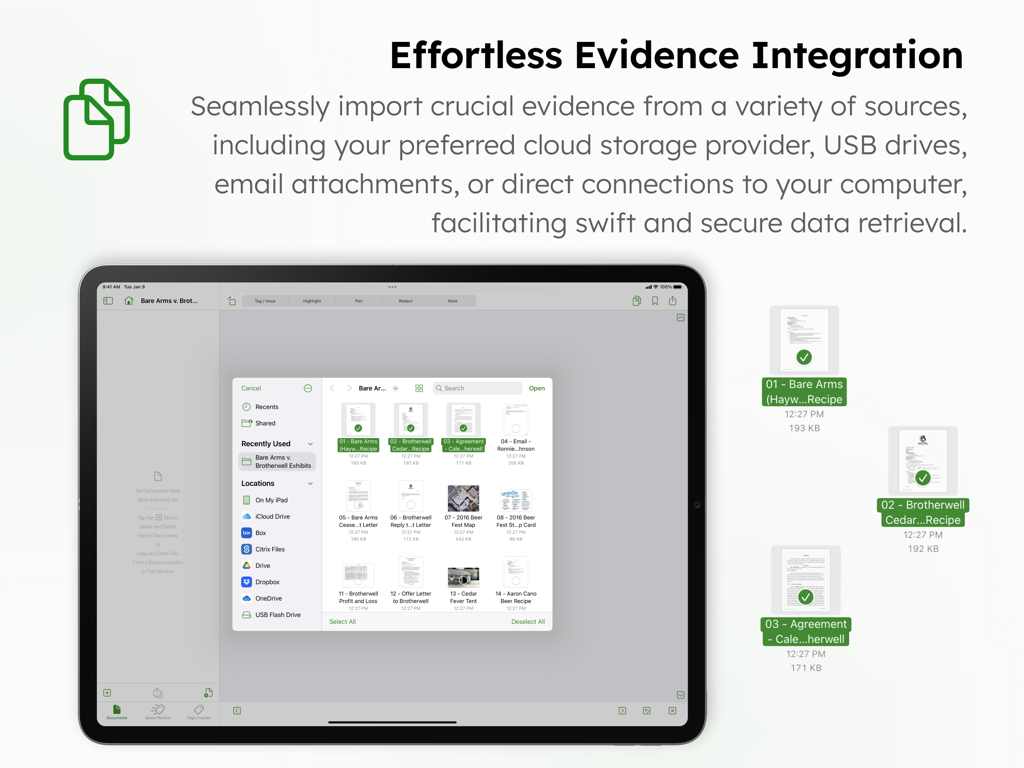
DocReviewPad App auf dem iPad zeigt die Dokumentenimport-Oberfläche für rechtliche Beweismittel aus verschiedenen Cloud-Speicher- und USB-Quellen
DocReviewPad App auf dem iPad zeigt die Dokumentenimport-Oberfläche für rechtliche Beweismittel aus verschiedenen Cloud-Speicher- und USB-Quellen

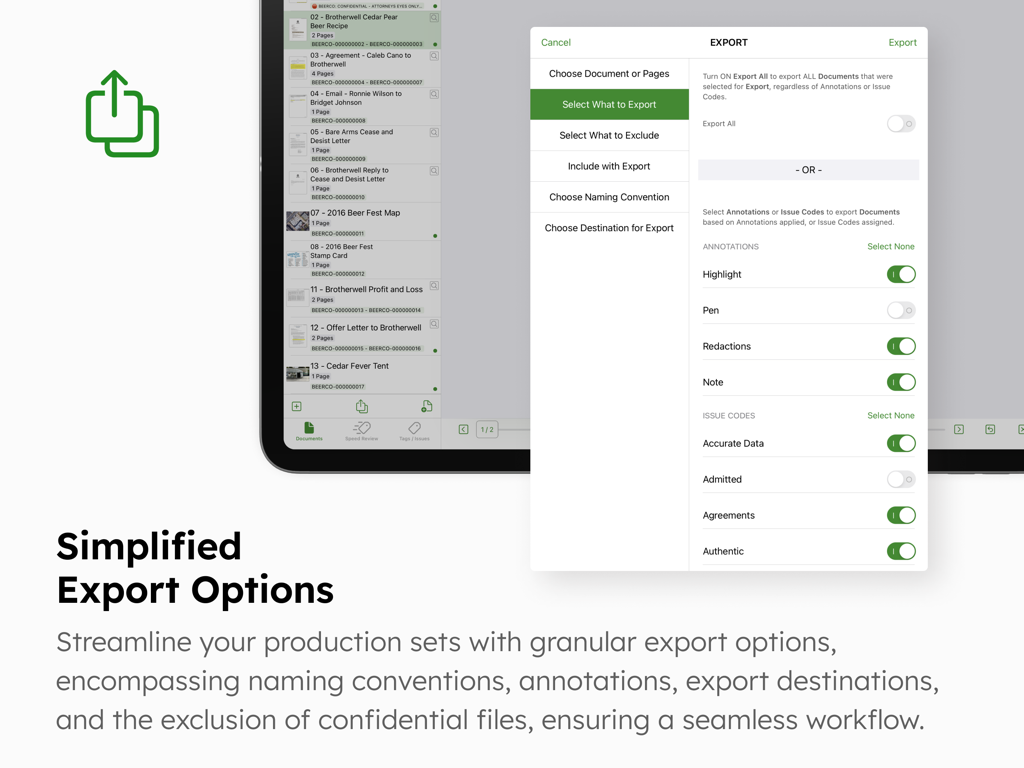
DocReviewPad App-Oberfläche zeigt detaillierte Exportoptionen und Einstellungen für Rechtsdokumente
DocReviewPad App-Oberfläche zeigt detaillierte Exportoptionen und Einstellungen für Rechtsdokumente

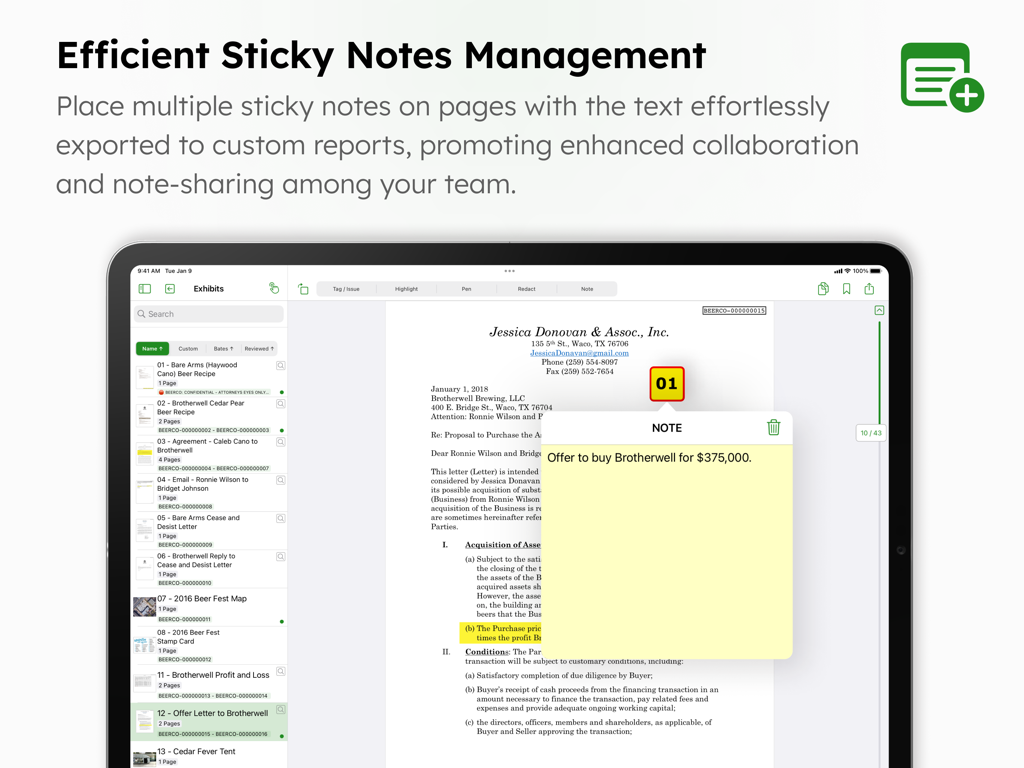
Eine digitale Haftnotiz auf ein Rechtsdokument innerhalb der DocReviewPad App-Oberfläche auf einem iPad angewendet
Eine digitale Haftnotiz auf ein Rechtsdokument innerhalb der DocReviewPad App-Oberfläche auf einem iPad angewendet

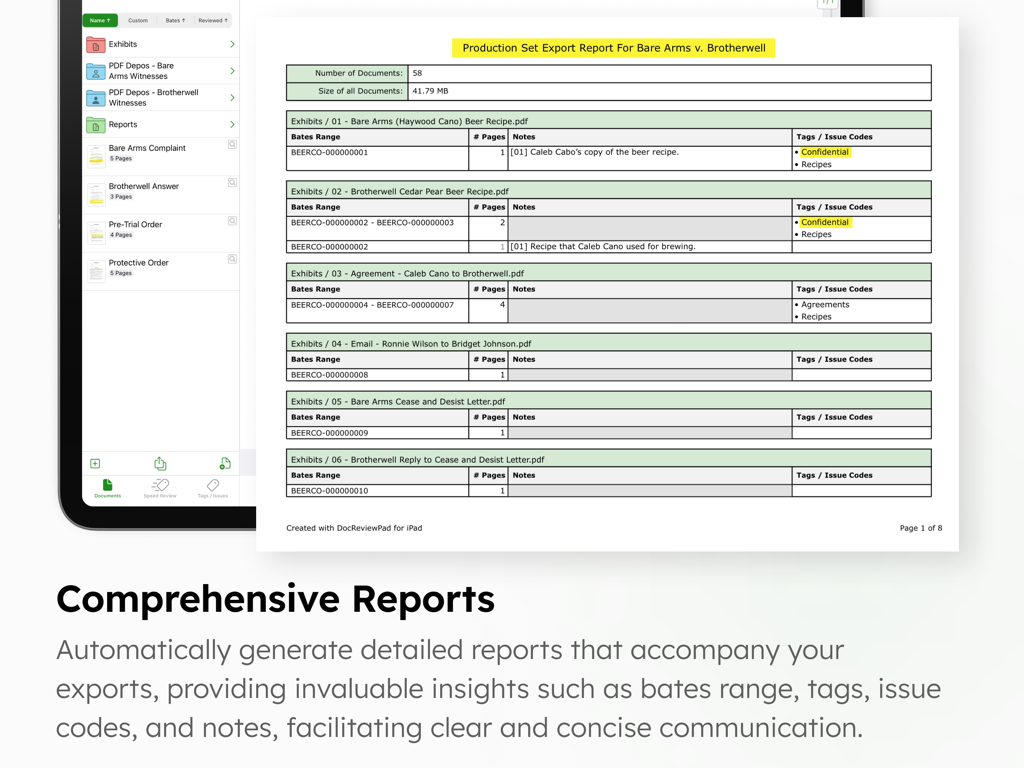
Ein Exportbericht für Produktionssätze von Rechtsdokumenten, der Bates-Bereiche und Sachverhaltscodes auf einem iPad-Bildschirm anzeigt
Ein Exportbericht für Produktionssätze von Rechtsdokumenten, der Bates-Bereiche und Sachverhaltscodes auf einem iPad-Bildschirm anzeigt

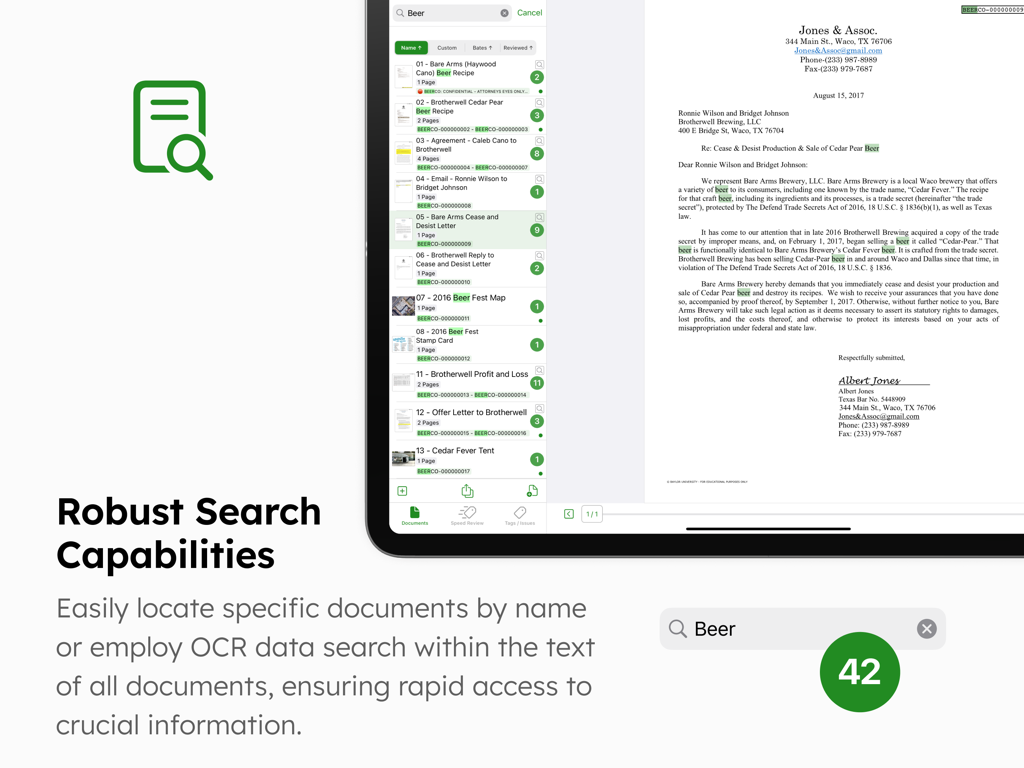
DocReviewPad App-Oberfläche auf einem iPad zeigt die robusten Such- und OCR-Funktionen für die Überprüfung von Rechtsdokumenten.
DocReviewPad App-Oberfläche auf einem iPad zeigt die robusten Such- und OCR-Funktionen für die Überprüfung von Rechtsdokumenten.

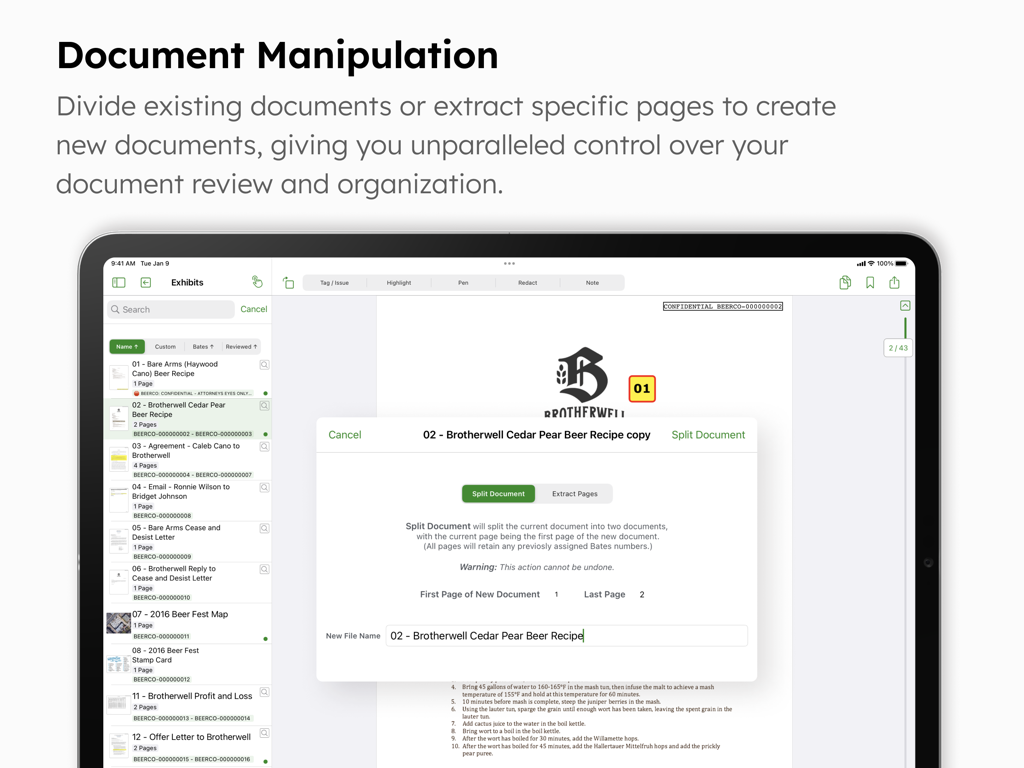
DocReviewPad-Oberfläche zeigt Dokumentenbearbeitungstools zum Teilen oder Extrahieren von Seiten auf einem iPad
DocReviewPad-Oberfläche zeigt Dokumentenbearbeitungstools zum Teilen oder Extrahieren von Seiten auf einem iPad

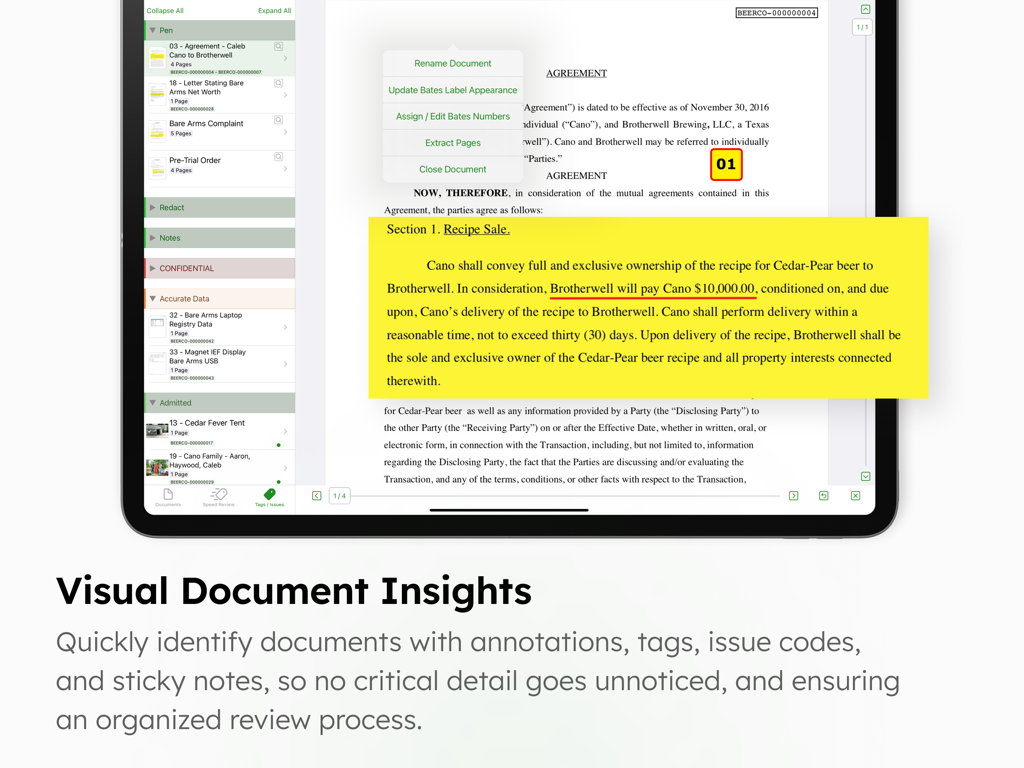
DocReviewPad App-Oberfläche auf einem iPad zeigt eine rechtliche Vereinbarung mit einer gelben virtuellen Haftnotiz und Anmerkungswerkzeugen

DocReviewPad App-Oberfläche auf einem iPad zeigt eine rechtliche Vereinbarung mit einer gelben virtuellen Haftnotiz und Anmerkungswerkzeugen

Prozessreife Dokumentenprüfung

Die Tools, die diese App auszeichnen, gewählt von 100 Nutzern.

🔢

Sofortige Bates-Nummerierung

Wenden Sie in Sekundenschnelle angepasste Bates-Stempel auf Tausende von Seiten an und ersetzen Sie stundenlange manuelle Arbeit durch einen einzigen Tipp auf Ihrem iPad oder Mac.

🛡️

Datenschutzorientierte Beweisaufnahme

Arbeiten Sie mit absolutem Vertrauen. Überprüfen Sie vertrauliche Akten sicher ohne obligatorische Cloud-Verbindung und halten Sie Ihre Daten lokal und privat.

⚖️

Präzise Sachverhaltscodierung

Organisieren Sie Beweismittel nach Zeugen oder rechtlichen Sachverhalten mit anpassbaren Tags und exportieren Sie dann professionelle Produktionssätze oder Berichte für die Verwendung vor Gericht.

Über die App

Alles, was Sie über wissen müssen DocReviewPad - Review Docs.

Beschreibung

DocReviewPad is a full-featured document review tool. Easily import documents, assign custom bates numbers, add virtual sticky notes, assign tags and issue codes to documents or pages, annotate with highlight, pen, and redact tools, search for text within documents, and much more. Create production sets and beautifully organized reports with all your review information. DocReviewPad can integrate with your Windows workflow, is powerful, easy to use, and a fraction of the cost of traditional or cloud based programs, all while being secure, private, mobile, and efficient. LIT SOFTWARE has set the bar for developing the best in litigation apps, garnering awards for innovation and ease of use. Our apps have been featured by Apple, and are loved by lawyers. —— LIT SUITE REVIEWS —— “The short review. Wow.” “This app can do things I’ve previously had to do on a desktop, but much easier and faster.” “Super way to review documents quickly.” “Generates professional reports with all the bates numbers listed, and exports to TrialPad into folders named for the issue code. Extremely useful.” “Helps me keep documents organized, bates stamps them, and create issue codes, which can then be generated into an easy-to-read report.” “Initial document analysis on iPad is fresh and fast, and frankly is a big winner.” “These are incredibly sophisticated and useful apps that are in many ways more powerful than PC software costing hundreds of dollars more.” —— QUICK FEATURE SUMMARY —— • Full featured document review capability, no cloud connection needed • Organize documents or pages with your own case specific customizable and color-coded issue codes • Easily mark documents or pages as confidential or privileged with built in tags • Import documents directly from an email, USB drive, or cloud storage providers like Box, Citrix Files, Dropbox, Google Drive, Microsoft OneDrive, and many more • Apply customized bates numbers to hundreds or thousands of documents in seconds • Highlight, annotate, redact, and zoom in on documents • Add multiple virtual sticky notes to each page • Create beautiful reports that include bates ranges, notes, tags, and issue codes assigned to each document or page • Search for a file name, or text within one document, a folder of documents, or the whole case • Granular export options for a document production set, omitting confidential or privileged documents • Create privilege log reports listing documents protected by a legal privilege • Organize your documents into witness or issue folders • Import PDF files with bookmarks and retain those bookmarks in DocReviewPad • Export your documents to TrialPad, organized by issue codes, into Key Doc folders • Share entire case files with other users using cloud storage or a USB drive • File formats supported: PDF, JPG, PNG, TIF, and TXT • Available for iPad and Mac —— EASILY ORGANIZE AND PRODUCE EVIDENCE —— Easily import files from many cloud storage providers, from a USB drive, drag-and-drop, even AirDrop. Then simply start swiping to speed review documents!  Annotate with highlights or redactions, add sticky notes, and create custom issue codes to assign to entire documents or individual pages. Granular export options allow you to share only what you want. LIT SUITE SUBSCRIPTION One subscription gives you access to all LIT SUITE apps on iPhone, iPad, and Mac. After your 7-day free trial, your App Store account will be charged and your subscription will renew automatically unless canceled in advance. Manage your subscription in your App Store account settings.

Neueste Version

26.1.1

Größe

39.0 MB

Erstveröffentlichung

30. Jan. 2021

Meistern Sie Ihren Offenlegungsprozess überall

Erleben Sie die Leistungsfähigkeit der professionellen Dokumentenprüfung auf Ihrem iPad und Mac. Schließen Sie sich Tausenden von Prozessanwälten an, die DocReviewPad für sichere, effiziente und prozessreife Ergebnisse wählen. Starten Sie noch heute Ihre 7-tägige kostenlose Testversion.

Herunterladen auf App Store

App information, icons, screenshots, and descriptions displayed on this page are sourced from the Apple App Store and are the property of their respective developers. Download estimates and rankings are based on MWM's proprietary models and may not reflect actual figures. This page is provided for informational and analytical purposes only.

Believe this page infringes your intellectual property? File a dispute