
Diese Seite ist keine offizielle Seite der App oder ihres Entwicklers, sondern eine unabhängige redaktionelle Veröffentlichung, die zu Informations- und Kommentarzwecken erstellt wurde. Sofern nicht ausdrücklich anders angegeben, sind weder die App noch ihr Entwickler mit MWM, Apple, Google Play, dem App-Herausgeber oder dem Entwickler der App verbunden, von ihnen unterstützt, gesponsert, autorisiert oder anderweitig offiziell verbunden, und nichts auf dieser Seite impliziert, dass die App unter Verwendung der Dienste von MWM entwickelt wurde. Alle Marken, Logos, Screenshots und andere Inhalte bleiben Eigentum ihrer jeweiligen Inhaber.


Dorico - Compose Music
Erwecken Sie Ihre Kompositionen zum Leben mit der intelligentesten Notationssoftware, die je entwickelt wurde. Von preisgekrönter Notengestaltung bis zu leistungsstarker MIDI-Bearbeitung – erleben Sie einen Desktop-Workflow, der Sie vom Studio bis zur Bühne begleitet.
Downloads
252K+Bewertung
Bewertungen gesamt
2K+Herausgeber
Kategorie
MusicSprachen
1Neueste Version
6.1.10Größe
968.9 MBErstveröffentlichung
27. Juli 2021Desktop-Komposition auf Ihrem iPad
Erleben Sie die intelligenteste Notationssoftware, die je entwickelt wurde. Vom ersten Entwurf bis zu druckreifen Partituren bringt Dorico professionelle Notengestaltung und leistungsstarke MIDI-Sequenzierung in Ihren mobilen Workflow.
Intelligente automatische Notengestaltung
Sparen Sie Stunden manueller Formatierung. Unsere erstklassige Engine passt die Notation automatisch an, während Sie schreiben, und stellt sicher, dass Ihre Partituren stets den höchsten professionellen Standards entsprechen.
Nahtloser Pro-Workflow
Nehmen Sie Ihr Studio mit auf Reisen. Genießen Sie volle Kompatibilität mit Dorico für Desktop und eine für Touch, Magic Keyboard und Apple Pencil-Annotationen optimierte Benutzeroberfläche.
Häufig gestellte Fragen
Alles, was Sie über wissen müssen Dorico - Compose Music
Was ist Dorico - Compose Music?
Dorico ist eine preisgekrönte Notations- und Kompositionssoftware von Steinberg für macOS, Windows und iPadOS. Sie ermöglicht Benutzern, Partituren zu komponieren, zu bearbeiten, abzuspielen und zu teilen.
Ist Dorico - Compose Music kostenlos nutzbar?
Ja, Dorico ist für Kompositionen mit bis zu vier Stimmen kostenlos nutzbar. Durch die Registrierung einer kostenlosen Steinberg ID erhöht sich dieses Limit auf acht Stimmen.
Wie geben Benutzer Musik in Dorico ein?
Dorico ermöglicht die Musikeingabe über eine Bildschirm-Klaviertastatur, Drum-Pads oder ein Griffbrett. Benutzer können auch ein MIDI-Keyboard anschließen oder externe Tastenkombinationen für eine effiziente Eingabe nutzen.
Enthält Dorico - Compose Music Sounds für die Wiedergabe?
Ja, Dorico enthält integrierte virtuelle Instrumente und Effekte für die Wiedergabe. Es unterstützt auch kompatible Audio Unit Plug-ins und externe MIDI-Geräte, was oft ein optionales Abonnement erfordert.
Wie können Benutzer mit Dorico - Compose Music erstellte Musik teilen?
Benutzer können fertige Dorico-Kompositionen als PDF-, Audio- oder MusicXML-Dateien teilen. Die App unterstützt auch den direkten Druck auf einen AirPrint-fähigen Drucker.
Ist Dorico für iPad mit anderen Dorico-Versionen kompatibel?
Dorico für iPad ist vollständig kompatibel mit Dorico für macOS und Windows. Dies ermöglicht es Benutzern, nahtlos an Projekten auf verschiedenen Geräten zu arbeiten und diese mit anderen Musikern zu teilen.
Was sind die Hauptoberflächenmodi in Dorico - Compose Music?
Dorico enthält vier Modi: Setup für Instrumente und Layouts, Write für Eingabe und Bearbeitung, Engrave für grafische Anpassungen (kostenpflichtiges Feature) und Play für MIDI-Bearbeitung und Wiedergabe.
Welche erweiterten Funktionen schaltet ein Dorico-Abonnement frei?
Ein kostenpflichtiges Abonnement oder ein einmaliger Kauf der Lifetime Unlock In-App-Berechtigung für Dorico bietet Zugriff auf den Engrave-Modus und ermöglicht das Schreiben für Ensembles mit einer unbegrenzten Anzahl von Stimmen.
Bietet Dorico - Compose Music MIDI-Bearbeitungsfunktionen?
Ja, Dorico bietet leistungsstarke MIDI-Bearbeitungswerkzeuge, einschließlich Piano-Roll- und Velocity-Editoren, die im Play-Modus verfügbar sind, um musikalische Darbietungen zu gestalten.
Die folgenden Screenshots und die Beschreibung stammen direkt aus dem offiziellen Store-Eintrag der App und sind Eigentum des Entwicklers.
App Store
Screenshots
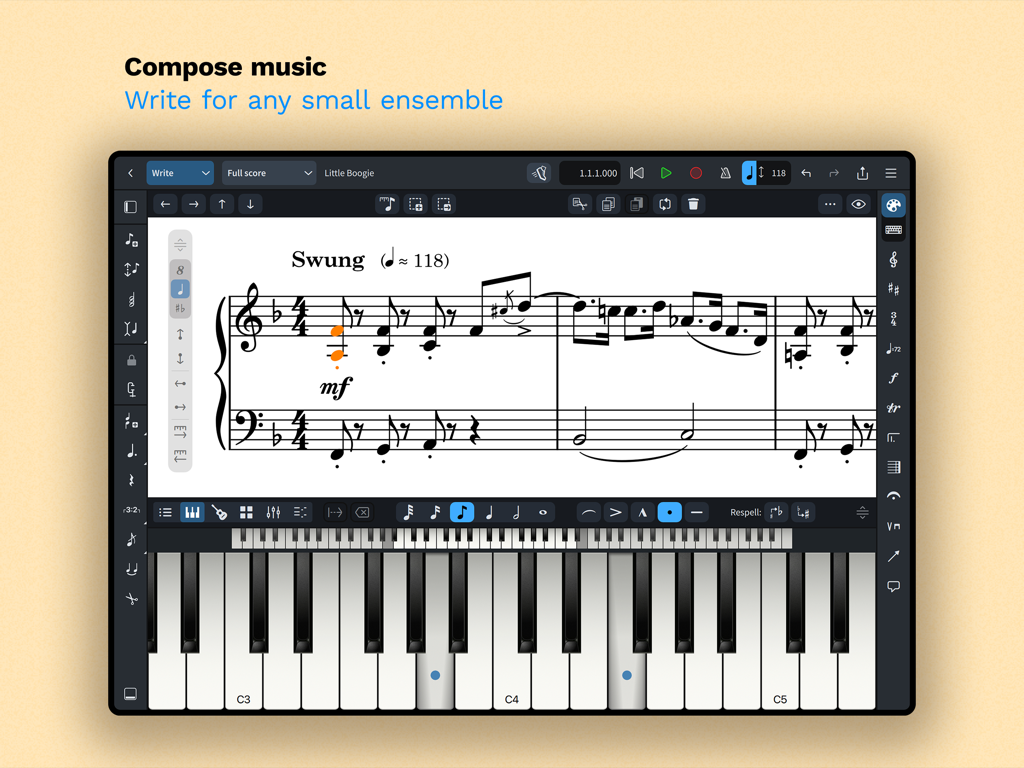
Dorico Notationsschnittstelle auf dem iPad, die eine Partitur und eine virtuelle Klaviertastatur anzeigt
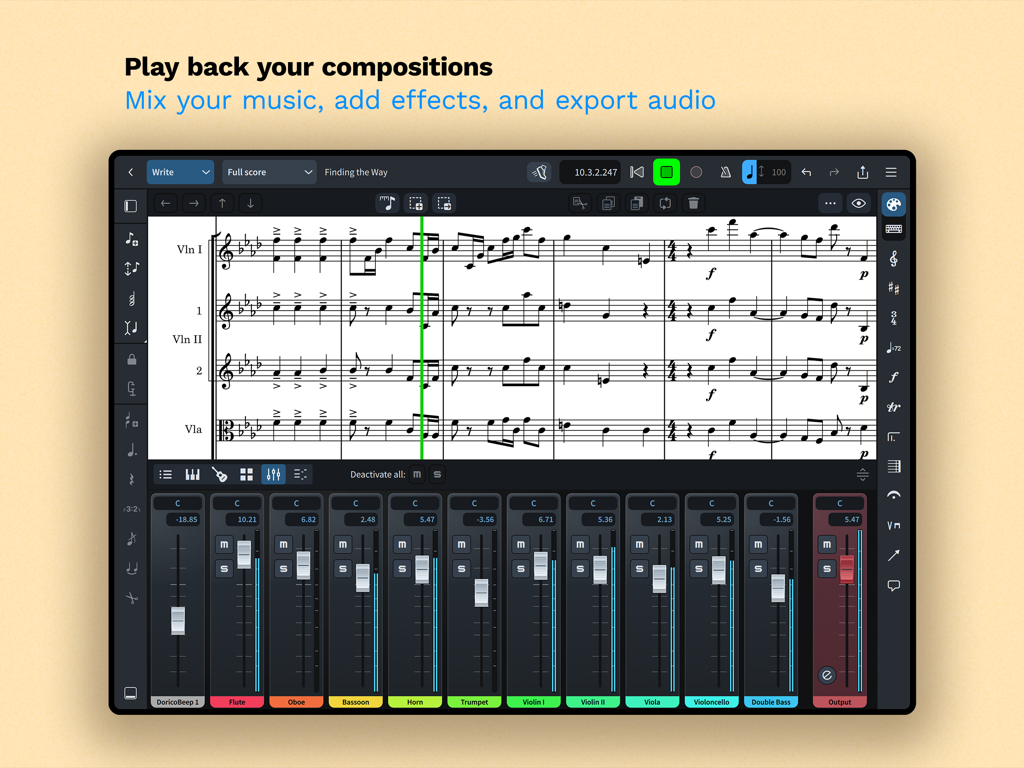
Dorico App-Oberfläche, die eine Partitur mit einem integrierten Mehrspur-Audio-Mixer auf einem iPad anzeigt
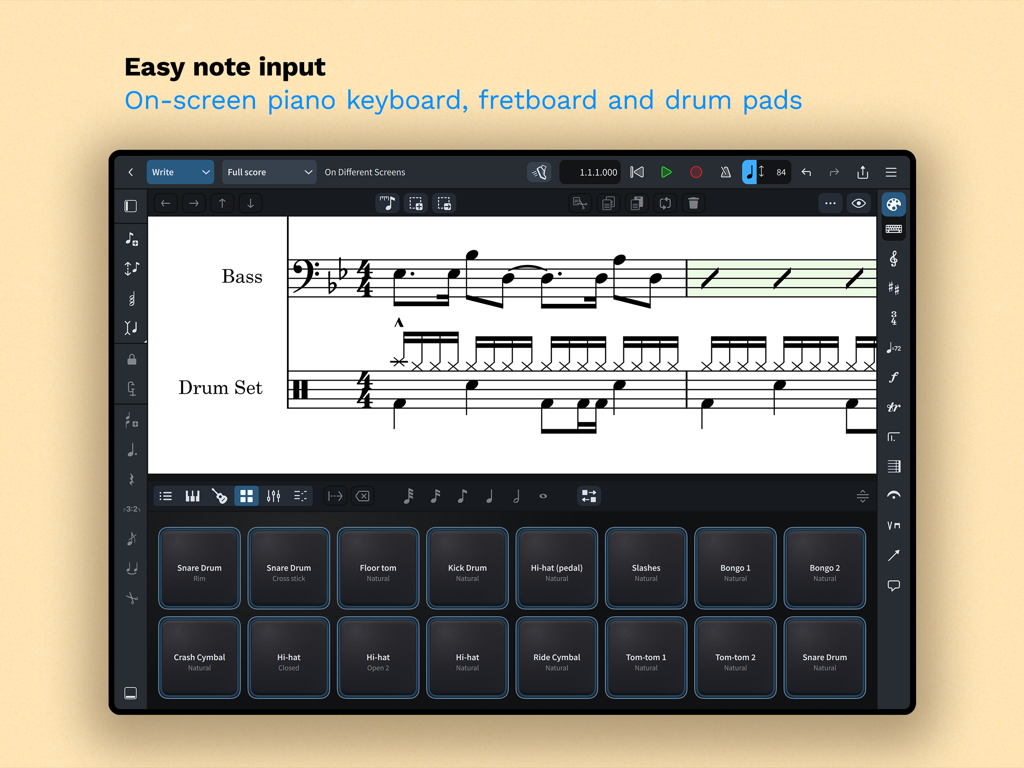
Dorico App-Oberfläche auf dem iPad, die Drum-Pads für die einfache Eingabe von Musiknotationen zeigt
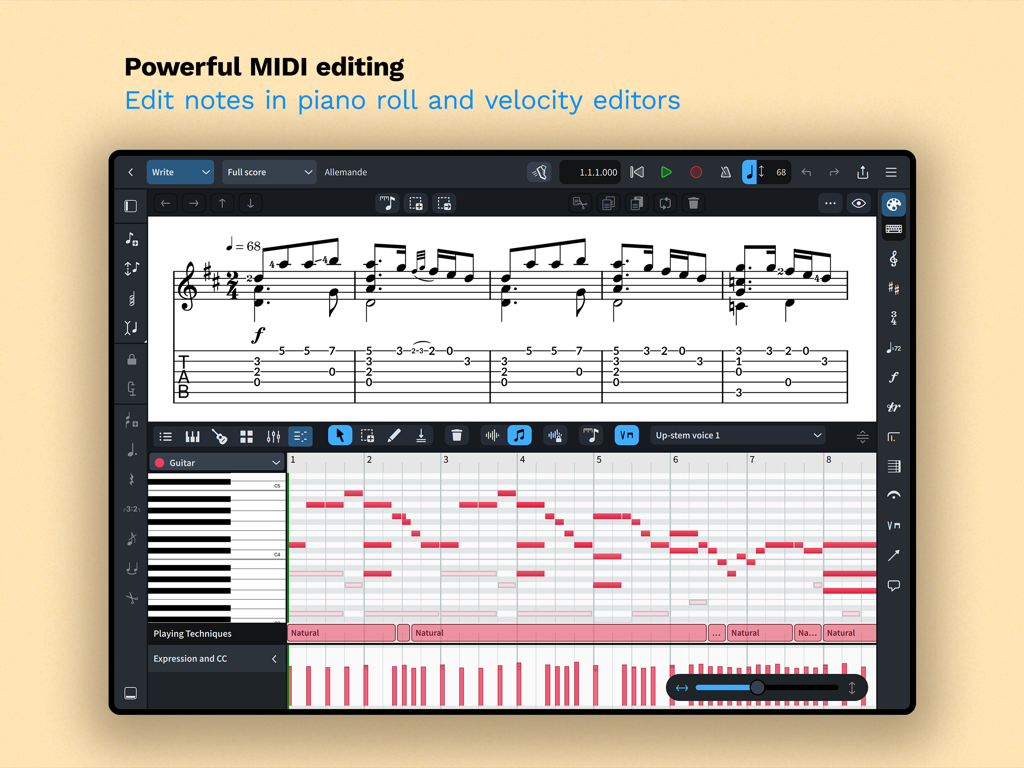
Dorico App-Oberfläche, die leistungsstarke MIDI-Bearbeitung mit Piano-Roll- und Velocity-Editoren für die Musikkomposition zeigt.
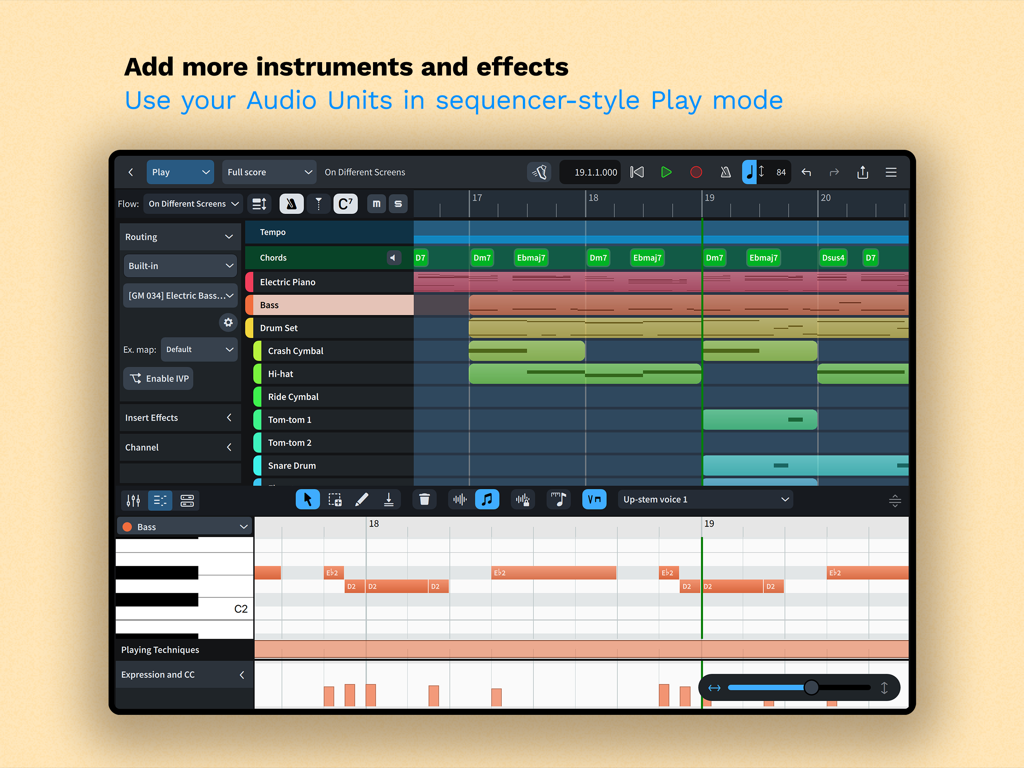
Dorico iPad App Play-Modus-Oberfläche mit einem Mehrspur-Sequenzer und einem Piano-Roll-MIDI-Editor
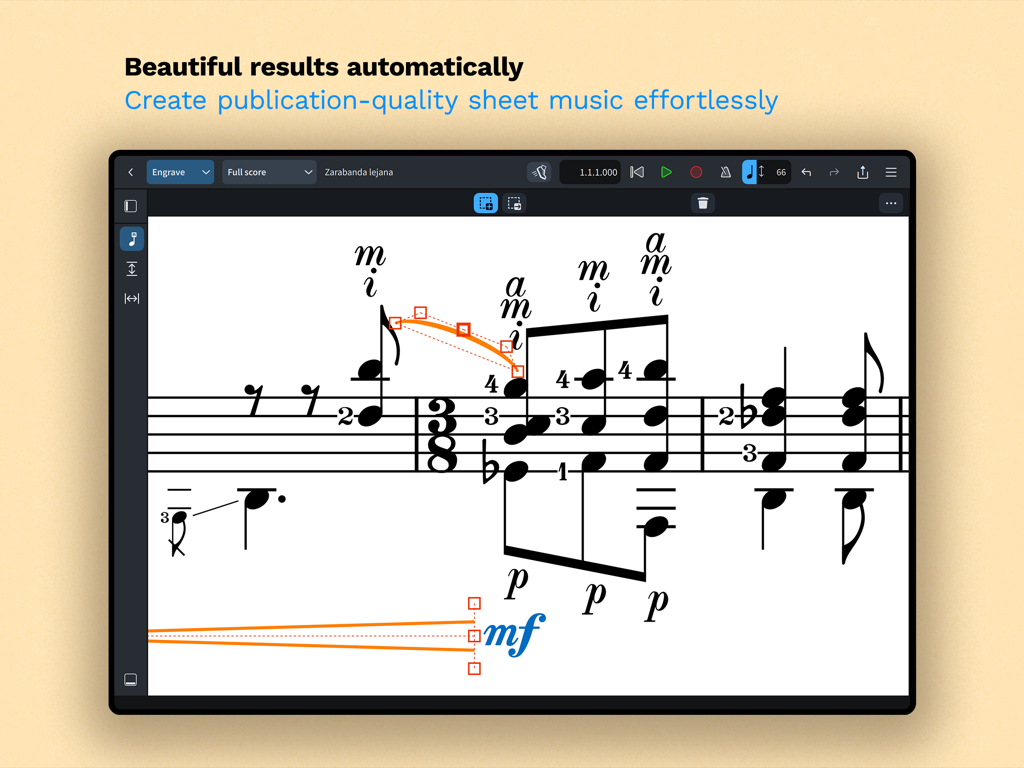
Ein Screenshot der Dorico App-Oberfläche, der professionelle Musiknotation im Engrave-Modus mit automatischer Formatierung zeigt.
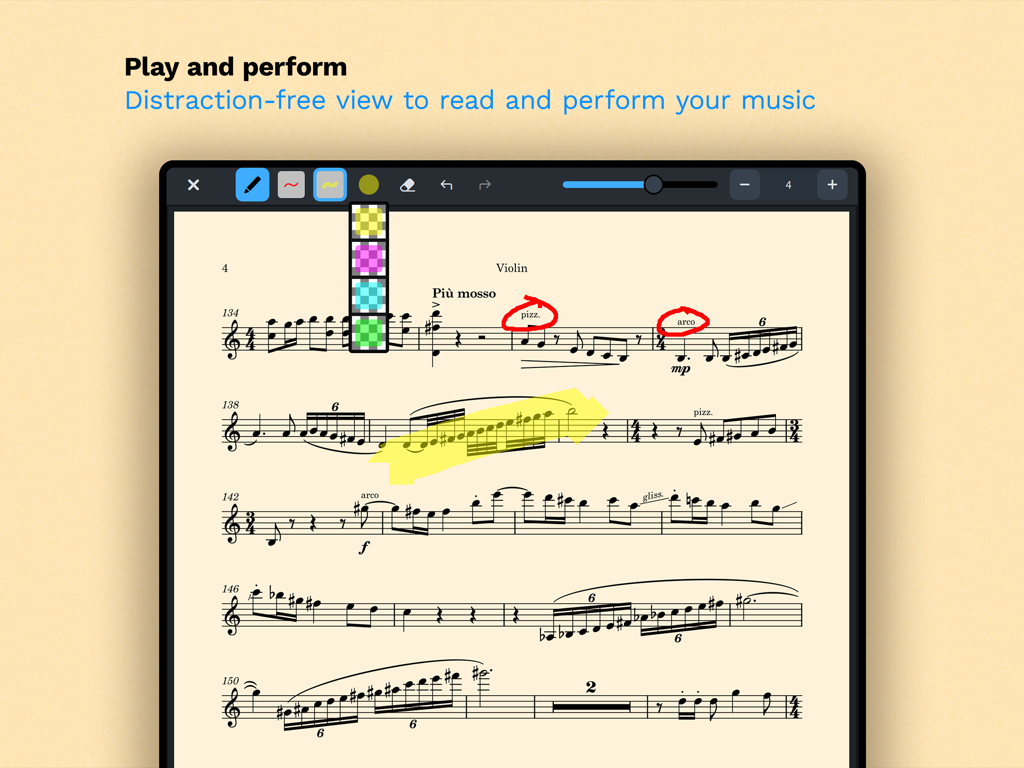
Eine Violinenpartitur im ablenkungsfreien Read-Modus von Dorico mit digitalen Annotationen und Hervorhebungen
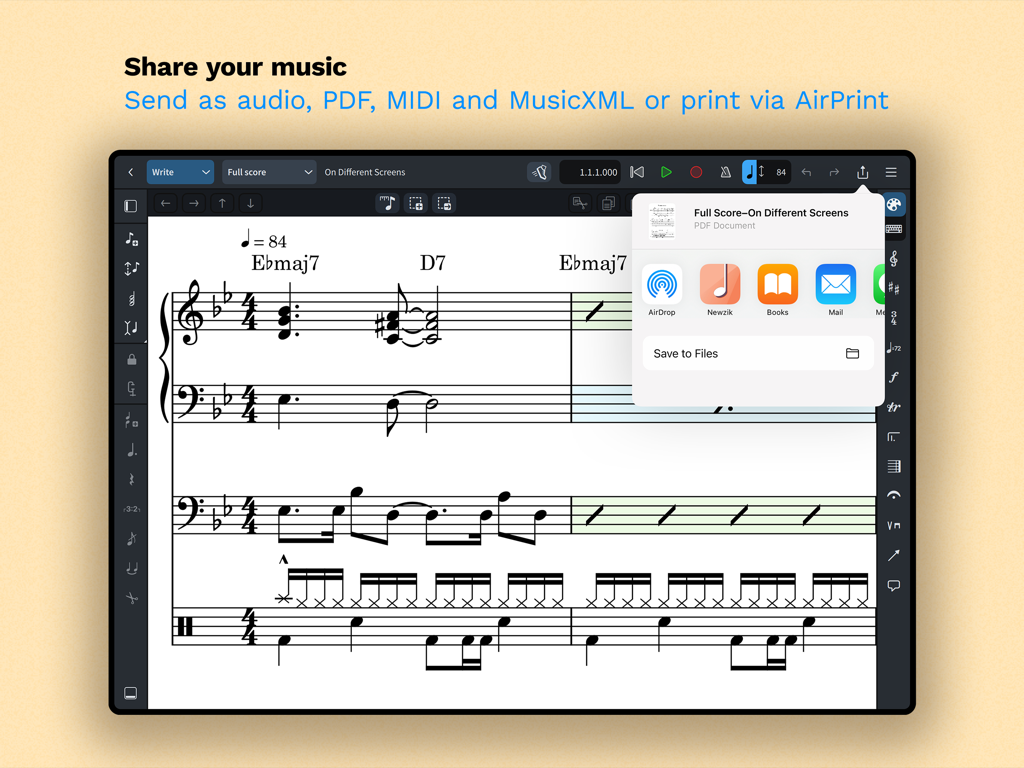
iPad-Bildschirm, der Freigabe- und Exportoptionen für Musiknotation in Dorico anzeigt
Beschreibung
Download
Ähnliche Apps
Apps mit ähnlichen Funktionen und Nutzererfahrung

来音制谱-sheet music editing
Beijing Xihang Technology Co., Ltd.

Composer Pro - Score Creator
嵩 张

Sibelius
Avid Technology Inc

Notation Pad-Sheet Music Score
嵩 张

Piano+ - Sheet Music Composer
嵩 张

Score Creator: compose music
Sharp Notes Company Limited

Maestro - Music Composer
Future Sculptor Pty Ltd

NotateMe
Neuratron Limited

Fender Notion: Music & Tab
Fender Digital, LLC
Diese Seite ist keine offizielle Seite der App oder ihres Entwicklers, sondern eine unabhängige redaktionelle Veröffentlichung, die zu Informations- und Kommentarzwecken erstellt wurde. Sofern nicht ausdrücklich anders angegeben, sind weder die App noch ihr Entwickler mit MWM, Apple, Google Play, dem App-Herausgeber oder dem Entwickler der App verbunden, von ihnen unterstützt, gesponsert, autorisiert oder anderweitig offiziell verbunden, und nichts auf dieser Seite impliziert, dass die App unter Verwendung der Dienste von MWM entwickelt wurde. Alle Marken, Logos, Screenshots und andere Inhalte bleiben Eigentum ihrer jeweiligen Inhaber.