
Diese Seite ist keine offizielle Seite der App oder ihres Entwicklers, sondern eine unabhängige redaktionelle Veröffentlichung, die zu Informations- und Kommentarzwecken erstellt wurde. Sofern nicht ausdrücklich anders angegeben, sind weder die App noch ihr Entwickler mit MWM, Apple, Google Play, dem App-Herausgeber oder dem Entwickler der App verbunden, von ihnen unterstützt, gesponsert, autorisiert oder anderweitig offiziell verbunden, und nichts auf dieser Seite impliziert, dass die App unter Verwendung der Dienste von MWM entwickelt wurde. Alle Marken, Logos, Screenshots und andere Inhalte bleiben Eigentum ihrer jeweiligen Inhaber.


GPS Map Camera Lite: Timestamp
Nie mehr raten, wo dieses eine Foto entstand. GPS Map Camera Lite: Zeitstempel prägt Fakten direkt ins Bild – eine digitale Tätowierung für jede Aufnahme, die ihre Herkunft unlöschbar macht.
Downloads
500k+Bewertung
Bewertungen gesamt
2.0KHerausgeber
Kategorie
Photo & VideoSprachen
10Neueste Version
1.4.15Größe
48.0 MBErstveröffentlichung
16. Mai 2020Eine detaillierte Bewertung der Kernfunktionen und ihres Nutzens für verschiedene Zielgruppen.
Analyse der GPS Map Camera Lite: Timestamp App
Automatische Stempelung von Standort- und Zeitdaten
Die App integriert automatisch präzise GPS-Koordinaten, Datum und Uhrzeit direkt in die Fotos, wodurch eine lückenlose Dokumentation von Ereignissen und Orten gewährleistet wird.
Geotagging zur einfachen Organisation und Verifizierung
Die App nutzt Geotagging, um Fotos nach Standort zu organisieren und deren Authentizität durch verifizierbare Standortdaten zu bestätigen, was für professionelle und persönliche Zwecke entscheidend ist.
Hinzufügen von Notizen, Logos und Wasserzeichen
Es ermöglicht Nutzern, zusätzliche Notizen, Firmenlogos oder Wasserzeichen direkt in die Bilder einzubetten, um den Kontext zu erweitern und die Urheberschaft zu kennzeichnen.
Kompassanzeige auf Kamera und Foto
Dieses Tool zeigt die Kompassrichtung direkt auf der Kameraansicht und auf dem aufgenommenen Foto an, was eine zusätzliche räumliche Orientierung ermöglicht.
Anpassbare Datums- und Zeitformate
Nutzer können das Format von Datum und Uhrzeit flexibel an ihre regionalen Präferenzen oder spezifischen Dokumentationsanforderungen anpassen.
Benutzerdefinierte Dateinamen
Die App erlaubt die Vergabe von benutzerdefinierten Dateinamen, was die Organisation und das schnelle Auffinden spezifischer Fotos erheblich erleichtert.
Häufig gestellte Fragen
Alles, was Sie über wissen müssen GPS Map Camera Lite: Timestamp
What is GPS Map Camera Lite: Timestamp?
GPS Map Camera Lite: Timestamp is a camera app that automatically embeds precise location, date, time, and other details directly onto photos and videos. It helps organize and verify captured moments.
Does GPS Map Camera Lite: Timestamp record video with location?
Yes, GPS Map Camera Lite: Timestamp records video with embedded location and timestamp details. This feature provides a complete record for documenting events and projects.
How does GPS Map Camera Lite: Timestamp add location to photos?
GPS Map Camera Lite: Timestamp adds location by using GPS for precise tracking. Users install the app, turn on GPS, customize stamps, and then capture photos or videos.
Can users customize date and time formats in GPS Map Camera Lite: Timestamp?
Yes, GPS Map Camera Lite: Timestamp allows users to customize date and time formats. The app also supports customizing units and other stamp details for personalized photo information.
What details can GPS Map Camera Lite: Timestamp embed on photos?
GPS Map Camera Lite: Timestamp can embed location, date, time, compass display, GPS coordinates, custom notes, logos, and watermarks onto photos. It also supports metric and imperial units.
Is GPS Map Camera Lite: Timestamp useful for real estate professionals?
Yes, GPS Map Camera Lite: Timestamp is perfect for real estate professionals. It helps them capture property photos with precise location details, ensuring accurate documentation and verification.
Can I add a custom note to photos using GPS Map Camera Lite: Timestamp?
Yes, GPS Map Camera Lite: Timestamp allows users to add custom notes to their photos. This feature helps provide additional context or descriptions for each captured moment.
Does GPS Map Camera Lite: Timestamp support different GPS coordinate formats?
Yes, GPS Map Camera Lite: Timestamp supports multiple GPS coordinate formats. Users can select options like Decimal, Deg Mins Secs, Dec Mins, UTM, and MGRS in the settings menu.
Can I use GPS Map Camera Lite: Timestamp for construction site documentation?
Yes, GPS Map Camera Lite: Timestamp is suitable for construction and inspection teams. It documents site progress and reports by capturing verifiable, location-tagged photos and videos.
Does GPS Map Camera Lite: Timestamp allow custom file naming?
Yes, GPS Map Camera Lite: Timestamp includes custom file naming options. Users can incorporate elements like notes, date, time, address, altitude, and coordinates into the file name.
Die folgenden Screenshots und die Beschreibung stammen direkt aus dem offiziellen Store-Eintrag der App und sind Eigentum des Entwicklers.
App Store
Screenshots
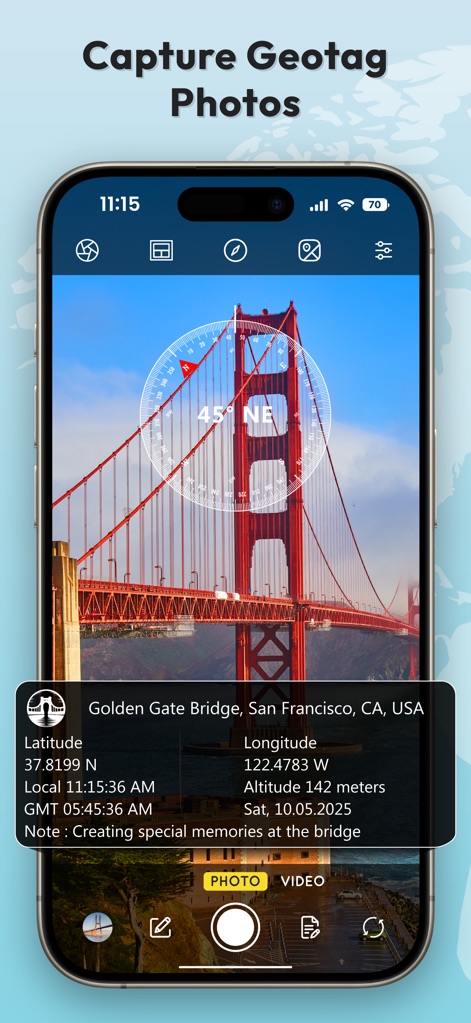
Dieses Bild demonstriert die Erfassung von präzisen Geotag-Fotos, wobei eine detaillierte Informationsbox am unteren Rand Standortdaten anzeigt und eine Kompassanzeige die Ausrichtung visualisiert.
Präzise Geotag-Fotos
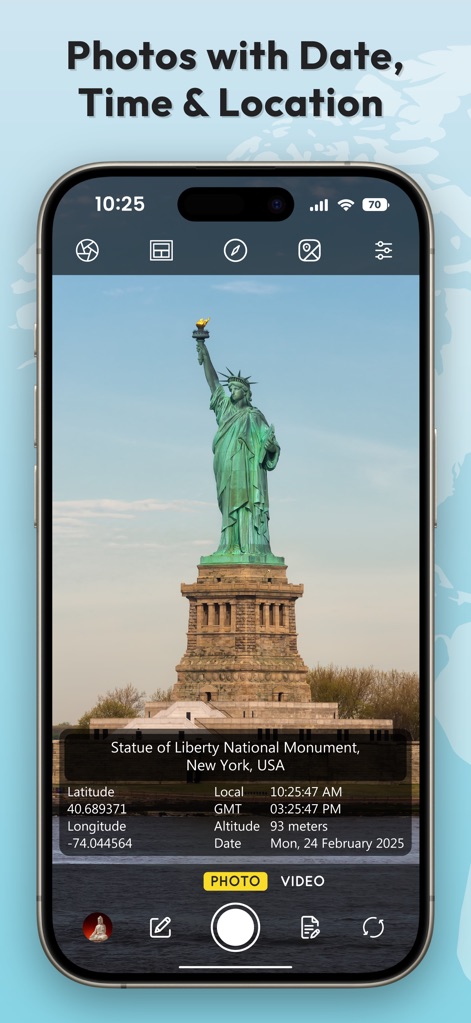
Die App ermöglicht die Aufnahme von Fotos wie dieses der Freiheitsstatue, die mit einer integrierten Datenbox versehen sind, welche Breiten- und Längengrad sowie Datum und Uhrzeit präzise erfasst.
Verortete Momentaufnahmen
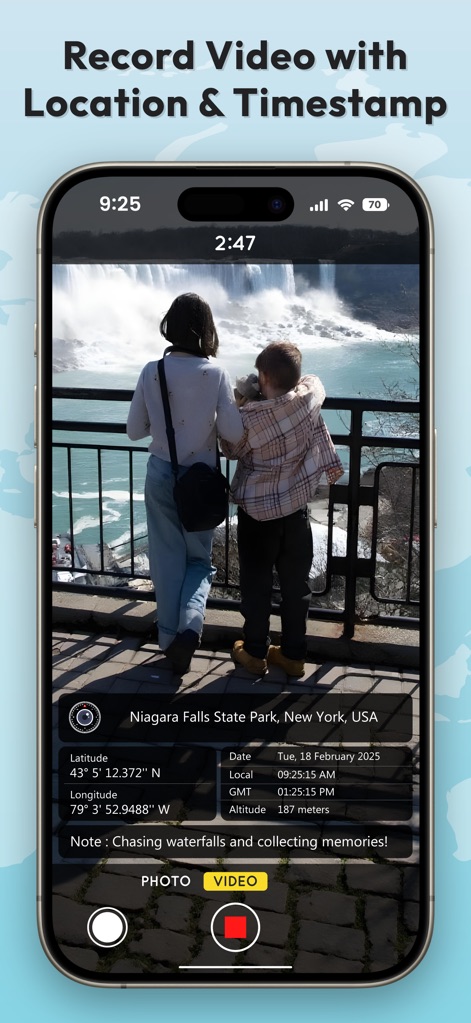
Nutzer können Videos mit eingebetteten Standort- und Zeitstempelinformationen aufnehmen, wie hier durch den roten Video-Aufnahmeknopf und die sichtbare Informationsleiste am unteren Bildrand verdeutlicht.
Dokumentierte Videos erstellen
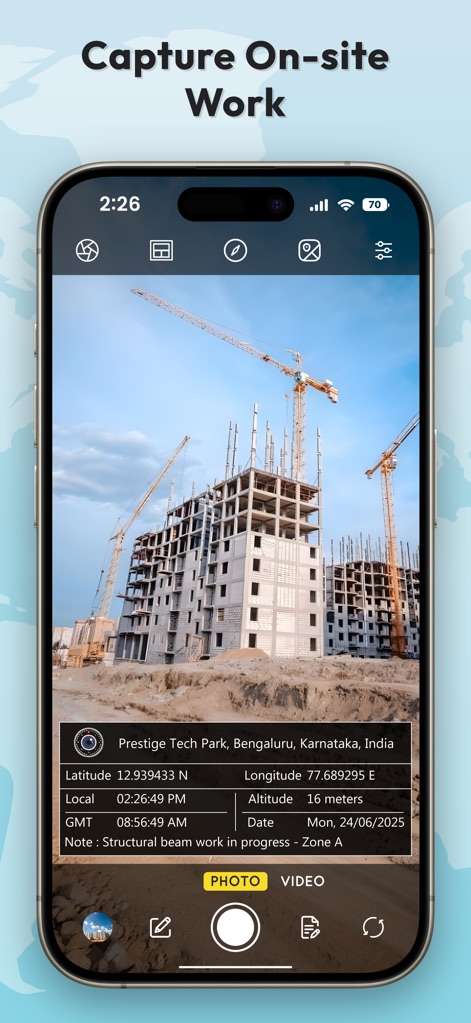
Dieses Beispiel zeigt die Dokumentation von Baustellenarbeiten, bei der eine präzise Infobox mit Standortdaten und einer personalisierbaren Notiz den Arbeitsfortschritt festhält.
Arbeitsfortschritt festhalten

Die App bietet umfangreiche Optionen zur automatischen Dateibenennung, ersichtlich an den aktivierbaren Schaltern für verschiedene Datenfelder und der dynamischen Vorschau des generierten Dateinamens.
Flexible Dateibenennung

Nutzer können Datums-, Zeit- und Koordinatenformate umfassend anpassen, was sich in den vielfältigen Einstellmöglichkeiten für Datum und Uhrzeit sowie der Auswahl des Koordinatendisplays zeigt.
Individuelle Formatierung

Die App bietet eine Auswahl an mehreren Stempelvorlagen, die nicht nur unterschiedliche Layouts präsentieren, sondern auch die Integration von Logos und individuellen Notizfeldern ermöglichen.
Flexible Stempeldesigns

Diese Ansicht zeigt die Möglichkeit, GPS-Koordinaten manuell auszuwählen und das gewünschte Format einzustellen, wie die Liste der verfügbaren Koordinatenformate und die markierte Option "Deg Mins Secs" illustrieren.
Manuelle Koordinateneingabe

Die App unterstützt die umfassende professionelle Dokumentation, indem sie detaillierte Informationsfelder mit Firmenlogo und Notiz anzeigt und präzise Standortangaben wie Breiten-/Längengrad und Höhe integriert.
Umfassende Dokumentation
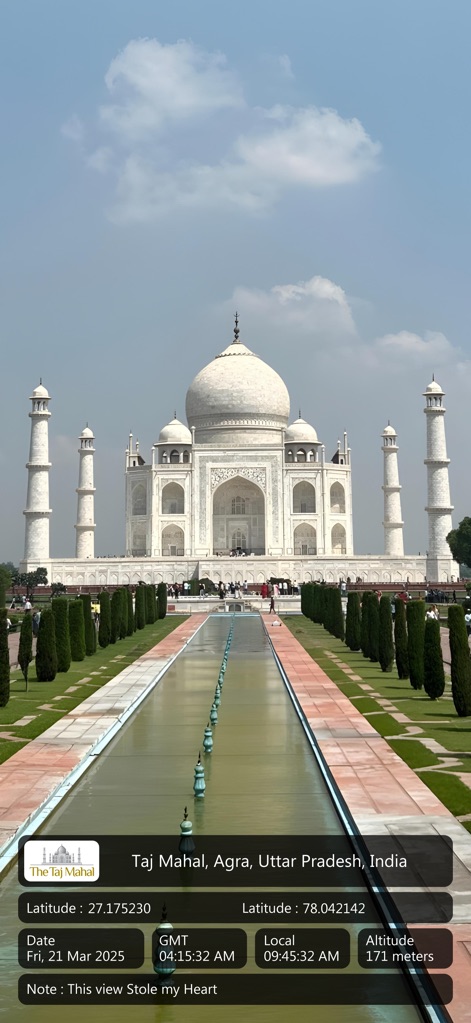
Nutzer können ikonische Orte wie das Taj Mahal festhalten, wobei der eingebettete Stempel alle relevanten Datums- und Uhrzeitinformationen sowie Geodaten direkt im Bild darstellt.
Denkmal-Erfassung
Beschreibung
Download
Ähnliche Apps
Apps mit ähnlichen Funktionen und Nutzererfahrung

Timestamp Camera -AI Timestamp
Shanghai Zongchong Information Technology Co., Ltd

Timestamp Camera - Date Stamp
Artify Inc.

Timestamp Camera: Time & GPS
Practical Apps from Sweden AB

Timestamp camera - gps cam
Guangzhou Siyue Network Technology Co., Ltd.

DateStamper
Jordan Hipwell

Timestamp Camera Basic
玉彬 陈

GPS Map Camera : Geo Photos
Chirag Gabani

Timestamp Camera: Time stamp
燕倩 费

Timestamp Camera - Time & GPS
Shaanxi Ruidebao Technology Co.,Ltd
Diese Seite ist keine offizielle Seite der App oder ihres Entwicklers, sondern eine unabhängige redaktionelle Veröffentlichung, die zu Informations- und Kommentarzwecken erstellt wurde. Sofern nicht ausdrücklich anders angegeben, sind weder die App noch ihr Entwickler mit MWM, Apple, Google Play, dem App-Herausgeber oder dem Entwickler der App verbunden, von ihnen unterstützt, gesponsert, autorisiert oder anderweitig offiziell verbunden, und nichts auf dieser Seite impliziert, dass die App unter Verwendung der Dienste von MWM entwickelt wurde. Alle Marken, Logos, Screenshots und andere Inhalte bleiben Eigentum ihrer jeweiligen Inhaber.