Adobe Acrobat Sign

Adobe Acrobat Sign

ダウンロード: App Store
ロゴ: Adobe Acrobat Sign

Adobe Acrobat Sign:外出中のプロフェッショナル向け安全な電子署名

どこからでも文書に署名、送信、追跡できるグローバルスタンダードを信頼する数百万人のビジネスリーダーに加わりましょう。より速く契約を締結し、HRのオンボーディングを自動化し、エンタープライズグレードのセキュリティで紙をPDFにスキャンしましょう。

開発元

Adobe Inc.

カテゴリ

Business

ダウンロード

1M+

ユーザー評価

2.5/5

評価数

1K+

対応言語

19

効率性の垣間見

このインターフェースを利用する 1M+ 人のユーザー.

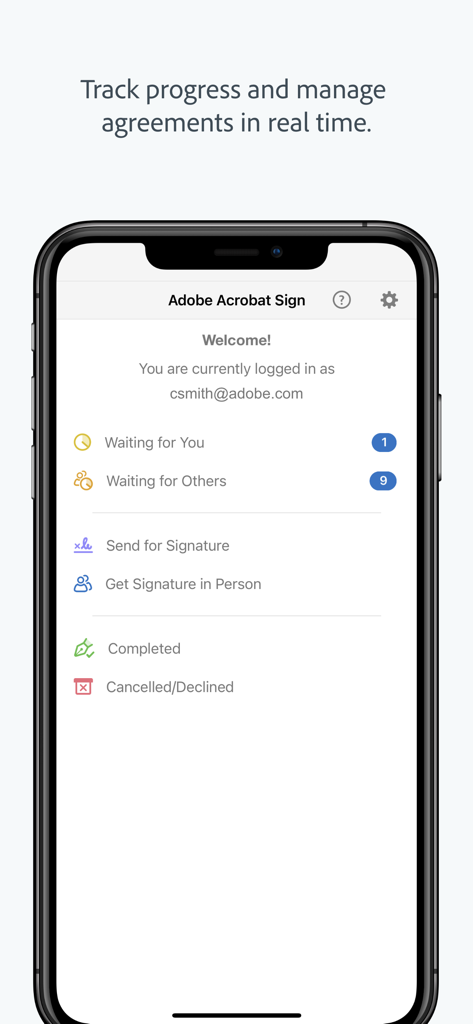
Adobe Acrobat Signモバイルダッシュボード。契約ステータスとリアルタイム追跡オプションを表示。
Adobe Acrobat Signモバイルダッシュボード。契約ステータスとリアルタイム追跡オプションを表示。

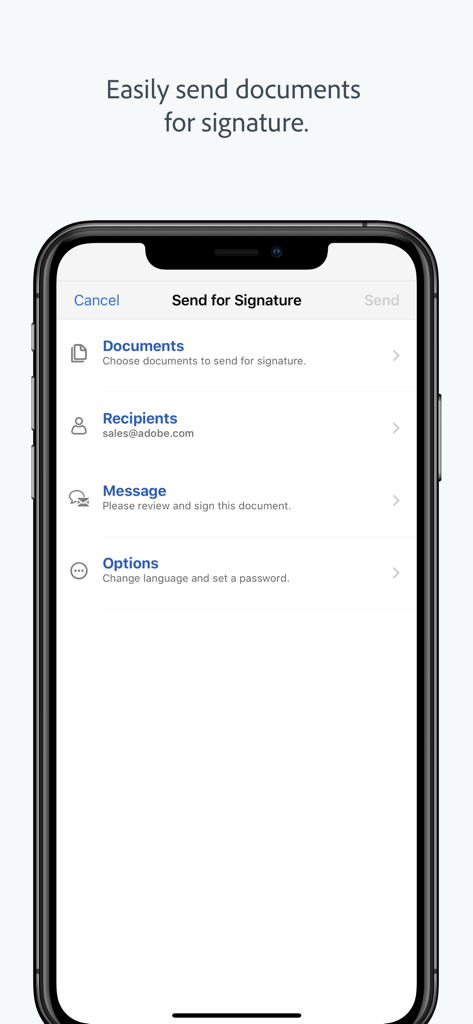
スマートフォンに表示されたAdobe Acrobat Signアプリのインターフェイス。署名のために送信ワークフロー、文書、受信者フィールドを表示。
スマートフォンに表示されたAdobe Acrobat Signアプリのインターフェイス。署名のために送信ワークフロー、文書、受信者フィールドを表示。

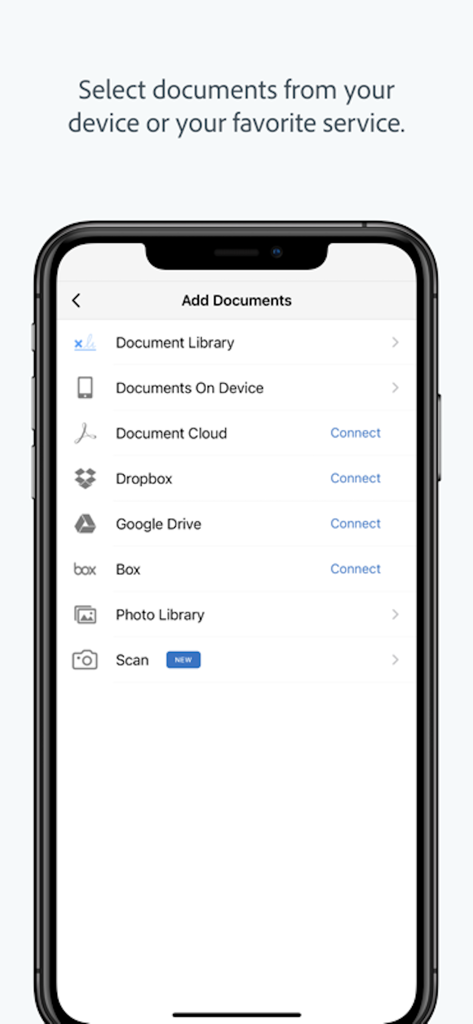
Adobe Acrobat Signモバイルインターフェイス。DropboxやGoogle Driveなどのクラウドサービスから文書を追加するオプションを表示。
Adobe Acrobat Signモバイルインターフェイス。DropboxやGoogle Driveなどのクラウドサービスから文書を追加するオプションを表示。

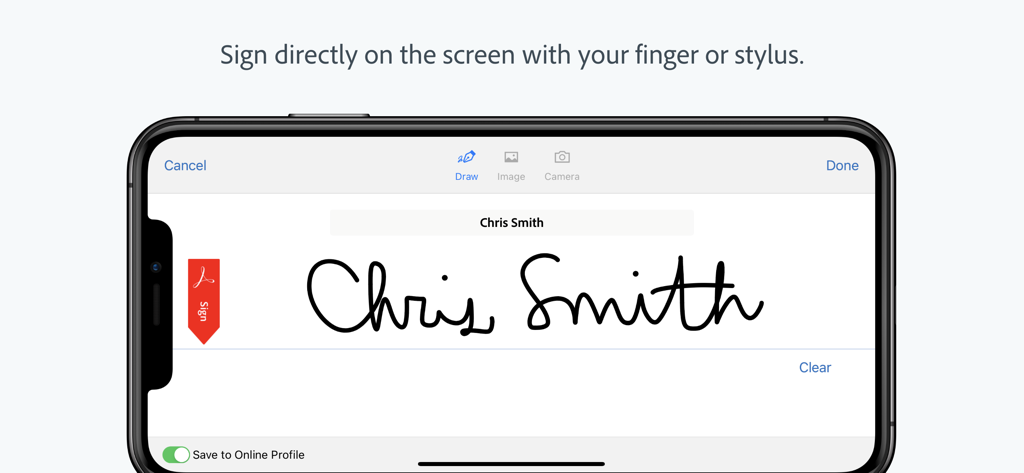
Adobe Acrobat Signアプリでデジタル署名を表示するスマートフォン画面。
Adobe Acrobat Signアプリでデジタル署名を表示するスマートフォン画面。

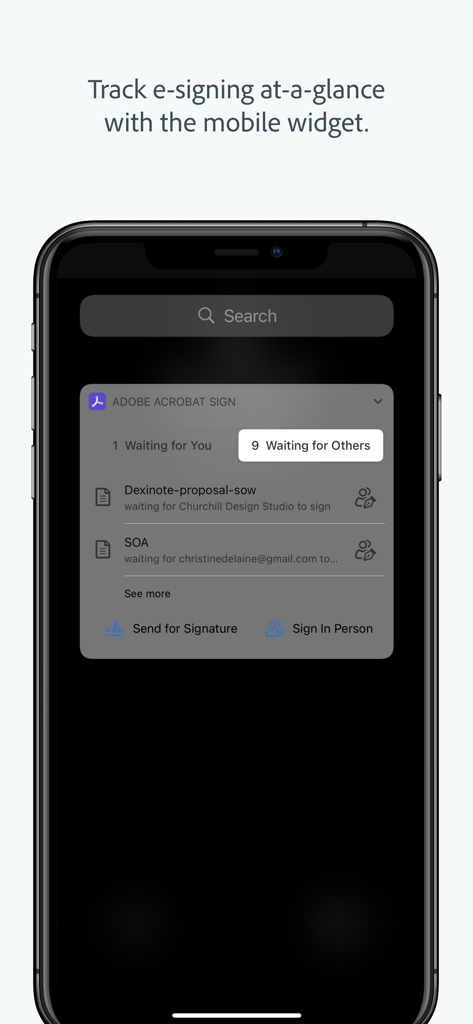
iPhone画面で文書ステータスを表示するAdobe Acrobat Signモバイルウィジェット。

iPhone画面で文書ステータスを表示するAdobe Acrobat Signモバイルウィジェット。

どこからでもより速く契約を締結

このアプリを際立たせるツール、 1M+ 人のユーザーが選択.

✍️

数秒で文書に署名

指やスタイラスで契約書を即座に完成させましょう。オフラインで作業し、オンラインに戻ったら自動的に同期して、ビジネスを継続させましょう。

⚖️

法的に有効で安全

米国のESIGN法やEUのeIDAS法を含む、グローバルな電子署名法に準拠しています。暗号化されたPDFと完全な監査証跡で契約を保護しましょう。

🔔

リアルタイムステータストラッキング

即時の更新で進捗状況を監視しましょう。クライアントが文書を表示または署名したときに確認し、自動リマインダーを送信してワークフローの摩擦を排除しましょう。

レビュー分析

ユーザーレビューの分析.

感情スコア

5%
ネガティブ

概要

The mobile app '481082197' receives overwhelmingly negative feedback, largely due to persistent login issues and a severe lack of core functionality. Users frequently encounter problems with signing in, getting stuck in infinite loops, or being unable to use third-party authentication methods like Google and Apple ID. Recent updates are repeatedly cited as detrimental, leading to app crashes, truncated template names, and an overall complicated user experience that often forces users back to desktop versions or manual processes. While a few individuals found simple signing easy, the vast majority express extreme dissatisfaction, deeming the app unusable and questioning the value of their paid subscriptions.

主なテーマ

Overall Functionality(30)
Login Experience(18)
App vs. Web/Old Version(13)
Document Signing Features(12)
Subscription Value(7)
User Interface(5)
Performance & Stability(4)

アプリについて

について知っておくべきこと Adobe Acrobat Sign.

説明

Get documents and forms signed. Easily. Securely. Anywhere. This app is a mobile companion for the Adobe Acrobat Sign e-signature service. With it, you’ll get an electronic signature solution you can trust, from the global leader in secure digital documents for over 25 years. Adobe Acrobat Sign is used by businesses of all sizes — including Fortune 1000 companies, healthcare organizations and financial institutions — to accelerate critical business processes in Sales, HR, Legal, and Operations. Adobe Acrobat Sign lets you e-sign documents and forms, send them to others for e-signature, track responses in real time and get signatures instantly with in-person signing. It even lets you work offline and syncs automatically when you’re back online. SIGN DOCUMENTS ON THE GO •Open and sign documents instantly. •Easily read documents before signing with Reading Mode. •Sign directly on the screen with your finger or stylus. •Sign or click to approve a document sent by others. •Delegate signing to another person or reject a signing request. •Save partially filled forms to complete at a more convenient time. •Sign documents offline. Adobe Acrobat Sign syncs automatically when you’re back online. GET SIGNATURES FROM OTHERS •Send documents for signature from your online document library, your device or email attachments. •Work with documents from Google Drive, Box, Dropbox or Adobe Document Cloud. •Use your iPad or iPhone to get signatures in person when meeting a client. •Choose a language for the signer’s experience. STORE AND MANAGE YOUR DOCUMENTS •Track progress and manage agreements with real-time status updates. •Send reminders to people who haven't signed yet. •View agreements stored in your online account. •All parties get a certified copy of the signed document automatically by email. LEGALLY BINDING AND SECURE •Adobe Acrobat Sign is compliant with e-signature laws around the world, including the U.S. ESIGN Act and the European Union eIDAS Regulation. •Signed documents are encrypted and saved as Certified PDFs. Recipients can validate document authenticity. •Each transaction includes a complete audit trail detailing events and actions. Signer geolocation information can also be added. •Adobe Acrobat Sign meets stringent security compliance standards and is certified compliant with ISO 27001, SOC 2 Type 2, HIPAA and PCI DSS v3.0 used by the Payment Card Industry. •Adobe Acrobat Sign provides protection for both the sender and the signer during the signing process with identity verification options, an audit trail, a tamper-evident seal and more. SCAN DOCUMENTS • Turn any paper document into a PDF, then send for fast e-signing. • Scan multiple document pages into a single PDF and reorder them as desired. • Easily attach, send, and sign scanned PDFs. • Enhance your camera images with boundary detection, perspective correction, and text sharpness. Adobe Acrobat Sign for iPhone and iPad requires an active subscription with one of these Adobe offerings: •Adobe Acrobat Sign Solutions •Adobe PDF Pack •Adobe Acrobat DC •Adobe Creative Cloud Complete Terms & Conditions: Your use of this application is governed by the Adobe General Terms of Use (https://adobe.com/go/terms_linkfree_en) and the Adobe Privacy Policy (http://www.adobe.com/go/privacy_policy_linkfree_en). Do Not Sell My Personal Information: https://www.adobe.com/privacy/ca-rights-linkfree.html

最新バージョン

3.33.1

サイズ

137.7 MB

リリース日

2011年12月20日

次の契約を締結する準備はできましたか?

どこからでも契約を安全に署名、送信、追跡するためにAdobeを信頼する数百万人のプロフェッショナルに加わりましょう。今すぐAcrobat Signをダウンロードしてください。

ダウンロード: App Store
FAQ

よくある質問

について知っておくべきこと Adobe Acrobat Sign

Adobe Acrobat Signとは何ですか?

Adobe Acrobat Signは、電子署名サービス用のモバイルコンパニオンであり、どこからでも簡単に、安全に文書に署名できるようにします。デジタル文書のグローバルリーダーによる信頼性の高い電子署名ソリューションを提供します。

Adobe Acrobat Signはどのように文書のセキュリティを確保していますか?

Adobe Acrobat Signは、署名された文書を認定PDFとして暗号化し、完全な監査証跡を提供します。グローバルな電子署名法に準拠しており、ISO 27001、SOC 2 Type 2、HIPAA、PCI DSS v3.0の基準で認定されています。

Adobe Acrobat Signでオフラインで文書に署名できますか?

はい、Adobe Acrobat Signではユーザーはオフラインで文書に署名できます。デバイスがオンラインに戻ると、アプリはすべての変更を自動的に同期し、中断のない継続的なワークフローを保証します。

どのような組織がAdobe Acrobat Signを使用していますか?

Fortune 1000企業、ヘルスケア組織、金融機関など、あらゆる規模の企業がAdobe Acrobat Signを使用しています。さまざまな部門で重要なビジネスプロセスを加速するために活用しています。

Adobe Acrobat Signを使用して他者から署名を取得するにはどうすればよいですか?

ユーザーは、オンライン文書ライブラリ、デバイス、またはメールの添付ファイルから署名のために文書を送信できます。Google Drive、Box、Dropbox、Adobe Document Cloudの文書もサポートしています。

Adobe Acrobat Signは法的に拘束力がありますか?

はい、Adobe Acrobat Signは法的に拘束力があります。米国のESIGN法や欧州連合のeIDAS規則など、世界中の電子署名法に準拠しており、認定された信頼性の高いプロセスを提供します。

Adobe Acrobat Signアプリで文書をスキャンできますか?

はい、Adobe Acrobat Signではユーザーは紙の文書をPDFにスキャンして電子署名することができます。複数ページの文書のスキャン、並べ替え、境界線検出と遠近法補正による画像品質の向上をサポートしています。

iPhoneまたはiPadでのAdobe Acrobat Signのサブスクリプション要件は何ですか?

Adobe Acrobat Sign for iPhone and iPadには、以下のいずれかのアドビ製品のアクティブなサブスクリプションが必要です:Adobe Acrobat Sign Solutions、Adobe PDF Pack、Adobe Acrobat DC、またはAdobe Creative Cloud Complete。

Adobe Acrobat Signで署名済み契約の進捗状況を追跡するにはどうすればよいですか?

Adobe Acrobat Signでは、ユーザーはリアルタイムのステータス更新で進捗状況を追跡し、契約を管理できます。ユーザーはオンラインアカウントで契約を表示し、まだ署名していない人にリマインダーを送信できます。

Adobe Acrobat Signでデバイス画面に直接署名できますか?

はい、ユーザーは指またはスタイラスを使用してデバイス画面に直接文書に署名できます。この機能により、Adobe Acrobat Signアプリ内で迅速かつ便利に電子署名できます。

Adobe Acrobat Signは、文書のためにどのようなサードパーティ製クラウドサービスと統合されていますか?

Adobe Acrobat Signは、Google Drive、Box、Dropbox、Adobe Document Cloudと統合されています。これにより、ユーザーはこれらのサービスに保存されている文書を署名リクエストのために利用できます。

App information, icons, screenshots, and descriptions displayed on this page are sourced from the Apple App Store and are the property of their respective developers. Download estimates and rankings are based on MWM's proprietary models and may not reflect actual figures. This page is provided for informational and analytical purposes only.

Believe this page infringes your intellectual property? File a dispute