
このページはアプリまたはその開発者の公式ページではなく、情報提供および論評を目的として作成された独立した編集出版物です。明示的に別段の記載がない限り、アプリおよびその開発者は、MWM、Apple、Google Play、アプリのパブリッシャー、またはアプリの開発者と提携、承認、後援、認可、またはその他の公式的な関係はなく、このページのいかなる内容も、アプリがMWMのサービスを使用して開発されたことを意味するものではありません。すべての商標、ロゴ、スクリーンショット、その他のコンテンツはそれぞれの所有者の財産です。


Affinity Photo 2 for iPad
iPadを本物のクリエイティブ・ワークステーションに変える。もはやデスクトップのサブではない。
ダウンロード
1M+ユーザー評価
評価数
8.0K開発元
カテゴリ
Photo & Video対応言語
8最新バージョン
2.6.4サイズ
1.7 GBリリース日
2022年11月9日iPadでのデスクトップ級画像編集を可能にする主要機能の評価
Affinity Photo 2 for iPad: プロフェッショナル機能深度分析
PSD/PSBファイル互換性
このアプリケーションは、Adobe PhotoshopのPSD/PSBファイルを開き、編集し、保存することを可能にし、既存のプロフェッショナルなワークフローとのシームレスな連携を実現します。
Apple Pencilの高精度なサポート
本アプリは、Apple Pencilの筆圧、傾き、角度を完全に活用し、直感的なブラシワーク、精密な選択、詳細な編集作業を可能にします。
非破壊RAW現像とプロフェッショナルな処理
ユーザーは、専用の16ビット開発ワークスペースでRAW画像を非破壊的に現像し、カメラから直接、高品質な調整と詳細な編集を行うことができます。
高品質なレタッチおよび補正ツール
本ツールは、直感的な選択ブラシ、周波数分離による肌のレタッチ、リキッドペルソナ、オブジェクト除去など、プロフェッショナルなレタッチと写真補正に必要な幅広い機能を提供します。
大規模画像と高深度カラー編集
本アプリは、100メガピクセルを超える大規模な画像をスムーズにサポートし、16ビットおよび線形無制限の32ビットパーチャンネル編集により、最高のカラー精度と柔軟性を提供します。
iOS16最適化と高性能な仮想メモリ
iOS16に最適化されており、仮想メモリスワップ機能により、特に大容量のドキュメントを扱う際のパフォーマンスが劇的に向上し、快適な作業環境を実現します。
高度なブラシエンジンとDAUB®ブラシ
このアプリケーションには、ペインティング、ドローイング、テクスチャ用の豊富なブラシライブラリとプロフェッショナルなDAUB®ブラシが搭載されており、カスタムブラシの作成も可能です。
非破壊ライブエフェクトおよび調整レイヤー
ライブメッシュワープフィルターを含む非破壊的なライブエフェクトレイヤー、調整レイヤー、フィルターレイヤー、マスクを無制限にサポートし、創造的な柔軟性と効率的な編集ワークフローを提供します。
よくある質問
について知っておくべきこと Affinity Photo 2 for iPad
Is Affinity Photo 2 for iPad a professional photo editor?
Yes, Affinity Photo 2 for iPad is a professional, desktop-grade photo editor used by photographers, graphic designers, and other creators.
Is Affinity Photo 2 for iPad optimized for Apple Pencil?
Yes, Affinity Photo 2 for iPad is fully optimized for Apple Pencil, harnessing its pressure, tilt, and angle sensitivity for precise control.
Does Affinity Photo 2 for iPad support non-destructive RAW editing?
Yes, Affinity Photo 2 for iPad provides non-destructive RAW development for linked or embedded RAW images, allowing full editing flexibility.
Can Affinity Photo 2 for iPad open Adobe Photoshop files?
Yes, Affinity Photo 2 for iPad can open, edit, and save Adobe Photoshop PSD/PSB files, ensuring compatibility with industry-standard formats.
Does Affinity Photo 2 for iPad support unlimited layers?
Yes, Affinity Photo 2 for iPad offers full support for unlimited layers, including layer groups, adjustment layers, filter layers, and masks.
Can Affinity Photo 2 for iPad remove objects from photos?
Yes, Affinity Photo 2 for iPad features tools to remove objects or erase backgrounds, blur photos, add filters, cut, and crop images.
Does Affinity Photo 2 for iPad have panorama stitching?
Yes, Affinity Photo 2 for iPad includes functionality to stitch picture-perfect panoramas, allowing users to create wide-angle images.
Does Affinity Photo 2 for iPad offer advanced lens corrections?
Yes, Affinity Photo 2 for iPad provides advanced lens corrections, including chromatic aberration, defringe, vignette, and noise reduction features.
What advanced image processing features does Affinity Photo 2 for iPad have?
Affinity Photo 2 for iPad offers Focus Merge, HDR Merge, and Tone Mapping for advanced image processing, enhancing detail and dynamic range.
Does Affinity Photo 2 for iPad include retouching tools?
Yes, Affinity Photo 2 for iPad provides quality retouching tools such as dodge, burn, clone, patch, blemish removal, and advanced inpainting.
Does Affinity Photo 2 for iPad feature an object selection tool?
Yes, Affinity Photo 2 for iPad includes an Object Selection Tool designed to speed up editing workflows by precisely selecting objects.
Can Affinity Photo 2 for iPad apply live layer masks?
Yes, Affinity Photo 2 for iPad supports applying non-destructive live layer masks, such as Hue range Masks, for flexible editing.
Does Affinity Photo 2 for iPad support blend modes?
Yes, Affinity Photo 2 for iPad allows experimentation with a range of blend modes, including Normal, Multiply, and Overlay, for creative effects.
Can Affinity Photo 2 for iPad perform full RAW development?
Yes, Affinity Photo 2 for iPad offers a dedicated workspace for full RAW development, with adjustments for exposure, clarity, and white balance.
Does Affinity Photo 2 for iPad support drag and drop assets?
Yes, Affinity Photo 2 for iPad allows users to easily drag and drop from saved assets, such as figures and trees, into their projects.
Can Affinity Photo 2 for iPad flawlessly retouch images?
Yes, Affinity Photo 2 for iPad provides a range of tools for flawless image retouching, including dedicated options for eye and skin retouching.
How does Affinity Photo 2 for iPad stitch panoramas?
Affinity Photo 2 for iPad stitches multiple images into perfect panoramas, providing an intuitive interface for panoramic image creation.
Can Affinity Photo 2 for iPad refine selections precisely?
Yes, Affinity Photo 2 for iPad allows users to precisely refine selections, including intricate details like individual strands of hair.
What file types does Affinity Photo 2 for iPad support?
Affinity Photo 2 for iPad supports popular file types including PSD, PNG, TIFF, JPG, JPEG XL, GIF, SVG, EPS, EXR, HDR, and PDF.
Does Affinity Photo 2 for iPad offer focus merge?
Yes, Affinity Photo 2 for iPad features Focus Merge functionality, allowing users to combine multiple images to achieve extended depth of field.
以下のスクリーンショットと説明は、アプリの公式ストアリスティングから直接取得されたものであり、アプリ開発者の所有物です。
アプリストア
スクリーンショット
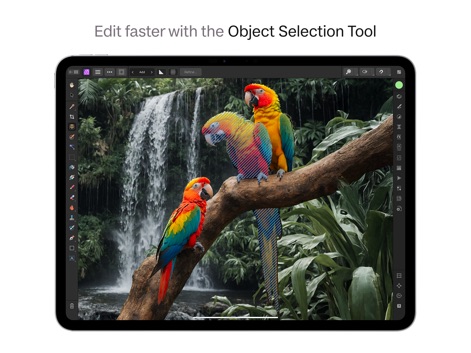
オブジェクト選択ツールを活用し、複雑な被写体から背景を効率的に分離できます。このツールは、精確な選択範囲と迅速な処理を実現します。
高速オブジェクト選択

ライブヒューレンジマスクを適用することで、色域に基づく非破壊編集が可能です。レイヤーパネルを通じて、編集フローを完全に制御できます。
非破壊ライブマスク

レイヤーオプションから提供される多様な描画モードを試すことで、創造的な合成効果を実現できます。不透明度スライダーで視覚的な強弱を調整可能です。
多彩な描画モード

専用ワークスペースでRAW画像を詳細に現像し、露出やホワイトバランスを調整できます。ヒストグラムは画像の色調分布をリアルタイムで表示します。
高度なRAW現像

保存済みのアセットパネルから要素を直接ドラッグ&ドロップすることで、複雑なシーンを素早く構築できます。人物や建築要素など、多様なアセットを利用可能です。
アセットの簡単配置

周波数分離レイヤーを利用して肌を滑らかにし、カーブ調整で詳細な色調補正が可能です。完璧なポートレートを簡単に作成できます。
プロフェッショナルなレタッチ

複数の画像を自動で結合し、息をのむようなパノラマ画像を生成できます。ナビゲーターパネルで全体の構図を確認しながら調整可能です。
精密パノラマ作成

複雑な髪の毛のディテールまで正確に捉える選択範囲の微調整が可能です。マットオプションを使用し、選択範囲を完璧に洗練させます。
高精度な選択範囲
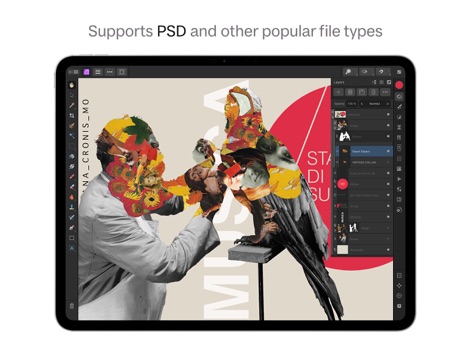
このアプリはPSDファイルを含む多様なフォーマットに対応し、複数のレイヤーを保持したまま編集できます。スマートオブジェクトを活用して非破壊ワークフローを実現します。
広範なファイル互換性

フォーカス結合機能により、異なる焦点で撮影された複数の画像を合成し、被写体のあらゆるディテールを鮮明に捉えます。ナビゲーターパネルで合成結果を効率的に確認できます。
詳細フォーカス結合
説明
Download
類似アプリ
似た機能とユーザー体験を持つアプリ
PhotoLayers
handyCloset Inc.

Blend Photos
TAPUNIVERSE LLC

Wand - AI canvas
Wand Technologies Inc.

Superimpose X
Pankaj Goswami

Image Blender
JHND i Sverige AB

Juxtaposer: cut, combine, edit
Pocket Pixels Inc.

Adobe Photoshop: Photo Editor
Adobe Inc.

Matter - 3D Effects
Pixite Inc.

Union - Combine & Edit Photos
Pixite Inc.
このページはアプリまたはその開発者の公式ページではなく、情報提供および論評を目的として作成された独立した編集出版物です。明示的に別段の記載がない限り、アプリおよびその開発者は、MWM、Apple、Google Play、アプリのパブリッシャー、またはアプリの開発者と提携、承認、後援、認可、またはその他の公式的な関係はなく、このページのいかなる内容も、アプリがMWMのサービスを使用して開発されたことを意味するものではありません。すべての商標、ロゴ、スクリーンショット、その他のコンテンツはそれぞれの所有者の財産です。