
このページはアプリまたはその開発者の公式ページではなく、情報提供および論評を目的として作成された独立した編集出版物です。明示的に別段の記載がない限り、アプリおよびその開発者は、MWM、Apple、Google Play、アプリのパブリッシャー、またはアプリの開発者と提携、承認、後援、認可、またはその他の公式的な関係はなく、このページのいかなる内容も、アプリがMWMのサービスを使用して開発されたことを意味するものではありません。すべての商標、ロゴ、スクリーンショット、その他のコンテンツはそれぞれの所有者の財産です。

ダウンロード
500k+ユーザー評価
評価数
6.1K開発元
カテゴリ
Utilities対応言語
16最新バージョン
1.0.1サイズ
64.2 MBリリース日
2024年12月22日スマートホーム環境における利便性と効率性を追求した主要機能評価
「Air Conditioner Controller」アプリの機能分析
遠隔操作とユニバーサル対応
ユーザーは、スマートフォンを通じてどこからでもエアコンの主要機能を遠隔で操作し、設定を調整できます。複数のブランドのエアコンにも対応しているため、物理的なリモコンの制約から解放されます。
スケジュール設定と自動化
本アプリは、エアコンのON/OFF時間や運転モード、温度設定を事前にスケジュールする機能を提供します。これにより、ユーザーは生活リズムに合わせた快適な室内環境を自動で維持し、エネルギー効率を向上させることが可能です。
包括的なエアコン制御
ユーザーは、目標温度の設定、運転モード(冷房、暖房、除湿など)の切り替え、電源のON/OFF、ファン速度の調整など、エアコンのあらゆる詳細な設定をアプリ内で行うことができます。
物理リモコンの完全代替
従来の物理的なエアコンリモコンが不要となり、紛失や故障の心配がなくなります。このアプリは、ユーザーのスマートフォンを多機能なユニバーサルリモコンとして機能させます。
よくある質問
について知っておくべきこと Air Conditioner Controller
What is the Air Conditioner Controller app?
The Air Conditioner Controller app is a mobile application for managing air conditioners. It allows users to adjust settings, set temperatures, monitor energy, schedule operations, and use remote control features from their device.
Can the Air Conditioner Controller app control multiple AC brands?
Yes, the Air Conditioner Controller app is a universal remote control. It equips users to control nearly any Air Conditioner worldwide, allowing them to discard traditional remotes.
Does the Air Conditioner Controller app allow remote control of ACs?
Yes, the Air Conditioner Controller app features a remote control that lets users operate their air conditioners from anywhere. Users can turn ACs ON/OFF and adjust settings remotely.
How can I set a timer for my AC using the Air Conditioner Controller app?
Users can set timers for their ACs through the Air Conditioner Controller app. The app allows for easy scheduling of when the air conditioner should turn on and off.
What are the main features of the Air Conditioner Controller app?
The Air Conditioner Controller app features smart AC remote control, temperature setting, operating mode switching (Cold, Heat, Dry, Fan), fan speed adjustment, and timer functions.
Is there a free trial for the Air Conditioner Controller app?
Yes, the Air Conditioner Controller app offers a limited 3-day free trial for a weekly subscription. The subscription automatically renews if not canceled before the trial ends.
How do subscriptions work in the Air Conditioner Controller app?
Subscriptions for the Air Conditioner Controller app automatically renew unless auto-renew is turned off 24 hours before the period ends. Payment is charged to the Apple ID account upon purchase confirmation.
Can I manage my subscription for the Air Conditioner Controller app?
Yes, users can manage their subscriptions and disable auto-renewal by accessing their App Store account settings after purchase. Subscriptions can be canceled at any time.
Does the Air Conditioner Controller app address user privacy?
Yes, user privacy and data security are top priorities for the Air Conditioner Controller app. A privacy policy is available for more detailed information.
How do I connect my AC to the Air Conditioner Controller app?
To connect, download and open the app, select your AC brand from the list, and allow your device to link with the air conditioner. Follow the in-app instructions to complete the setup.
以下のスクリーンショットと説明は、アプリの公式ストアリスティングから直接取得されたものであり、アプリ開発者の所有物です。
アプリストア
スクリーンショット
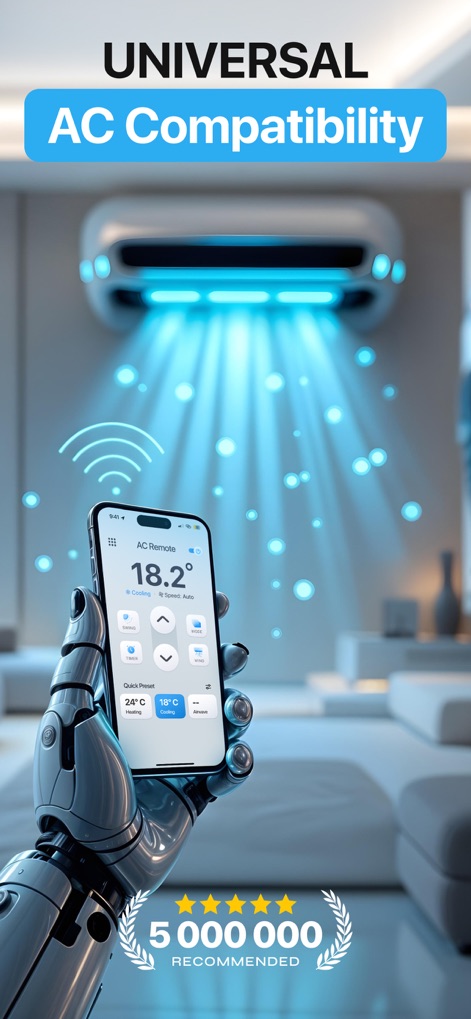
ロボットアームに持たれたスマートフォンが、エアコンを無線で操作する様子を描写しています。画面上部には「UNIVERSAL AC Compatibility」と、下部には「5,000,000 RECOMMEND」の評価が示されています。
普遍的なAC制御

ユーザーはスマートフォンの画面中央に表示された「18.2°C」の現在の温度を確認し、下方にある「SWING」や「TIMER」といった操作ボタンを通じてエアコンを制御できます。
iPhoneで簡単操作
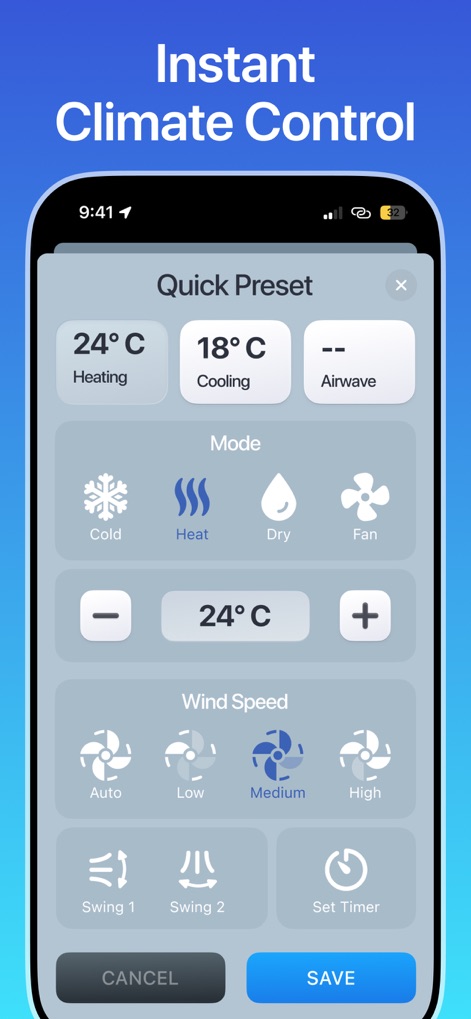
クイックプリセットから「18°C Cooling」を選択できるほか、「Cold」「Heat」「Dry」「Fan」といった複数の運転モードオプションを詳細に設定できます。
瞬時の気候制御
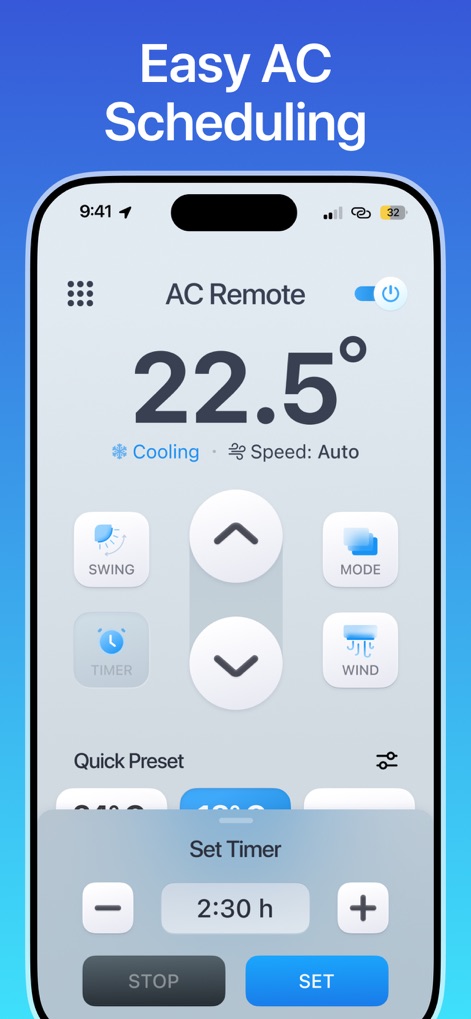
現在の室温が「22.5°C」と表示されており、ユーザーは「Set Timer」機能を用いて「2:30 h」といった具体的な時間でエアコンのタイマーを設定できます。
簡単なスケジュール設定
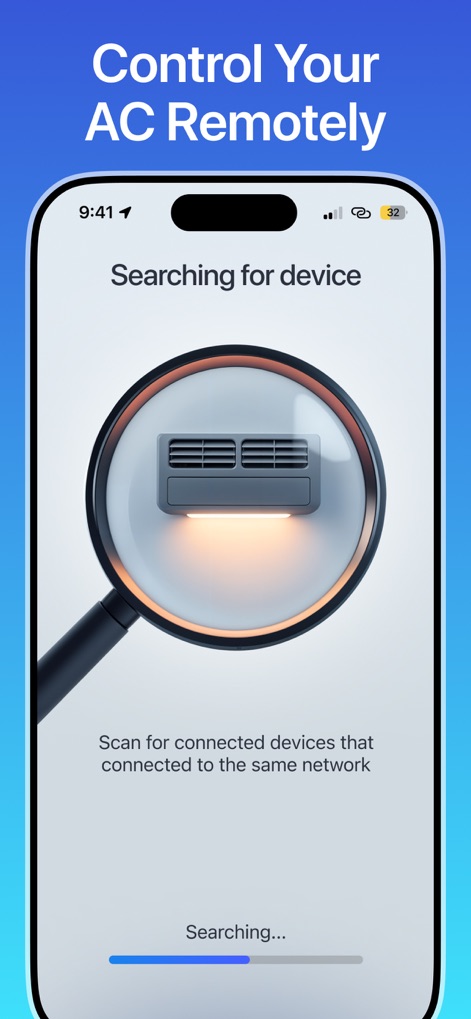
アプリは「Searching for device」と表示され、虫眼鏡アイコンで示されたエアコンの画像を通じて、ユーザーが接続可能なデバイスをスキャンしている状態を表現しています。
ACを遠隔管理
説明
Download
類似アプリ
似た機能とユーザー体験を持つアプリ
Universal AC Remote Control .
KUPOLDEV LP
Smart AC Remote Controller App
Faiz Ul Hassan
AC Remote - Universal Control
PATRIC MARCO KUCK
Air Conditioner Pro, AC Remote
Calypso Wilde
Universal AC Remote Control ㅤ
MSM COMPANY Sp. z o.o
AC Remote, Air Conditioner Pro
Matthew Clarke

AC Universal Remote Control
ALPHA TRAN TRADING AND TRANSPORTATION COMPANY LIMITED

Remote AC Universal & Control
FUJI CAC JOINT STOCK COMPANY
AC Remote & Air Conditioner
HASNA BOUJMIA
このページはアプリまたはその開発者の公式ページではなく、情報提供および論評を目的として作成された独立した編集出版物です。明示的に別段の記載がない限り、アプリおよびその開発者は、MWM、Apple、Google Play、アプリのパブリッシャー、またはアプリの開発者と提携、承認、後援、認可、またはその他の公式的な関係はなく、このページのいかなる内容も、アプリがMWMのサービスを使用して開発されたことを意味するものではありません。すべての商標、ロゴ、スクリーンショット、その他のコンテンツはそれぞれの所有者の財産です。