
このページはアプリまたはその開発者の公式ページではなく、情報提供および論評を目的として作成された独立した編集出版物です。明示的に別段の記載がない限り、アプリおよびその開発者は、MWM、Apple、Google Play、アプリのパブリッシャー、またはアプリの開発者と提携、承認、後援、認可、またはその他の公式的な関係はなく、このページのいかなる内容も、アプリがMWMのサービスを使用して開発されたことを意味するものではありません。すべての商標、ロゴ、スクリーンショット、その他のコンテンツはそれぞれの所有者の財産です。


ダウンロード
750k+ユーザー評価
評価数
3.6K開発元
カテゴリ
Finance対応言語
1最新バージョン
1.5.3サイズ
111.1 MBリリース日
2024年3月8日このパーソナルファイナンスアプリが提供する主要な利点と独自性
Budget Bestie:詳細な機能分析
キャッシュスタッフィングのデジタル実装
物理的な現金を必要とせず、実績のあるキャッシュスタッフィングの手法をスマートフォン上で安全かつ便利に利用できます。
デジタル封筒作成
本アプリは、食費、外食費、家賃などの費用カテゴリごとにデジタル封筒を作成することを可能にし、ユーザーが支出を視覚的に管理できます。
貯蓄目標の追跡
貯蓄専用のデジタル封筒を作成し、設定した貯蓄目標に対する進捗状況を追跡することで、ユーザーの目標達成を確実にサポートします。
自動封筒割り当ての提案
過去の支出履歴と今後の請求書に基づいて、各デジタル封筒に割り当てる金額を自動的に推奨し、ユーザーの計算の手間を省きます。
柔軟な予算編成スケジュール
本アプリは、ユーザーが給料日に合わせて、週ごと、隔週ごと、月2回、または月ごとの予算編成を柔軟に行えるようにします。
支出パターン分析
ユーザーの月間の支出傾向をまとめることで、細かな出費が全体に与える影響を可視化し、より意識的な金銭管理を促進します。
封筒からの支出記録
ユーザーは購入時に対応するデジタル封筒から支出を記録することができ、割り当てられた予算内で意識的に消費することを促します。
定期支出のリマインダー
ユーザーが定期的な支出を記録していない場合に通知を送信し、延滞料金の発生を防ぎ、支払いの管理を支援します。
よくある質問
について知っておくべきこと Budget Bestie
What is Budget Bestie?
Budget Bestie is an app that helps users manage their money using the cash stuffing method. It provides features like creating digital envelopes, tracking spending, and hitting savings goals.
How does the cash stuffing method work in Budget Bestie?
Budget Bestie digitizes the cash stuffing method. Users create envelopes for expenses, virtually 'stuff' them with funds, spend from corresponding envelopes, and repeat the process upon receiving income.
Can Budget Bestie help me achieve my savings goals?
Yes, Budget Bestie helps users hit savings goals. The app allows for the creation of specific savings envelopes and tracks progress to ensure users stay on track towards their targets.
What budgeting frequencies does Budget Bestie support?
Budget Bestie supports various budgeting frequencies, including weekly, biweekly, twice a month, or monthly. Users select their preferred schedule to align with their income cycle.
Does Budget Bestie offer suggestions for how much money to put in envelopes?
Yes, Budget Bestie provides budget suggestions. It recommends how much to 'stuff' into each envelope by analyzing previous spending habits and upcoming bills, eliminating manual calculations.
How does Budget Bestie prevent late payments?
Budget Bestie helps avoid late fees by sending notifications for unrecorded recurring expenses. Users receive reminders when a scheduled payment is due but not yet logged.
How do I log an expense in the Budget Bestie app?
Users can easily add expenses in Budget Bestie by selecting the 'Expense' option from the transaction screen. They input the amount, date, and choose the corresponding envelope.
Can I create different types of custom envelopes in Budget Bestie?
Yes, Budget Bestie allows users to create custom envelopes. Options include variable envelopes for fluctuating costs, fixed envelopes for regular payments, and saving envelopes for financial goals.
How do subscriptions work for Budget Bestie?
Budget Bestie offers subscription plans (monthly or annual) managed directly by Apple. Users choose their plan before a free trial begins and can manage or cancel it within their iPhone settings.
Can I cancel my Budget Bestie subscription at any time?
Yes, users can cancel their Budget Bestie subscription anytime. Subscriptions are billed and managed by Apple, so cancellation occurs within the iPhone's settings app.
以下のスクリーンショットと説明は、アプリの公式ストアリスティングから直接取得されたものであり、アプリ開発者の所有物です。
アプリストア
スクリーンショット
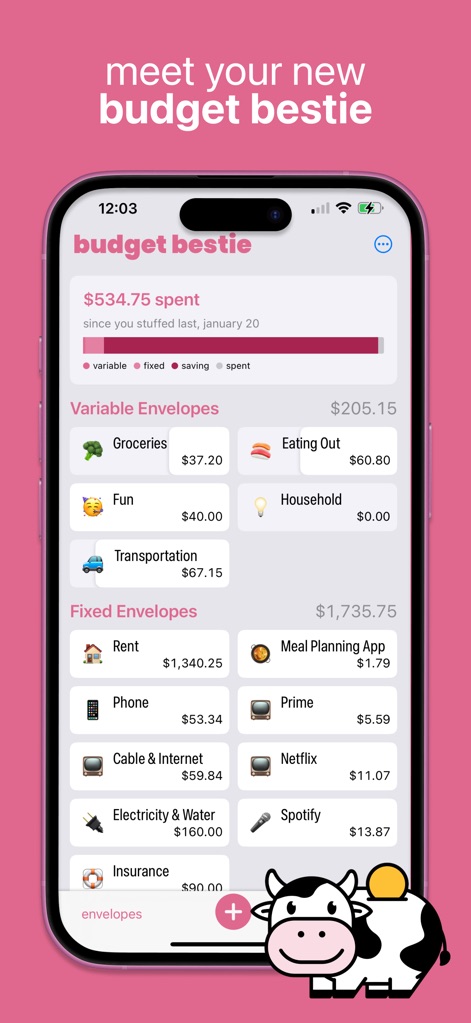
この画面では、エンベロープ(封筒)システムにより、食費や家賃などの各カテゴリに割り当てられた予算を一覧できます。また、支出の内訳を示すカラーバーで、変動費、固定費、貯蓄、実際の支出がどのように配分されているかを視覚的に把握できます。
家計簿を視覚化
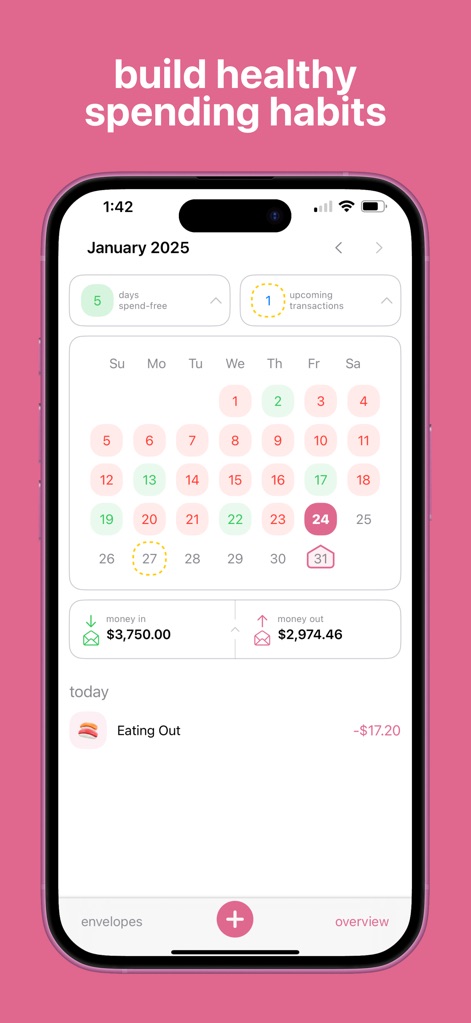
ユーザーは、カレンダービューで「支出のない日」を特定し、日々の支出状況を直感的に把握できます。画面下部には、入金額と出金額の概要が表示され、月間の資金の流れを簡単に確認できます。
支出パターンを把握
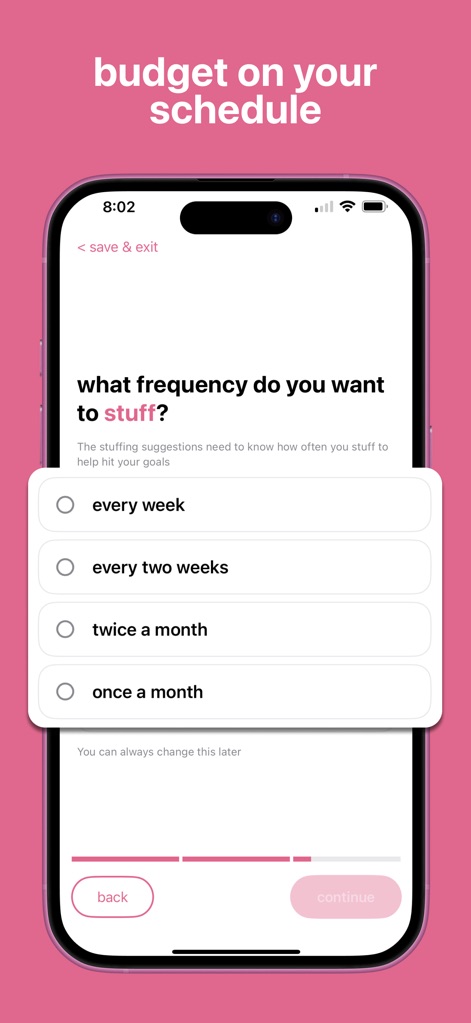
この画面では、週ごと、2週間ごと、月に2回、月ごとなど、ユーザーのライフスタイルに合わせた予算作成頻度を選択できます。画面下部の進行バーは、設定プロセスのどの段階にいるかを明確に示します。
柔軟な予算サイクル
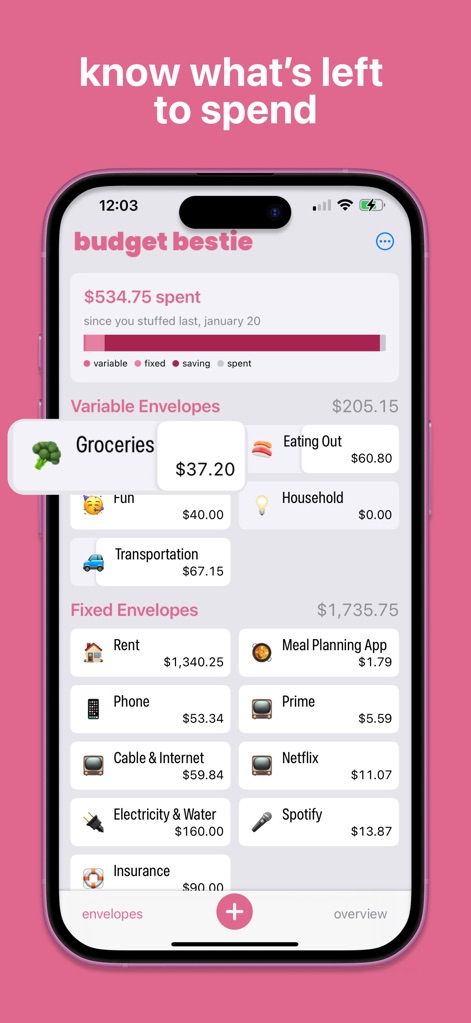
アプリは、食料品などの各エンベロープ(封筒)に残っている金額を明確に表示し、ユーザーがいくら使えるかを瞬時に確認できます。各支出項目には、視覚的に分かりやすいアイコンが割り当てられています。
残高を即座に確認

このツールは、家賃などの固定費に対して過去の習慣に基づいた予算の提案額を大きく表示します。また、各費目の次回の支払い予定日と金額が明記され、計画的な予算編成をサポートします。
スマートな予算提案

ユーザーは、直感的なテンキーインターフェースを使用して支出額を素早く入力できます。この画面では、費用、送金、収入のいずれかの取引タイプを簡単に選択して記録を完了できます。
簡単な支出記録

アプリは、電気・水道料金などの今後の未処理の取引を一覧表示し、ユーザーが支払い忘れを防ぐのに役立ちます。カレンダービューでは、支払い予定日を示す通知が視覚的に強調表示されます。
支払い忘れを防止

緊急資金などの貯蓄エンベロープ(封筒)に対して、達成目標額と現在の進捗状況を示す進捗バーが明確に表示されます。また、過去の予算更新履歴が一覧で確認でき、貯蓄の軌跡を追うことができます。
貯蓄目標を設定
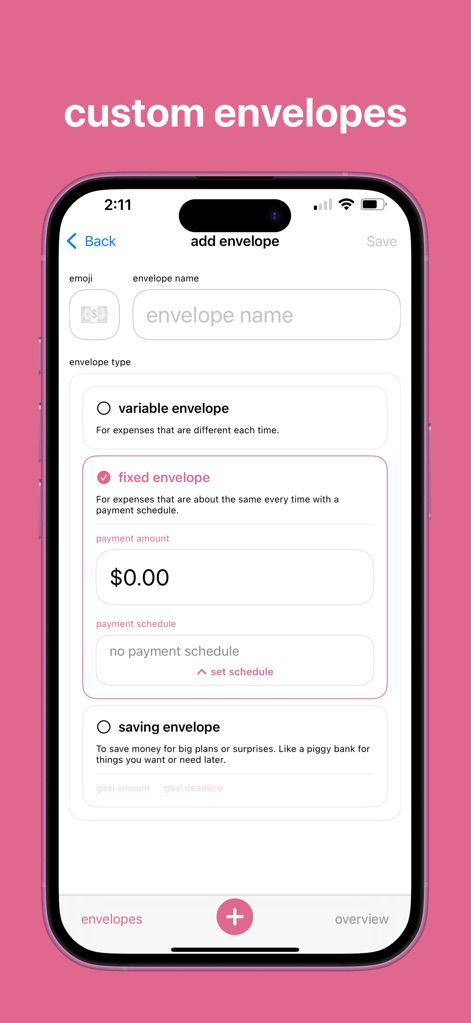
ユーザーは、変動費、固定費、貯蓄エンベロープ(封筒)の中から適切なタイプを選択し、ニーズに合わせてカスタマイズできます。固定費エンベロープでは、支払い金額と支払いスケジュールを設定するオプションが提供されます。
カスタムエンベロープ
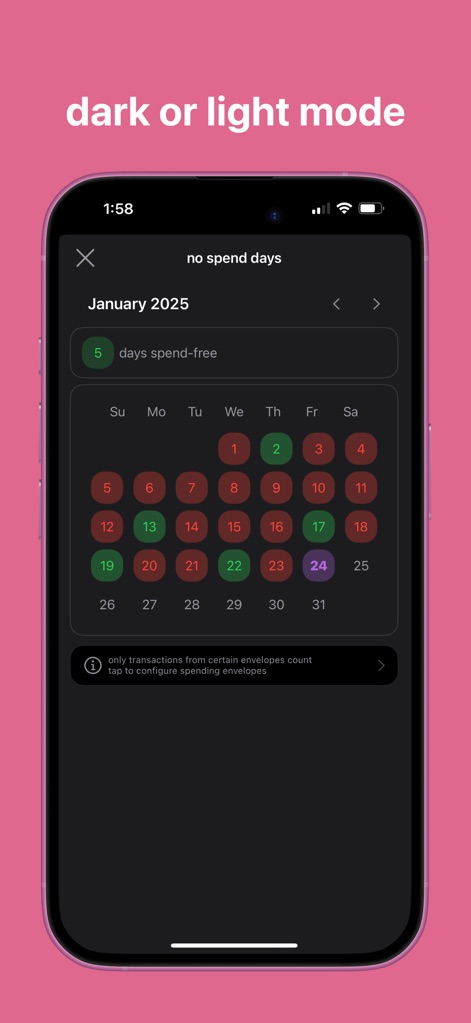
アプリは、ユーザーの好みに応じてダークモード表示に対応しており、目に優しいインターフェースを提供します。この画面には、「支出のない日」をカウントする機能が表示され、ユーザーの節約意識を高めます。
テーマを選択
説明
Download
類似アプリ
似た機能とユーザー体験を持つアプリ

鲨鱼记账本-城市理财圈子必备工具软件
Beijing Shark Pioneer Network Technology Co.,Ltd

咔皮记账 -自动记账 AI记账 预算 多账本 资产管理 存钱
Shanghai Yuhuan Technology Co., Ltd.

Money manager, expense tracker
Orange dog d.o.o.

Money Manager Expense & Budget
Realbyte Inc.

Budget Planner App - Fleur
Akash Jain

iCost记账-快速简洁好用的记账理财助手&记账软件
Guangzhou Quji Technology Co., Ltd.

YNAB
You Need A Budget LLC

Copilot: Track & Budget Money
Copilot Money, Inc.

小青账记账-存钱记账本理财购物清单
YouQian
このページはアプリまたはその開発者の公式ページではなく、情報提供および論評を目的として作成された独立した編集出版物です。明示的に別段の記載がない限り、アプリおよびその開発者は、MWM、Apple、Google Play、アプリのパブリッシャー、またはアプリの開発者と提携、承認、後援、認可、またはその他の公式的な関係はなく、このページのいかなる内容も、アプリがMWMのサービスを使用して開発されたことを意味するものではありません。すべての商標、ロゴ、スクリーンショット、その他のコンテンツはそれぞれの所有者の財産です。