
このページはアプリまたはその開発者の公式ページではなく、情報提供および論評を目的として作成された独立した編集出版物です。明示的に別段の記載がない限り、アプリおよびその開発者は、MWM、Apple、Google Play、アプリのパブリッシャー、またはアプリの開発者と提携、承認、後援、認可、またはその他の公式的な関係はなく、このページのいかなる内容も、アプリがMWMのサービスを使用して開発されたことを意味するものではありません。すべての商標、ロゴ、スクリーンショット、その他のコンテンツはそれぞれの所有者の財産です。

Camera360-Selfie Editor
現実をねじ曲げ、理想の顔面を創造する。ありふれた風景すら、一瞬で『映える』舞台に変える。このアプリは、ユーザーに『SNS世界の全能感』を授ける。
ダウンロード
25M+ユーザー評価
評価数
1.7M開発元
カテゴリ
Photo & Video対応言語
10最新バージョン
10.02.29サイズ
478.7 MBリリース日
2011年6月22日Camera360-Selfie Editor アプリ分析
ソーシャルメディア向け高機能写真・動画編集ツールの徹底評価
自然でスタイリッシュなメイクアップ
ユーザーは、30種類以上のメイクアップフィルターをカスタマイズし、お気に入りのスタイルと色で自然かつスタイリッシュな仕上がりを実現できます。
スムーズスキン
ユーザーは、しわやシミを修正し、肌を滑らかにできます。
ビデオセルフィー
このアプリは、10秒から60秒の動画に音楽を加え、フィルターやメイクアップを同時に適用してビデオセルフィーを作成する機能を提供します。
かわいいARステッカー
本アプリは、スマート顔認識機能により、顔だけでなく表情も捉えることができるインタラクティブなARステッカーを備えています。
顔・体の整形(リシェイプ)
ユーザーは、21種類の微調整機能により、自然な仕上がりで顔や体の形を変更できます。
高品質フィルター(300種以上)
本ツールは、レトロ、白黒、HDR、LOMO、香港スタイルなど、300種類以上の高品質なフィルターを備えており、多様な表現を可能にします。
ワンタップ美肌補正
このアプリは、ワンタップで写真を瞬時に美しく補正する機能を提供します。
アニメエフェクト
ユーザーは、独自の漫画フィルターを適用して、他にはないユニークな写真を作成できます。
マジックスカイ
このアプリは、アニメ風や夢のような空に写真を変更し、創造的な表現を楽しめる機能を提供します。
絵画フィルター
本ツールは、写真を絵画のように変えるフィルターを提供し、誰もがアーティストのような作品を作成できます。
よくある質問
について知っておくべきこと Camera360-Selfie Editor
What is Camera360-Selfie Editor?
Camera360-Selfie Editor is a professional, easy-to-use app for photo editing and selfie retouching. It allows users to enhance images with filters, stickers, make-ups, and advanced editing tools.
Does Camera360 offer face retouching features?
Yes, Camera360 provides original face retouching. Features include smoothing skin, reshaping with 21 micro-adjustments, and one-tap beautification. Users can also protect specific parts during adjustments.
What types of photo filters are available in Camera360?
Camera360 offers diverse filters like Magic Sky, Painting, Anime, and Movie filters. It includes over 300 high-quality filters from retro to HDR, and over 30 natural and stylish makeup filters.
Can I use AR stickers in Camera360-Selfie Editor?
Yes, Camera360-Selfie Editor includes cute AR stickers with smart face recognition. These stickers capture facial expressions, allowing for interactive photo experiences, visible in screenshots showing themed stickers.
How can I cancel my Camera360 VIP subscription?
To cancel Camera360 VIP, go to iPhone "Settings" > "iTunes Store and App Store" > "Apple ID" > "View Apple ID" > "Account Settings" > "Subscribe", then select Camera360 VIP to cancel.
Does Camera360-Selfie Editor support video recording?
Yes, Camera360-Selfie Editor supports video selfies from 10 to 60 seconds. Users can customize videos with music, filters, and makeup simultaneously, enhancing their short video creations.
Can Camera360 correct image distortion or perspective?
Yes, Camera360 offers Image Correction, supporting vertical and horizontal adjustments. This feature is particularly useful for photos of buildings, ensuring lines are straight and the perspective is balanced.
以下のスクリーンショットと説明は、アプリの公式ストアリスティングから直接取得されたものであり、アプリ開発者の所有物です。
アプリストア
スクリーンショット

楽しいARスタンプ
スマートな顔認識によるARスタンプと、キュートなキラキラエフェクトで、あなたのセルフィーを魅力的に演出します。

最新トレンドメイク
このアプリは、人気の自然なメイクアップを適用し、多彩なフィルターオプションであなたの魅力を最大限に引き出します。

スタイル別編集
簡単にプロのような仕上がりを実現するプリセットテンプレートを活用し、ワンタップで写真の雰囲気を劇的に変化させることが可能です。
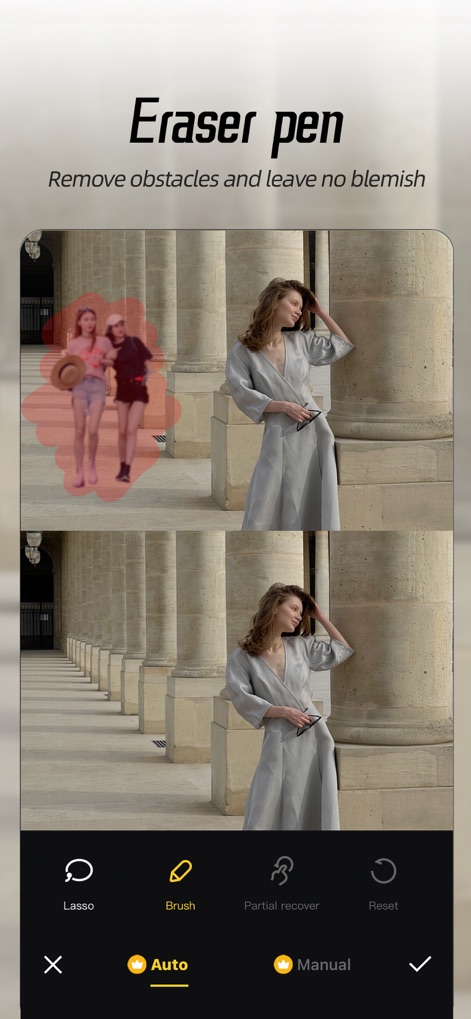
不要物消去
背景の不要なオブジェクトをブラシツールで簡単に除去し、写真のメイン被写体を際立たせるクリーンな仕上がりを実現します。
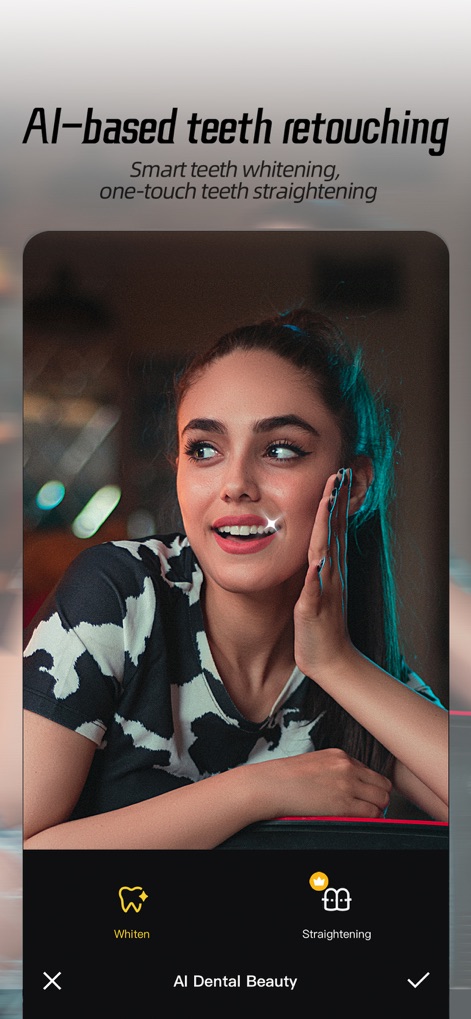
AI美歯補正
AIを活用したスマートな歯のホワイトニング機能と、ワンタップで歯列を整える矯正機能で、輝く笑顔を完璧に仕上げます。

自然な美肌補正
このツールは、肌の自然な質感を保ちながら、シミやニキビなどの気になる部分を修正し、美しい肌を演出します。

芸術的エフェクト
モーションブラーやチルトシフトなどのクリエイティブなボケ効果を適用することで、写真に動きと奥行きを与え、ユニークな視覚効果を生み出します。

繊細な顔補正
顔の立体感を強調する輪郭補正と、鼻や目などの部分的な調整機能で、あなたの顔立ちをより洗練された印象に仕上げます。
説明
Download
類似アプリ
似た機能とユーザー体験を持つアプリ

Meitu- AI Photo & Video Editor
Xiamen Meitu Technology Co., Ltd.

BeautyCam-AI Photo Editor
Xiamen Meitu Technology Co., Ltd.

BeautyPlus-Selfie Photo Editor
PIXOCIAL TECHNOLOGY (SINGAPORE) PTE. LTD.

Peachy - AI Face & Body Editor
SHANTANU PTE. LTD.

Airbrush: Face Photo Editor
PIXOCIAL TECHNOLOGY (SINGAPORE) PTE. LTD.
YouCam Perfect AI Photo Editor
PERFECT MOBILE CORP.

Persona: AI Beauty Editor
TICKET TO THE MOON, INC.

Wuta Camera - Nice Shot Always
Shanghai Benqumark Network Tech Co., Ltd.

Perfect365 Makeup Photo Editor
Perfect365, Inc.
このページはアプリまたはその開発者の公式ページではなく、情報提供および論評を目的として作成された独立した編集出版物です。明示的に別段の記載がない限り、アプリおよびその開発者は、MWM、Apple、Google Play、アプリのパブリッシャー、またはアプリの開発者と提携、承認、後援、認可、またはその他の公式的な関係はなく、このページのいかなる内容も、アプリがMWMのサービスを使用して開発されたことを意味するものではありません。すべての商標、ロゴ、スクリーンショット、その他のコンテンツはそれぞれの所有者の財産です。