Canon Viewer - Sheet music
ダウンロード: App Store

このページはアプリまたはその開発者の公式ページではなく、情報提供および論評を目的として作成された独立した編集出版物です。明示的に別段の記載がない限り、アプリおよびその開発者は、MWM、Apple、Google Play、アプリのパブリッシャー、またはアプリの開発者と提携、承認、後援、認可、またはその他の公式的な関係はなく、このページのいかなる内容も、アプリがMWMのサービスを使用して開発されたことを意味するものではありません。すべての商標、ロゴ、スクリーンショット、その他のコンテンツはそれぞれの所有者の財産です。


ロゴ: Canon Viewer - Sheet music
ダウンロード: App Store

Canon Viewer - Sheet music

瞬時の移調、自動ページめくり、Apple Pencilサポートを備えた8,000以上のプロフェッショナル楽譜にアクセスできます。よりスマートに練習し、進捗状況を録音し、iPadに音楽コレクション全体を持ち運びましょう。

主要数値

ダウンロード

57K+

ユーザー評価

4.6/5

評価数

700

開発元

Funtap Co. Ltd.

カテゴリ

Music

対応言語

2

最新バージョン

3.15.13

サイズ

130.3 MB

リリース日

2020年3月3日
機能

デジタル精度で全ての曲をマスター

8,000以上のタイトルを持つライブラリで、よりスマートに練習し、瞬時に移調し、ペーパーレス化するために、プロフェッショナルツールを使用している数千人のミュージシャンに加わりましょう。

スマートな注釈付けとApple Pencilサポート

紙とペンはもう必要ありません。Apple Pencilで自然に楽譜に注釈を付け、編集したシートをPDFとしてエクスポートして、柔軟性を最大限に高めましょう。

瞬時のワンタップ移調

シングルタップで、どんな曲でもあなたの声域や楽器に合わせられます。手動で書き直すことなく、12のキーすべてで瞬時に移調できます。

以下のスクリーンショットと説明は、アプリの公式ストアリスティングから直接取得されたものであり、アプリ開発者の所有物です。

アプリストア

スクリーンショット

Canon Viewer - Sheet music - ピアノの譜面台に置かれたCanon Viewerアプリのデジタル楽譜を表示するiPad。人が演奏している。

ピアノの譜面台に置かれたCanon Viewerアプリのデジタル楽譜を表示するiPad。人が演奏している。

Canon Viewer - Sheet music - ピアノを演奏する女性。再生テキストのオーバーレイがデジタル楽譜機能を強調している。
ピアノを演奏する女性。再生テキストのオーバーレイがデジタル楽譜機能を強調している。

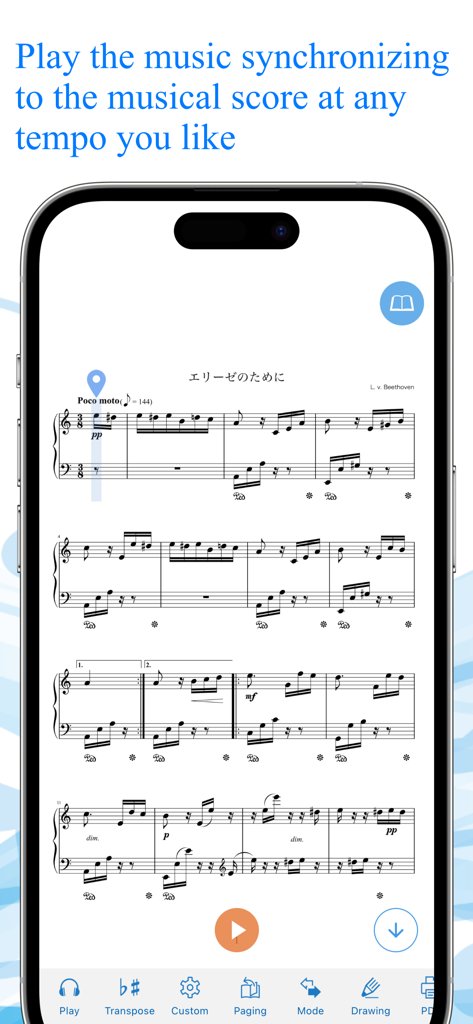
Canon Viewer - Sheet music - Canon Viewerアプリが、スマートフォンで同期された楽譜再生を表示している。
Canon Viewerアプリが、スマートフォンで同期された楽譜再生を表示している。

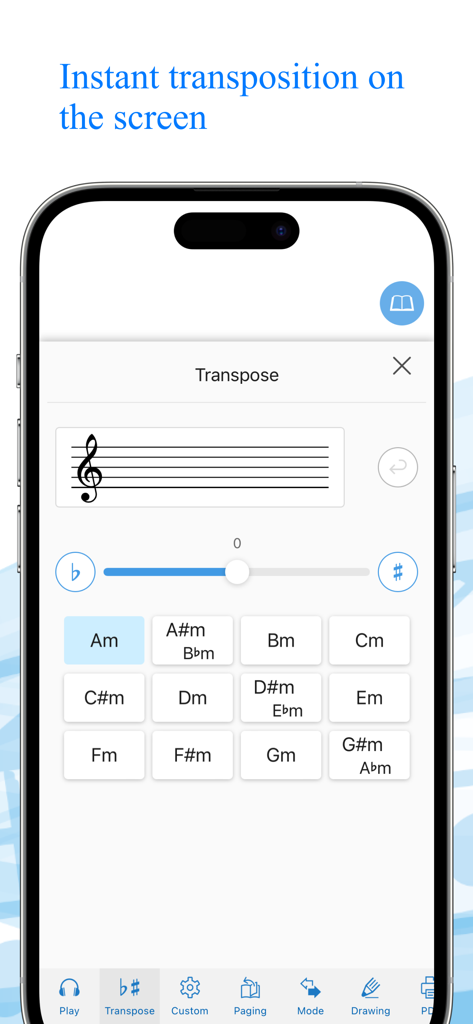
Canon Viewer - Sheet music - Canon Viewerアプリの瞬時移調インターフェースを示すスマートフォンの画面。鍵盤のグリッドと移調スライダーが表示されている。
Canon Viewerアプリの瞬時移調インターフェースを示すスマートフォンの画面。鍵盤のグリッドと移調スライダーが表示されている。

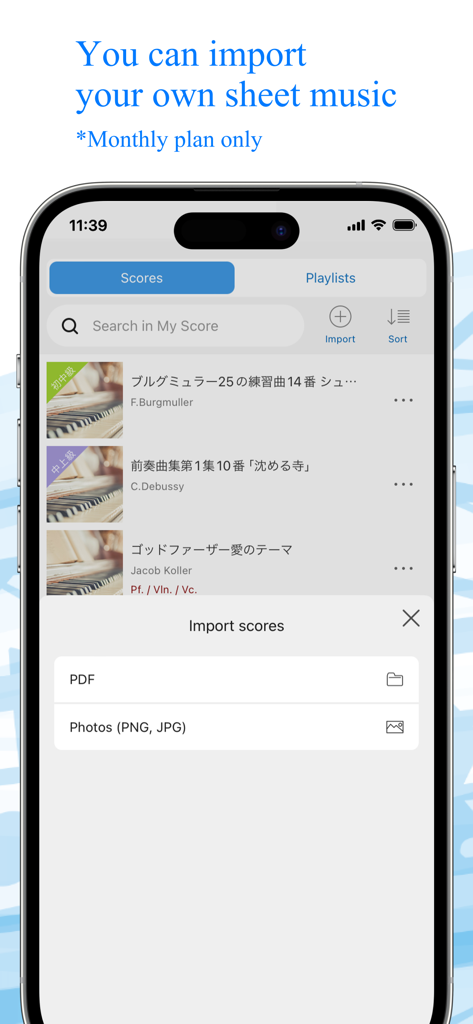
Canon Viewer - Sheet music - Canon Viewerアプリのインターフェース。PDFまたは写真ファイル経由で個人用楽譜をインポートする機能が表示されている。
Canon Viewerアプリのインターフェース。PDFまたは写真ファイル経由で個人用楽譜をインポートする機能が表示されている。

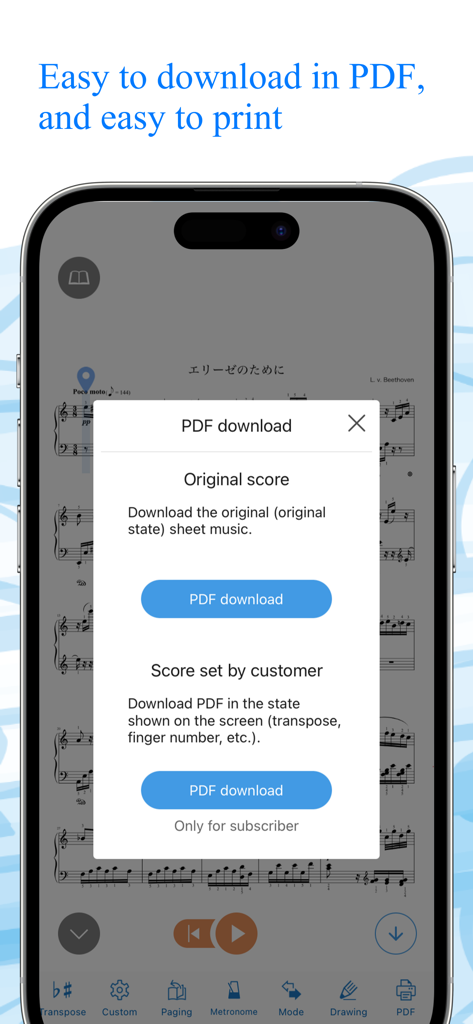
Canon Viewer - Sheet music - Canon Viewerアプリが、元の楽譜とカスタマイズされた楽譜のPDFダウンロードメニューを表示している。
Canon Viewerアプリが、元の楽譜とカスタマイズされた楽譜のPDFダウンロードメニューを表示している。

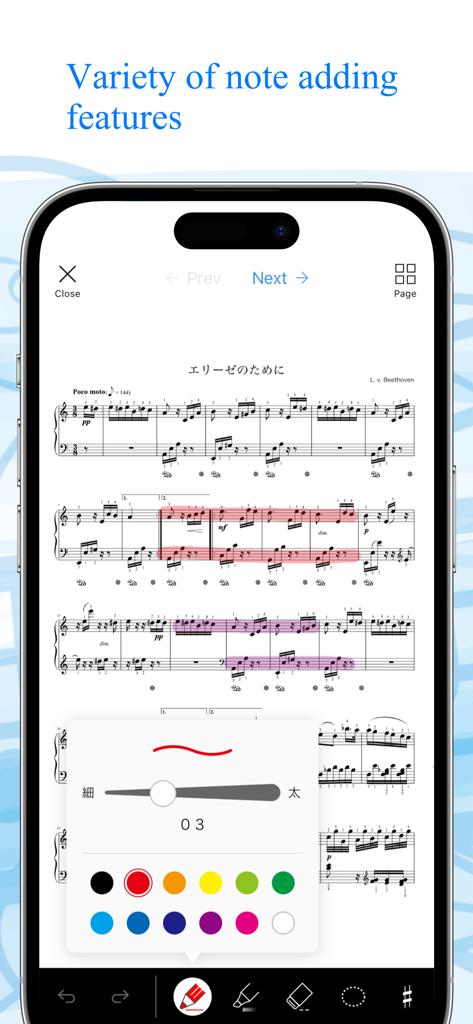
Canon Viewer - Sheet music - Canon Viewerアプリでピアノの楽譜と、さまざまな色でデジタルノートやハイライトを追加するためのメニューが表示されている携帯電話の画面。
Canon Viewerアプリでピアノの楽譜と、さまざまな色でデジタルノートやハイライトを追加するためのメニューが表示されている携帯電話の画面。

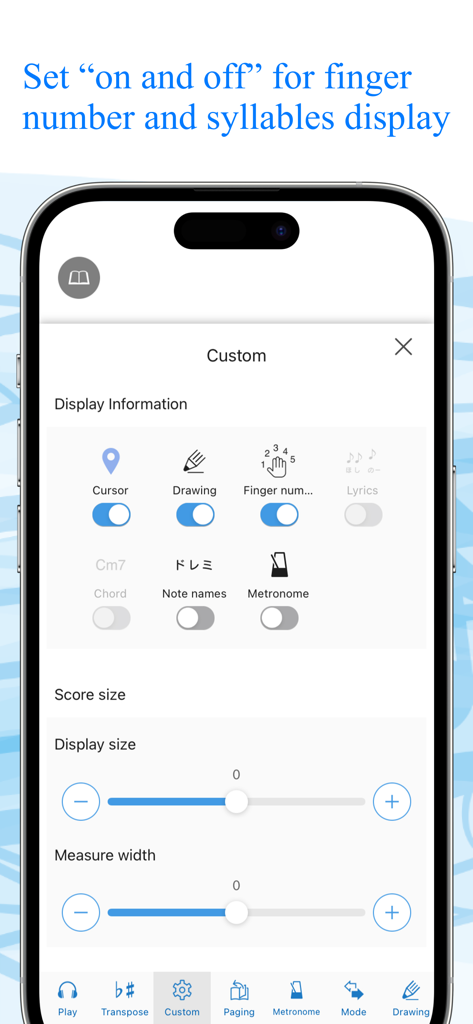
Canon Viewer - Sheet music - Canon Viewerアプリの設定画面。運指番号や音名などの表示をカスタマイズするトグルが表示されている。
Canon Viewerアプリの設定画面。運指番号や音名などの表示をカスタマイズするトグルが表示されている。

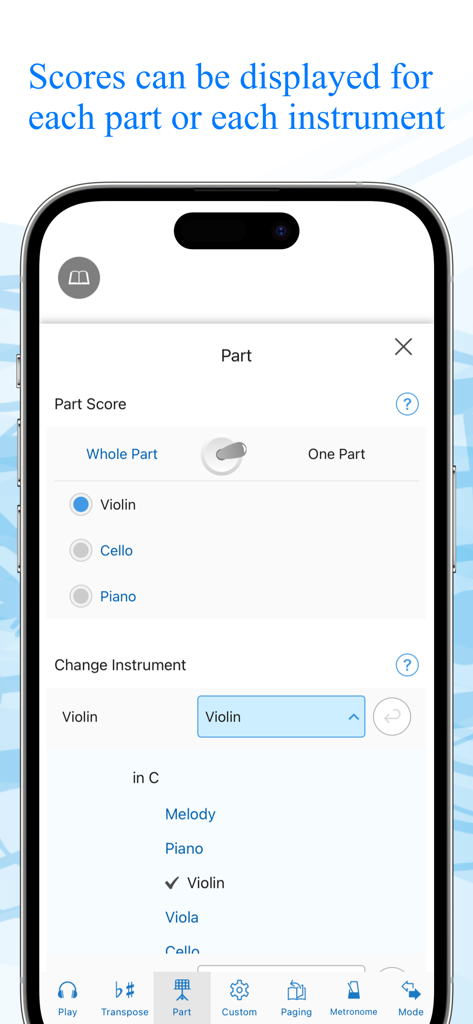
Canon Viewer - Sheet music - 特定の楽器パートと楽譜を選択するためのアプリインターフェース。

特定の楽器パートと楽譜を選択するためのアプリインターフェース。

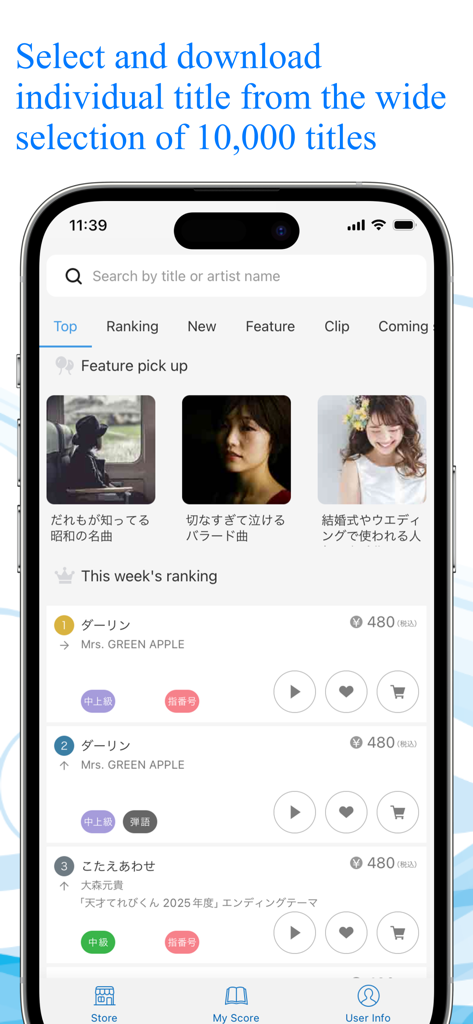
Canon Viewer - Sheet music - Canon Viewerストアを示すスマートフォンの画面。検索バーとダウンロード用のデジタル楽譜タイトルのランキングリストが表示されている。

Canon Viewerストアを示すスマートフォンの画面。検索バーとダウンロード用のデジタル楽譜タイトルのランキングリストが表示されている。

説明

This is a [free musical score application] with selection of 8,000 titles, where users can download their favorite tiles individually and can find many user-friendly features. “My score” can be used off-line. Users can customize their musical scores by using the functions such as [Automatic page turner] [Adding notes] [Play a musical score] and [background change]. When a user wants to play the melody line with wind instruments or stringed instruments, musical scores that correspond to the selected instruments will be automatically displayed. Another function transposes a whole musical score for those who want to play at the most appropriate key for a certain instrument. ”This is the very musical score application that all the music lovers have wanted!” Please discover what our application offers that may change your music life with its impressive user-friendly features. ◆◇ Point 1 : You can PLAY the musical scores ◇◆ You can listen to the sound, so that makes it easier to read musical sheets with complicated melody or rhythm. You can also change the tempo and play only the selected part, like only the right hand part of the piano scores, or only the alto and tenor parts of the chorus scores. This useful function will surely make your practice more efficient. ◆◇ Point 2 : Instant transposition with one click of a button ◇◆ With only one click of a button, you can transpose to any of 12 keys. If you want to play an instrument at a half lower key to accompany a singer, you can transpose instantly! You can also optimize your scores with “Change of Sound Range” function. Transposed musical scores can be downloaded in PDF format and printed. ◆◇ Point 3 : Perfect command of page turner ◇◆ The greatest feature of Canon Musical Score Viewer is the advanced page turner function. Users can set the speed and timing such as “At which measure to turn the page” for each score. If the display is set for “Scroll display” mode, the score will be shown as a single score flow from the beginning to the end, meaning users do not have to turn pages at all. It also works with external “Page turner pedal”. ◆◇ Point 4 : Scores can be displayed exclusively for favorite parts and instruments ◇◆ Users can change the parts other than piano as “Your favorite instrument”. According to the selection of the instrument, the score will be automatically altered. Display of “All parts” and “Each part” can be switched automatically. ◆◇ Point 5 : Free writing on the screen ◇◆ Users can freely add notes and codes to the scores on the screen, and download the edited scores in PDF format to print. For iPad, the use of Apple Pencil will make the editing easier. ◆◇ Point 6 : 2 kinds of practice mode ◇◆ [Repeat practice mode] Users can select the part of the score to play repeatedly. [Record practice mode] Users can record their performance and play it with the corresponding score. ◆◇ Point 7 : Customized display function ◇◆ Users can select any necessary information to be displayed including [Finger numbers] [Syllables] [Codes] and [Lyrics] by setting ON/OFF. Background image can also be customized with your favorite one. ** About Digital Musical Score Canon Digital Musical Score Canon is an online musical score delivery service. It delivers and sells more than 8,000 titles, majorly popular and trendy titles. All the scores are produced by professionals. All the purchased scores can be displayed and used on “Canon Musical Score Viewer” that can be operated on a Web browser or application of smartphones and tablets. https://www.canon-score.com/support

Download

ダウンロード: App Store

このページはアプリまたはその開発者の公式ページではなく、情報提供および論評を目的として作成された独立した編集出版物です。明示的に別段の記載がない限り、アプリおよびその開発者は、MWM、Apple、Google Play、アプリのパブリッシャー、またはアプリの開発者と提携、承認、後援、認可、またはその他の公式的な関係はなく、このページのいかなる内容も、アプリがMWMのサービスを使用して開発されたことを意味するものではありません。すべての商標、ロゴ、スクリーンショット、その他のコンテンツはそれぞれの所有者の財産です。