Scriptation: PDF for Film & TV
ダウンロード: App Store

このページはアプリまたはその開発者の公式ページではなく、情報提供および論評を目的として作成された独立した編集出版物です。明示的に別段の記載がない限り、アプリおよびその開発者は、MWM、Apple、Google Play、アプリのパブリッシャー、またはアプリの開発者と提携、承認、後援、認可、またはその他の公式的な関係はなく、このページのいかなる内容も、アプリがMWMのサービスを使用して開発されたことを意味するものではありません。すべての商標、ロゴ、スクリーンショット、その他のコンテンツはそれぞれの所有者の財産です。


ロゴ: Scriptation: PDF for Film & TV
ダウンロード: App Store

Scriptation: PDF for Film & TV

新しい脚本ドラフトへの手書きノートのコピーはもう不要です。注釈を数秒でインテリジェントに移行し、業界をリードするデジタルバインダーで制作を完璧に管理しましょう。

主要数値

ダウンロード

71K+

ユーザー評価

4.8/5

評価数

4K+

開発元

Scriptation LLC

カテゴリ

Productivity

対応言語

4

最新バージョン

5.1.10

サイズ

222.1 MB

リリース日

2016年5月1日
機能

すべての改訂版を完璧に管理

手動の脚本更新を排除し、制作を円滑に進めるために業界のプロによって設計された、エミー賞®受賞のツールキット。

インテリジェントなノート移行

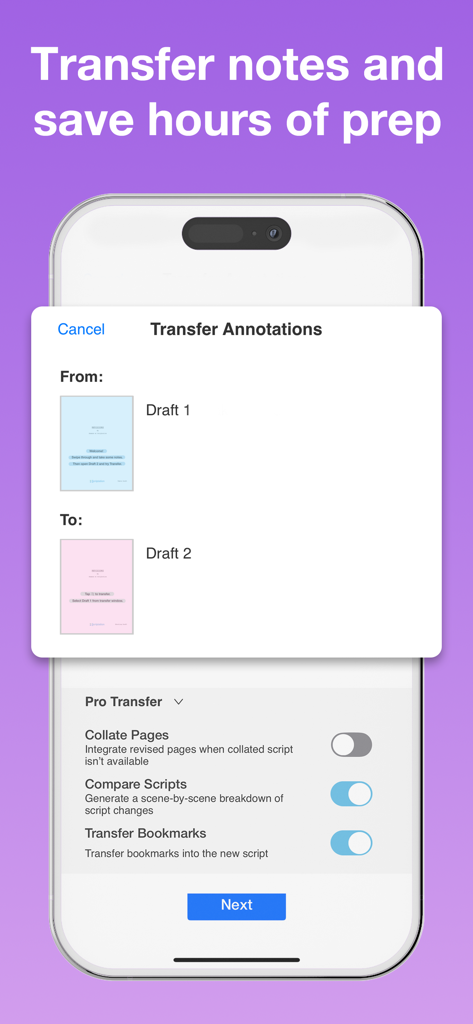
手作業でのコピーは不要です。独自のアルゴリズムが脚本の変更箇所を分析し、数秒ですべてのノートを新しいドラフトに移動します。

デジタル制作バインダー

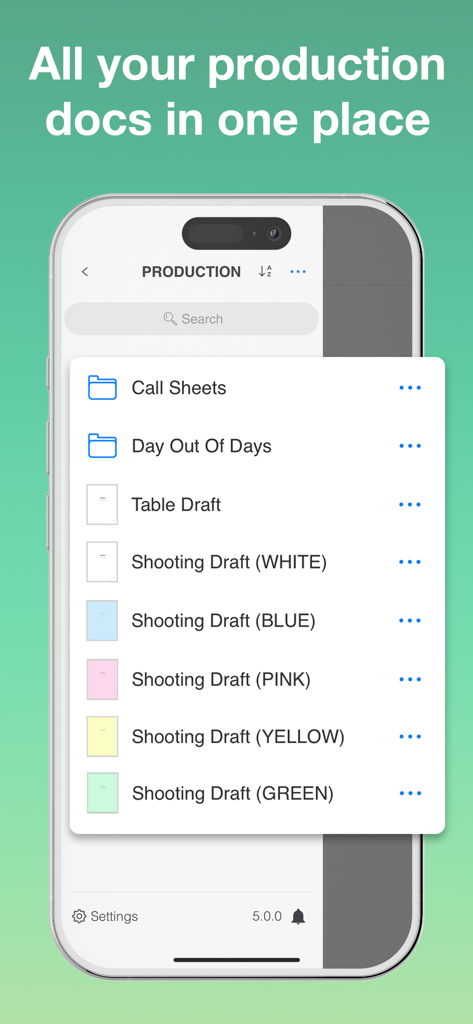
脚本、香盤表、スケジュールを1つの整理されたハブに集約。重いバインダーを捨てて、真のペーパーレスな現場を実現。

以下のスクリーンショットと説明は、アプリの公式ストアリスティングから直接取得されたものであり、アプリ開発者の所有物です。

アプリストア

スクリーンショット

Scriptation: PDF for Film & TV - エミー賞受賞技術を搭載した映画・テレビ業界標準アプリとしての地位を強調するScriptationのスプラッシュ画面
エミー賞受賞技術を搭載した映画・テレビ業界標準アプリとしての地位を強調するScriptationのスプラッシュ画面

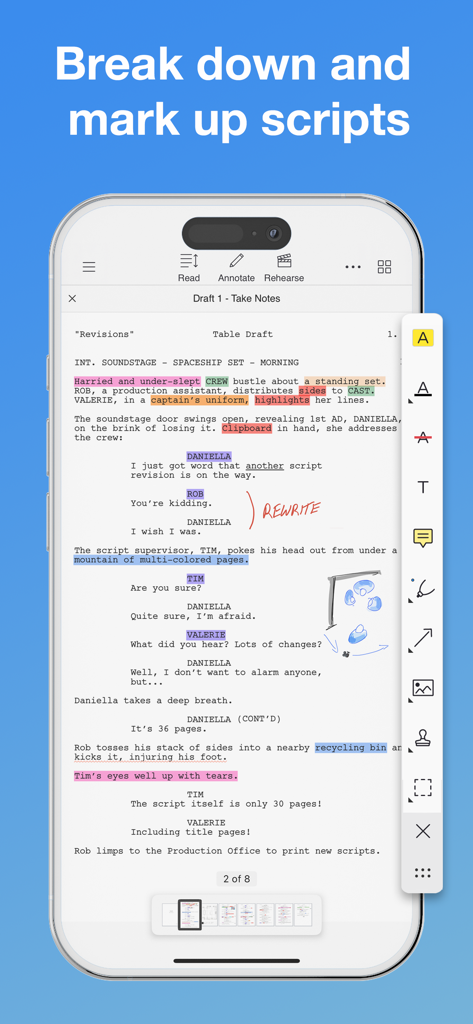
Scriptation: PDF for Film & TV - ハイライトや手書きのノートで注釈が付けられた脚本が表示されている、ScriptationアプリのiPhone画面
ハイライトや手書きのノートで注釈が付けられた脚本が表示されている、ScriptationアプリのiPhone画面

Scriptation: PDF for Film & TV - プロ向けの移行オプションを備えた、2つの脚本ドラフト間で注釈を移行するツールを表示するiPhone上のScriptationアプリ画面
プロ向けの移行オプションを備えた、2つの脚本ドラフト間で注釈を移行するツールを表示するiPhone上のScriptationアプリ画面

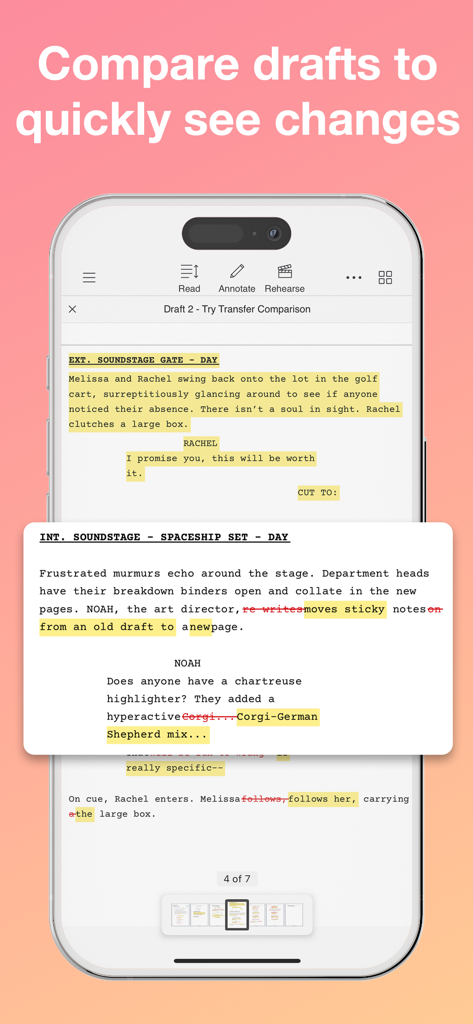
Scriptation: PDF for Film & TV - 変更箇所を示すためのハイライト表示と打ち消し線が含まれた、2つの脚本ドラフトの比較を表示するiPhone上のScriptationアプリのスクリーンショット
変更箇所を示すためのハイライト表示と打ち消し線が含まれた、2つの脚本ドラフトの比較を表示するiPhone上のScriptationアプリのスクリーンショット

Scriptation: PDF for Film & TV - 香盤表のフォルダや色分けされた脚本ドラフトが含まれるデジタル制作バインダーを表示するScriptationアプリ画面
香盤表のフォルダや色分けされた脚本ドラフトが含まれるデジタル制作バインダーを表示するScriptationアプリ画面

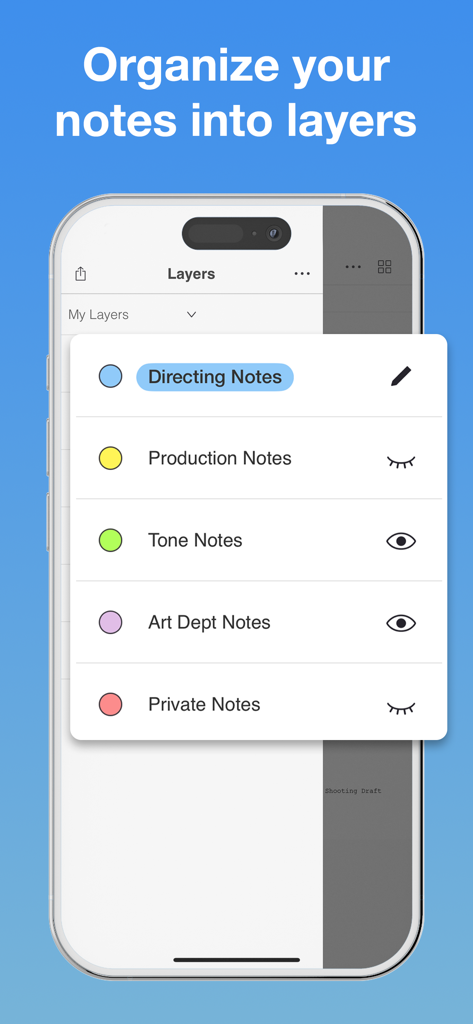
Scriptation: PDF for Film & TV - 演出や制作などの映画制作カテゴリーごとに整理された注釈レイヤーを表示するiPhone上のScriptationアプリ
演出や制作などの映画制作カテゴリーごとに整理された注釈レイヤーを表示するiPhone上のScriptationアプリ

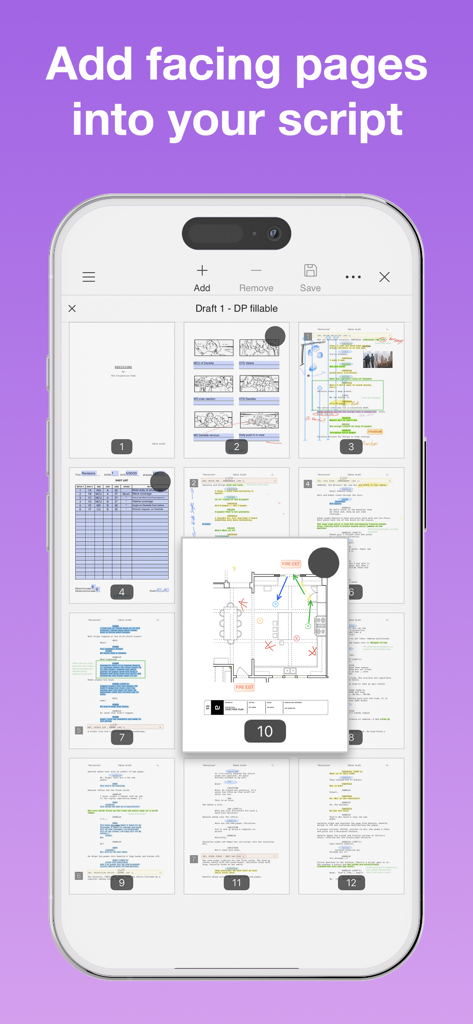
Scriptation: PDF for Film & TV - デジタル映画脚本にフロアプランや対向ページを追加している様子を表示するScriptationアプリのインターフェース
デジタル映画脚本にフロアプランや対向ページを追加している様子を表示するScriptationアプリのインターフェース

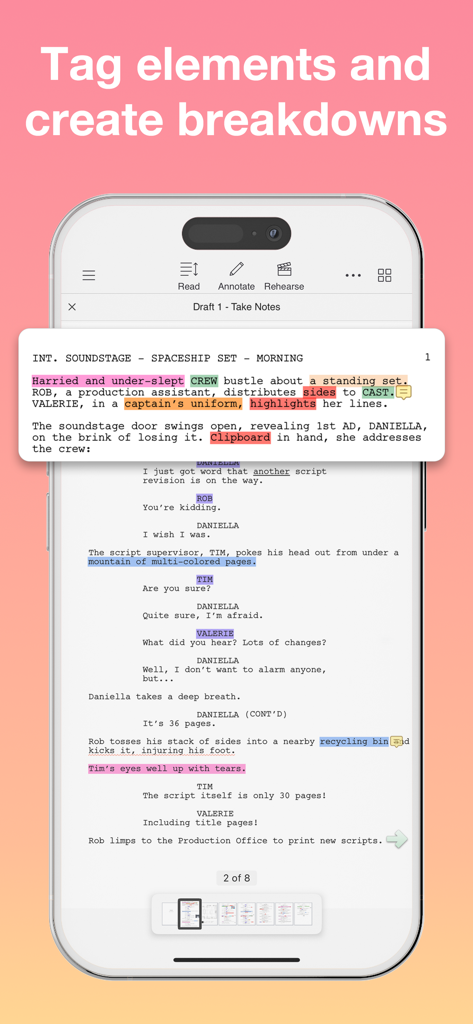
Scriptation: PDF for Film & TV - 制作ブレイクダウンの作成に使用される、ハイライトされた脚本要素を表示するScriptationアプリのiPhoneスクリーンショット
制作ブレイクダウンの作成に使用される、ハイライトされた脚本要素を表示するScriptationアプリのiPhoneスクリーンショット

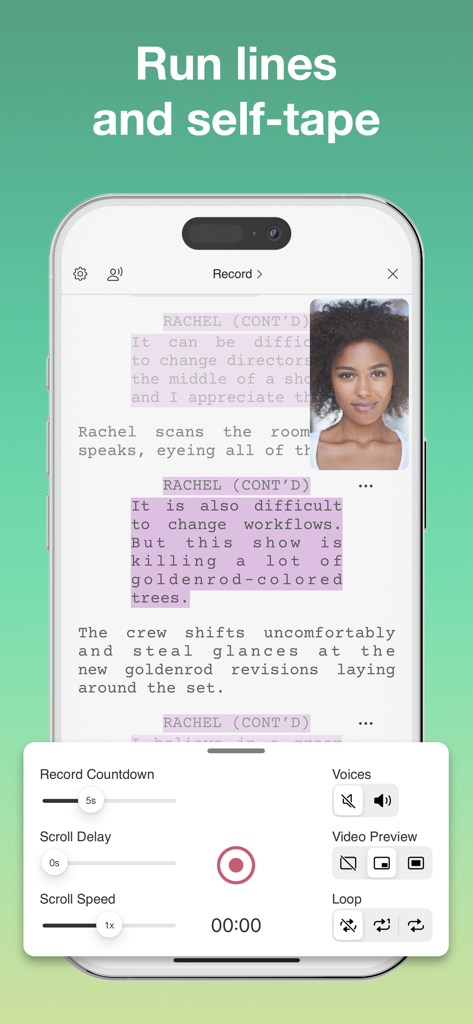
Scriptation: PDF for Film & TV - 脚本とビデオプレビューを表示する、セリフ練習およびセルフテープ録画機能のiPhone上のScriptationアプリ画面
脚本とビデオプレビューを表示する、セリフ練習およびセルフテープ録画機能のiPhone上のScriptationアプリ画面

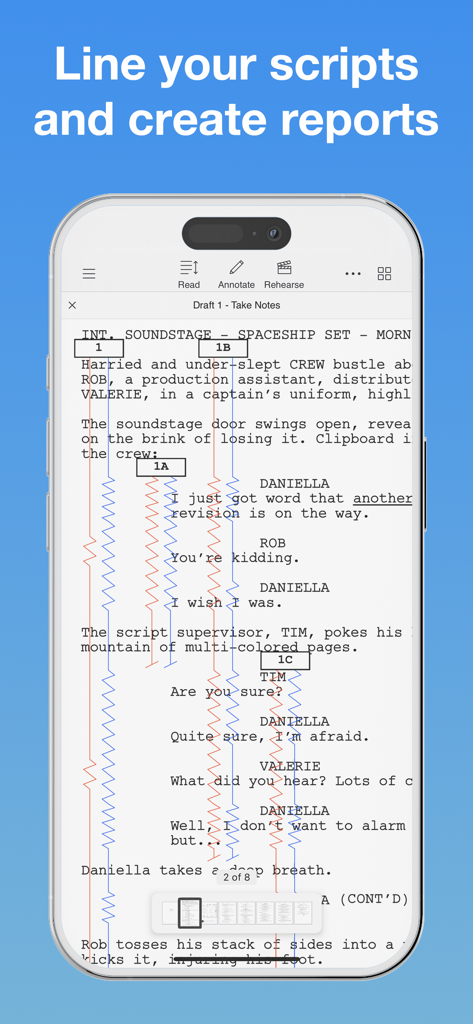
Scriptation: PDF for Film & TV - デジタル脚本上に赤と青の垂直線が表示された、プロ仕様のスクリプト・スーパーバイザー用ライニングツールを表示するScriptationアプリ

デジタル脚本上に赤と青の垂直線が表示された、プロ仕様のスクリプト・スーパーバイザー用ライニングツールを表示するScriptationアプリ

説明

"When I mark up my script, I use Scriptation now." - Kathy Bates "Scriptation changed my life. Every time you get a new draft, it transfers all your notes." - Sophia Bush Scriptation, the Emmy® winning PDF annotation app for the film, television, and video industry, is the revolutionary app for production that intelligently transfers your annotations, notes, and markups into new script revisions. NOTE TRANSFER - THE SCRIPTATION DIFFERENCE If you've ever had 30 revision pages on a 40-page script, you know how time consuming it is to copy your notes to new script pages. Scriptation's proprietary note transfer algorithms analyze script changes and transfers every note to its corresponding location in the next draft in literally seconds. ANNOTATE Pen and paper, meet stylus and tablet. Scriptation offers a full set of annotation tools that allow you to highlight text, type notes, add photos, insert stickies, record sound, and more. ORGANIZE You can finally get rid of that 3-ring binder. Scriptation gets you organized by keeping all your scripts, call sheets, schedules, and production documents in a digital production binder. LAYERS Want to separate notes based on meetings? Or share your thoughts with your department? Scriptation's annotation layers makes it easy to navigate between sets of notes. PAGE MAKER Insert facing pages, set plans, photos, diagrams, and more, and transfer them into new script revisions. You can even ditch paper sides by creating your own with all your notes. AUTO HIGHLIGHT That table read script isn't going to highlight itself. Or is it? Built for actors but customized for sound mixers, Scriptation automatically highlights character lines with the tap of a button. READ / REHEARSE / RECORD Elevate your rehearsal process with customizable character voices, line reminders, and scene looping. Use as a read partner or teleprompter for self-tape auditions. Set recording delays for slates and access Auto-Highlight within Reader Mode. TAGGING Break down your script into customizable categories and generate reports. Add scene descriptions, notes, and images to your reports. Export as a formatted PDF or a CSV to integrate the data into other spreadsheets. LINING Professional script supervisor lining tools to streamline your workflow. Easily mark up your script, track coverage, and maintain continuity across scenes and revisions. SCRIPTATION INDUSTRY PRO Scriptation Industry Pro is an auto-renewing subscription service that offers advanced features to optimize the way you work. When you make the jump to Industry Pro, here's what you get across all of your devices. • Pro Note Transfer: Multi-Layer, Collate Pages, Compare Scripts • Tagging: Tag Elements, Generate Reports • Page Maker: Add Facing Pages, Shot Lists • Sides Creator: Generate Daily Sides • Script Supervisor Lining Tools • Layer Upgrades: Show/Hide, Shareable Layers • Reader Upgrades: Read Aloud, Assign Voices, Self-Tape Scriptation Industry Pro has 1 Month and 12 Month subscription options. For offers that include a 14-day free trial, after the free trial period you will be automatically renewed to the current subscription price which you can cancel at any time. Scriptation Industry Pro automatically renews unless auto-renew is turned off at least 24-hours before the end of the current period. Your account will be charged for renewal within 24-hours prior to the end of the current period. Payment will be charged to your iTunes account at confirmation of purchase. You may manage Scriptation Industry Pro subscriptions and turn off auto-renewal by going to your Account Settings after purchase. Any unused portion of a free trial period will be forfeited when you purchase a subscription. Terms of Use: https://scriptation.com/terms Privacy Policy: https://scriptation.com/privacy Facebook: https://facebook.com/scriptationapp Instagram: https://instagram.com/scriptation Twitter: https://twitter.com/scriptation YouTube: https://youtube.com/scriptation

Download

ダウンロード: App Store

このページはアプリまたはその開発者の公式ページではなく、情報提供および論評を目的として作成された独立した編集出版物です。明示的に別段の記載がない限り、アプリおよびその開発者は、MWM、Apple、Google Play、アプリのパブリッシャー、またはアプリの開発者と提携、承認、後援、認可、またはその他の公式的な関係はなく、このページのいかなる内容も、アプリがMWMのサービスを使用して開発されたことを意味するものではありません。すべての商標、ロゴ、スクリーンショット、その他のコンテンツはそれぞれの所有者の財産です。