Cast to TV: Screen Share
ダウンロード: App Store

このページはアプリまたはその開発者の公式ページではなく、情報提供および論評を目的として作成された独立した編集出版物です。明示的に別段の記載がない限り、アプリおよびその開発者は、MWM、Apple、Google Play、アプリのパブリッシャー、またはアプリの開発者と提携、承認、後援、認可、またはその他の公式的な関係はなく、このページのいかなる内容も、アプリがMWMのサービスを使用して開発されたことを意味するものではありません。すべての商標、ロゴ、スクリーンショット、その他のコンテンツはそれぞれの所有者の財産です。

ロゴ: Cast to TV: Screen Share
ダウンロード: App Store

Cast to TV: Screen Share

映画、写真、アプリをiPhoneからあらゆるスマートTVにワイヤレスでストリーミング。ケーブルやハードウェアは不要 – 好きなものをすべて、即座に高品質でミラーリングできます。

主要数値

ダウンロード

100

ユーザー評価

1.0/5

評価数

0

開発元

Collabrains Technologies LTD

カテゴリ

Utilities

対応言語

12

最新バージョン

1.1

サイズ

9.6 MB

リリース日

2026年1月12日
機能

あなたの小さな画面に命を吹き込む

ワイヤレスストリーミングの究極の自由を体験してください。あらゆるスマートTVを、仕事、遊び、そしてその間のすべてのために、iPhoneまたはiPadの強力な拡張機能に変えましょう。

インスタント画面ミラーリング

遅延なくリアルタイムで画面全体を共有できます。スライドのプレゼンテーション、モバイルゲーム、または部屋のみんなとソーシャルメディアを閲覧するのに最適です。

シネマティックメディアキャスト

4Kビデオ、高解像度のフォトギャラリー、音楽を直接テレビにストリーミングできます。お気に入りの思い出を、息をのむような品質で大画面で追体験しましょう。

以下のスクリーンショットと説明は、アプリの公式ストアリスティングから直接取得されたものであり、アプリ開発者の所有物です。

アプリストア

スクリーンショット
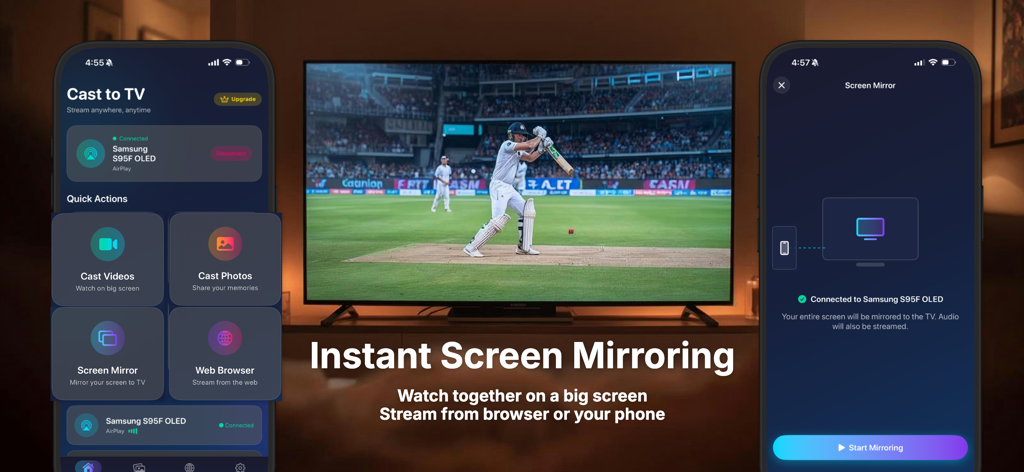
Cast to TV: Screen Share - サムスンのスマートTVにスポーツの試合を画面ミラーリングしているiPhoneアプリのインターフェース
サムスンのスマートTVにスポーツの試合を画面ミラーリングしているiPhoneアプリのインターフェース

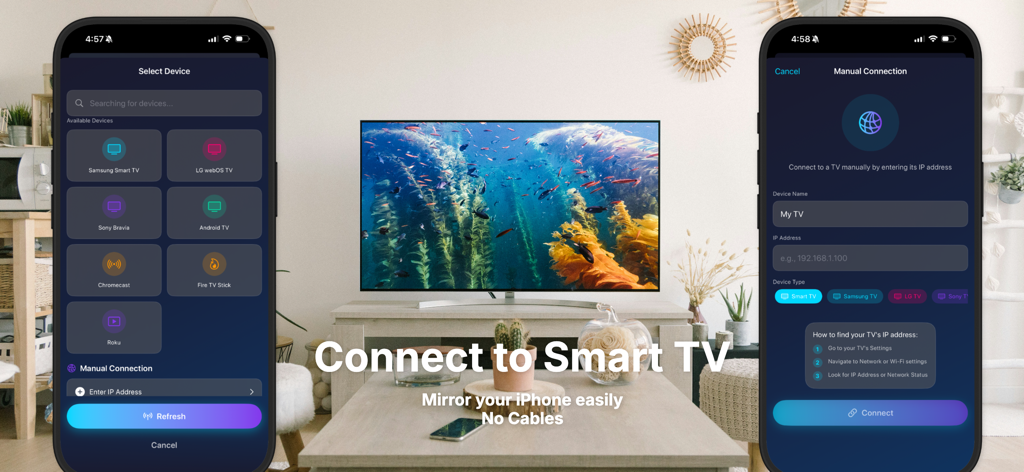
Cast to TV: Screen Share - ケーブルなしで画面ミラーリングのためにiPhoneをスマートTVに接続するためのインターフェース

ケーブルなしで画面ミラーリングのためにiPhoneをスマートTVに接続するためのインターフェース

説明

Cast to TV lets you stream and mirror your iPhone or iPad to your Smart TV with ease. Watch videos, movies, photos, and web content or mirror your screen in real time on a larger display. Built for speed and stability, Cast to TV works with most Smart TVs and requires no cables or additional hardware. Just connect over Wi-Fi and start casting instantly. Key Features • Screen mirroring from iPhone to TV • Cast videos, movies, and online content • Stream photos and slideshows • Music casting with high-quality audio • Fast and stable Wi-Fi connection • Compatible with most Smart TVs • Simple and intuitive user interface Ideal For • Watching movies and shows on a big screen • Sharing photos and videos with friends and family • Presentations, meetings, and demonstrations • Gaming and live screen sharing How It Works 1. Connect your iPhone and TV to the same Wi-Fi network 2. Open Cast to TV 3. Select your TV and start casting No cables. No complicated setup. Download Cast to TV and enjoy seamless screen mirroring and streaming anytime. Cast to TV offers optional auto-renewable subscriptions; weekly, monthly and yearly premiums that unlock some advanced features. Subscription Details: • Subscriptions are billed automatically unless canceled at least 24 hours before the end of the current period • Payment is charged to your Apple ID • Subscriptions can be managed or canceled anytime in your App Store account settings • Any unused portion of a free trial (if offered) will be forfeited when a subscription is purchased Privacy Policy: https://www.sadynamics.com/cast-to-tv-privacy-policy/ Terms of Use: https://www.sadynamics.com/cast-to-tv-terms-of-use-eula/

Download

ダウンロード: App Store

このページはアプリまたはその開発者の公式ページではなく、情報提供および論評を目的として作成された独立した編集出版物です。明示的に別段の記載がない限り、アプリおよびその開発者は、MWM、Apple、Google Play、アプリのパブリッシャー、またはアプリの開発者と提携、承認、後援、認可、またはその他の公式的な関係はなく、このページのいかなる内容も、アプリがMWMのサービスを使用して開発されたことを意味するものではありません。すべての商標、ロゴ、スクリーンショット、その他のコンテンツはそれぞれの所有者の財産です。








