
このページはアプリまたはその開発者の公式ページではなく、情報提供および論評を目的として作成された独立した編集出版物です。明示的に別段の記載がない限り、アプリおよびその開発者は、MWM、Apple、Google Play、アプリのパブリッシャー、またはアプリの開発者と提携、承認、後援、認可、またはその他の公式的な関係はなく、このページのいかなる内容も、アプリがMWMのサービスを使用して開発されたことを意味するものではありません。すべての商標、ロゴ、スクリーンショット、その他のコンテンツはそれぞれの所有者の財産です。


ダウンロード
7.5M+ユーザー評価
評価数
192.9K開発元
カテゴリ
Photo & Video対応言語
2最新バージョン
2.0.109サイズ
54.5 MBリリース日
2015年7月11日ウェブ動画のテレビ視聴体験を向上させる主要機能
「Cast Web Videos to TV - iWebTV」機能分析
ウェブ動画のテレビキャスト
このアプリは、オンラインのウェブ動画を対応するテレビデバイスに直接キャストし、画面ミラーリングよりも優れた画質を提供します。
高解像度再生対応
ユーザーは、デバイスに応じて最大4Kまでの高解像度でウェブ動画を視聴できます。
高機能ウェブブラウザ
本アプリは、複数のタブ、迷惑なポップアップのブロック、URLバーからの検索、広告ブロッカー、閲覧履歴などの機能を備えた高度なブラウザを提供します。
字幕サポート
このツールは、字幕の自動検出機能と、映画やテレビ番組向けの字幕ライブラリを提供し、視聴体験を向上させます。
ライブストリーム対応
ユーザーは、このアプリを通じてオンラインのライブストリームコンテンツをテレビで視聴できます。
連続再生キュー
この機能により、複数の動画をキューに追加して連続再生できるため、中断のない視聴が可能です。
包括的な再生コントロール
アプリを終了した後でも(ロック画面からでも)、ユーザーは再生、一時停止、スキップなどの完全な再生コントロールを利用できます。
カスタマイズ可能なホームページとブックマーク
ユーザーは自分好みのホームページを設定したり、ウェブページや動画をブックマークとして保存したりできます。
ビデオプレビュー
このアプリは、ビデオプレビュー機能を提供し、ユーザーが目的のシーンを素早く見つけるのを助けます。
プライバシーモード
本ツールはプライバシーモードを備えており、ユーザーの閲覧履歴や個人情報を保護します。
よくある質問
について知っておくべきこと Cast Web Videos to TV - iWebTV
What is iWebTV?
iWebTV is an application designed to cast any online video to compatible televisions. It supports various devices like Chromecast, Roku, Fire TV, Apple TV, and Samsung TVs.
What devices does iWebTV support for casting?
iWebTV works with Chromecast, Roku, Fire TV, Apple TV (4th Gen), and Samsung TVs (2018 and later models). It also supports Smart TVs from various manufacturers without preliminary setup.
Does iWebTV support high-definition video streaming?
Yes, iWebTV supports HD resolution, including 1080p and up to 4K, depending on the casting device. It sends the actual video stream for optimal quality.
Can I use iWebTV to block ads while browsing?
Yes, iWebTV includes an advanced browser with an ad blocker feature. It also blocks or hides spammy popups to enhance the browsing experience.
Are subtitles available when casting videos with iWebTV?
Yes, iWebTV offers subtitle auto-detection and includes a Movie/TV Subtitle library. Premium Services subscribers get unlimited subtitle downloads.
What is the difference between iWebTV and mirroring apps?
Unlike mirroring apps, iWebTV sends the actual video stream directly to your TV. This method provides significantly better image quality and an improved overall viewing experience.
Does iWebTV offer a subscription for premium features?
Yes, iWebTV offers 'Premium Services' as a subscription for $0.99/month or $9.99/year. This unlocks all premium features, including Cloud Proxy Streaming and unlimited subtitle downloads.
Can I queue multiple videos to play on iWebTV?
Yes, iWebTV is 'Binge-ready' and allows users to queue up several videos. This feature ensures continuous playback for an uninterrupted viewing experience.
Does iWebTV support live streams?
Yes, iWebTV supports live streams, allowing users to cast real-time content from the web to their television.
Can I browse the web directly within the iWebTV app?
Yes, iWebTV features a full-feature web browser. It supports multiple tabs, a search bar, browsing history, and privacy modes.
What privacy features does iWebTV offer?
iWebTV includes privacy modes within its advanced browser. Users can start anonymous or private sessions and clear browsing history, tabs, and videos.
以下のスクリーンショットと説明は、アプリの公式ストアリスティングから直接取得されたものであり、アプリ開発者の所有物です。
アプリストア
スクリーンショット

このアプリは、HDから最大4Kまでの解像度でオンライン動画をテレビにストリーミングできます。大画面での高精細な視聴体験と、様々なオンラインコンテンツの再生を可能にします。
テレビで高画質

映画やテレビ番組に最適な字幕機能と、便利な動画キューを体験してください。この機能は、自動字幕検出を提供し、ユーザーは複数の動画をキューに追加して連続視聴できます。
映画と字幕
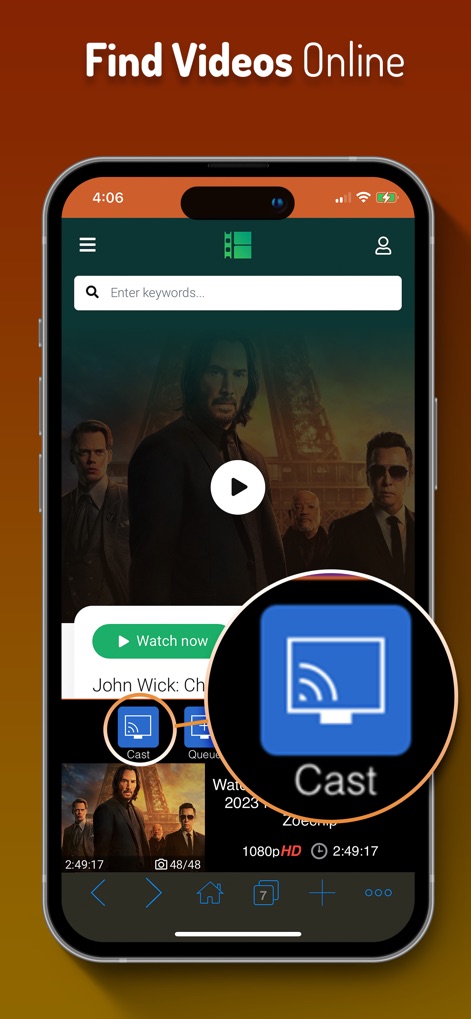
オンライン動画の検索を簡素化し、ワンタップでテレビにキャスト。このアプリは、直感的な検索バーを通じてコンテンツを素早く見つけることを支援し、明示的な「Cast」ボタンでスムーズなキャスト開始を提供します。
簡単動画検索

幅広いストリーミングデバイスとの互換性により、テレビへの接続が容易になります。Roku、Chromecast、Fire TV、Apple TV、Samsung TVなど、多様なデバイスへの簡単な接続オプションが用意されています。
多彩なTV接続

iPhoneから動画再生を完全にコントロールし、テレビで快適に視聴できます。この画面は、一時停止、早送りなどの豊富な再生コントロールと、続けて視聴できる便利な動画キューを示しています。
スマホで完全操作

内蔵された高機能ウェブブラウザで、コンテンツ探索とプライバシー保護を両立させます。このブラウザは、閲覧履歴やブックマークの管理機能に加え、匿名セッションやプライベートセッションなどのプライバシーモードを提供します。
高機能ウェブブラウザ
説明
Download



このページはアプリまたはその開発者の公式ページではなく、情報提供および論評を目的として作成された独立した編集出版物です。明示的に別段の記載がない限り、アプリおよびその開発者は、MWM、Apple、Google Play、アプリのパブリッシャー、またはアプリの開発者と提携、承認、後援、認可、またはその他の公式的な関係はなく、このページのいかなる内容も、アプリがMWMのサービスを使用して開発されたことを意味するものではありません。すべての商標、ロゴ、スクリーンショット、その他のコンテンツはそれぞれの所有者の財産です。