Cirrus SR22
Cirrus SR22
ダウンロード: App Store

このページはアプリまたはその開発者の公式ページではなく、情報提供および論評を目的として作成された独立した編集出版物です。明示的に別段の記載がない限り、アプリおよびその開発者は、MWM、Apple、Google Play、アプリのパブリッシャー、またはアプリの開発者と提携、承認、後援、認可、またはその他の公式的な関係はなく、このページのいかなる内容も、アプリがMWMのサービスを使用して開発されたことを意味するものではありません。すべての商標、ロゴ、スクリーンショット、その他のコンテンツはそれぞれの所有者の財産です。

ロゴ: Cirrus SR22
ダウンロード: App Store

Cirrus SR22

究極のiPad EFBで推測を排除します。SR22 G1、G2、またはG3に特化して調整された実際のPOHデータを使用して、質量・重心、離陸性能、「もしも」のシナリオを数秒で計算します。

主要数値

ダウンロード

500

ユーザー評価

1.0/5

評価数

0

開発元

Gyronimo, LLC

カテゴリ

Education

対応言語

1

最新バージョン

2.1

サイズ

16.9 MB

リリース日

2015年4月27日
機能

Cirrusパイロットのための精密フライトプランニング

SR22の性能と質量・重心計算のための究極のEFBツール。実際のPOHデータに基づいた高解像度のインタラクティブな計算で、手動チャートを置き換えます。

インタラクティブな質量・重心計算

直感的なスライダーを使用して、数秒で乗客と手荷物の重量を設定します。高解像度のグラフィック表示でCGエンベロープを即座に確認できます。

瞬時の性能計算

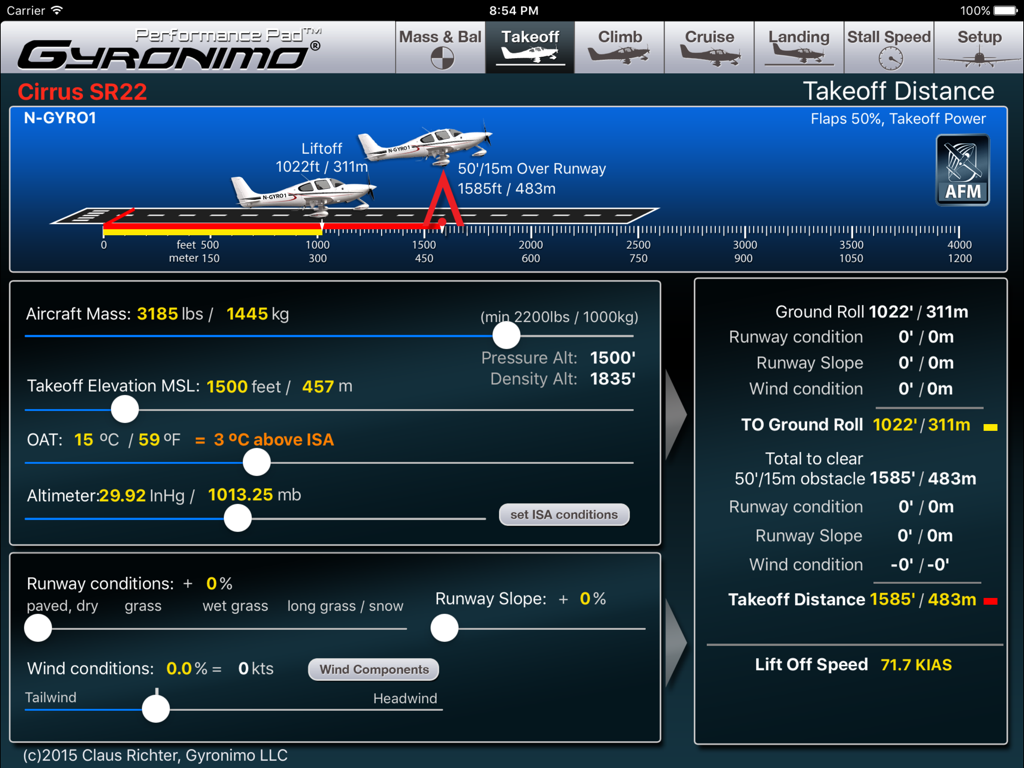
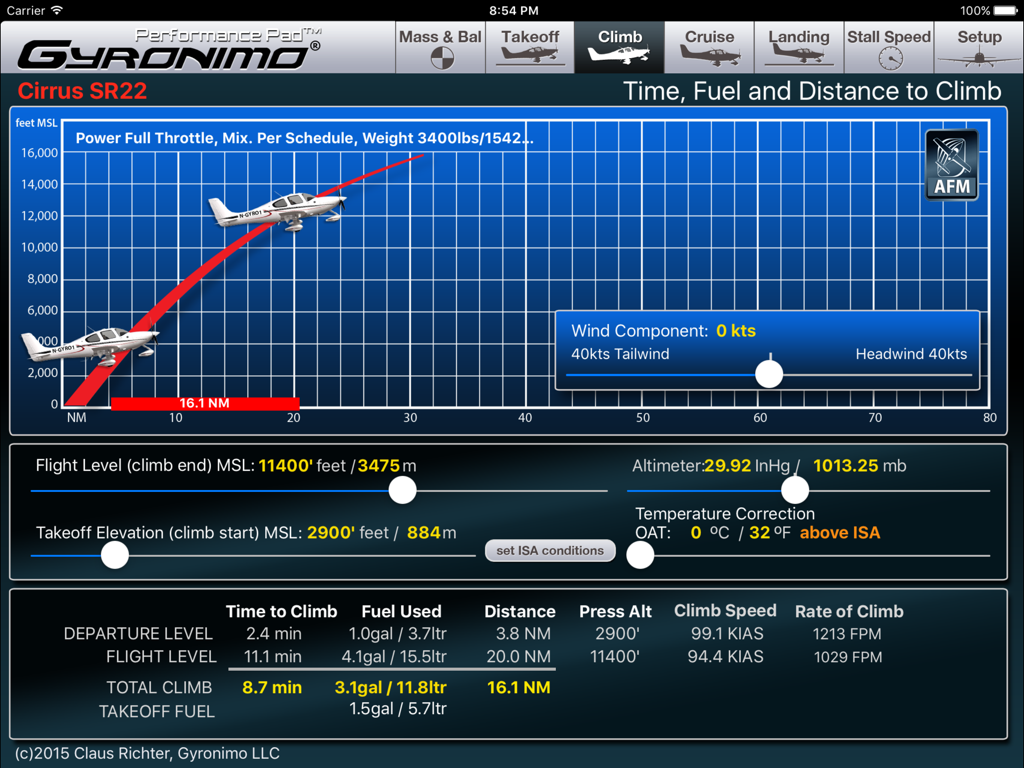
数秒で正確な離陸、上昇、着陸データを取得します。リアルタイムの環境変数を使用して、滑走距離と密度高度を計算します。

以下のスクリーンショットと説明は、アプリの公式ストアリスティングから直接取得されたものであり、アプリ開発者の所有物です。

アプリストア

スクリーンショット
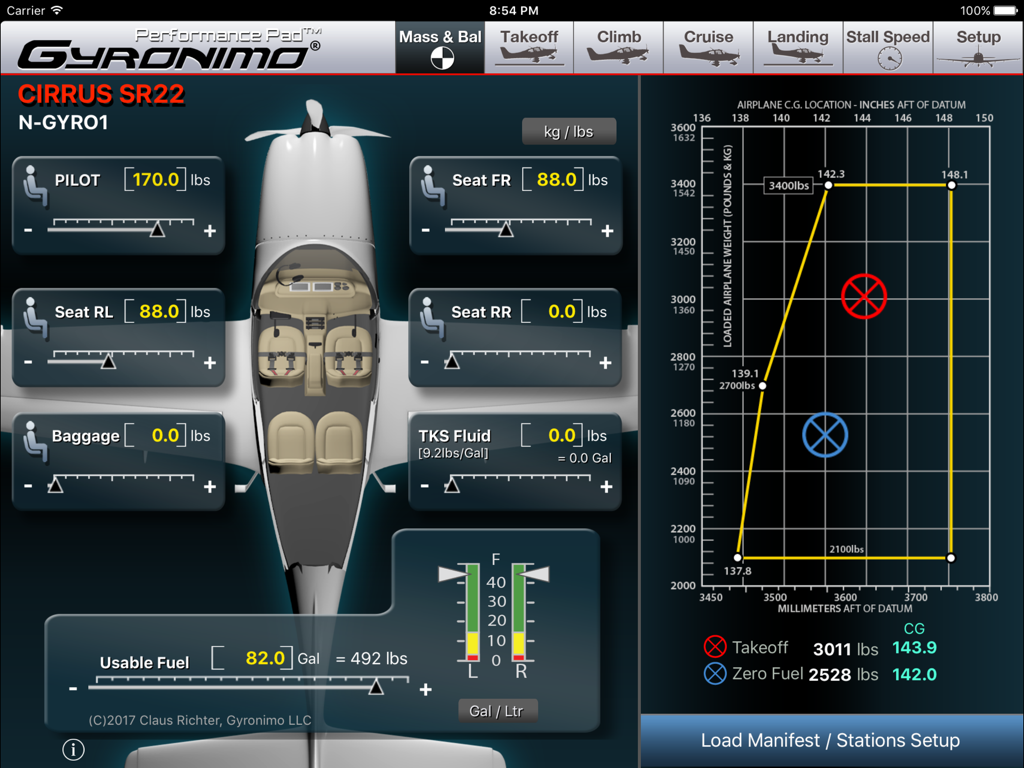
Cirrus SR22 - 重量・重心計算と調整可能なスライダー、重心エンベロープグラフを表示するCirrus SR22 Performance Padアプリのスクリーンショット。
重量・重心計算と調整可能なスライダー、重心エンベロープグラフを表示するCirrus SR22 Performance Padアプリのスクリーンショット。

Cirrus SR22 - 質量と環境条件の調整可能なスライダーを備えた、Cirrus SR22航空機の離陸距離と滑走距離計算画面。
質量と環境条件の調整可能なスライダーを備えた、Cirrus SR22航空機の離陸距離と滑走距離計算画面。

Cirrus SR22 - Cirrus SR22の上昇性能計算(上昇時間、燃料、距離を含む)を表示するiPadインターフェイス
Cirrus SR22の上昇性能計算(上昇時間、燃料、距離を含む)を表示するiPadインターフェイス

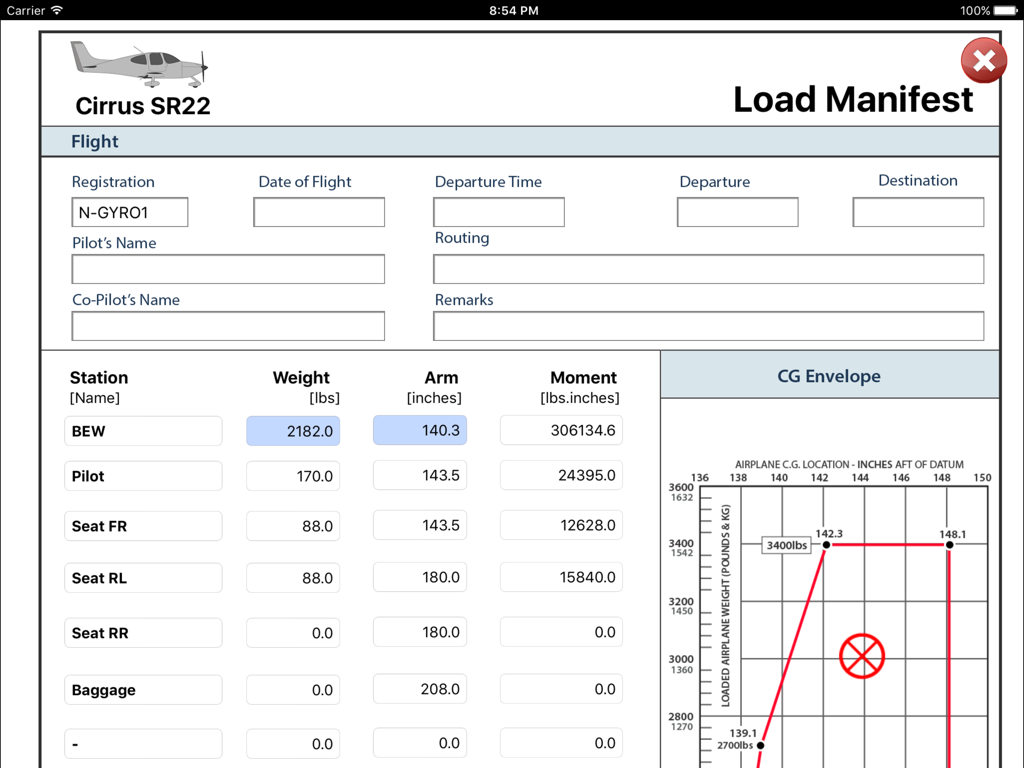
Cirrus SR22 - 重量計算と重心エンベロープグラフを表示するCirrus SR22ロードマニフェスト画面のiPadスクリーンショット
重量計算と重心エンベロープグラフを表示するCirrus SR22ロードマニフェスト画面のiPadスクリーンショット

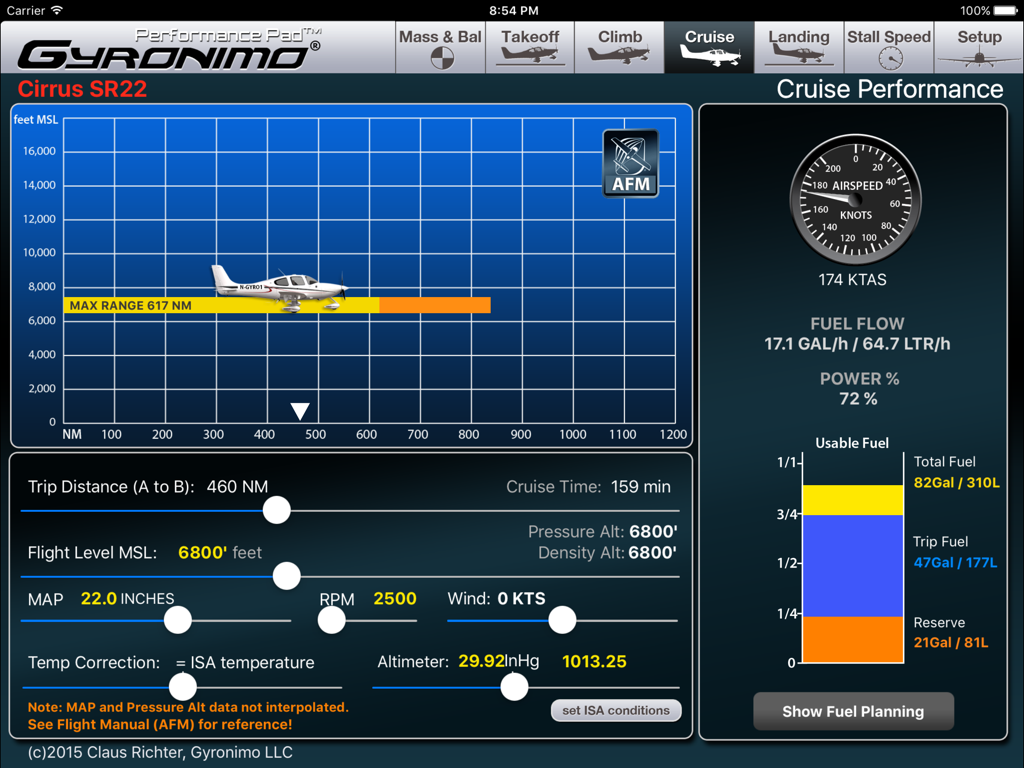
Cirrus SR22 - 燃料計画と飛行データを含むCirrus SR22巡航性能ページ

燃料計画と飛行データを含むCirrus SR22巡航性能ページ

説明

Gyronimo Performance Pad -Cirrus SR22- The ultimate EFB computer for Mass & Balance and Performance. *** now with 81/92 US Gal Fuel Tank Option to accommodate SR22 G1, G2 and G3 models. *** For SR22 model with MTOW 3400 lbs with Cirrus Perspective Avionics System (based on flight manual revision Sept. 2011) The W&B and performance computations can be used for all SR22 serial numbers (0002-3026 and subsequent). ++ TKS Anti Icing Fluid option. **** NOW WITH PROFESSIONAL LOAD MANIFEST ***** Sign the manifest on the iPad and send it via email. Calculate and interpolate performance data using the actual values from the Pilot's Operating Handbook (POH). Finish your complete fight planning in just a few seconds. Performance planning has never been easier and quicker. Results are updated immediately and displayed in high resolution graphics, enhanced for the iPad 2/3 and iPad Mini. Change all important values using sliders. Experiment with the results and create "what if" scenarios in no time. Find your optimal cruise altitude, takeoff ground roll, landing distance, climb data and stall speeds. The Performance Pad has seven main pages: 1. The Mass & Balance (or Weight & Balance) Page Calculates Center of Gravity, Moments, Takeoff and Zero Fuel Mass. Set person and baggage weights in seconds using the convenient sliders. Check if the CG is within limits using three graphical displays - Moment Envelope - CG envelope - Aircraft axis 2. The Takeoff Page Using the actual data from the Operating Handbook the Performance Pad calculates and displays Ground Roll and Landing Distance based on: - Aircraft Mass - Takeoff Elevation in MSL (Pressure Altitude and Density Altitude will be computed) - Outside Air Temperature (OAT) - Altimeter Setting - Runway Conditions (i.e. paved dry to long grass or snow) - Runway Slope - Wind Conditions Wind Components Computer - Use the Wind Components page to determine your headwind or tailwind component. Rotate the wind dial to set wind direction, set windspeed and the results will be transferred to your takeoff computations automatically! 3. The Climb page Calculates time, fuel and distance based on - Difference between Takeoff Elevation and intended Flight Level - Altimeter Setting - Outside Air Temperature (OAT) - Altimeter Setting - Headwind or Tailwind Component Also the Rate of Climb and Climb Speed will be displayed. 4. The Cruise Page Using the actual data from the Pilot's Operating Handbook you can determine the optimal cruise altitude based on - Trip Distance - Flight Level - MAP / RPM - Temperature - Wind and Altimeter Setting 5. Landing Page Calculates Ground Roll and Landing Distance based on wind, elevation, altimeter setting etc. Like on the Takeoff Page you can use the Wind Components Computer to quickly determine head- or tailwind components 6. Stall Speed Page. Calculates The Stall Speed based on Bank Angle and Flap Settings. Stall Speed will be computed as KIAS and KCAS using the actual values from the POH. 7. Setup - Load and Save up to five Aircraft Settings and Scenarios. - Send a Mass & Balance Summary to your email address. - Visit our video channel and watch tutorials and video manuals. Mode Switch: The Performance Pad can be used in two Modes: "Individual Mode" All calculations can be done independently from each other. "Plan Mode" Calculated values will be forwarded to the next page and an additional "Flight Summary Page" is available. Gyronimo LLC is not affiliated with Cirrus Aircraft. All Gyronimo Performance Pads for Cirrus aircrafts are not sponsored or endorsed by Cirrus Aircraft. The author disclaims any liability for any direct, indirect, incidental, or consequential losses or damages in connection with your access to or use of this software. The information contained in this software is for general information purposes only.

Download

ダウンロード: App Store

このページはアプリまたはその開発者の公式ページではなく、情報提供および論評を目的として作成された独立した編集出版物です。明示的に別段の記載がない限り、アプリおよびその開発者は、MWM、Apple、Google Play、アプリのパブリッシャー、またはアプリの開発者と提携、承認、後援、認可、またはその他の公式的な関係はなく、このページのいかなる内容も、アプリがMWMのサービスを使用して開発されたことを意味するものではありません。すべての商標、ロゴ、スクリーンショット、その他のコンテンツはそれぞれの所有者の財産です。