Class Planner (cloud)
ダウンロード: App Store

このページはアプリまたはその開発者の公式ページではなく、情報提供および論評を目的として作成された独立した編集出版物です。明示的に別段の記載がない限り、アプリおよびその開発者は、MWM、Apple、Google Play、アプリのパブリッシャー、またはアプリの開発者と提携、承認、後援、認可、またはその他の公式的な関係はなく、このページのいかなる内容も、アプリがMWMのサービスを使用して開発されたことを意味するものではありません。すべての商標、ロゴ、スクリーンショット、その他のコンテンツはそれぞれの所有者の財産です。

ロゴ: Class Planner (cloud)
ダウンロード: App Store

Class Planner (cloud)

K-12 教育者向けの究極のプロフェッショナルオーガナイザー。iPhone、iPad、Mac 間で授業を即座に同期し、カリキュラム基準を追跡し、Google Classroom とシームレスに統合して時間を節約しましょう。

主要数値

ダウンロード

800

ユーザー評価

4.6/5

評価数

100

開発元

Glen Botha

カテゴリ

Education

対応言語

4

最新バージョン

2.21.2

サイズ

22.2 MB

リリース日

2021年7月9日
機能

カリキュラムを楽々マスター

最新の教育者のために設計された Class Planner (cloud) は、授業計画と管理タスクを合理化し、最も重要なこと、つまり生徒に集中できるようにします。

シームレスなクラウド同期

Mac で計画し、iPad で教え、iPhone でスケジュールを確認しましょう。すべての Apple デバイスで授業は完全に同期されたままです。

基準連動型計画

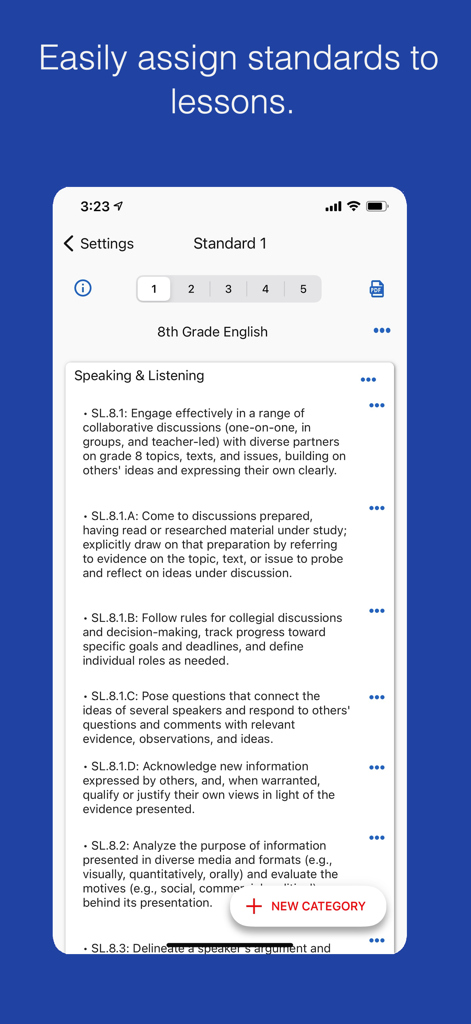
教育基準を簡単にインポートし、授業に直接リンクしましょう。管理レビュー用のプロフェッショナル PDF を数秒で生成します。

以下のスクリーンショットと説明は、アプリの公式ストアリスティングから直接取得されたものであり、アプリ開発者の所有物です。

アプリストア

スクリーンショット
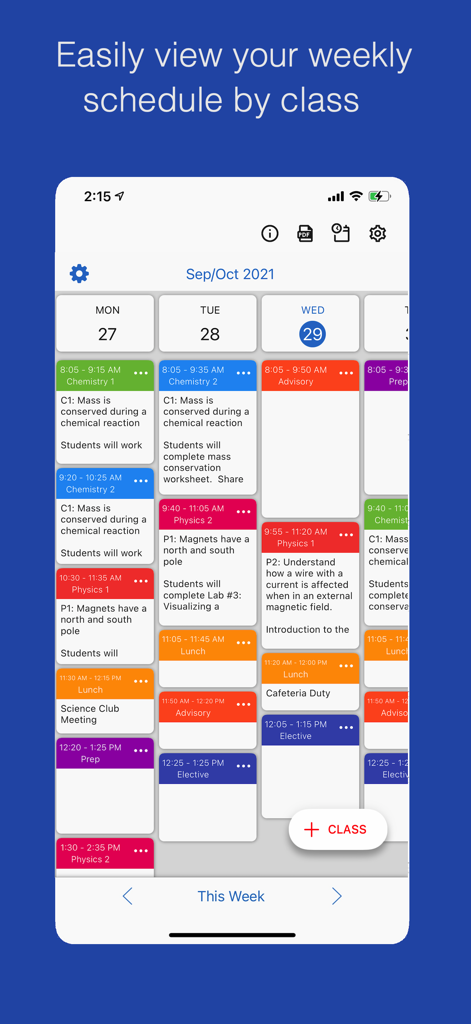
Class Planner (cloud) - 色分けされたクラスブロックと授業メモが表示された週次教師スケジュールを示すモバイルインターフェイス。
色分けされたクラスブロックと授業メモが表示された週次教師スケジュールを示すモバイルインターフェイス。

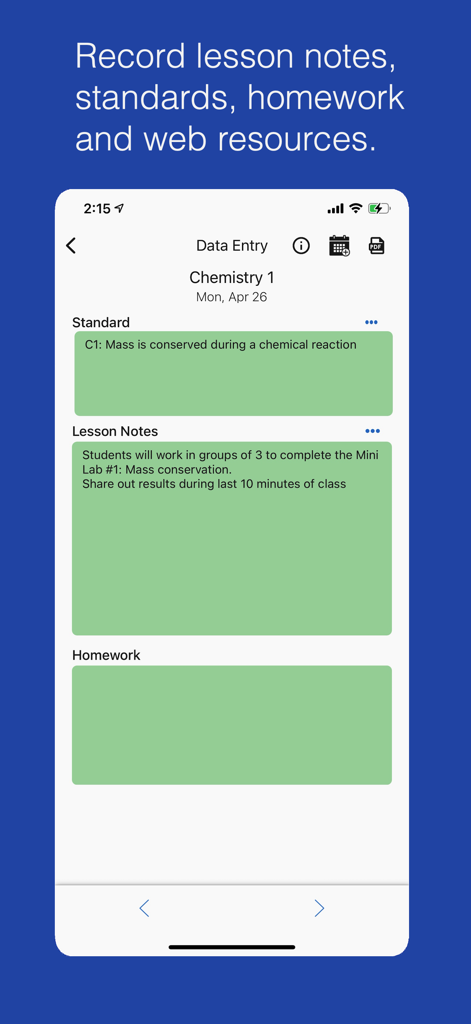
Class Planner (cloud) - 化学クラスの授業メモとカリキュラム基準を示す Class Planner アプリのモバイルインターフェイス
化学クラスの授業メモとカリキュラム基準を示す Class Planner アプリのモバイルインターフェイス

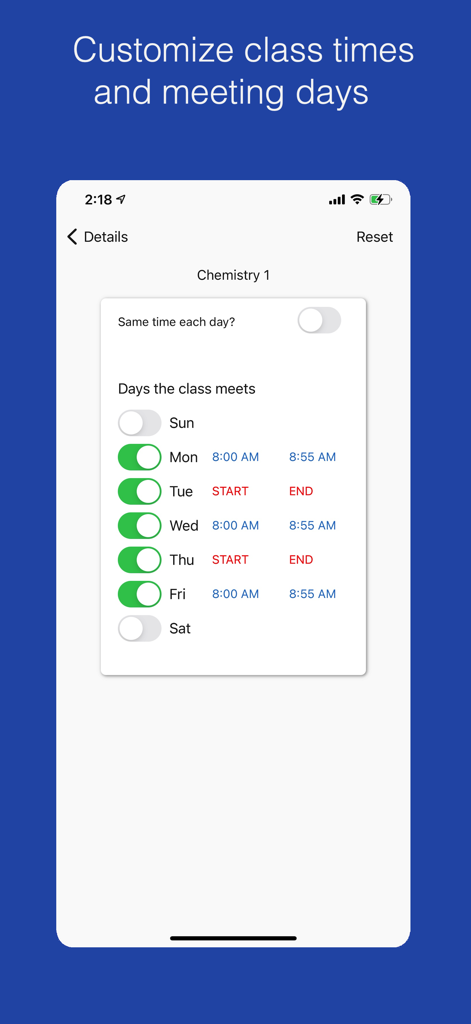
Class Planner (cloud) - Class Planner アプリで化学クラスの会議曜日と時刻を設定するためのインターフェイス
Class Planner アプリで化学クラスの会議曜日と時刻を設定するためのインターフェイス

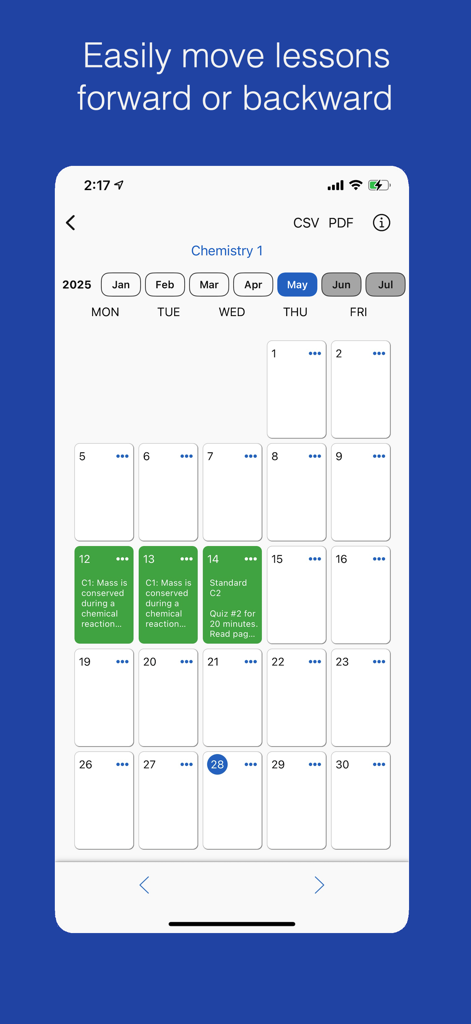
Class Planner (cloud) - 化学クラスの授業計画と授業の移動機能を示す Class Planner アプリのカレンダーインターフェイス
化学クラスの授業計画と授業の移動機能を示す Class Planner アプリのカレンダーインターフェイス

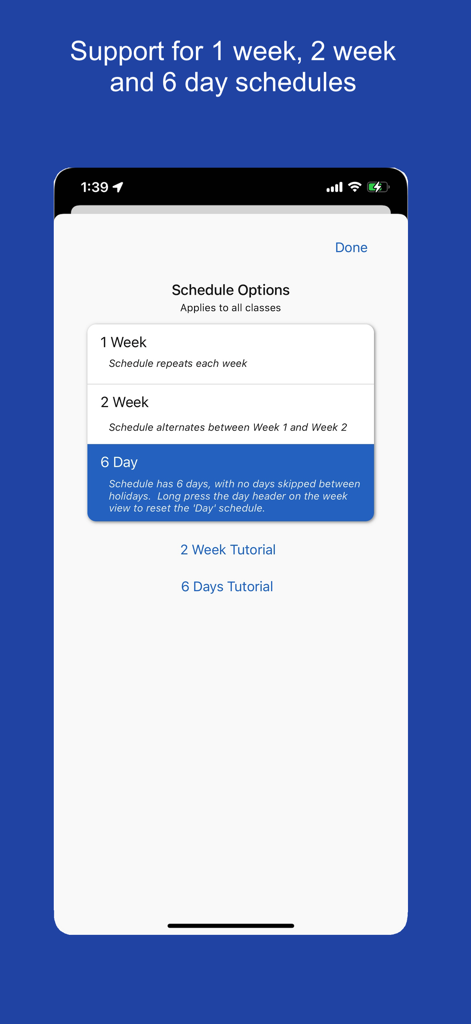
Class Planner (cloud) - 1週間、2週間、6日間のオプションを含むクラススケジュールサイクルを選択するためのインターフェイス
1週間、2週間、6日間のオプションを含むクラススケジュールサイクルを選択するためのインターフェイス

Class Planner (cloud) - Class Planner クラウドアプリのインターフェイスで、8年生の英語の授業計画の教育基準を表示

Class Planner クラウドアプリのインターフェイスで、8年生の英語の授業計画の教育基準を表示

説明

Class Planner (cloud) is a new release of the Class Planner app. This version stores data in the cloud instead of on device, so the app data is accessible from multiple devices such as a phone, an iPad and a MacBook computer. Your data automatically syncs from all your devices. Class Planner allows teachers to easily keep a record of their lesson plans which include the standards, lesson notes, homework and an online web resources. Features • Support a 1 week, 2 weeks or 6 day schedule. • Easily import standards and link to a lesson • View lessons for the day, the week, or by a class • Easily move lessons forward or backwards • Generate a PDF of the lesson for administrators or personal records • Sync homework with Google Classroom announcements. • Add a home screen widget to show today's class schedule Try the app for free for 2 classes. Activate an autorenewable subscription to support up to 20 classes or up to 30 classes. Autorenewable Subscription Details To access additional features the user needs to subscribe to an auto renewable subscription. This means the subscription automatically renews 24 hours before the end of the subscription date. Auto renewable subscriptions can be managed from the user iTunes account, and a link is provided in the subscription screen while in the app. All future updates are included with the auto renewable monthly subscription fee. The subscription may be cancelled for any future months, and the user will still have access to the data, only the additional features will be disabled. Feel free to email the developer at support@inpocketsolutions.com to give feedback. I love to make improvements based on user suggestions and anything to help teachers keep track of their lesson plans is appreciated. Privacy Policy: https://inpocketsolutions.com/privacy-policy Terms of Use: https://inpocketsolutions.com/terms

Download

ダウンロード: App Store

このページはアプリまたはその開発者の公式ページではなく、情報提供および論評を目的として作成された独立した編集出版物です。明示的に別段の記載がない限り、アプリおよびその開発者は、MWM、Apple、Google Play、アプリのパブリッシャー、またはアプリの開発者と提携、承認、後援、認可、またはその他の公式的な関係はなく、このページのいかなる内容も、アプリがMWMのサービスを使用して開発されたことを意味するものではありません。すべての商標、ロゴ、スクリーンショット、その他のコンテンツはそれぞれの所有者の財産です。








