classroom.cloud Student
ダウンロード: App Store

このページはアプリまたはその開発者の公式ページではなく、情報提供および論評を目的として作成された独立した編集出版物です。明示的に別段の記載がない限り、アプリおよびその開発者は、MWM、Apple、Google Play、アプリのパブリッシャー、またはアプリの開発者と提携、承認、後援、認可、またはその他の公式的な関係はなく、このページのいかなる内容も、アプリがMWMのサービスを使用して開発されたことを意味するものではありません。すべての商標、ロゴ、スクリーンショット、その他のコンテンツはそれぞれの所有者の財産です。

ロゴ: classroom.cloud Student
ダウンロード: App Store

classroom.cloud Student

学校のiPad全体で、教室の行動を管理し、オンラインアクティビティを監視し、生徒の幸福を守るための、教師向けの簡単でクラウドベースのプラットフォーム。

主要数値

ダウンロード

400

ユーザー評価

1.5/5

評価数

0

開発元

NetSupport Ltd

カテゴリ

Education

対応言語

24

最新バージョン

2.10.0000

サイズ

26.8 MB

リリース日

2021年12月1日
機能

指導の強化と生徒の安全の確保

教室のエンゲージメントを高め、IT管理を合理化し、生徒をオンラインで保護するために設計された、K-12環境向けの完全なクラウドベースプラットフォーム。

生徒のエンゲージメントを促進

リアルタイムの画面監視、インスタントなWebサイト起動、理解度を測るインタラクティブなクラスアンケートで、生徒を課題に集中させましょう。

高度なセーフガーディング

いじめや自傷行為に関するキーワードアラートと、生徒が懸念事項を報告するための目立たないツールで、デジタル環境を保護しましょう。

以下のスクリーンショットと説明は、アプリの公式ストアリスティングから直接取得されたものであり、アプリ開発者の所有物です。

アプリストア

スクリーンショット
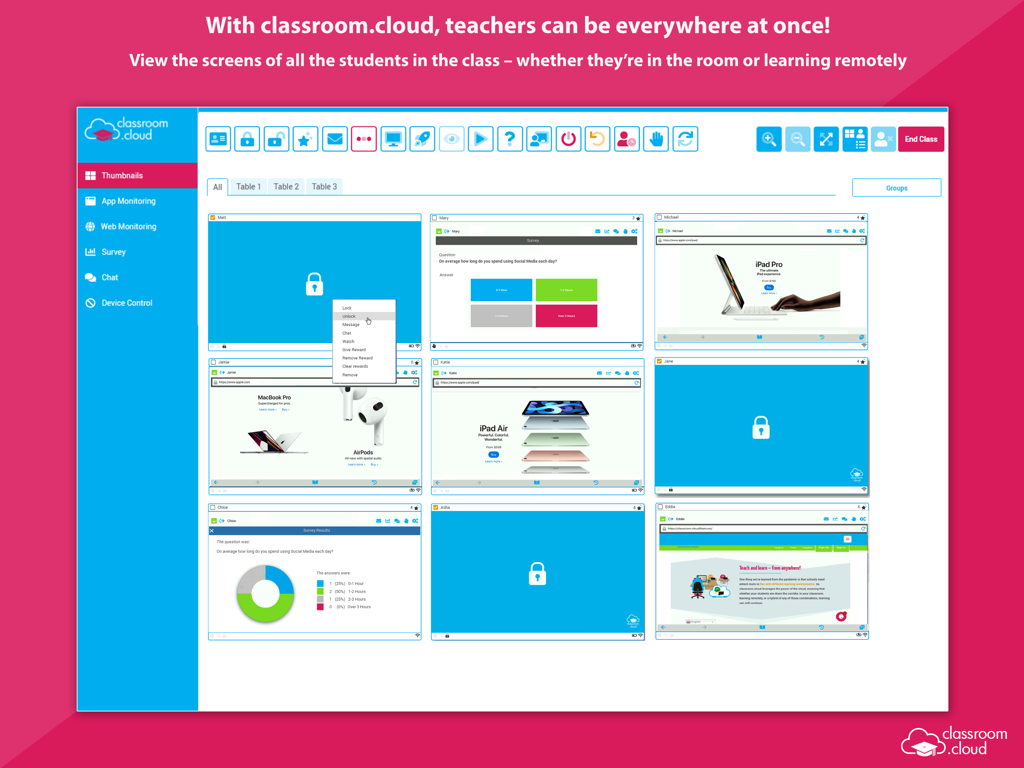
classroom.cloud Student - 教室管理ダッシュボードに、生徒のiPad画面のリアルタイムサムネイルが表示されている。
教室管理ダッシュボードに、生徒のiPad画面のリアルタイムサムネイルが表示されている。

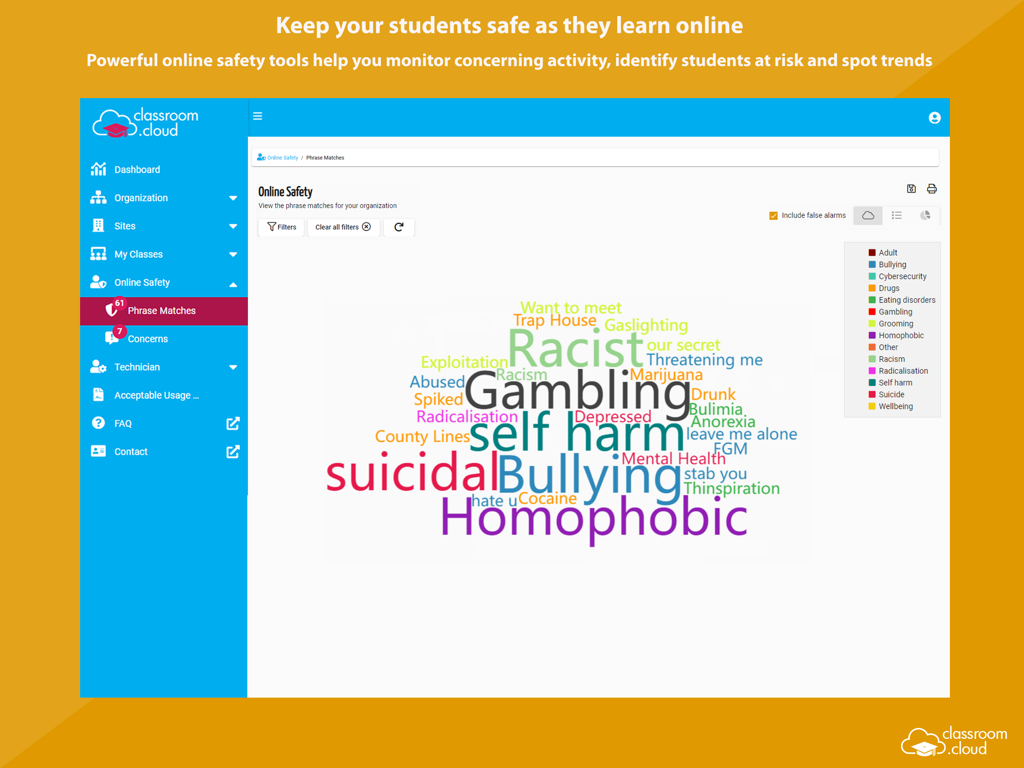
classroom.cloud Student - 監視対象キーワードのワードクラウドを特徴とする、classroom cloud student safety dashboard
監視対象キーワードのワードクラウドを特徴とする、classroom cloud student safety dashboard

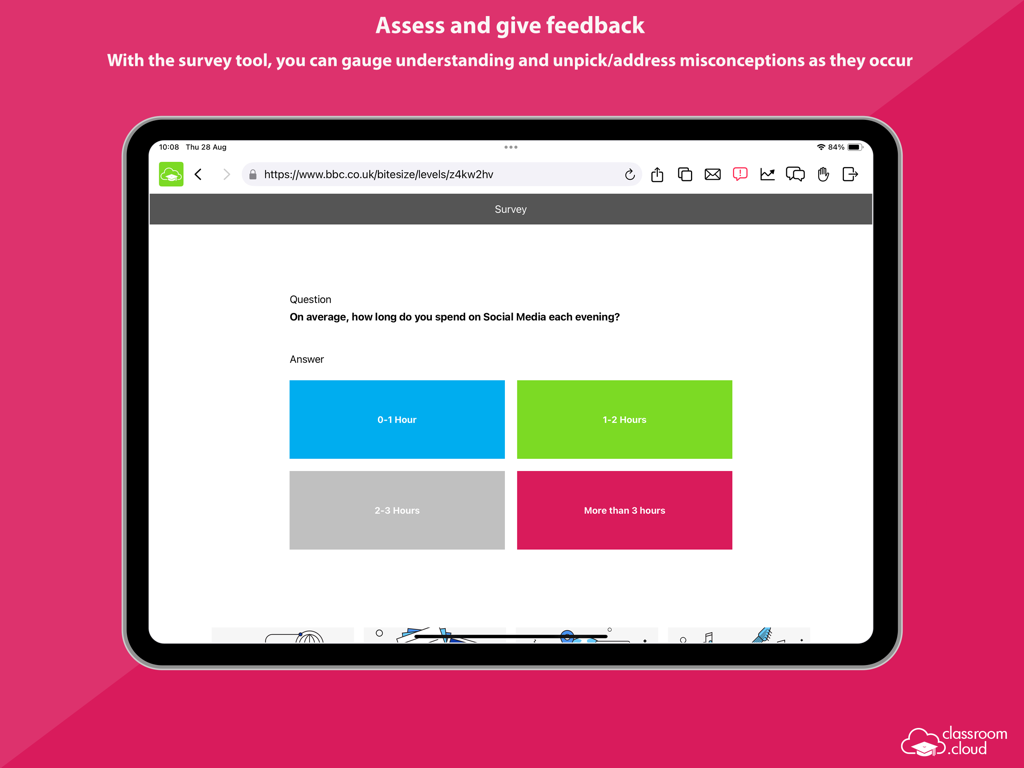
classroom.cloud Student - iPad上のclassroom.cloud Studentアプリのアンケートツールのスクリーンショット
iPad上のclassroom.cloud Studentアプリのアンケートツールのスクリーンショット

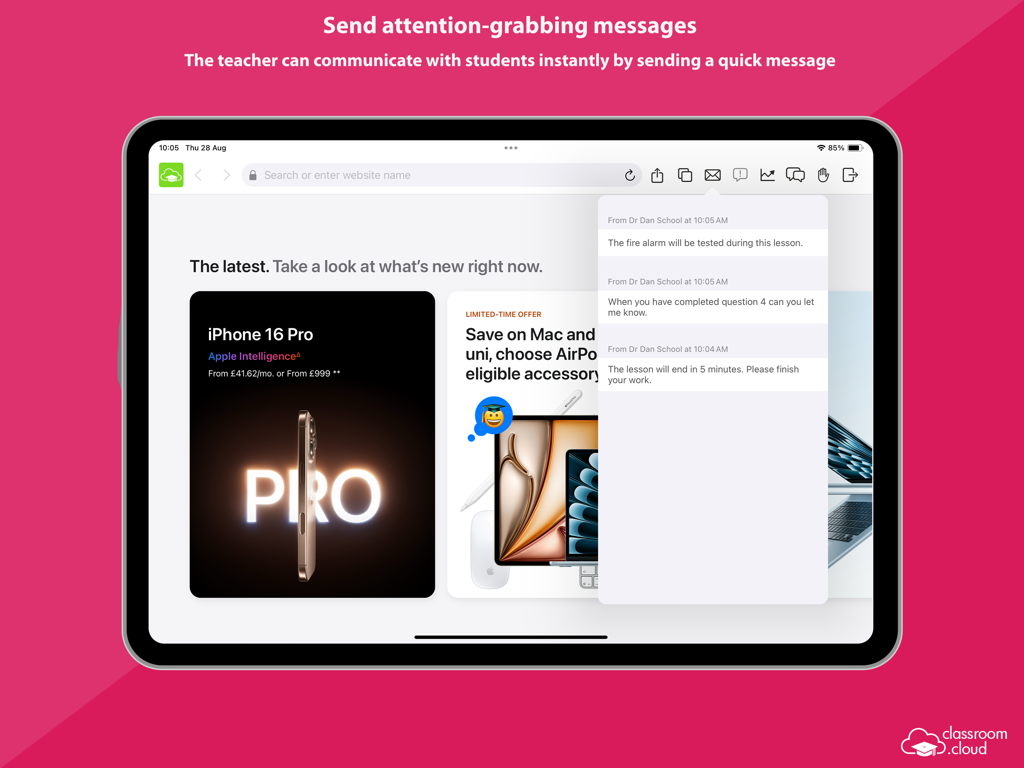
classroom.cloud Student - iPadにclassroom cloud studentアプリが表示され、教師からのインスタントメッセージと通知が表示される
iPadにclassroom cloud studentアプリが表示され、教師からのインスタントメッセージと通知が表示される

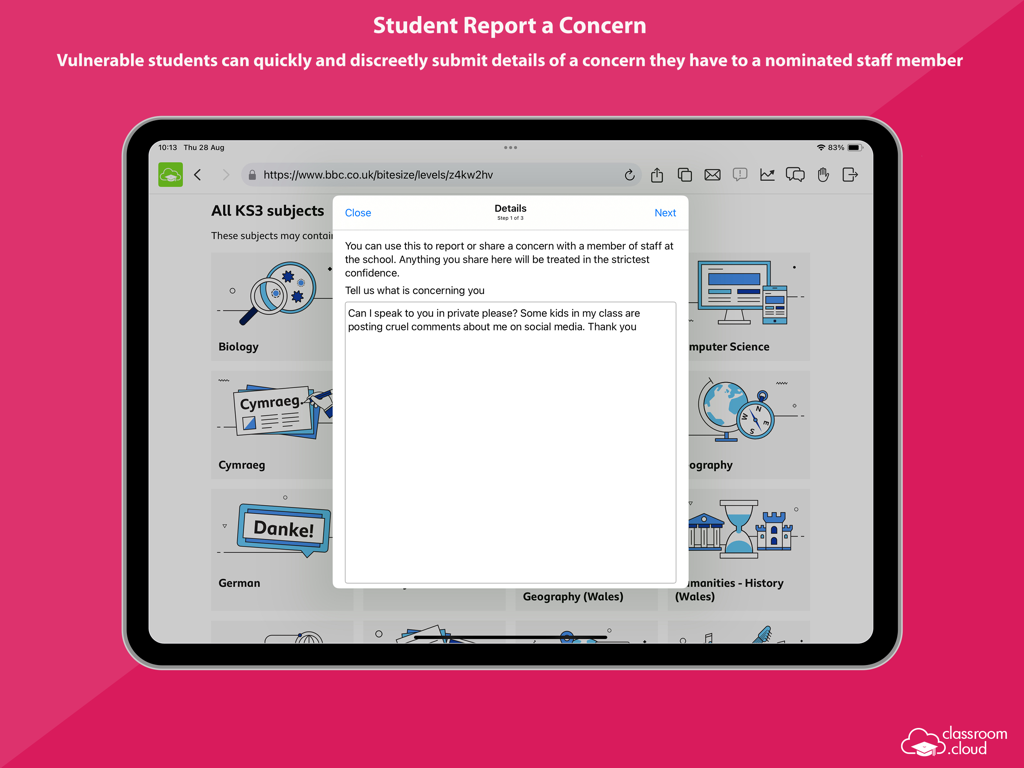
classroom.cloud Student - 生徒がiPad上のclassroom.cloudアプリを使用して、学校関係者に懸念事項を目立たなく報告する
生徒がiPad上のclassroom.cloudアプリを使用して、学校関係者に懸念事項を目立たなく報告する

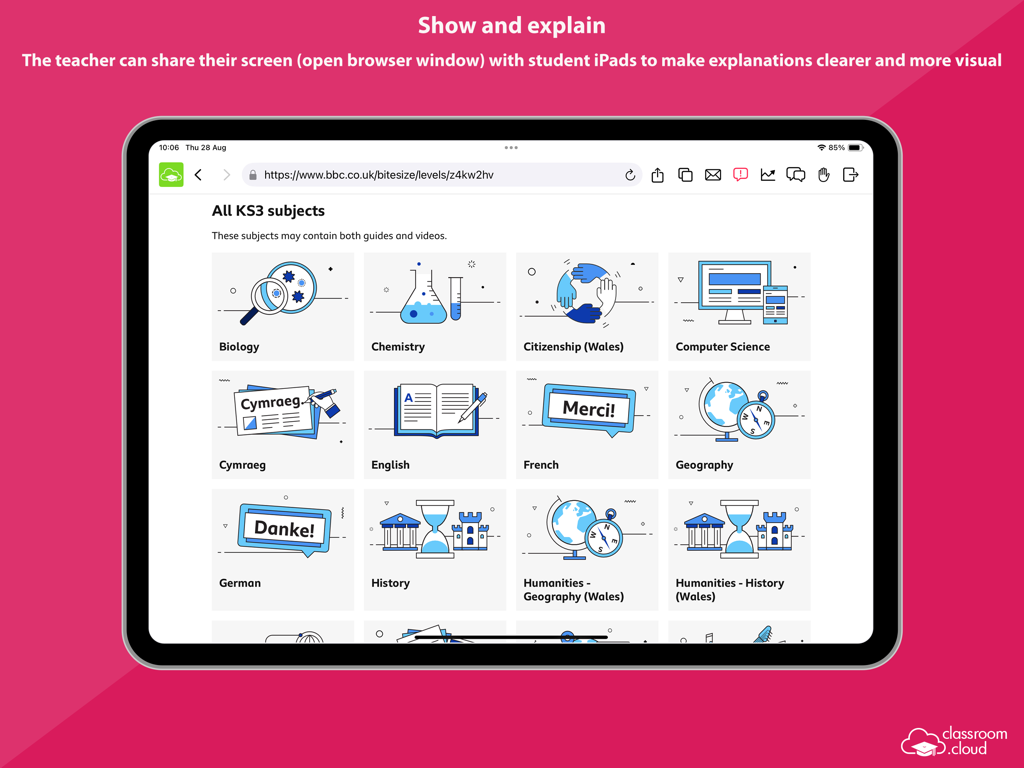
classroom.cloud Student - 教師が教室での説明のために、生徒のiPadと教育用ウェブサイトの画面を共有する
教師が教室での説明のために、生徒のiPadと教育用ウェブサイトの画面を共有する

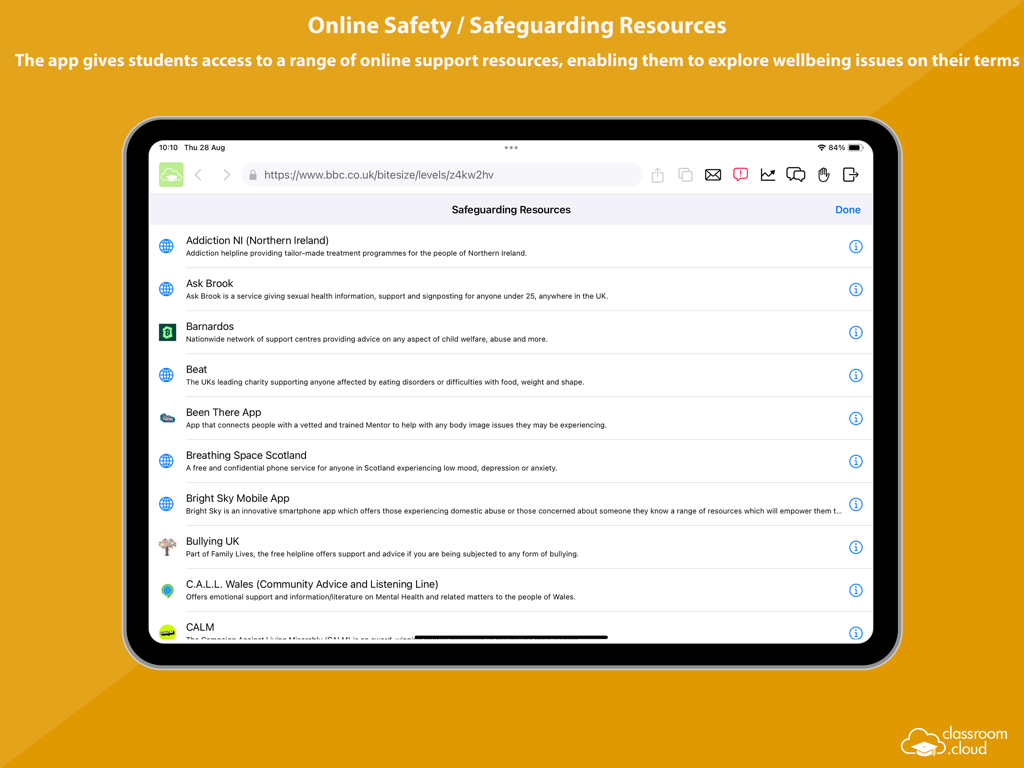
classroom.cloud Student - iPad上のclassroom cloudアプリの生徒向けオンラインセーフティとセーフガーディングリソースのリスト。
iPad上のclassroom cloudアプリの生徒向けオンラインセーフティとセーフガーディングリソースのリスト。

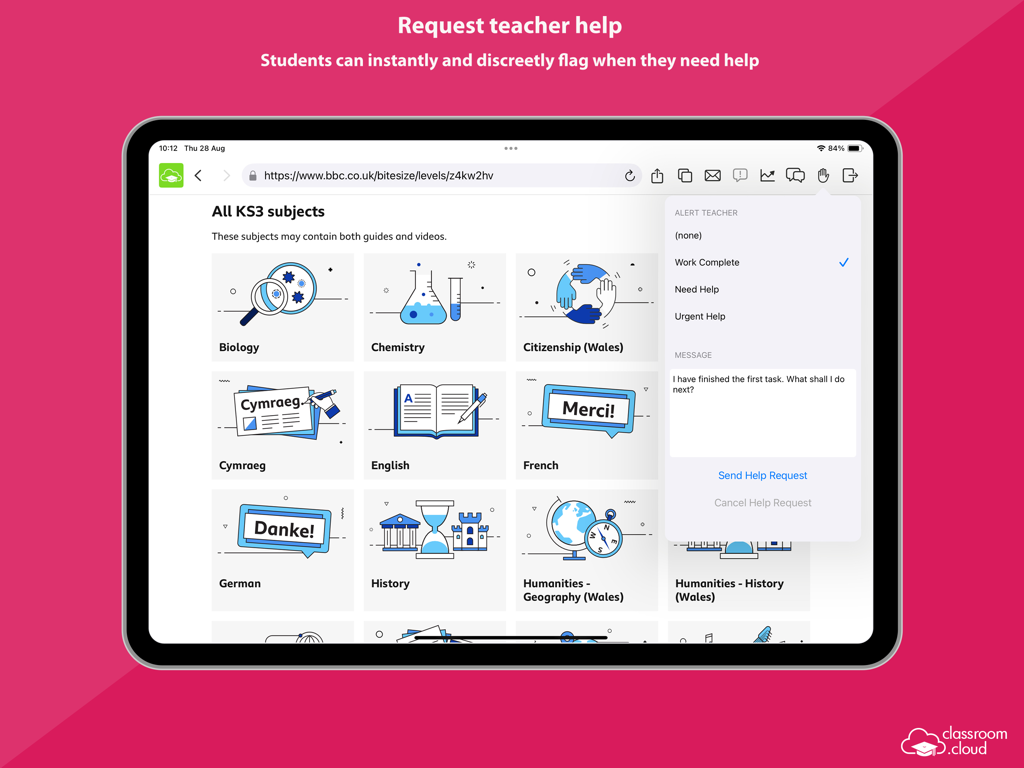
classroom.cloud Student - iPadインターフェイスのclassroom.cloud Studentアプリ。生徒が教材を閲覧中に、教師に目立たなくヘルプをリクエストしている様子。
iPadインターフェイスのclassroom.cloud Studentアプリ。生徒が教材を閲覧中に、教師に目立たなくヘルプをリクエストしている様子。

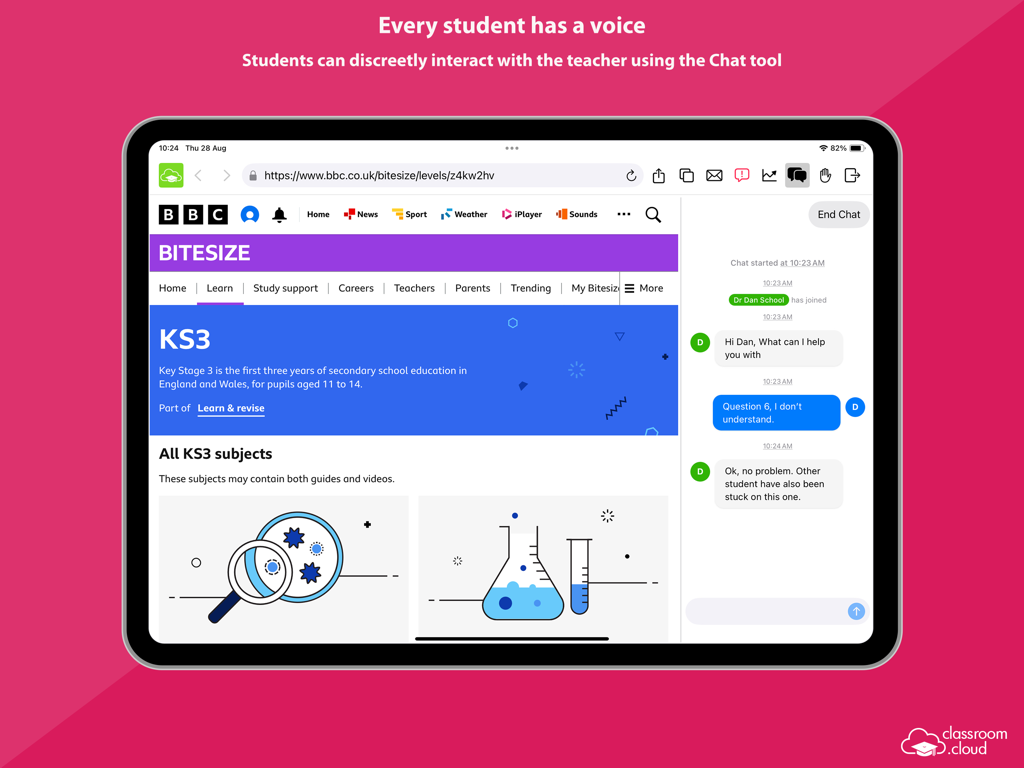
classroom.cloud Student - iPad上のclassroom.cloudチャットツールを使用する生徒。授業中に教師に目立たなくヘルプを求める。
iPad上のclassroom.cloudチャットツールを使用する生徒。授業中に教師に目立たなくヘルプを求める。

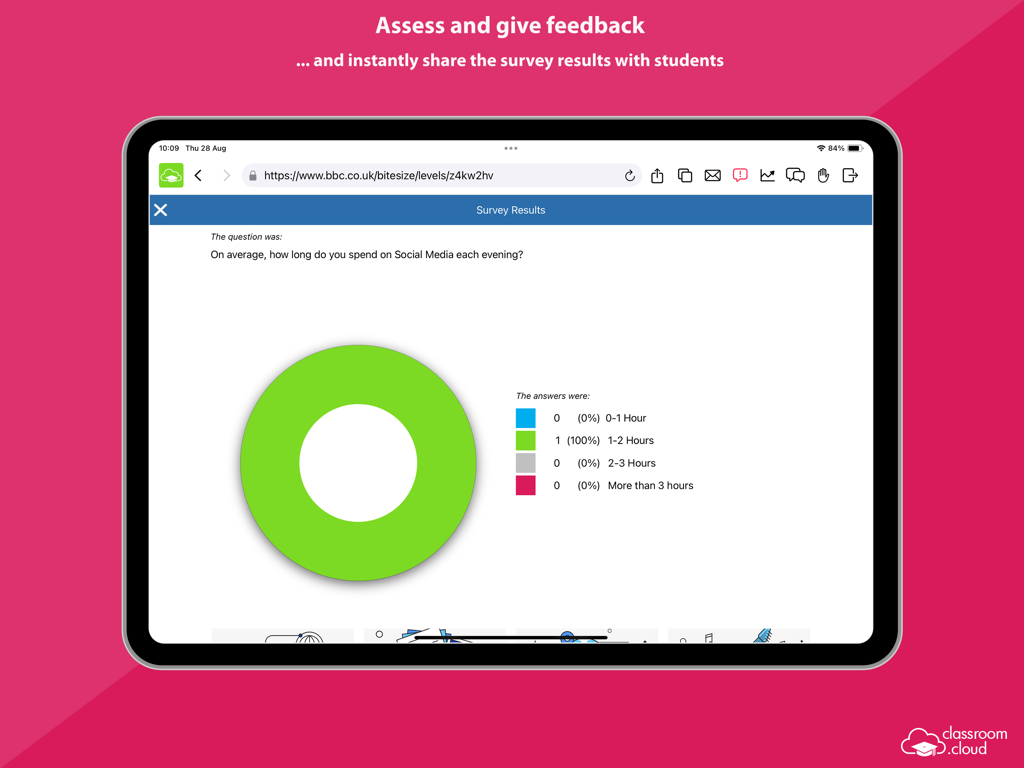
classroom.cloud Student - iPad用classroom.cloudアプリの生徒アンケート結果を示すドーナツチャート。

iPad用classroom.cloudアプリの生徒アンケート結果を示すドーナツチャート。

説明

Designed for use within schools and other educational institutions, this Student browser app for iOS is for use with classroom.cloud, the easy breezy, low-cost, cloud-based IT management, online safety and teaching platform for schools. classroom.cloud is a teacher’s dream come true. Incredibly easy to use, it provides a range of teaching tools that can flex to any learning environment – both in school and with remote learners. From real-time instruction and assessment tools, to boosting collaboration and support, as well as helping manage online behavior – it has it all! With the optional online safety toolkit, selected staff can monitor online activity, identify students at risk, and spot concerning trends. And, with its range of IT management tools, school techs can manage teacher and student devices centrally, as well as see at a glance how your technology is being used and how to maximize it – saving you a bunch of time and money! Once your school has registered online with classroom.cloud, the app can be easily deployed by the IT team to student iPads (iOS 14 and above), enabling teachers to connect instantly and securely to the devices from the cloud-based Teacher console and allowing school techs to deliver instant remote support and device management. The classroom.cloud student app can be set as the default browser on devices and offers support for Entra ID and Google authentication, allowing you to force students to sign-in to the app with Microsoft or Google credentials if applicable. Teacher Tools: • Choice of flexible connection methods – connect to a pre-defined group of student devices, a specified list of device or student names, or on the fly using a Class Code. • Easily monitor students’ internet use via crystal-clear thumbnails. Zoom in using Watch/View Mode to take a closer look at activity on a single student device. • Broadcast the teacher’s screen and audio to connected student devices to help show/talk them through explanations and lesson activities. • Lock students’ screens in a single click to gain attention. • Present students with the lesson objectives and their expected learning outcomes. • Chat, send a message, and support your students via help requests – without their peers knowing. • Get a feel for students’ understanding of the topic you have just taught them by sending out a quick survey for them to respond to. • See details of the websites that students are currently viewing to check they are focused on the task at hand. • Restrict internet use by employing ‘approved’ and ‘restricted’ website lists during the lesson. • Save yourself a heap of time by launching a website on the students’ devices. • Recognize good work or behaviour by assigning Rewards to students during the lesson. Admin/Technician Tools: • Retrieve a real-time view of the hardware and software installed on each student device. • Monitor internet usage. • Send instant notifications to student iPads. • Send Acceptable Use Policies (AUPs) to student iPads and track acknowledgements in the Web Portal. Online Safety Tools: • Keyword monitoring - alerts nominated staff when students type or search for any terms that match with those in the classroom.cloud keyword database – providing internet safety indicators for self-harm, bullying, sexual and criminal exploitation, and much more. Language packs are included to ensure your school can monitor concerning activity in students’ first languages. • Report a concern - students who feel vulnerable can use the app to 'report concerns' directly and discreetly to the online safety team. • Online resources - gives students instant access to a list of relevant online agencies should they want to seek external help with a particular problem or concern. The innovation behind classroom.cloud comes from NetSupport, the trusted developer of effective classroom management tools for schools for more than 35 years.

Download

ダウンロード: App Store

このページはアプリまたはその開発者の公式ページではなく、情報提供および論評を目的として作成された独立した編集出版物です。明示的に別段の記載がない限り、アプリおよびその開発者は、MWM、Apple、Google Play、アプリのパブリッシャー、またはアプリの開発者と提携、承認、後援、認可、またはその他の公式的な関係はなく、このページのいかなる内容も、アプリがMWMのサービスを使用して開発されたことを意味するものではありません。すべての商標、ロゴ、スクリーンショット、その他のコンテンツはそれぞれの所有者の財産です。








