Clocke
Clocke
ダウンロード: App Store

このページはアプリまたはその開発者の公式ページではなく、情報提供および論評を目的として作成された独立した編集出版物です。明示的に別段の記載がない限り、アプリおよびその開発者は、MWM、Apple、Google Play、アプリのパブリッシャー、またはアプリの開発者と提携、承認、後援、認可、またはその他の公式的な関係はなく、このページのいかなる内容も、アプリがMWMのサービスを使用して開発されたことを意味するものではありません。すべての商標、ロゴ、スクリーンショット、その他のコンテンツはそれぞれの所有者の財産です。

ロゴ: Clocke
ダウンロード: App Store

Clocke

視力低下や記憶障害のある高齢者の方に、シンプルでコントラストの高いデイクロックを提供します。共有カレンダーを通じてスケジュールをリモートで管理し、明確なリマインダーで日々の不安を軽減し、パーソナライズされた挨拶や写真でつながりを保ちましょう。

主要数値

ダウンロード

3K+

ユーザー評価

1.0/5

評価数

0

開発元

LocoDog Design LLC

カテゴリ

Health & Fitness

対応言語

2

最新バージョン

1.2

サイズ

16.0 MB

リリース日

2020年12月23日
機能

あらゆる瞬間のための安心

ClockeはiPadを高視認性のオリエンテーション補助具に変え、高齢者がその日とつながり続けるのを助け、介護者に完全な安心感をもたらします。

大きく高コントラストなディスプレイ

視力低下や記憶力に課題がある方のために設計された、一日、日付、時刻を明確なフルスペルテキストで表示し、混乱を軽減します。

リモートでのスケジュール管理

共有カレンダーと同期して、ご自身のデバイスから予定や服薬リマインダーを追加できます。変更はすぐに相手の画面に表示されます。

以下のスクリーンショットと説明は、アプリの公式ストアリスティングから直接取得されたものであり、アプリ開発者の所有物です。

アプリストア

スクリーンショット
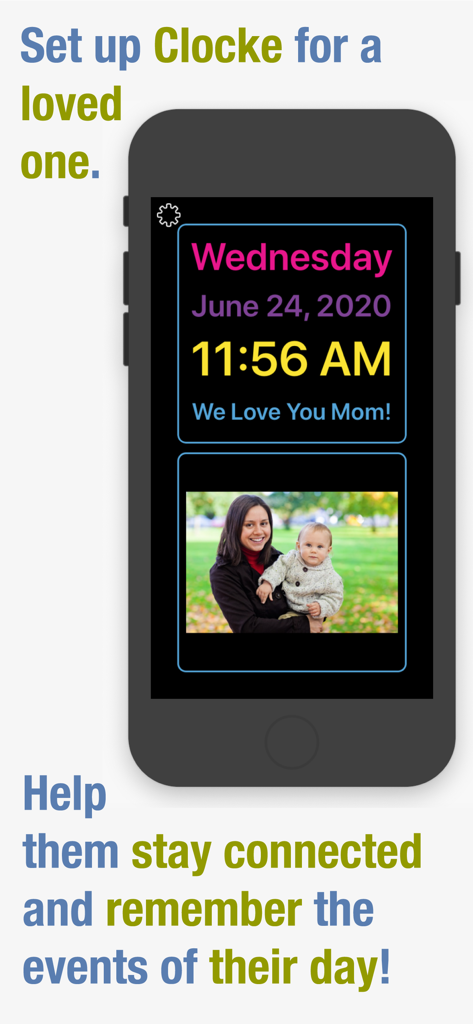
Clocke - Clockeアプリのインターフェースがスマートフォンに表示され、時間、日付、個人的なメッセージ、家族の写真が表示されており、高齢者の記憶をサポートします。
Clockeアプリのインターフェースがスマートフォンに表示され、時間、日付、個人的なメッセージ、家族の写真が表示されており、高齢者の記憶をサポートします。

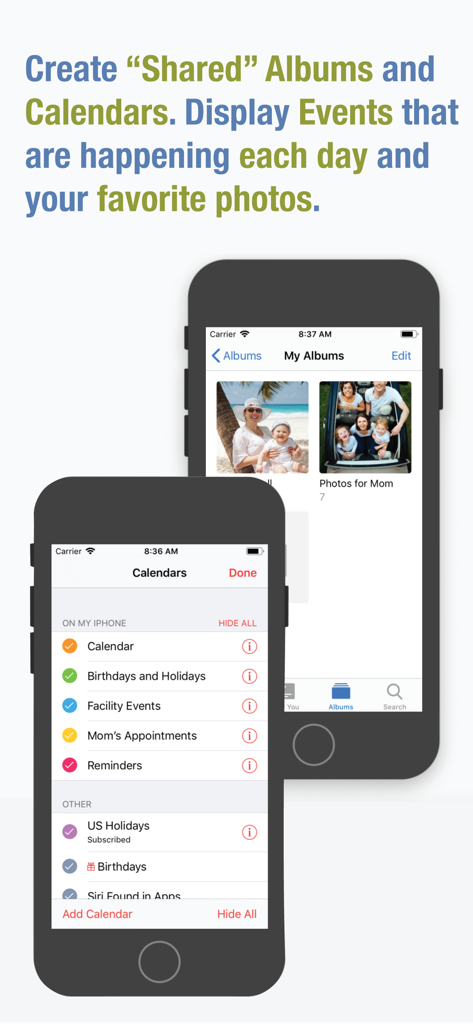
Clocke - 共有カレンダーとフォトアルバムの設定を表示するインターフェース、高齢者ケア用
共有カレンダーとフォトアルバムの設定を表示するインターフェース、高齢者ケア用

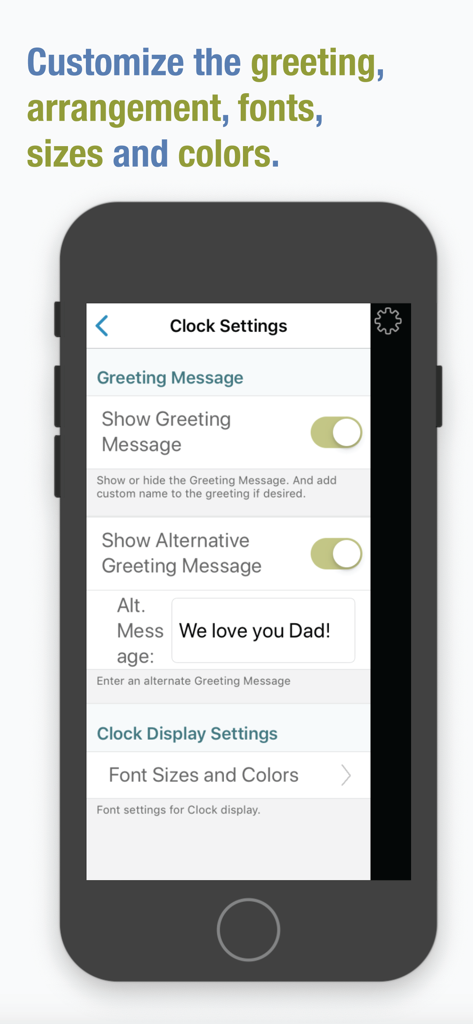
Clocke - Clockeアプリの設定画面で、挨拶メッセージや時計表示フォントをカスタマイズするオプションを表示
Clockeアプリの設定画面で、挨拶メッセージや時計表示フォントをカスタマイズするオプションを表示

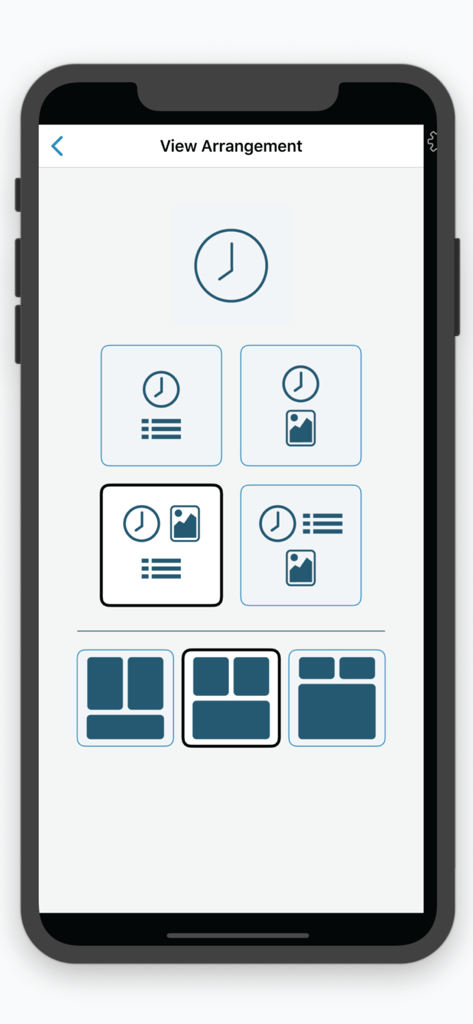
Clocke - 時計、カレンダー、写真のさまざまな表示オプションを示すビュー配置設定

時計、カレンダー、写真のさまざまな表示オプションを示すビュー配置設定

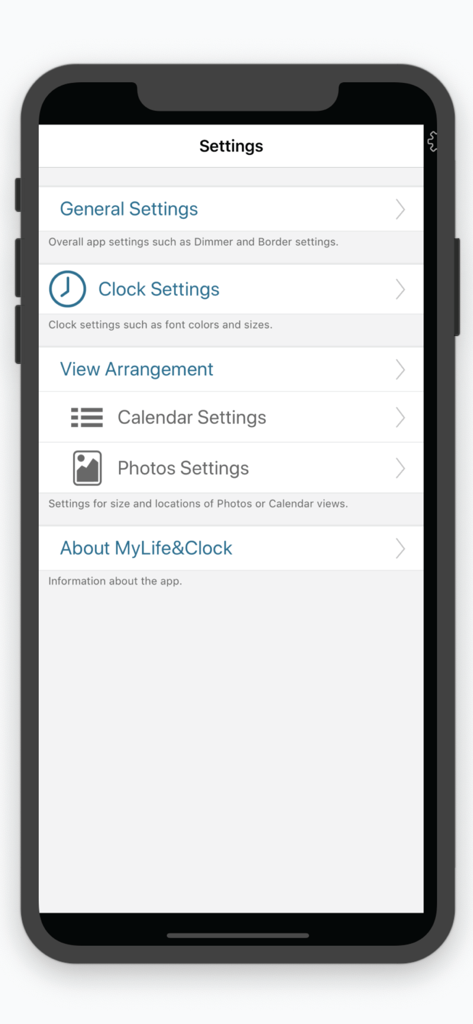
Clocke - Clockeアプリの設定メニュー。高齢者向けのカスタマイズオプションを表示
Clockeアプリの設定メニュー。高齢者向けのカスタマイズオプションを表示

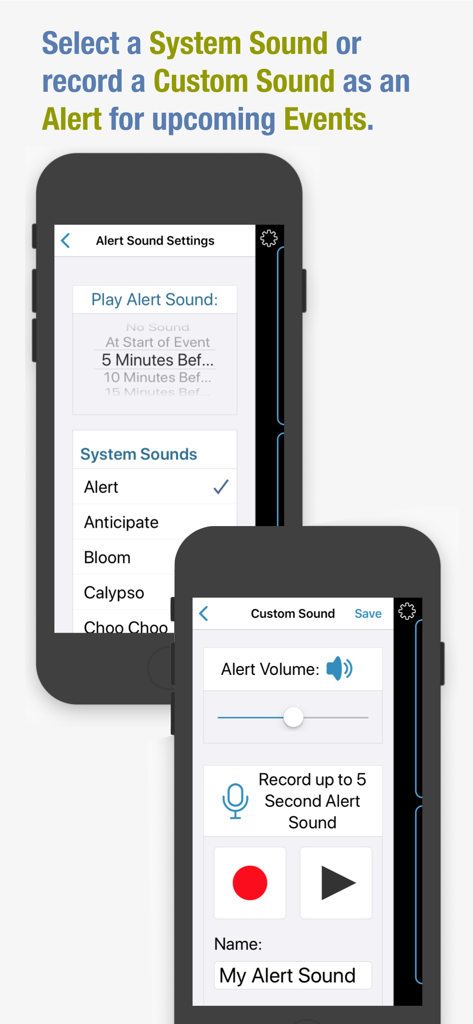
Clocke - Clockeアプリのスクリーンショット。アラート音設定と、高齢者記憶ケア用のカスタム音声録音インターフェースを表示
Clockeアプリのスクリーンショット。アラート音設定と、高齢者記憶ケア用のカスタム音声録音インターフェースを表示

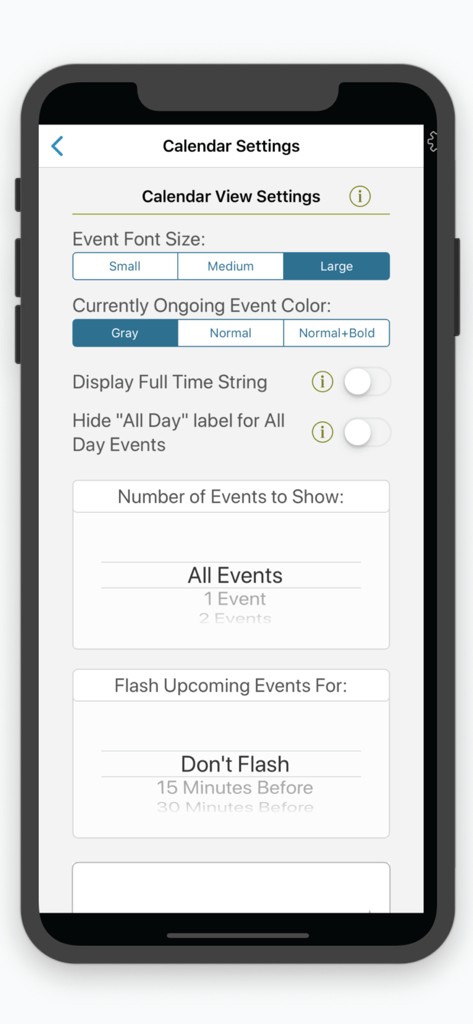
Clocke - Clockeアプリのカレンダー設定インターフェース。フォントサイズ設定も表示
Clockeアプリのカレンダー設定インターフェース。フォントサイズ設定も表示

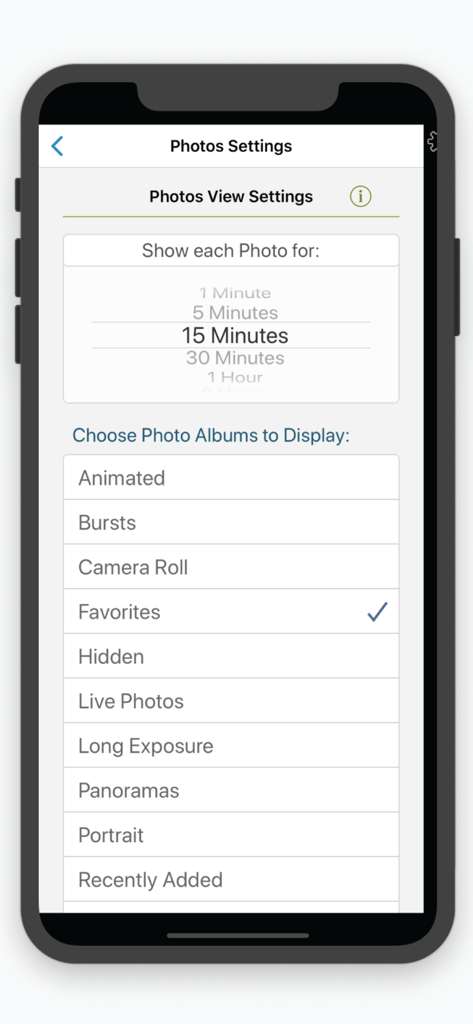
Clocke - Clockeアプリの写真表示設定。アルバム選択と写真表示時間を表示

Clockeアプリの写真表示設定。アルバム選択と写真表示時間を表示

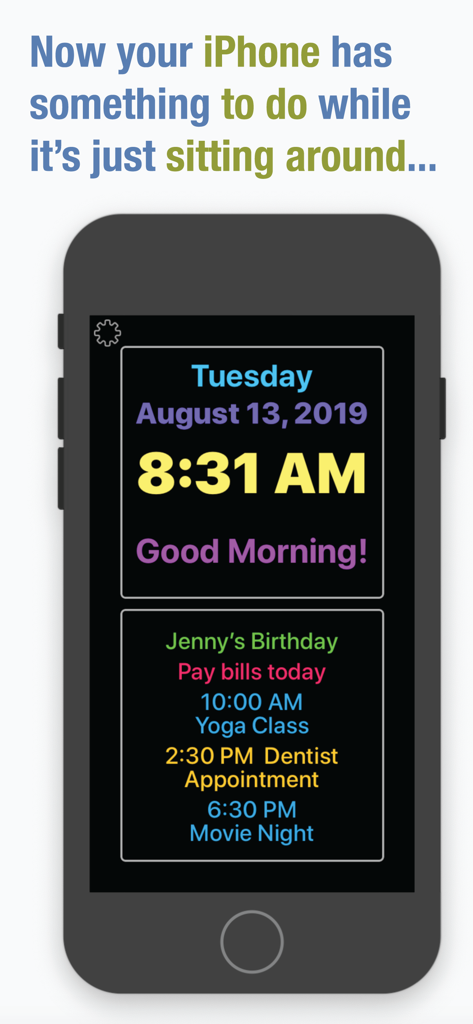
Clocke - iPhone画面にClockeアプリが表示され、大きな文字で時刻、日付、毎日のカレンダーリマインダーのリストが表示されています。

iPhone画面にClockeアプリが表示され、大きな文字で時刻、日付、毎日のカレンダーリマインダーのリストが表示されています。

説明

Clocke is a simple, large and easy to read clock that clearly displays the full day of the week, month, date and a greeting message in large letters. Clocke is great for seniors! Clocke provides structure, routine and focus for people faced with memory loss, Dementia or Alzheimer’s, who often lose the ability to recognize what day it is. Clocke has a clear and large display that helps reduce anxiety about the time of day and ease the worry of missing an appointment, mealtime, birthday, a favorite TV program, or any other event. Add comforting photos to the display or add calendar events from personal, family or shared calendars in the Calendar App. Displayed on an iPad with a stand, Clocke is invaluable for the visually impaired or anyone who wants to easily see the time/day/day of week or calendar events for the day. Customizations include: Display Calendar Events – choose from a list of the Calendars you have set up in the Calendar App. Choose the number of events to show, Small/Medium/Large type or, as a reminder have Clocke flash upcoming events. Use "shared" Calendars to be able to add/remove/edit Events remotely. Event Alert Sounds – use a System sound or record a custom sound to play an alert at upcoming Events. Have your facility create a "shared" Google calendar that you can subscribe to and display in Clocke. Give a calendar the name "Reminders" and these entries will be displayed without times. For example, a Reminder with a Start Time of 10:00 AM and End Time of 10:30 AM could say "Did you take your morning pill?". It would only display during the set time. An "All Day" Reminder could say "Tomorrow is Sue's Birthday", and would be displayed all day. Name a Calendar "Birthdays and Holidays" to add your own special "All Day" events to be displayed. Clock Display - sizes and colors are adjustable. Choose from a variety of display arrangement options. Display Photos – Clocke gives you the ability to display photos from Albums you have set up on your iPad or iPhone. Choose an Album or Albums to display and the amount of time you want each photo to display. Auto-Dimming On/Off – the display automatically dims at 7:00PM and brightens at 6:00AM by default but these values are customizable. Auto-dimming settings from “Light” to “Extra Dark” are available as well as turning Auto-dimming Off/On/Always On. Personal Greeting On/Off – an on/off setting is available as well as the ability to add a name to the message. Making the display more personal and comforting is easy by adding a name to the “Good Morning”, “Good Evening”, “Good Afternoon” and “Good Night” message. Parts of the day begin at: Morning 4:00AM, Afternoon 12:00 Noon, Evening 5:00PM, and Night 10:00PM. Protection from accidental changes – changing the Clocke settings can be set to require a double-tap on the "Settings" button, keeping users from inadvertently making changes or getting confused. Power "Not Connected" Indicator – we recommend that your device be connected to power while Clocke is in use. An indicator is displayed if the device is not connected to power.  Time Formats – Clocke supports AM/PM and 24-hour time display. It supports displaying the Day, Time, and Date in the current Region setting. Event times are also displayed using the current Region format. Event titles are displayed in the same language that they are input in. Privacy – Clocke does not collect any user data or display ads. We also recommend that you use of a stand for your iPad or iPhone. See our website for which ones we like.

Download

ダウンロード: App Store

このページはアプリまたはその開発者の公式ページではなく、情報提供および論評を目的として作成された独立した編集出版物です。明示的に別段の記載がない限り、アプリおよびその開発者は、MWM、Apple、Google Play、アプリのパブリッシャー、またはアプリの開発者と提携、承認、後援、認可、またはその他の公式的な関係はなく、このページのいかなる内容も、アプリがMWMのサービスを使用して開発されたことを意味するものではありません。すべての商標、ロゴ、スクリーンショット、その他のコンテンツはそれぞれの所有者の財産です。