Combine - Code Editor & Git
ダウンロード: App Store

このページはアプリまたはその開発者の公式ページではなく、情報提供および論評を目的として作成された独立した編集出版物です。明示的に別段の記載がない限り、アプリおよびその開発者は、MWM、Apple、Google Play、アプリのパブリッシャー、またはアプリの開発者と提携、承認、後援、認可、またはその他の公式的な関係はなく、このページのいかなる内容も、アプリがMWMのサービスを使用して開発されたことを意味するものではありません。すべての商標、ロゴ、スクリーンショット、その他のコンテンツはそれぞれの所有者の財産です。


ロゴ: Combine - Code Editor & Git
ダウンロード: App Store

Combine - Code Editor & Git

妥協なくオフラインでコーディング。デスクトップクラスの環境で、完全なGit統合、ライブWebプレビュー、85以上の言語に対応したインテリジェントなシンタックスハイライトを体験してください。

主要数値

ダウンロード

2K+

ユーザー評価

1.0/5

評価数

0

開発元

Margins Technologies LLC

カテゴリ

Developer Tools

対応言語

1

最新バージョン

1.4.12

サイズ

29.3 MB

リリース日

2025年7月3日
機能

モバイル開発者のためのデスクトップパワー

プロフェッショナルグレードのツール、完全なGit統合、そして完全なオフラインプライバシーを備えた、妥協のないコーディング環境を体験してください。

エリートシンタックス&テーマ

85以上の言語でコーディング。プロフェッショナルな可読性とスタイルを追求した70以上のプレミアムテーマと90のフォントファミリーを使用。

プロフェッショナルGitクライアント

ワークフロー全体を管理:クローン、マージ、リベース、スタッシュをセキュアなSSH認証とiCloudキーチェーン暗号化で。

以下のスクリーンショットと説明は、アプリの公式ストアリスティングから直接取得されたものであり、アプリ開発者の所有物です。

アプリストア

スクリーンショット
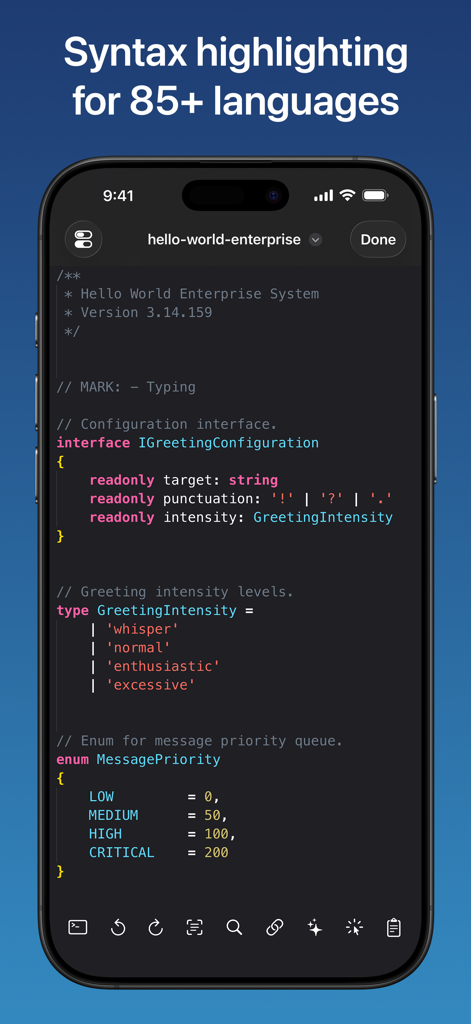
Combine - Code Editor & Git - Combineエディターアプリでコードのシンタックスハイライトが表示されているモバイル画面。
Combineエディターアプリでコードのシンタックスハイライトが表示されているモバイル画面。

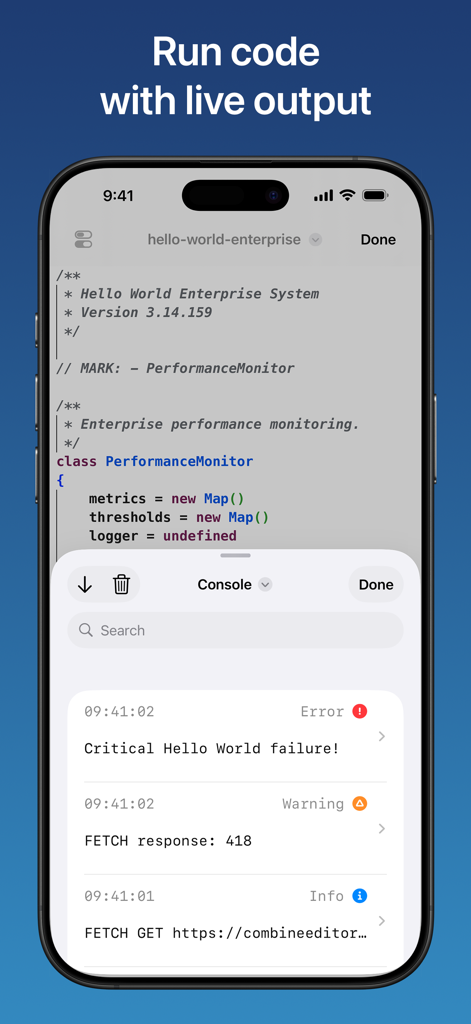
Combine - Code Editor & Git - Combineモバイルアプリのインターフェース。JavaScriptのコードエディターと、iPhoneにエラー、警告、ログが表示されるライブコンソールが表示されています。
Combineモバイルアプリのインターフェース。JavaScriptのコードエディターと、iPhoneにエラー、警告、ログが表示されるライブコンソールが表示されています。

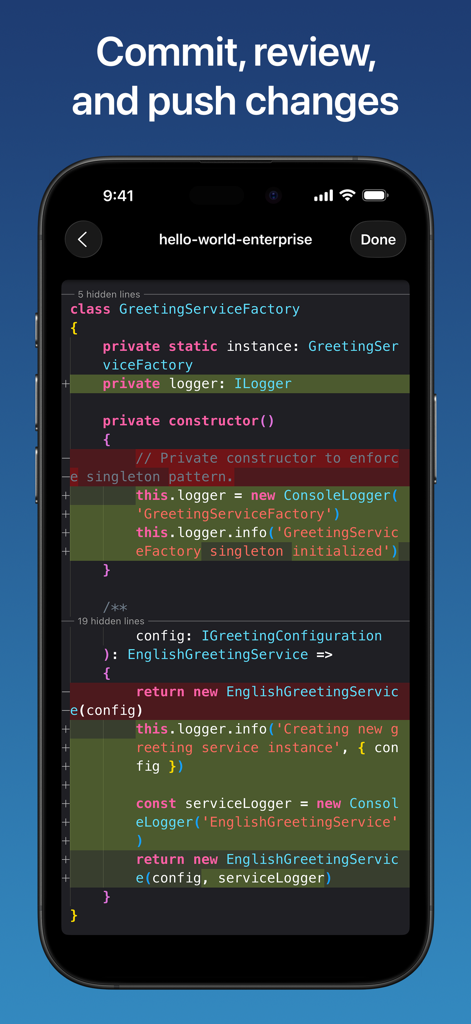
Combine - Code Editor & Git - Combineコードエディターのスクリーンショット。コードの追加と削除がハイライトされたGit diffビューがiPhoneに表示されています。

Combineコードエディターのスクリーンショット。コードの追加と削除がハイライトされたGit diffビューがiPhoneに表示されています。

Combine - Code Editor & Git - iPhone上のCombineコードエディターアプリでの要素検査付きライブWebプレビュー。
iPhone上のCombineコードエディターアプリでの要素検査付きライブWebプレビュー。

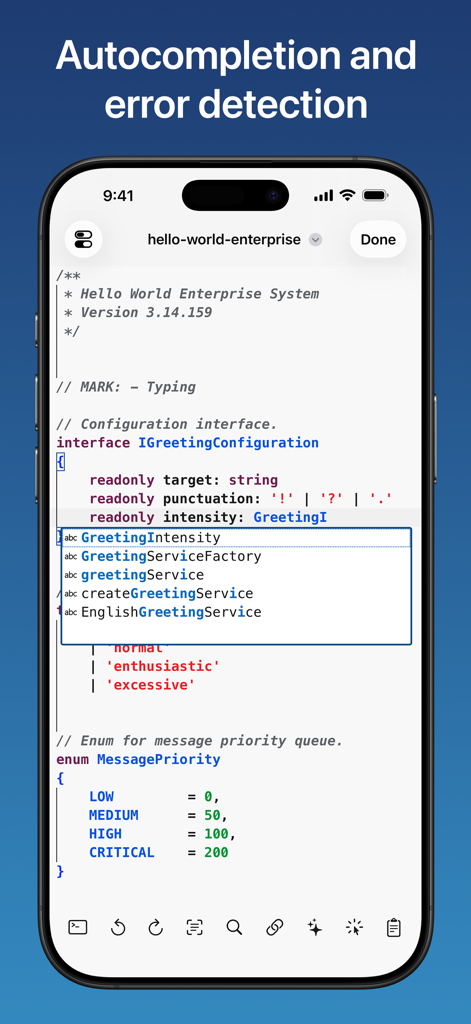
Combine - Code Editor & Git - Combineコードエディターに、iPhone上のTypeScriptコードの自動補完とエラー検出が表示されています。
Combineコードエディターに、iPhone上のTypeScriptコードの自動補完とエラー検出が表示されています。

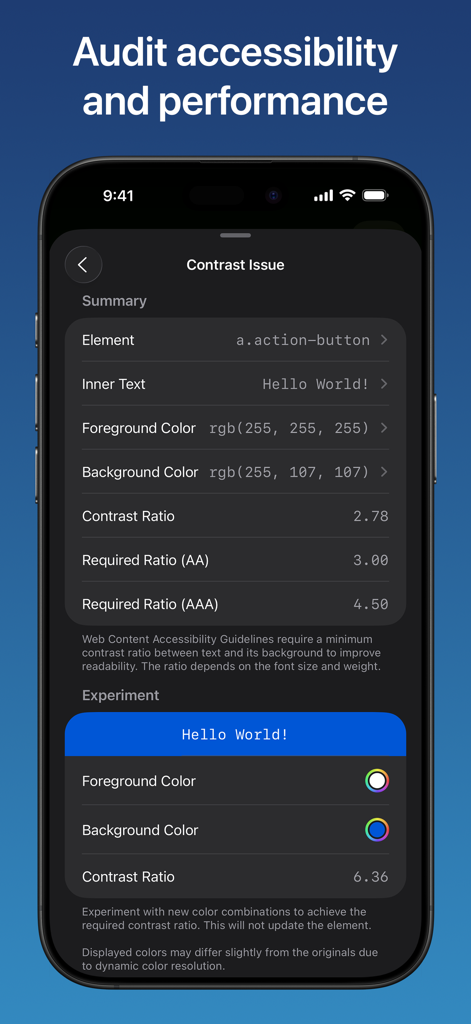
Combine - Code Editor & Git - Combineアプリのスクリーンショット。Web要素のコントラスト比のアクセシビリティ監査が表示されています。
Combineアプリのスクリーンショット。Web要素のコントラスト比のアクセシビリティ監査が表示されています。

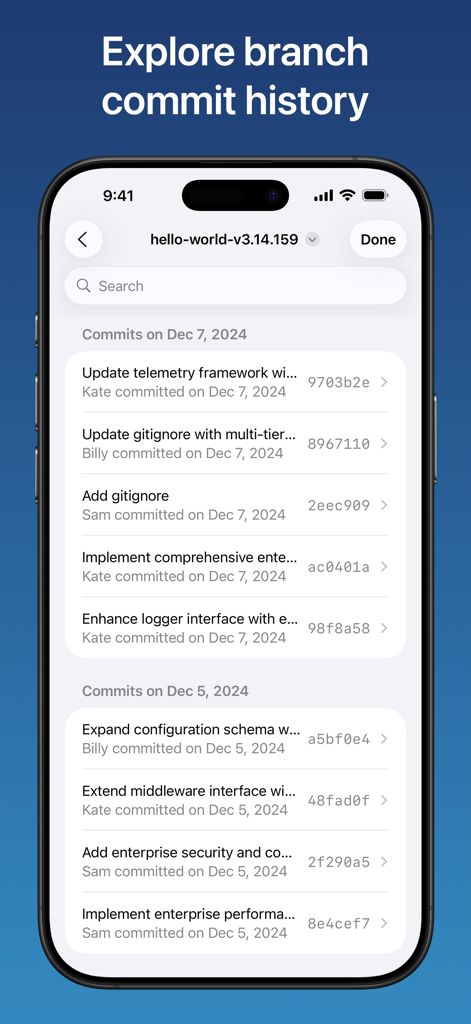
Combine - Code Editor & Git - CombineアプリのGitブランチコミット履歴インターフェース。

CombineアプリのGitブランチコミット履歴インターフェース。

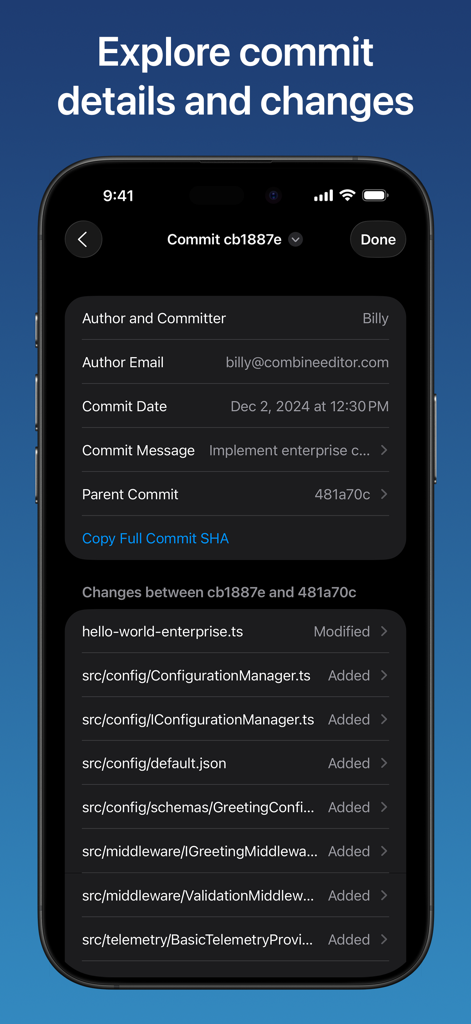
Combine - Code Editor & Git - Combineアプリのインターフェース。iPhone画面にGitコミット作成者情報と変更されたファイルリストが表示されています。
Combineアプリのインターフェース。iPhone画面にGitコミット作成者情報と変更されたファイルリストが表示されています。

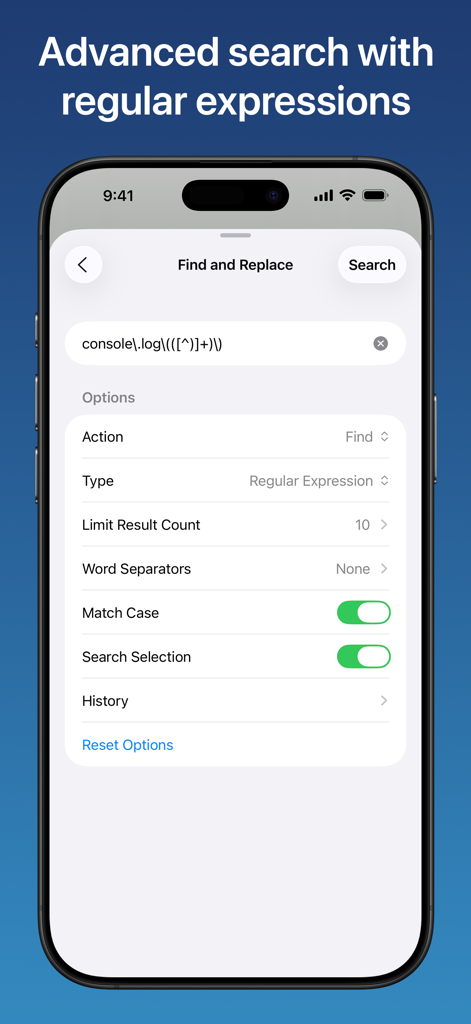
Combine - Code Editor & Git - Combineコードエディターのインターフェース。iPhoneで正規表現を使用した高度な検索および置換オプションが表示されています。
Combineコードエディターのインターフェース。iPhoneで正規表現を使用した高度な検索および置換オプションが表示されています。

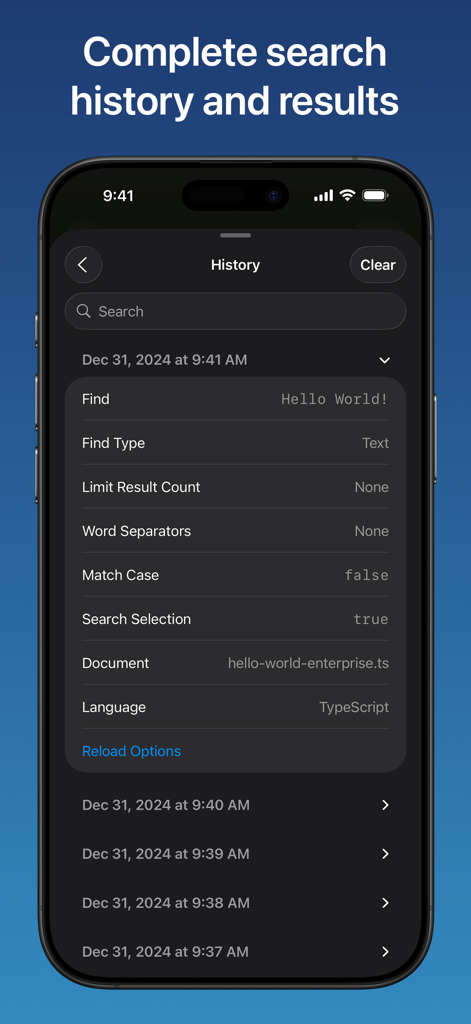
Combine - Code Editor & Git - Combineコードエディターアプリの検索履歴インターフェース。詳細なクエリパラメータと履歴ログが表示されています。

Combineコードエディターアプリの検索履歴インターフェース。詳細なクエリパラメータと履歴ログが表示されています。

説明

Professional coding with zero compromises. Turn your iPhone or iPad into a professional development studio. Code offline anywhere, run code, preview web projects live, seamlessly manage Git repositories, and use advanced debugging tools to accelerate your workflow. CODE EDITOR • Expert syntax highlighting and intelligent code completion for over 85 programming languages. • Code completely offline: no account or internet connection needed. • Choose from 70 exclusive themes or create your own custom themes with over 200 customizable elements. • Smart auto-completion with auto-closing brackets/quotes/comments, auto-indent, auto-surround, and bracket pair colorization. • Choose from over 160 quick actions for your customizable toolbar including running code, undo, redo, character insertion, text transformation, and so much more. • Live web preview: render HTML, CSS, and Markdown with instant updates. Load CSS files directly from your device to see changes in real-time. • Smart element inspection: tap any element in the live preview for instant highlighting with size, role, and layout details. Long-press to dive deeper and review computed styles, bounding box data, and the complete DOM hierarchy. • Code execution: run JavaScript as a standalone script or within HTML previews for full DOM interactivity. Review real-time console logs, errors, and warnings as they happen. • Comprehensive web audit: get scored reports in live previews across four key categories - accessibility, best practices, PWA readiness, and SEO. • Network monitor: capture all HTTP requests with headers, timing, and response data. Export as Curl commands or HAR files for streamlined collaboration and debugging. • Share live previews as images and PDFs, and instantly transform Markdown to HTML. • Advanced find and replace with regex support, case matching, selection limiting, and search history. • Fully customizable with hundreds of settings synced across all your devices. • Real-time error detection and code validation with on-demand code review. • Multi-cursor support: use up to 100 cursors simultaneously for rapid text editing. • Intelligent code folding with customizable strategies. • Live minimap and slider, with real-time rendering of actual characters or color blocks. • Choose from 90 font families with dynamic sizing and endless colors. • Powerful diff editor with customizable algorithms and conflict resolution. • Use standard, interval, or relative line numbers, or none at all. • Real-time fading of unused code and strikethrough of deprecated code. • Optimized for large documents and high performance. • Advanced features: sticky/smooth scrolling, read-only mode, tab completion and sticky tab stops, and indentation detection. • Professional customization: placeholders, word-wrapping, encoding methods, whitespace rendering, variable line-height, and cursor styling. GIT CLIENT • Complete Git workflow: create, clone, fetch, push, pull, and manage repositories. • Secure authentication: use personal access tokens or SSH keys, securely stored in iCloud Keychain with end-to-end encryption. • Full branch management: view, checkout, merge, rebase, rename, and reset branches. • Advanced operations: stage and commit changes, stash work for later, and resolve conflicts. • Manage commits: view, amend, checkout, cherry-pick, and revert commits. • Powerful comparisons: compare branches, commits, and tags. • Repository insights: browse commit history, view diffs, create and manage tags, and configure multiple remotes. • Performance tools: prune references and view branch reflogs. FILE MANAGER • Native iOS Files integration: your documents and repositories work with any app and sync across all your devices. • Complete file operations: browse, add, delete, move, search, share, sort, and tag documents. Privacy Policy: https://www.combineeditor.com/privacy Terms of Service: https://www.combineeditor.com/terms

Download

ダウンロード: App Store

このページはアプリまたはその開発者の公式ページではなく、情報提供および論評を目的として作成された独立した編集出版物です。明示的に別段の記載がない限り、アプリおよびその開発者は、MWM、Apple、Google Play、アプリのパブリッシャー、またはアプリの開発者と提携、承認、後援、認可、またはその他の公式的な関係はなく、このページのいかなる内容も、アプリがMWMのサービスを使用して開発されたことを意味するものではありません。すべての商標、ロゴ、スクリーンショット、その他のコンテンツはそれぞれの所有者の財産です。