Comic maker - Arcstudio
ダウンロード: App Store

このページはアプリまたはその開発者の公式ページではなく、情報提供および論評を目的として作成された独立した編集出版物です。明示的に別段の記載がない限り、アプリおよびその開発者は、MWM、Apple、Google Play、アプリのパブリッシャー、またはアプリの開発者と提携、承認、後援、認可、またはその他の公式的な関係はなく、このページのいかなる内容も、アプリがMWMのサービスを使用して開発されたことを意味するものではありません。すべての商標、ロゴ、スクリーンショット、その他のコンテンツはそれぞれの所有者の財産です。


ロゴ: Comic maker - Arcstudio
ダウンロード: App Store

Comic maker - Arcstudio

絵を描くのが苦手?問題ありません。AIを使ってプロフェッショナルなパネルを生成し、ウェブトゥーンをデザインし、デジタルストーリーに命を吹き込みましょう。わずか数秒で完了します。

主要数値

ダウンロード

900

ユーザー評価

1.0/5

評価数

0

開発元

WEXPY TECHNOLOGIES (OPC) PRIVATE LIMITED

カテゴリ

Graphics & Design

対応言語

1

最新バージョン

4.3

サイズ

52.1 MB

リリース日

2025年5月26日
機能

アイデアから壮大なコミックまで、わずか数秒で

Arcstudioは、誰もがクリエイターになれるようにします。ペンや紙は不要—あなたの想像力と、次世代のデジタルストーリーテラーのために設計された高度なAIエンジンだけが必要です。

プロンプトからパネルへの魔法

簡単なテキストを見事なマンガやコミックアートに変えましょう。アートスタイルを選択し、AIに面倒な作業を任せている間に、あなたはストーリーに集中してください。

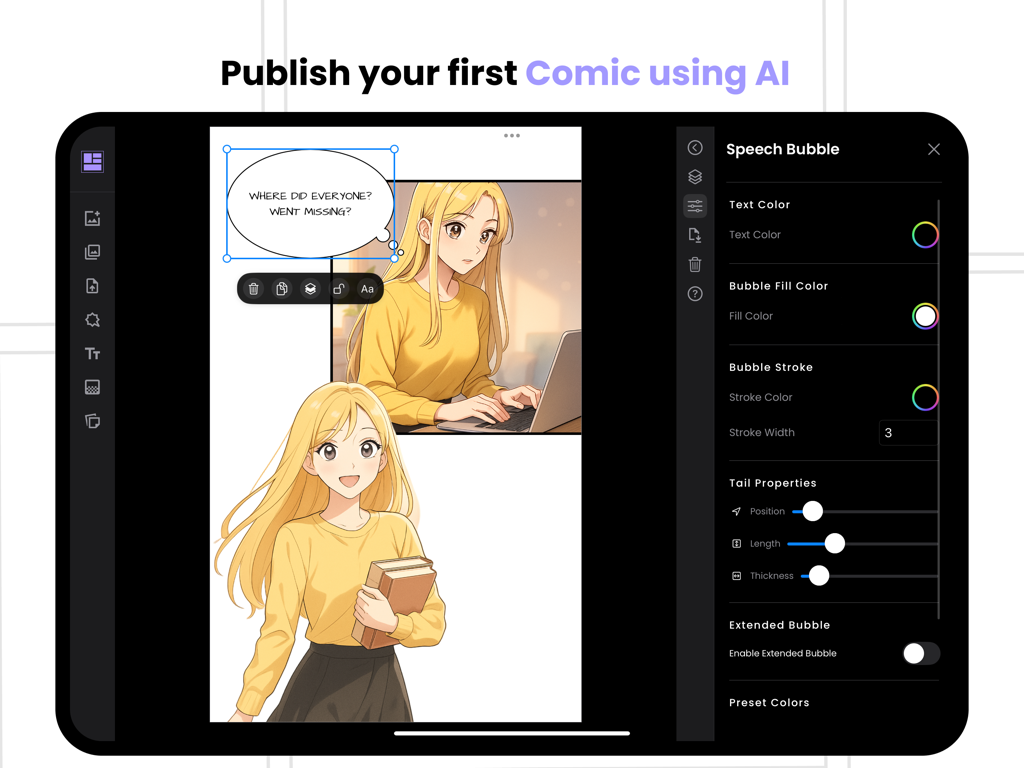
プロのレイアウトと吹き出し

吹き出しやパネルを簡単にドラッグ、ドロップ、サイズ変更できます。iPadやMacで読者のために完璧な映画のような流れを作りましょう。

以下のスクリーンショットと説明は、アプリの公式ストアリスティングから直接取得されたものであり、アプリ開発者の所有物です。

アプリストア

スクリーンショット
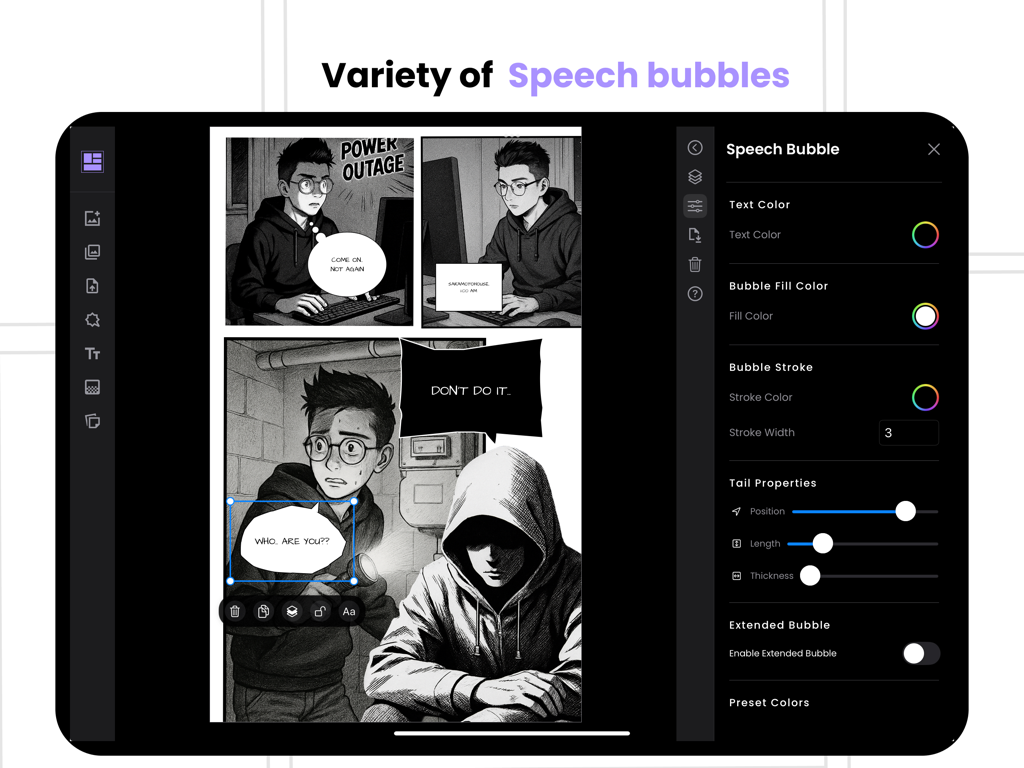
Comic maker - Arcstudio - コミックメーカーArcstudioアプリでの吹き出しとテキストのカスタマイズ用インターフェース。
コミックメーカーArcstudioアプリでの吹き出しとテキストのカスタマイズ用インターフェース。

Comic maker - Arcstudio - iPad上のArcstudioコミックメーカーアプリのインターフェース。マンガパネルと吹き出しのカスタマイズを表示。

iPad上のArcstudioコミックメーカーアプリのインターフェース。マンガパネルと吹き出しのカスタマイズを表示。

説明

Create Comics, Manga & Digital Stories Instantly! Ever wanted to create your own comic book, manga, or digital story but didn’t know where to start? With Comic Maker - Arcstudio, you can bring your ideas to life in seconds! Whether you love manga, digital comics, or classic comic books, Arcstudio makes creation fast, fun, and effortless—no drawing skills needed. ► AI-Powered Comic & Manga Creation Turn ideas into comics instantly – Enter a short prompt, and let AI create full comic panels for you. Choose your art style – From manga, comic book, webtoon, and digital comics, find the perfect look. Add text and speech bubbles – Customize dialogue, narration, and sound effects for your story. Auto-generate scenes – AI helps you create comic book backgrounds. Seamless panel layouts – Arrange panels for a professional manga or comic book feel. ► Endless Possibilities Use Arcstudio to create: Manga and Anime-Inspired Stories Classic and Digital Comic Books Webcomics and Comic Strips Superhero, Fantasy, and Sci-Fi Adventures Fan Art and Original Graphic Novels From a quick one-panel comic strip to a full manga series or comic book, Arcstudio lets your creativity shine. ► Why Arcstudio? No drawing skills needed – AI generates high-quality comic book and manga art for you. Diverse styles – Experiment with manga, digital comics, and webtoon styles. Easy-to-use editor – Add, move, or resize panels, speech bubbles, and text effortlessly. Share and go viral – Export in high resolution and post your comics and manga on social media. Join thousands of comic book fans, manga artists, and storytellers using Arcstudio to create stunning visuals with just a few taps. ► Ready to Create Your First Comic? Download Comic Maker - Arcstudio now and start crafting your own manga, comics, and digital stories today. Terms of use: https://www.apple.com/legal/internet-services/itunes/dev/stdeula/

Download

ダウンロード: App Store

このページはアプリまたはその開発者の公式ページではなく、情報提供および論評を目的として作成された独立した編集出版物です。明示的に別段の記載がない限り、アプリおよびその開発者は、MWM、Apple、Google Play、アプリのパブリッシャー、またはアプリの開発者と提携、承認、後援、認可、またはその他の公式的な関係はなく、このページのいかなる内容も、アプリがMWMのサービスを使用して開発されたことを意味するものではありません。すべての商標、ロゴ、スクリーンショット、その他のコンテンツはそれぞれの所有者の財産です。







