Cross Paste: Clipboard Sync
ダウンロード: App Store

このページはアプリまたはその開発者の公式ページではなく、情報提供および論評を目的として作成された独立した編集出版物です。明示的に別段の記載がない限り、アプリおよびその開発者は、MWM、Apple、Google Play、アプリのパブリッシャー、またはアプリの開発者と提携、承認、後援、認可、またはその他の公式的な関係はなく、このページのいかなる内容も、アプリがMWMのサービスを使用して開発されたことを意味するものではありません。すべての商標、ロゴ、スクリーンショット、その他のコンテンツはそれぞれの所有者の財産です。

ロゴ: Cross Paste: Clipboard Sync
ダウンロード: App Store

Cross Paste: Clipboard Sync

自分にリンクをメールするのをやめましょう。iOS、Windows、Web間で、シームレスでアカウント不要のクリップボード共有を体験してください。絶対的なプライバシーとゼロの摩擦を必要とする開発者やパワーユーザーのために構築されました。

主要数値

ダウンロード

200

ユーザー評価

1.0/5

評価数

0

開発元

Mobile Tech Media, LLC

カテゴリ

Developer Tools

対応言語

1

最新バージョン

1.0

サイズ

51.2 MB

リリース日

2025年12月14日
機能

すべてのデバイスで1つのクリップボード

iPhoneとWindows PCの間のギャップを埋めます。テキスト、リンク、コードスニペットを、ゼロの摩擦と絶対的なプライバシーで瞬時に同期します。

ユニバーサル・クロスプラットフォーム同期

iPhoneでコピーして、PCやMacに瞬時にペーストします。壁に囲まれた庭から解放され、リアルタイムでデバイス間でデータを移動します。

プライバシー最優先、アカウント設定不要

簡単なQRコードスキャンで、数秒で同期を開始します。メールも、パスワードも、データ収集もありません — プライバシーを尊重する安全なツールだけです。

以下のスクリーンショットと説明は、アプリの公式ストアリスティングから直接取得されたものであり、アプリ開発者の所有物です。

アプリストア

スクリーンショット
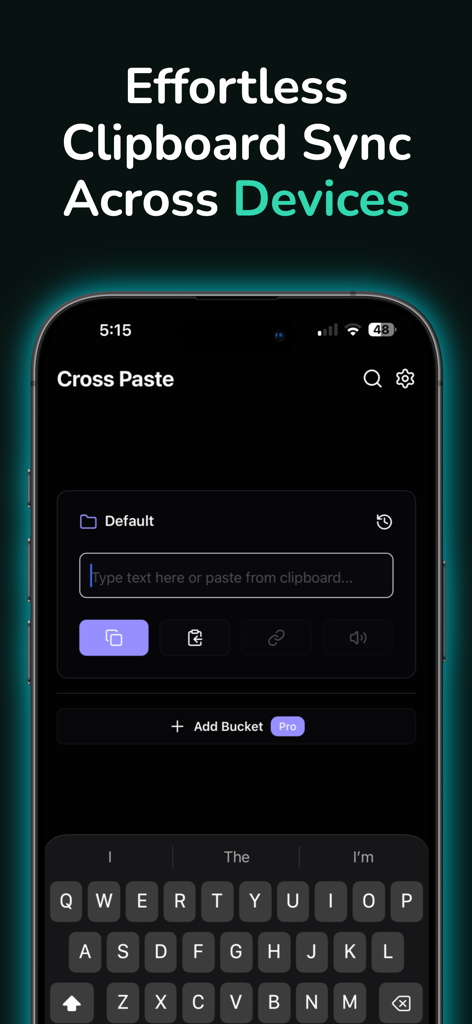
Cross Paste: Clipboard Sync - Cross Pasteアプリのインターフェース。複数のデバイス間でクリップボードを同期します。
Cross Pasteアプリのインターフェース。複数のデバイス間でクリップボードを同期します。

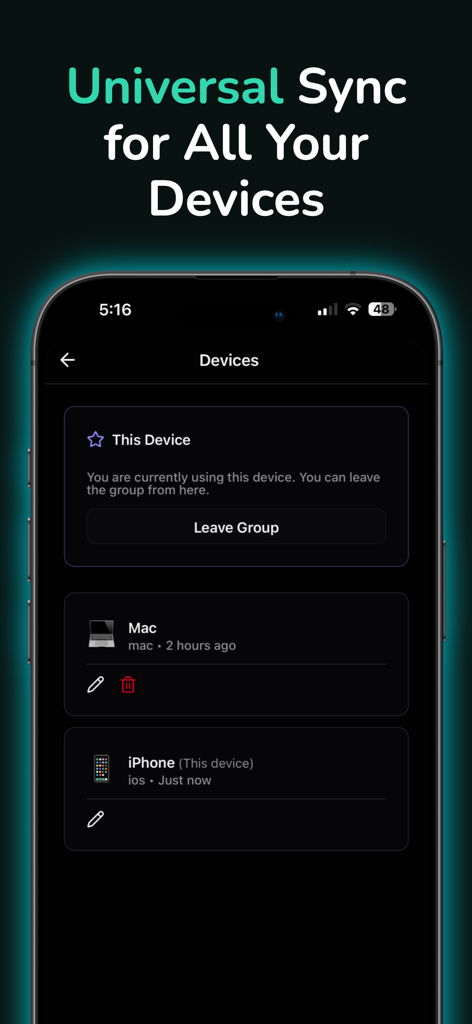
Cross Paste: Clipboard Sync - Cross Pasteアプリのインターフェース。ユニバーサルクリップボード同期のために、iPhoneとMacが接続されたデバイス画面を表示します。
Cross Pasteアプリのインターフェース。ユニバーサルクリップボード同期のために、iPhoneとMacが接続されたデバイス画面を表示します。

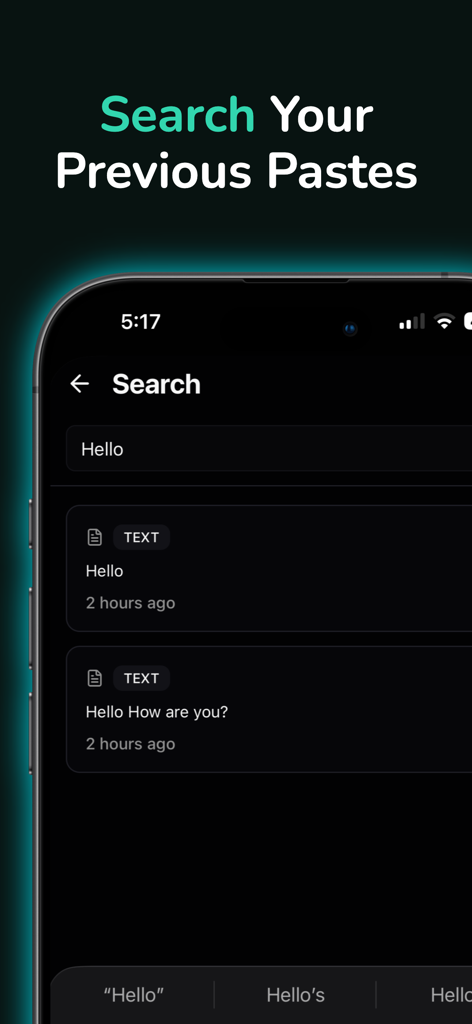
Cross Paste: Clipboard Sync - Cross Pasteアプリの検索画面。iPhone上の単語「hello」の過去のクリップボード履歴を表示します。
Cross Pasteアプリの検索画面。iPhone上の単語「hello」の過去のクリップボード履歴を表示します。

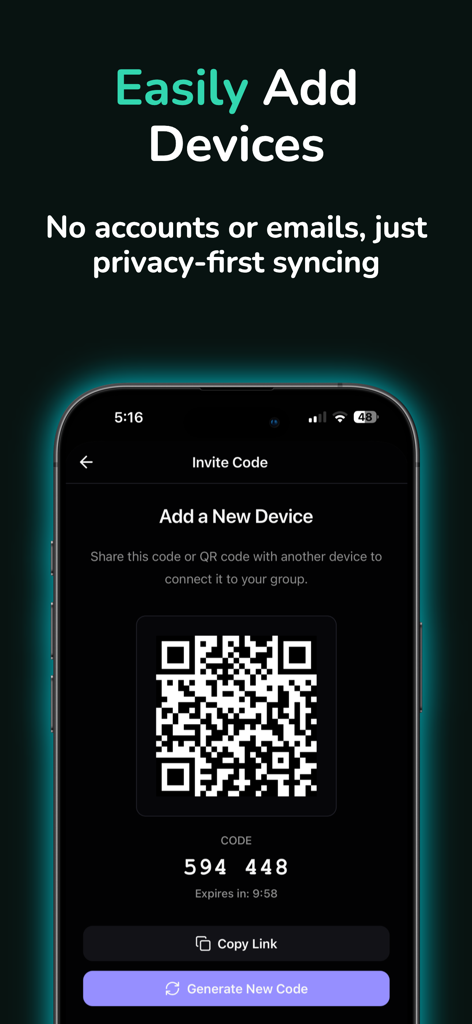
Cross Paste: Clipboard Sync - Cross Pasteアプリ画面。アカウントなしでクリップボード同期のための新しいデバイスを追加するためのQRコードと数字の招待コードを表示します。

Cross Pasteアプリ画面。アカウントなしでクリップボード同期のための新しいデバイスを追加するためのQRコードと数字の招待コードを表示します。

説明

Copy on Your iPhone, Paste on Your Computer. It's That Simple. Cross Paste is your universal clipboard manager that connects your Apple devices with the rest of your digital world. Copy something on your iPhone, and it's instantly available on your Mac, PC, or web browser. No more emailing yourself links. No more switching between apps. Just seamless clipboard sync across every device you own. HOW IT WORKS 1. Install Cross Paste on all your devices 2. Scan a QR code to connect them 3. Start copying and pasting instantly That's it. No accounts. No passwords. No complicated setup. Just working technology that makes your life easier. WHY YOU'LL LOVE IT Works Everywhere The clipboard manager that bridges the gap between your mobile devices and your desktop environment. Mix and match the devices you use daily. Lightning Fast Your clipboard syncs instantly. Copy on your phone, switch to your laptop, and it's already there waiting for you. Private & Secure No account required. No personal information collected. Your clipboard stays yours, with secure device-to-device sync. Never Lose Anything Keep your clipboard history safe. Find that link you copied yesterday, or that code snippet from last week. Everything is saved and searchable. Stay Organized Create custom buckets to organize your clipboard by project. Keep work separate from personal, code snippets organized, and everything exactly where you need it. Find Anything Instantly Search your entire clipboard history with smart search. Just describe what you're looking for, and find it in seconds. Listen to Your Clipboard Use text-to-speech to listen to long articles or documents. Perfect for multitasking or when you can't look at your screen. Quick Link Access Instantly open URLs from your clipboard history. No more copying and pasting into your browser—just tap and go. PERFECT FOR EVERYONE Developers Copy code snippets between your machines. Keep your development workflow seamless across every screen. Writers & Researchers Sync research notes between your iPad and PC. Never lose that perfect quote or important link. Students Share notes between your phone and laptop instantly. Study anywhere, on any device. Power Users Connect unlimited devices. Organize everything with custom buckets. Search your entire clipboard history. Multi-Device Users If you switch between mobile and desktop throughout the day, Cross Paste makes it feel like one seamless experience. KEY FEATURES - Universal Clipboard Sync: Copy on iPhone, paste on your PC. Seamless transfer between mobile and desktop. - Clipboard History Manager: Your clipboard history is saved and searchable. - Cross-Platform Freedom: Works across iOS, macOS, PC, and web browsers. - Real-Time Sync: Connect your phone, tablet, and computer. - No Account Required: Privacy-first design. No sign-ups, no passwords. - Custom Buckets: Organize your clipboard by project or category. - Smart Search: Find any paste by content or date. - Text-to-Speech: Listen to your clipboard content on the go. - Recovery Keys: Save a recovery key to restore your sync group on new devices. https://www.apple.com/legal/internet-services/itunes/dev/stdeula/

Download

ダウンロード: App Store

このページはアプリまたはその開発者の公式ページではなく、情報提供および論評を目的として作成された独立した編集出版物です。明示的に別段の記載がない限り、アプリおよびその開発者は、MWM、Apple、Google Play、アプリのパブリッシャー、またはアプリの開発者と提携、承認、後援、認可、またはその他の公式的な関係はなく、このページのいかなる内容も、アプリがMWMのサービスを使用して開発されたことを意味するものではありません。すべての商標、ロゴ、スクリーンショット、その他のコンテンツはそれぞれの所有者の財産です。








