
このページはアプリまたはその開発者の公式ページではなく、情報提供および論評を目的として作成された独立した編集出版物です。明示的に別段の記載がない限り、アプリおよびその開発者は、MWM、Apple、Google Play、アプリのパブリッシャー、またはアプリの開発者と提携、承認、後援、認可、またはその他の公式的な関係はなく、このページのいかなる内容も、アプリがMWMのサービスを使用して開発されたことを意味するものではありません。すべての商標、ロゴ、スクリーンショット、その他のコンテンツはそれぞれの所有者の財産です。

Cut Notes
手元を見るのをやめましょう。タップ一つでフレーム単位の正確なフィードバックを記録し、Premiere Pro、Avid、Final Cut Proに直接マーカーをエクスポート。
ダウンロード
22K+ユーザー評価
評価数
0開発元
カテゴリ
Utilities対応言語
1最新バージョン
2.6.1サイズ
10.1 MBリリース日
2010年12月20日ポストプロダクションワークフローを効率化
Cut Notesは、視聴と編集の間のギャップを埋め、iPadでフレーム単位で正確なノートを取ることができ、プロの編集スイートと瞬時に同期します。
フレーム単位で正確な同期
Premiere Pro、Avid、FCPXに直接接続。手動でタイムコードを入力することなく、編集の正確なフレームにノートが自動的にタイムスタンプされます。
瞬時にワンタップで記録
カスタマイズ可能なプリセットボタンで画面に集中。'Great Take'や'Fix Audio'のような一般的な問題をタップ一つで記録し、カットから目を離しません。
よくある質問
について知っておくべきこと Cut Notes
Cut Notesとは何ですか?
Cut Notesは、ポストプロダクションのプロフェッショナル向けのiPadノートアプリです。プリセットボタンを使用して迅速にメモを取り、編集アプリケーションの時間コードと同期させることができます。
Cut Notesはビデオコンテンツを再生しますか?
いいえ、Cut Notesはビデオコンテンツを再生しません。これは厳密にコンパニオンアプリとして機能し、ノート作成のために外部ビデオソースまたは編集アプリケーションと同期するように設計されています。
Cut Notesはどの編集ソフトウェアの時間コード同期をサポートしていますか?
Cut Notesは、Kollaborate、Final Cut Pro (6/7/X)、Adobe Premiere Pro (CS 6.0.2/CC)、Avid Media Composer/Symphony、Adobe Audition、Pro Tools、およびMIDI時間コードをサポートするすべてのアプリとの時間コード同期をサポートしています。
Cut Notesではどのように迅速にメモを入力できますか?
Cut Notesでは、ノートキーを使用して迅速にメモを入力できます。ノートキーをタップすると、現在の時間コード位置にメモが即座に追加されます。ユーザーはカスタムノートキーセットを作成してメモを整理できます。
Cut Notesでは手動でメモを入力できますか?
はい、Cut Notesでは手動でメモを入力できます。ユーザーは提供されたテキストボックスにカスタムメモを入力できます。アプリは、ユーザーが入力し始めるとメモを挿入するため、急ぐ必要はありません。
Cut Notesからメモのエクスポートオプションは何がありますか?
Cut Notesは、Final Cut Pro 6/7、Final Cut Pro X、Avid Media Composer、およびPro Toolsにメモをエクスポートします。Pro Toolsの場合、エクスポートにはサードパーティ製アプリケーションEdiMarkerが必要ですが、これは別個のものです。
Cut Notesはクラウド統合機能を提供していますか?
はい、Cut NotesはKollaborateクラウドプラットフォームと統合されています。この統合により、同僚とのメモ共有、共同ノート作成セッション、Webブラウザからの時間コード同期、およびリモート再生制御が可能になります。
ユーザーはCut Notesのノートキーボタンをカスタマイズできますか?
はい、ユーザーはCut Notesのノートキーボタンをカスタマイズできます。アプリでは、既存のノートキーの変更、新しいノートキーセットの作成、および個々のキーへの異なるカラーコードの割り当てが可能です。
Cut Notesアプリのターゲットユーザーは誰ですか?
Cut Notesは、スタジオやフリーランサーを含むポストプロダクションのプロフェッショナル向けに設計されています。映画やビデオ編集のワークフローを合理化するための専用iPadノート作成ツールとして機能します。
以下のスクリーンショットと説明は、アプリの公式ストアリスティングから直接取得されたものであり、アプリ開発者の所有物です。
アプリストア
スクリーンショット
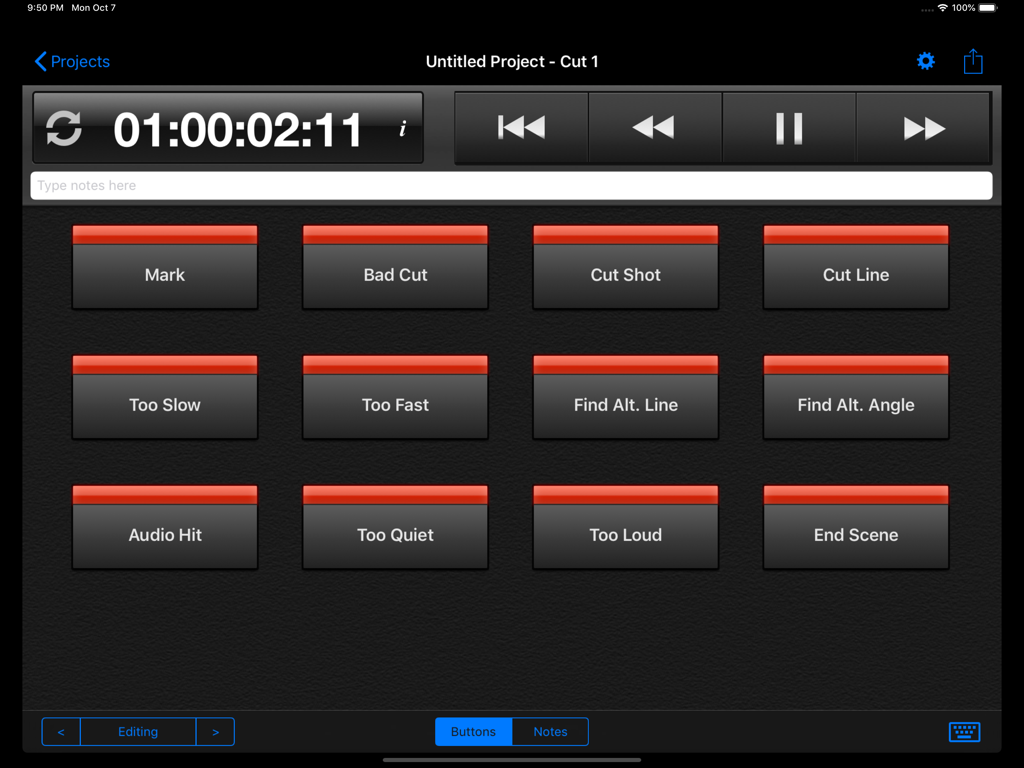
Cut Notes iPadアプリのインターフェース。タイムコード表示とビデオ編集用のカスタムノートショートカットキーが表示されています。
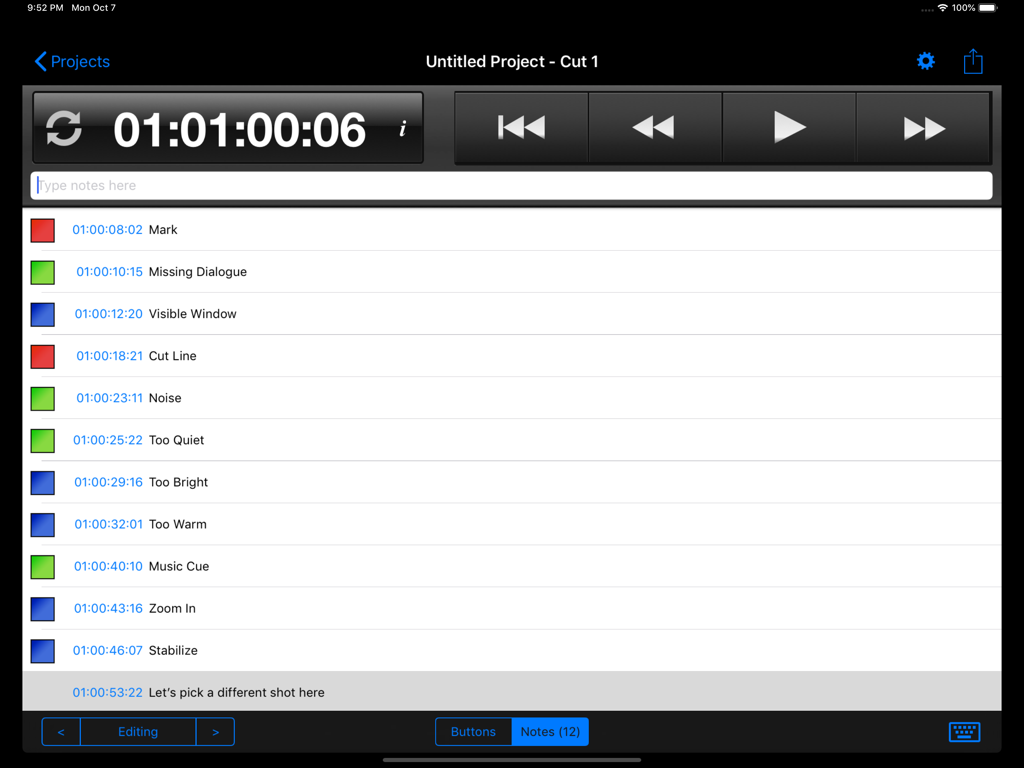
iPad上のCut Notesアプリのインターフェース。タイムスタンプ付きのビデオ編集ノートのリストとトランスポートコントロールが表示されています。
説明
Download
類似アプリ
同じカテゴリのトップランクアプリ

Google LLC

Google Chrome
Google LLC

中国移动(手机营业厅)
China Mobile Online Services Co., Ltd.

Google Authenticator
Google LLC

CNH do Brasil
Servicos e Informacoes do Brasil

Cleanup: Phone Storage Cleaner
DEEP FLOW SOFTWARE SERVICES - FZCO

gov.br
Servicos e Informacoes do Brasil

中国电信-全国统一官方服务平台
CHINA TELECOM Corporation Ltd.

Microsoft Edge: AI Browser
Microsoft Corporation
このページはアプリまたはその開発者の公式ページではなく、情報提供および論評を目的として作成された独立した編集出版物です。明示的に別段の記載がない限り、アプリおよびその開発者は、MWM、Apple、Google Play、アプリのパブリッシャー、またはアプリの開発者と提携、承認、後援、認可、またはその他の公式的な関係はなく、このページのいかなる内容も、アプリがMWMのサービスを使用して開発されたことを意味するものではありません。すべての商標、ロゴ、スクリーンショット、その他のコンテンツはそれぞれの所有者の財産です。