Dark Mode for Safari: NightEye
ダウンロード: App Store

このページはアプリまたはその開発者の公式ページではなく、情報提供および論評を目的として作成された独立した編集出版物です。明示的に別段の記載がない限り、アプリおよびその開発者は、MWM、Apple、Google Play、アプリのパブリッシャー、またはアプリの開発者と提携、承認、後援、認可、またはその他の公式的な関係はなく、このページのいかなる内容も、アプリがMWMのサービスを使用して開発されたことを意味するものではありません。すべての商標、ロゴ、スクリーンショット、その他のコンテンツはそれぞれの所有者の財産です。

ロゴ: Dark Mode for Safari: NightEye
ダウンロード: App Store

Dark Mode for Safari: NightEye

目の疲れから解放され、深夜の生産性を向上させましょう。NightEyeは、データを一切収集することなく、お使いのAppleデバイス全体で一貫した、目に優しいダークモードとブルーライトフィルターを提供します。

主要数値

ダウンロード

8K+

ユーザー評価

3.8/5

評価数

300

開発元

PROMOTINO LTD OOD

カテゴリ

Utilities

対応言語

33

最新バージョン

5.3.7

サイズ

10.3 MB

リリース日

2019年3月18日
機能

現代の夜更かし好きのためにデザインされた

Night Eyeは単なるテーマではありません。ウェブのあらゆる場所で、あなたの目を保護し、集中力を高めるための強力なツールキットです。

インテリジェントダークモード

すべてのウェブサイトをスマートにダークテーマに変換し、画像を鮮明でクリアに保ち、シームレスな体験を提供します。

高度な目の保護

ブルーライトをカットし、画面をあなたの正確な快適レベルまで暗くすることで、疲労を軽減し、睡眠を改善します。

以下のスクリーンショットと説明は、アプリの公式ストアリスティングから直接取得されたものであり、アプリ開発者の所有物です。

アプリストア

スクリーンショット
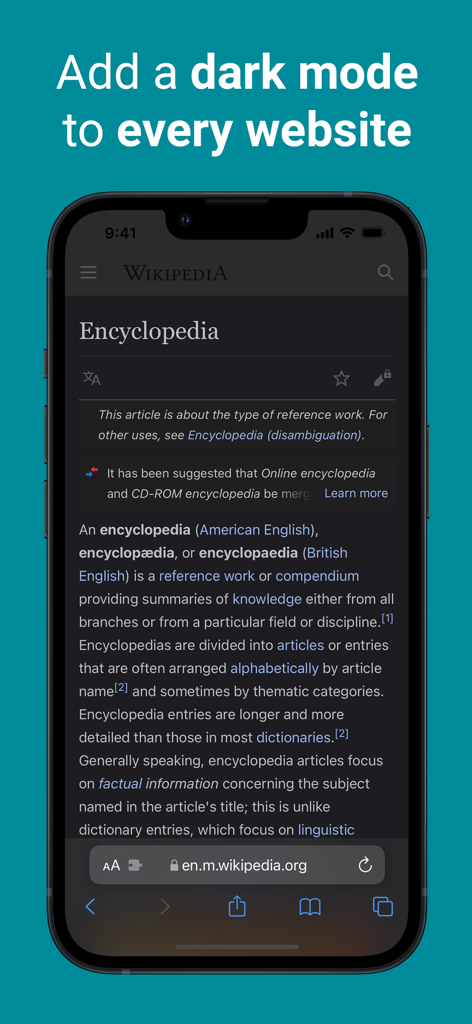
Dark Mode for Safari: NightEye - NightEye Safari拡張機能を使用してダークモードで表示されたiPhoneのWikipedia
NightEye Safari拡張機能を使用してダークモードで表示されたiPhoneのWikipedia

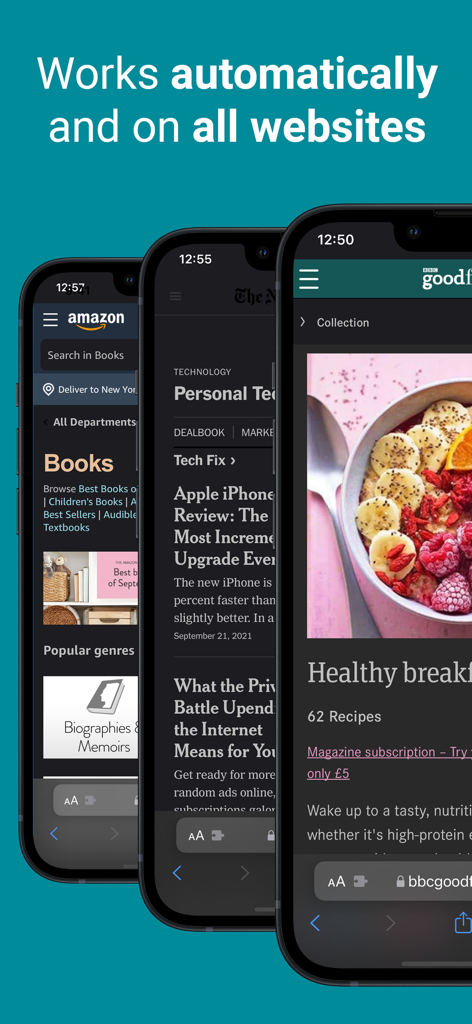
Dark Mode for Safari: NightEye - Amazonとニュースサイトで自動ダークモード変換を表示するNightEye拡張機能
Amazonとニュースサイトで自動ダークモード変換を表示するNightEye拡張機能

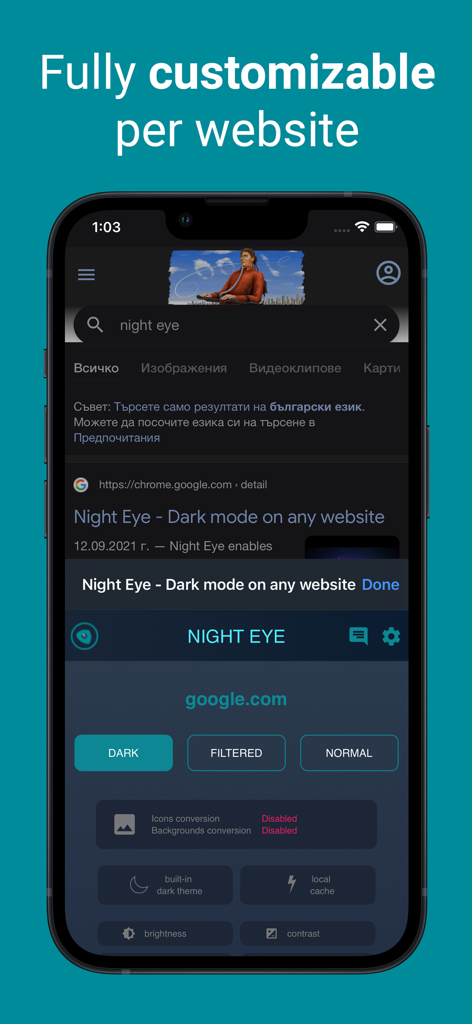
Dark Mode for Safari: NightEye - ダークモードのGoogle検索ページでNight Eye Safari拡張機能のカスタマイズオプションを示すiPhoneスクリーンショット
ダークモードのGoogle検索ページでNight Eye Safari拡張機能のカスタマイズオプションを示すiPhoneスクリーンショット

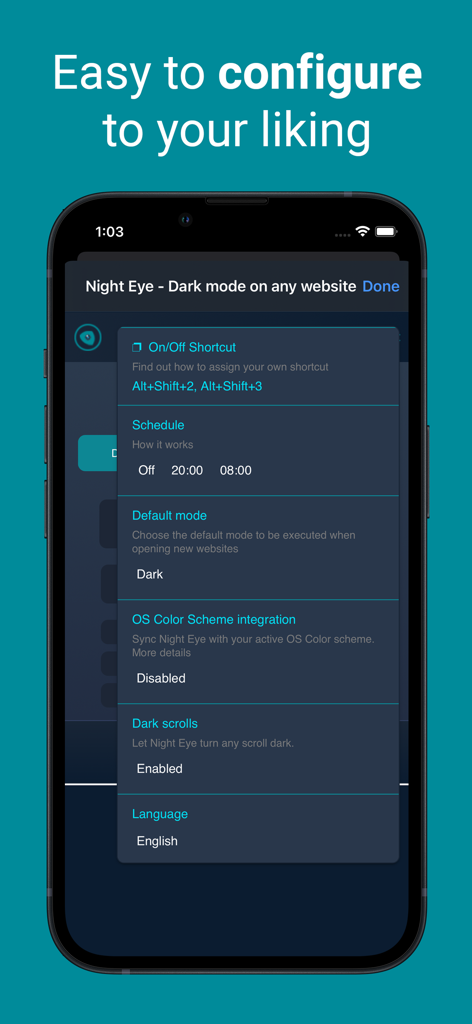
Dark Mode for Safari: NightEye - スケジュール、デフォルトモード、OSカラースキーム統合などの設定オプションを表示するNight Eyeアプリ設定画面

スケジュール、デフォルトモード、OSカラースキーム統合などの設定オプションを表示するNight Eyeアプリ設定画面

説明

Enhance your browsing with Night Eye, a browser extension specially designed for a flawless "dark mode" experience on any site. By utilizing an advanced "dark mode" transformation technique, it efficiently evaluates and adjusts every color to provide a consistent and soothing dark theme. Opting for a dark interface can significantly diminish eye strain, making it a perfect choice for those sensitive to bright screens, or for users who often find themselves in dimly lit surroundings. Studies even indicate that reduced ambient light can positively influence sleep patterns. With Night Eye, dive into a serene "dark mode" on popular platforms such as Messenger, Quora, Search, Reddit, Wikipedia, and beyond. Further, its compatibility with native dark themes on select sites ensures you have total autonomy over your digital landscape. Dive into the world of "dark mode" with Night Eye and redefine your browsing ambiance. Discover the perfect dark mode experience for your browsing needs with Night Eye's four tailored plans: 1. Night Eye Lite: - Enjoy dark mode on up to 5 websites. - Switch between websites as often as you like. 2. Night Eye Pro: - Unlock the app's full potential on up to 3 browsers. - Yearly subscription plan. - Get started with a 2-month free trial (no payment required), which can be extended to a full year! 3. Night Eye Pro Max: - Experience complete dark mode capabilities on up to 6 browsers. - Yearly subscription plan. 4. Night Eye Ultimate: - Dive into the ultimate dark mode experience on up to 10 browsers. - Make it yours forever with a one-time payment. Explore Night Eye and transform your browsing experience today! AVAILABLE MODES Our extension offers three modes: Dark, Filtered, and Normal. - In Dark mode, all colors, small images, and icons are converted to provide the best dark experience. - In Filtered mode, the website's colors are not changed, but you can adjust brightness, contrast, warmth, and more. - Normal mode allows you to switch back to the website's regular theme. GLOBAL OPTIONS - OS/Browser Color scheme integration - integrate with your operating system's or browser's color scheme - Deep integration with websites that have their own built-in dark themes. - Scheduling for dark mode to turn on and off - Custom dark mode for online PDFs - Export/Import data between your browsers DARK MODE OPTIONS PER WEBSITE You can customize Night Eye's settings for a single website or globally, including adjusting contrast, blue light filter, and dimming. - Images - Night Eye analyses and converts only the small images and icons in a website to give you even smoother experience. Facebook posts and other significant media are not converted. - Brightness / Saturation / Contrast - Adjust the brightness, the contrast and the saturation to match the recommended healthy levels and protect your eyes. The default setting for each is 50%, but you can customize each to the preferred levels. - Blue Light - Take care of your eyes by eliminating the blue light coming from your screen. Highly recommended especially during late night browsing. Simply slide to the preferred level of warmth. - Dim - Extremely useful if you are working in a dark space/room and the screen is the only source of light in the room. The default setting is set to 50%, but you can customize it as you please. WE CARE ABOUT PRIVACY Safari will alert you that the extension may read and change all your data on the websites that you visit. Here is why: This extension analyses the colors of each webpage and converts them in order to give you a smooth and consistent dark mode. There is no other way the extension can convert the colors without the privilege to access them. However, we NEVER collect any of your data. Our business model relies on subscriptions and not on storing and selling your data. Last but not least, we are also internet users and don’t want to be evil.

Download

ダウンロード: App Store

このページはアプリまたはその開発者の公式ページではなく、情報提供および論評を目的として作成された独立した編集出版物です。明示的に別段の記載がない限り、アプリおよびその開発者は、MWM、Apple、Google Play、アプリのパブリッシャー、またはアプリの開発者と提携、承認、後援、認可、またはその他の公式的な関係はなく、このページのいかなる内容も、アプリがMWMのサービスを使用して開発されたことを意味するものではありません。すべての商標、ロゴ、スクリーンショット、その他のコンテンツはそれぞれの所有者の財産です。








