
このページはアプリまたはその開発者の公式ページではなく、情報提供および論評を目的として作成された独立した編集出版物です。明示的に別段の記載がない限り、アプリおよびその開発者は、MWM、Apple、Google Play、アプリのパブリッシャー、またはアプリの開発者と提携、承認、後援、認可、またはその他の公式的な関係はなく、このページのいかなる内容も、アプリがMWMのサービスを使用して開発されたことを意味するものではありません。すべての商標、ロゴ、スクリーンショット、その他のコンテンツはそれぞれの所有者の財産です。

ダウンロード
12.5M+ユーザー評価
評価数
488.3K開発元
カテゴリ
Utilities対応言語
12最新バージョン
9.9.4サイズ
81.3 MBリリース日
2011年11月5日Decibel X:dB Sound Level Meter アプリ分析
プロフェッショナルな騒音測定を実現する主要機能の深掘り
精度の高い測定と事前キャリブレーション
このアプリは、すべてのAppleデバイス向けにテストおよび事前キャリブレーションされており、実際のSPLデバイスに匹敵する高精度な騒音レベル測定を提供します。
NIOSH・OSHA準拠の線量計機能
NIOSHおよびOSHAの基準に準拠した線量計機能を搭載しており、ユーザーは職場での騒音曝露量を評価し、安全規制への適合性を確認することが可能です。
周波数重み付けフィルター
ITU-R 468、A、B、C、Zといった複数の周波数重み付けフィルターをサポートしており、ユーザーは特定の規制や分析要件に応じた騒音評価を行うことができます。
高度な履歴データ管理
録音されたデータは履歴レコードとして保存され、将来のアクセスや分析のために利用可能です。各レコードは高解像度のPNGグラフまたはCSVテキストとしてエクスポートでき、iCloudを介してデバイス間で同期されます。
リアルタイムFFTおよびBARグラフ表示
FFT(高速フーリエ変換)およびBARグラフを使用してリアルタイムで周波数分析を表示し、主要な周波数を特定することで、ユーザーは音響特性を詳細に把握することができます。
強力なカスタムキャリブレーション
線形、オクターブ1/1、1/3といったオプションを含む強力なキャリブレーション機能を提供し、ユーザーは測定プロファイルをロードおよび保存することで、より高い精度と特定の環境への適応を実現できます。
標準時間重み付け
SLOW (500ms)、FAST (200ms)、IMPULSE (50ms)といった標準的な時間重み付けに対応しており、ユーザーは多様な騒音測定規格や動的な音響イベントの分析要件に合わせて測定を調整できます。
包括的な測定値表示
現在値、平均値(Leq)、最大値を含む包括的な測定値を、視覚的に分かりやすいデジタルおよびアナログレイアウトで表示し、ユーザーは騒音レベルの全体像を瞬時に把握できます。
ヘルスケアアプリ連携
騒音レベルデータをAppleのヘルスケアアプリに直接エクスポートできるため、ユーザーは自身の健康データと騒音曝露を統合して管理し、長期的な傾向を把握できます。
Apple Watch連携
このアプリはApple Watchをサポートしており、ユーザーは手首から直接騒音レベルを確認できるため、迅速なモニタリングが可能です。
よくある質問
について知っておくべきこと Decibel X:dB Sound Level Meter
How does Decibel X ensure accurate sound measurements?
Decibel X features pre-calibrated measurements for all Apple devices, ensuring trusted accuracy. Its precision matches that of real Sound Pressure Level (SPL) devices, making it a professional sound meter.
Can I track noise exposure over time with Decibel X?
Yes, Decibel X includes a dosimeter feature that complies with NIOSH and OSHA standards. It protects your ears by monitoring noise levels and can export data to the Health app for health insights.
What types of frequency weightings does Decibel X support?
Decibel X supports multiple frequency weighting filters including ITU-R 468, A, B, C, and Z. This allows for diverse frequency analysis and precise sound level measurements.
Does Decibel X integrate with Apple Health?
Yes, Decibel X integrates with the Apple Health app. It can automatically export noise levels directly into your Health app for comprehensive environmental sound data tracking and management.
Can Decibel X save and export measurement data?
Yes, Decibel X saves recording data automatically and syncs via iCloud. Users can export records in various formats, including WAV, PDF, CSV, and HTML, for future analysis and sharing.
What is the measurement range of the Decibel X app?
The Decibel X app provides a standard measurement range from 30 dBA up to 130 dBA. This range covers typical environmental and occupational sound levels for effective monitoring.
Can I customize the calibration of the Decibel X sound meter?
Yes, Decibel X supports powerful custom calibration, including Linear, Octave 1/1, and 1/3 options. Users can load and save calibration profiles for higher precision and accuracy.
Does Decibel X offer different visual themes for its interface?
Yes, Decibel X features a beautiful, intuitive UI design with three available themes. Users can choose between LIGHT, DARK, and CLASSIC themes for personalized visual experiences.
Can Decibel X display real-time frequency analysis?
Yes, Decibel X features FFT and BAR graphs for real-time frequency analysis. It also displays the predominant frequency, which is useful for musical tests and detailed sound examination.
Does Decibel X support Apple Watch?
Yes, Decibel X supports Apple Watch. Users can see noise levels directly from their wrist, providing convenient access to sound measurements without needing to access their phone.
以下のスクリーンショットと説明は、アプリの公式ストアリスティングから直接取得されたものであり、アプリ開発者の所有物です。
アプリストア
スクリーンショット

プロフェッショナル測定
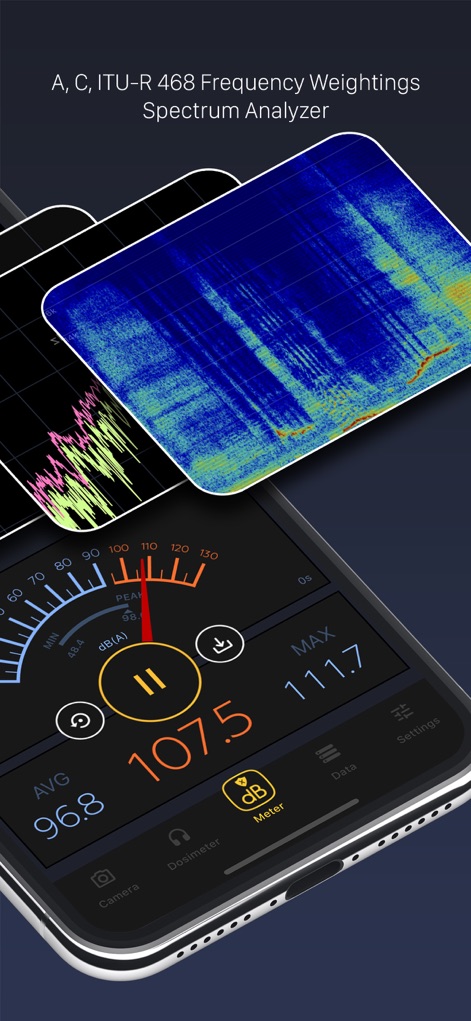
このアプリは周波数分析グラフと詳細なdBレベル表示により、プロフェッショナルな音響測定を提供します。
精密騒音計 & 分析
リアルタイムのSPL測定値と、視覚的に鮮やかなスペクトルアナライザーを通じて、正確な騒音レベルと周波数分布を把握できます。

騒音曝露を管理
NIOSH基準に準拠したドシメーター機能で騒音曝露を正確に測定し、リアルタイムの騒音曝露率と予測値を確認できます。

履歴データ管理
記録された騒音レベル履歴はiCloud同期でデバイス間で共有され、CSVやPDFなど多様な形式でエクスポート可能です。

ヘルスケア連携
本アプリはAppleのヘルスケアアプリとシームレスに連携し、環境騒音レベルを自動的に記録・エクスポートします。

高度なキャリブレーション
このツールは、オクターブ1/1による詳細な周波数応答調整と、カスタム設定を保存・読み込みするプロファイル管理をサポートします。

InstaDecibelで共有
カメラ機能を使用して、現在の騒音レベルを写真やビデオにオーバーレイ表示し、その情報をソーシャルネットワークで簡単に共有できます。

カスタムテーマ選択
ユーザーは、ダーク、ライト、クラシックの3種類のテーマから好みに合わせてUIを選択し、視覚的な体験をパーソナライズできます。
説明
Download
類似アプリ
似た機能とユーザー体験を持つアプリ
Decibel Meter: Sound dB Level
传胜 贾
Smaart RTA
Rational Acoustics LLC
Decibel : dB sound level meter
Vlad Polyanskiy
Decibel dB Sound Meter Ultra
Ultrafine, Lda
Decibel Meter Sound Detector
Ashraf Thoppukadavil
Sound Meter (Decibel)
Unicom TOV

NIOSH Sound Level Meter
EA LAB d.o.o.
Sound Meter HQ
ExaMobile S.A.
Audio / Spectrum Analyzer
Loop-Sessions.LLC.
このページはアプリまたはその開発者の公式ページではなく、情報提供および論評を目的として作成された独立した編集出版物です。明示的に別段の記載がない限り、アプリおよびその開発者は、MWM、Apple、Google Play、アプリのパブリッシャー、またはアプリの開発者と提携、承認、後援、認可、またはその他の公式的な関係はなく、このページのいかなる内容も、アプリがMWMのサービスを使用して開発されたことを意味するものではありません。すべての商標、ロゴ、スクリーンショット、その他のコンテンツはそれぞれの所有者の財産です。