Detail: AI Video Editor
ダウンロード: App Store

このページはアプリまたはその開発者の公式ページではなく、情報提供および論評を目的として作成された独立した編集出版物です。明示的に別段の記載がない限り、アプリおよびその開発者は、MWM、Apple、Google Play、アプリのパブリッシャー、またはアプリの開発者と提携、承認、後援、認可、またはその他の公式的な関係はなく、このページのいかなる内容も、アプリがMWMのサービスを使用して開発されたことを意味するものではありません。すべての商標、ロゴ、スクリーンショット、その他のコンテンツはそれぞれの所有者の財産です。


ロゴ: Detail: AI Video Editor
ダウンロード: App Store

Detail: AI Video Editor

App Store Award受賞アプリを64.5万人以上のクリエイターが利用中。数秒でバズるショート動画、ポッドキャスト、Vlogを録画、自動編集、共有できます。

主要数値

ダウンロード

645K+

ユーザー評価

4.5/5

評価数

3K+

開発元

Detail Technologies B.V.

カテゴリ

Photo & Video

対応言語

40

最新バージョン

5.5.3

サイズ

325.1 MB

リリース日

2023年3月10日
機能

AIスピードでプロ級コンテンツを制作

カメラクルーと編集者を兼ねるオールインワンAI動画スタジオ。技術的な手間なく、あらゆるプラットフォームでブランドを成長させましょう。

瞬時にAI自動編集

手作業でのカット編集はもう不要。AIが最高のハイライトを検出し、タップひとつでTikTokやリール用の、キャプション付きの洗練されたショート動画を作成します。

スマートディレクター&テレプロンプター

自信を持ってメッセージを伝えましょう。AIディレクターがストーリーテリングをガイドし、内蔵テレプロンプターが完璧なテイクを保証します。

FAQ

よくある質問

について知っておくべきこと Detail: AI Video Editor

Detail: AI Video Editor は自動ビデオ編集を提供していますか?

はい、Detail: AI Video Editor は AI Auto-Edit を使用して、長編コンテンツから短いクリップまで、映像の最適な瞬間を自動的に見つけ出し、すぐに共有できるビデオやショートを作成します。

Detail: AI Video Editor にはテレプロンプター機能がありますか?

はい、Detail には AI ディレクター付きの統合テレプロンプターが含まれています。この会話型ガイドは、スクリプトを表示してシームレスな録画体験を提供し、ユーザーが事前の準備なしにストーリーを録画できるように支援します。

Detail: AI Video Editor を使用してソーシャルメディアプラットフォームにライブストリーミングできますか?

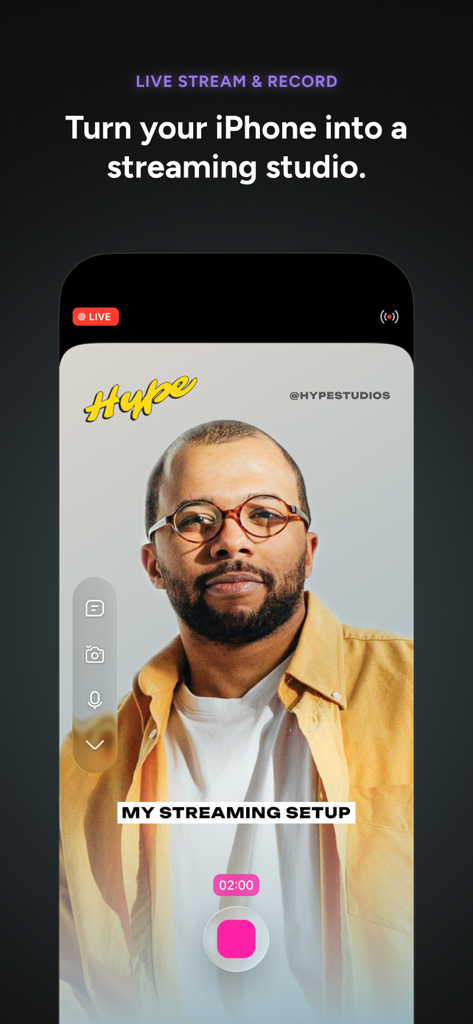
はい、Detail を使用すると、RTMP 経由で YouTube、Twitch、Instagram、LinkedIn、Kick、Facebook などのプラットフォームに直接ライブストリーミングでき、iPhone をプロのストリーミングスタジオに変えることができます。

以下のスクリーンショットと説明は、アプリの公式ストアリスティングから直接取得されたものであり、アプリ開発者の所有物です。

アプリストア

スクリーンショット
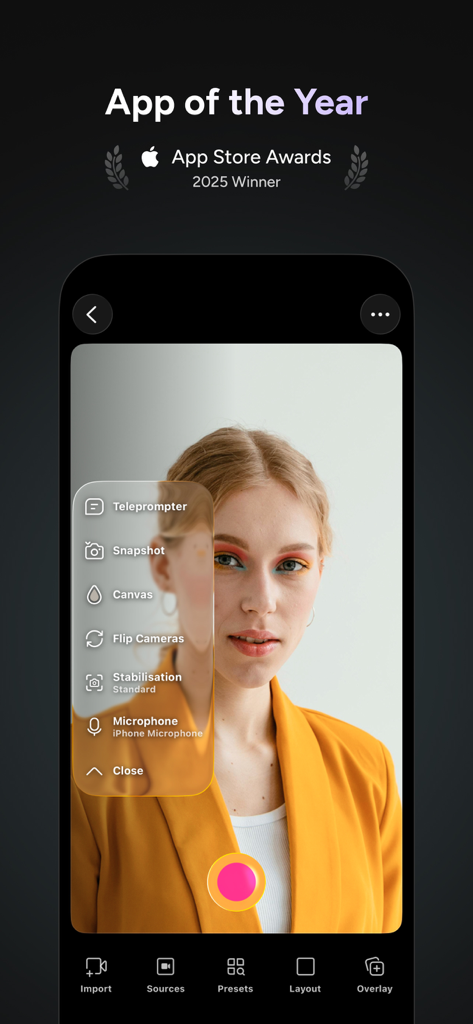
Detail: AI Video Editor - テレプロンプターメニューとプロフェッショナルな録画ツールを備えた、Detail AI動画編集アプリのカメラインターフェイス

テレプロンプターメニューとプロフェッショナルな録画ツールを備えた、Detail AI動画編集アプリのカメラインターフェイス

Detail: AI Video Editor - ピクチャーインピクチャーレイアウトで、インスタントリアクション動画録画機能を示すDetail AI動画編集アプリのモバイルインターフェイス。
ピクチャーインピクチャーレイアウトで、インスタントリアクション動画録画機能を示すDetail AI動画編集アプリのモバイルインターフェイス。

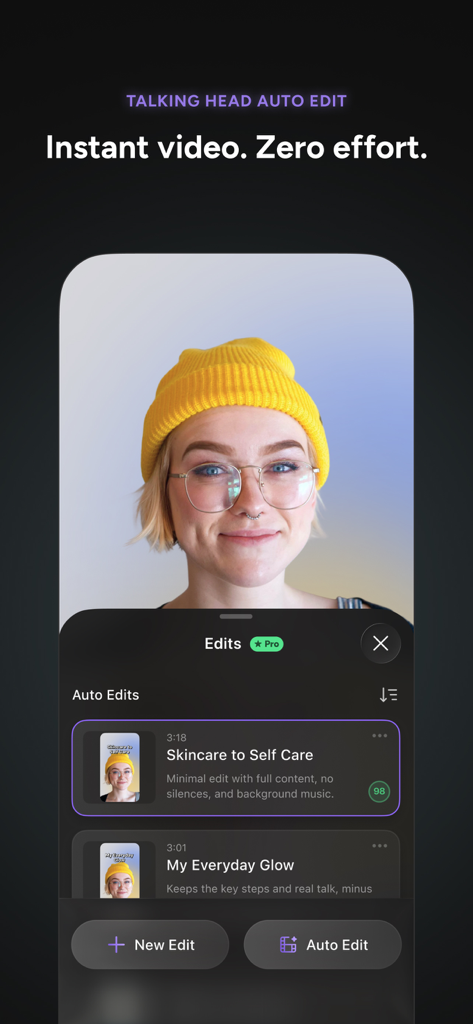
Detail: AI Video Editor - トークヘッド動画クリエイター向けの自動編集を示すDetail AI動画編集アプリのインターフェイス
トークヘッド動画クリエイター向けの自動編集を示すDetail AI動画編集アプリのインターフェイス

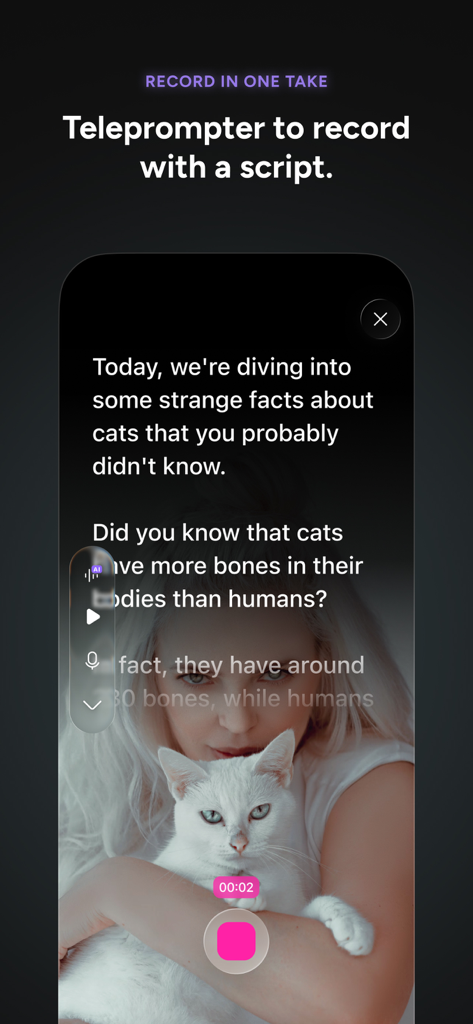
Detail: AI Video Editor - スクリプトを録画中に、Detail AI動画編集アプリのテレプロンプター機能を示すモバイル画面
スクリプトを録画中に、Detail AI動画編集アプリのテレプロンプター機能を示すモバイル画面

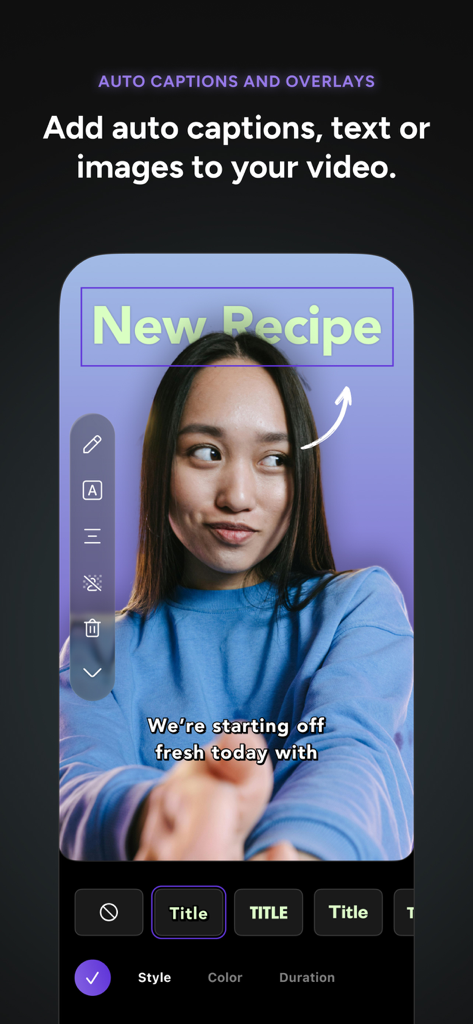
Detail: AI Video Editor - キャプションと「New Recipe」というテキストオーバーレイがVlog録画に表示されている、Detail AI動画編集アプリのモバイルインターフェイス
キャプションと「New Recipe」というテキストオーバーレイがVlog録画に表示されている、Detail AI動画編集アプリのモバイルインターフェイス

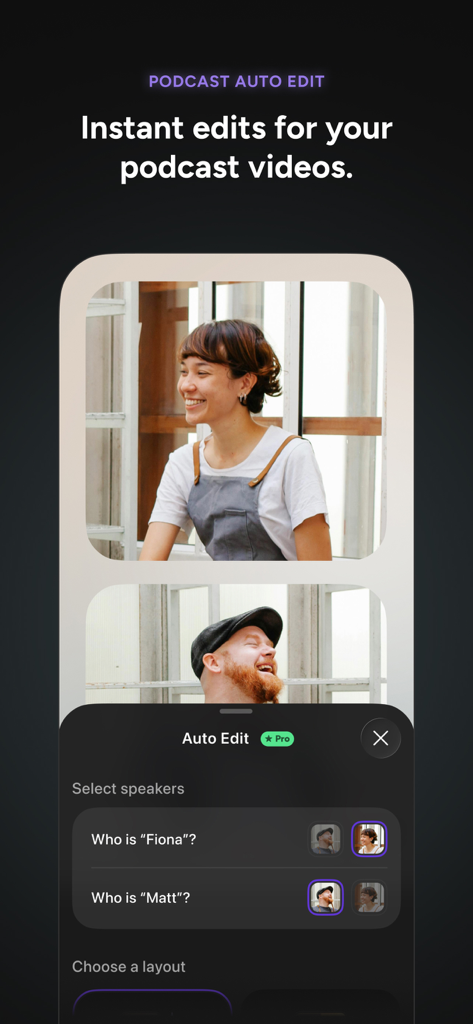
Detail: AI Video Editor - スピーカー選択機能を備えたポッドキャスト自動編集インターフェイスを示す、Detail AI動画編集アプリのスクリーンショット。
スピーカー選択機能を備えたポッドキャスト自動編集インターフェイスを示す、Detail AI動画編集アプリのスクリーンショット。

Detail: AI Video Editor - iPhone上のDetail AI動画編集アプリのライブストリーミングおよび録画インターフェイス
iPhone上のDetail AI動画編集アプリのライブストリーミングおよび録画インターフェイス

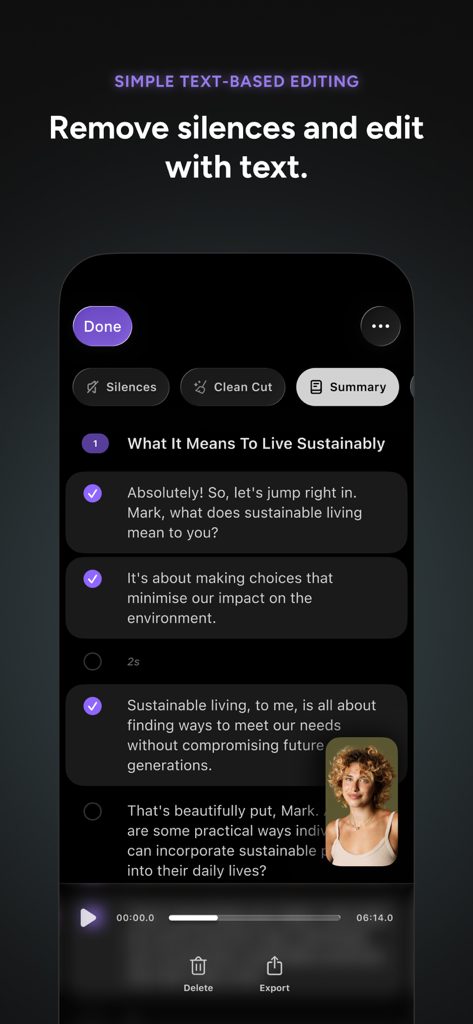
Detail: AI Video Editor - クリエイター向けのテキストベース編集と無音除去機能を示す、Detail AI動画編集アプリのモバイルインターフェイス。
クリエイター向けのテキストベース編集と無音除去機能を示す、Detail AI動画編集アプリのモバイルインターフェイス。

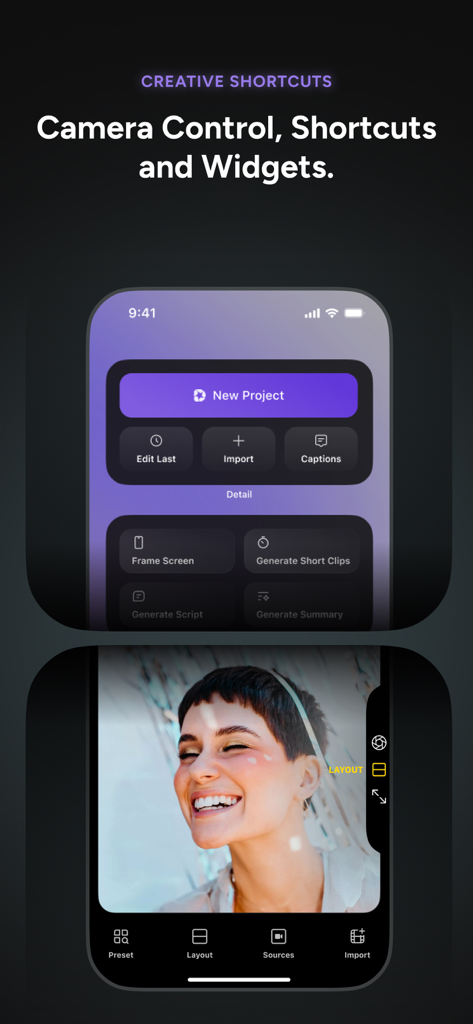
Detail: AI Video Editor - クリエイティブショートカットとカメラコントロールを示す、Detail AI動画編集アプリのインターフェイス。

クリエイティブショートカットとカメラコントロールを示す、Detail AI動画編集アプリのインターフェイス。

説明

With Detail, everyone can tell their story with video. App Store Awards Winner 2025. Detail combines the simplicity of a camera app with the power of a video editor. Whether you're creating a 60-second reaction video, a presentation, a 30-minute interview or podcast, or a live stream, you can do it all in one place with Detail. Record or import a video and use AI Auto-Edit to create videos and shorts automatically. Instant video. Record, done! Turn your iPhone or iPad into a professional video studio with Detail, the ultimate AI video editor for content creators. Whether you're making TikTok shorts, YouTube vlogs, reels, podcasts, or Instagram stories, Detail has everything you need without juggling complicated apps or gear. NEW: Auto-Edit & AI Director • AI Director: A conversational guide in the teleprompter that helps you record your story. Just talk — no prep needed. • Auto-Edit: Finds the best moments and creates ready-to-share videos, from long-form to short clips. • Edits: Create multiple versions of your timeline in one project. • Shortcuts: Jump into your next video faster with new Home Screen Shortcuts. AI Video Editing Made Easy Say goodbye to complicated editing software. Detail's AI editor helps you craft professional content in minutes. The teleprompter and Auto-Edit streamline your workflow. Create perfect cuts and transitions for vlogs, shorts, and reels ideal for TikTok and Instagram. Get unlimited recording, remote recording, captions and editing for free; upgrade to Pro to unlock AI features like Auto-Edit. Powerful Camera Features • Easy multi-camera recording with two iPhones or iPads. • Switch between front and back cameras. • Create instant reaction videos—import content and convert into social-ready shorts. • Display video behind you for commentary, tutorials, or presentations. YouTube Vlogger's Dream • Import Photos or Videos to create a video • Create end screens to boost subscribers. • YouTube-optimized export settings. • Generate stand-out thumbnails. Instagram Story & Reel Enhancer • Text-based editing for create reels and shorts fast. • Pre-configured aspect ratios. • Instagram-style filters. Podcast Production Suite • Podcast Auto-Edit for quick, polished video podcasts. • Record with iPhone mic, Rode/DJI wireless, or USB microphones. • AI audio enhancement. • Publish to major platforms with one tap. • Extract audio from any video. Livestream with Professional Quality • Stream to YouTube, Twitch, Instagram, LinkedIn, Kick or Facebook via RTMP. • Record high-quality video while streaming. • Use overlays, layouts, and multi-camera setups. Advanced Editing Tools • Green screen effects with Chroma Key. • Speed up video or slow motion clips. • Motion graphics and text animation. • Integrated teleprompter with AI Director. • AI color grading with filters. Captions & Subtitles • AI auto-captions in multiple languages. • Customizable caption styles. • Burned-in subtitles. Collaboration & Workflow • Cloud sync for saving and sharing projects. • Collaborate on edits and share recordings. • Organize videos, shorts, and reels with cloud storage. Everyone can create, stream, and edit like a pro. Join thousands of creators using Detail to produce YouTube vlogs, TikTok shorts, video podcasts, and Instagram reels. Whether you're a beginner or an experienced creator, Detail's AI-powered tools help you create unique content faster. Download Detail now and start recording, editing, and live streaming with ease!

Download

ダウンロード: App Store

このページはアプリまたはその開発者の公式ページではなく、情報提供および論評を目的として作成された独立した編集出版物です。明示的に別段の記載がない限り、アプリおよびその開発者は、MWM、Apple、Google Play、アプリのパブリッシャー、またはアプリの開発者と提携、承認、後援、認可、またはその他の公式的な関係はなく、このページのいかなる内容も、アプリがMWMのサービスを使用して開発されたことを意味するものではありません。すべての商標、ロゴ、スクリーンショット、その他のコンテンツはそれぞれの所有者の財産です。








