Digital Photo Frame Slideshow

Digital Photo Frame Slideshow

ダウンロード: App Store
ロゴ: Digital Photo Frame Slideshow

デジタルフォトフレーム スライドショー:iPadを感動的な思い出のハブに

エレガントで自動化されたフォトフレームで、iOSデバイスに新たな命を。iCloud、Googleフォト、Flickrに接続して、大切な瞬間を高解像度のシネマティックスタイルで表示しましょう。

開発元

Digital Photo Frame Slideshow Maker - Picture & Video Creator App LLC

カテゴリ

Photo & Video

ダウンロード

46K+

ユーザー評価

4.3/5

評価数

1K+

対応言語

13

あなたの思い出を、再構築

このインターフェースを利用する 46K+ 人のユーザー.

App Storeの「私たちが愛するアプリ」バッジとユーザーレビューを表示するデジタルフォトフレームアプリのプロモーションバナー

App Storeの「私たちが愛するアプリ」バッジとユーザーレビューを表示するデジタルフォトフレームアプリのプロモーションバナー

デジタルフォトフレームスライドショーアプリ内で白黒の結婚写真を表示するiPhone画面

デジタルフォトフレームスライドショーアプリ内で白黒の結婚写真を表示するiPhone画面

iCloud、Googleフォト、Flickr、Unsplashの統合アイコンが表示された家族写真を表示するスマートフォン
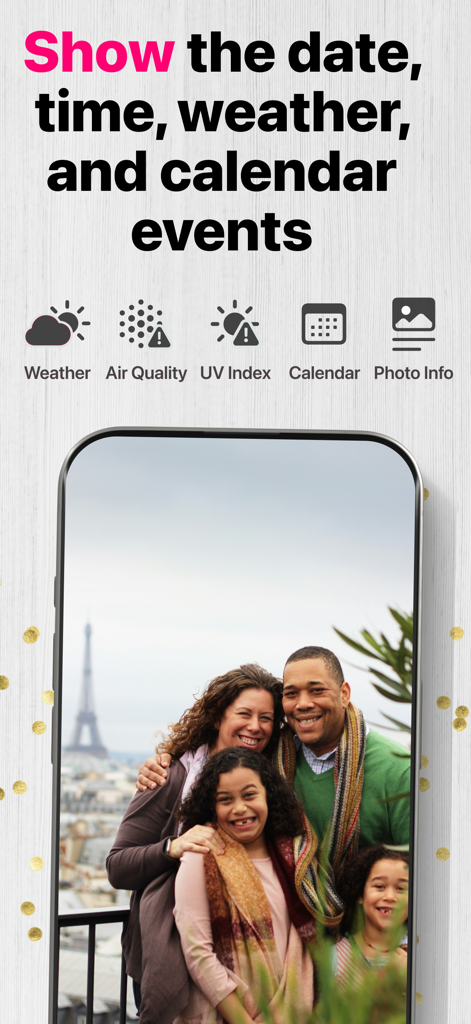
iCloud、Googleフォト、Flickr、Unsplashの統合アイコンが表示された家族写真を表示するスマートフォン

天気とカレンダーイベントの情報オーバーレイが表示された家族写真を表示するスマートフォン

天気とカレンダーイベントの情報オーバーレイが表示された家族写真を表示するスマートフォン

母親が赤ちゃんを抱いているiPhone画面に、お気に入りの思い出に近づくことについてのテキストを表示

母親が赤ちゃんを抱いているiPhone画面に、お気に入りの思い出に近づくことについてのテキストを表示

共有アルバムからスライドショーが自動更新されることについてのテキストと共に、子供たちの写真を表示するiPhone画面

共有アルバムからスライドショーが自動更新されることについてのテキストと共に、子供たちの写真を表示するiPhone画面

デジタルフォトフレームアプリを使用している子供たちの同じ写真を表示するスマートフォンと壁掛けテレビ
デジタルフォトフレームアプリを使用している子供たちの同じ写真を表示するスマートフォンと壁掛けテレビ

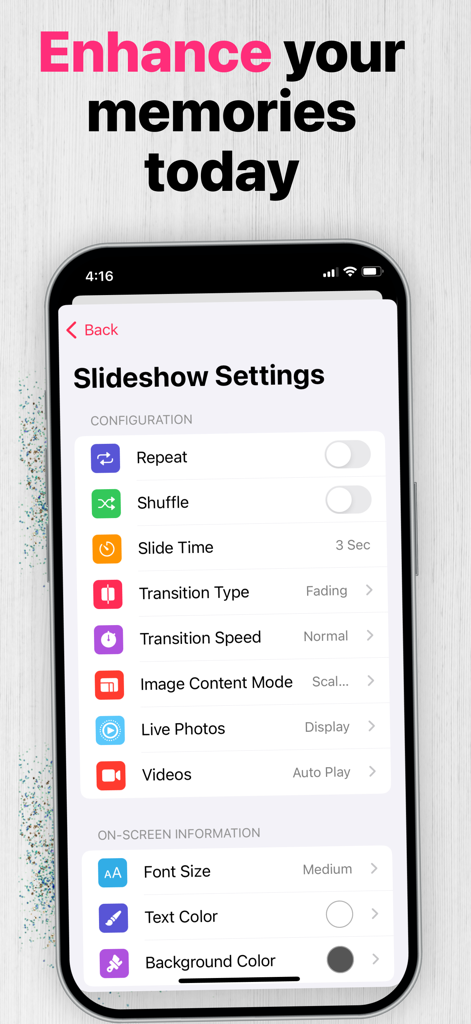
写真のトランジションと表示のカスタマイズオプションを示すスライドショー設定メニュー

写真のトランジションと表示のカスタマイズオプションを示すスライドショー設定メニュー

iPhone、iPad、Macのユニバーサル互換性を説明するテキストと共に、家族写真のスライドショーを表示するiPad

iPhone、iPad、Macのユニバーサル互換性を説明するテキストと共に、家族写真のスライドショーを表示するiPad

最高の画面で、すべての瞬間を追体験

このアプリを際立たせるツール、 46K+ 人のユーザーが選択.

☁️

統合クラウドハブ

iCloud、Googleフォト、Flickrから高解像度で思い出を直接ストリーミングし、手動アップロードの手間を省きます。

♻️

テクノロジーに第二の命を

古いiPadを、日常のスケジュールに自動で合わせるスマートタイマーコントロールを備えたプレミアムホームアクセサリーにアップサイクルしましょう。

🖼️

シネマティックホームデコレーション

エレガントなケン・バーンズトランジション、芸術的な背景ぼかし、役立つリアルタイムの天気・時計オーバーレイで、あなたの空間を格上げしましょう。

アプリについて

について知っておくべきこと Digital Photo Frame Slideshow.

説明

*Digital picture frames are great because it's a whole lot easier to swap out photos of your loved ones, rotating images keep your living room or corridor feeling fresh, and you can showcase a themed group of photos that fit the occasion like childhood photos of your uncle on his 70th birthday. Get the best from your IOS device and turn it into a powerful photo frame with Digital Photo Frame! NEW: Improved version with a lot of features requested by our users. DISPLAY PHOTOS FROM • Your device Camera Roll, Albums, Smart Albums, Moments and any folder in your phone like WhatsApp images • Your Images from iCloud and Shared Streams • Your synced albums from iTunes • Public photos from Flickr • Photos from Unsplash • Photos from Google Photos MAIN FEATURES • Blur background effect mode or default mode • Various resize/fit modes to avoid borders or crop • Shuffle mode • Several slide effect options (transitions types including random mode and Ken Burns transation) • Slideshow interval can be chosen (from 3 second to 24 hours) • Showtime and date on screen (choose between 12-hour time format or 24-hour time format) • Show Weather on screen (Weather, temperature, location, IV Index, Air Pollution Index) • Timer Control (Choose when you want to start and end the slideshow and the slideshow will start and end at the desired times) • Display Photos, Live Photos & Videos ADDITIONAL FEATURES • Optimized for a large number of images • Thumbnails view • Full screen • Slideshow mode or manual navigation • Option to select manually which photos or albums to be displayed • Option to display all albums or moments. • Share the photos on Facebook, Flickr, E-mail, AirPrint... • Landscape or portrait orientation • Photo captions • Dark mode EXAMPLE OF USE CASES • Display memories with ease • A professional way to showcase your images to clients Digital Photo Frame uses all the most important capabilities of an iOS device to turn your iPad or iPhone into a high-quality photo frame to feature your chosen photos in a slideshow. No doubt that powerful performance and visual effects, screen quality and touchscreen controls of the all-purpose iOS device are definitely better than similar features of the specialized cheap analogs at the stores. Digital Photo Frame extends active life of any iOS device allowing them to serve as a great photo frame and remind the perfect moments of your life. SUBSCRIPTIONS • Yearly Premium Subscription (Enjoy all features for 1 year) Cancel subscription any time. Subscription automatically renews unless auto-renew is turned off at least 24-hours before the end of the current period by going to your iOS Account Settings after purchase. Payment will be charged to iTunes Account. Any unused portion of free trial period, if offered, will be forfeited when you purchase a subscription. Terms and conditions - https://www.digitalphotoframeapp.com/terms/ Privacy Policy - https://www.digitalphotoframeapp.com/privacy/ For more information or questions, please contact at info@digitalphotoframeapp.com

最新バージョン

6.3

サイズ

64.3 MB

リリース日

2017年3月28日

カメラロールに眠る思い出を救い出しましょうか?

46,000人以上のユーザーに加わり、iPadに第二の命を。デバイスをプレミアムHDデジタルフレームに変え、お気に入りの瞬間を今日から表示しましょう。

ダウンロード: App Store

App information, icons, screenshots, and descriptions displayed on this page are sourced from the Apple App Store and are the property of their respective developers. Download estimates and rankings are based on MWM's proprietary models and may not reflect actual figures. This page is provided for informational and analytical purposes only.

Believe this page infringes your intellectual property? File a dispute