
このページはアプリまたはその開発者の公式ページではなく、情報提供および論評を目的として作成された独立した編集出版物です。明示的に別段の記載がない限り、アプリおよびその開発者は、MWM、Apple、Google Play、アプリのパブリッシャー、またはアプリの開発者と提携、承認、後援、認可、またはその他の公式的な関係はなく、このページのいかなる内容も、アプリがMWMのサービスを使用して開発されたことを意味するものではありません。すべての商標、ロゴ、スクリーンショット、その他のコンテンツはそれぞれの所有者の財産です。

ダウンロード
25M+ユーザー評価
評価数
65.7K開発元
カテゴリ
Productivity対応言語
23最新バージョン
5.18.8サイズ
368.5 MBリリース日
2011年8月18日DWG FastView-CAD Viewer&Editor アプリの専門的評価
モバイルCAD作業を革新する主要機能の徹底分析
高度な3Dモデル表示と操作
BIM、Revit、Solidworksなど多様な3D設計ソフトウェアモデルに対応し、アセンブリプレビュー、回転、断面表示、3D計測、注釈付けなどの高度な機能をモバイルデバイスで実現します。現場や外出先での詳細なレビューとコラボレーションを可能にします。
モバイルでの本格的なCAD編集機能
移動、コピー、回転、拡大縮小、色付け、計測、レイヤー管理など、デスクトップレベルのCAD編集機能をモバイルデバイスで提供します。これにより、ユーザーは現場や外出先で図面を修正し、リアルタイムでの設計変更に対応できます。
AutoCADとの完全互換性および高速アクセス
DWGおよびDXF形式を含むAutoCADファイルとの完全な互換性を持ち、ファイルサイズに制限なく正確かつ高速なアクセスを提供します。既存のワークフローを中断することなく、あらゆるCADファイルをモバイルでスムーズに扱えます。
2Dと3Dモードのシームレスな切り替え
2D図面と3Dモデル表示を簡単に切り替えることができ、ワイヤーフレーム、リアリスティック、隠線処理などの多様な3D表示モードを提供します。これにより、ユーザーは設計のあらゆる側面を包括的に視覚化し、より深い洞察を得ることができます。
多様なファイル形式へのエクスポートと共有
CAD図面をPDF、BMP、JPG、PNGなどの形式にエクスポートし、自由に共有することが可能です。PDFへの変換時には用紙サイズや向き、色などをカスタマイズでき、他者との情報共有やプレゼンテーションを効率化します。PDFからDWGへの変換も可能です。
オフライン作業と多様なクラウド連携
インターネット接続がない環境でも、図面をローカルに保存して作業を継続できます。また、Dropbox、OneDrive、Google Driveなどの主要なクラウドサービスやネットワークディスクからの図面のオープン、表示、編集、共有に対応しており、柔軟なファイル管理が可能です。
正確な座標指定と描画
2Dおよび3Dにおける絶対座標、相対座標、極座標、球面座標、円筒座標など、高度な座標指定をサポートします。これにより、ユーザーは点を正確に移動させたり、精度の高い図面を作成したりすることができ、プロフェッショナルな要求に応えます。
レジストレーション不要で即時利用
アプリをダウンロードするだけで、登録なしにすぐに使用を開始できます。これにより、ユーザーは手軽にアプリの機能を試し、必要な時に迅速にCAD作業に取り掛かることが可能です。
よくある質問
について知っておくべきこと DWG FastView-CAD Viewer&Editor
What is DWG FastView?
DWG FastView is a cross-platform CAD software fully compatible with AutoCAD (DWG, DXF). It allows users to view, edit, measure, and dimension CAD drawings, and supports over 40 formats of 3D designs.
Is registration required to use DWG FastView?
No, registration is not required to use DWG FastView. Users can download and immediately use the app without needing to create an account.
What 3D modeling file formats does DWG FastView support?
DWG FastView supports over 40 3D design software models including BIM, Revit, Solidworks, NX, CATIA, Inventor, SolidEdge, ACIS, and Pro/E, with file types such as .rvt, .sldprt, .stp, and .step.
Can DWG FastView export CAD drawings to other formats?
Yes, DWG FastView supports exporting CAD drawings to PDF, BMP, JPG, and PNG formats. Users can also convert PDF files back to DWG format within the app.
Does DWG FastView work offline?
Yes, DWG FastView allows users to save their work in a local workspace for offline access. Drawings can also be opened, viewed, and edited from cloud services when an internet connection is available.
What is the subscription model for DWG FastView?
DWG FastView offers auto-renewing subscriptions, billed either monthly or annually. Payment is charged to the user's iTunes/App Store account upon confirmation of purchase.
How do I cancel my DWG FastView auto-renewing subscription?
Users can cancel their auto-renewing subscription by turning off the feature in their iTunes/App Store account settings. This must be done at least 24 hours before the current subscription period ends to avoid being billed.
What 3D features are available in DWG FastView?
DWG FastView offers 3D model assembly part preview, scaling, rotation, sectioning, and explosion. It also includes 3D measurement, annotation, PMI display/hiding, color matching, and multiple views.
Can DWG FastView access files from cloud storage?
Yes, DWG FastView can open, view, edit, and share drawings from various cloud services including Dropbox, OneDrive, Google Drive, Box, and WebDAV, provided there is an internet connection.
Does DWG FastView allow users to create new layers in CAD drawings?
Yes, DWG FastView allows users to create new layers within CAD drawings. This functionality is part of its comprehensive tools for real CAD work on mobile devices.
以下のスクリーンショットと説明は、アプリの公式ストアリスティングから直接取得されたものであり、アプリ開発者の所有物です。
アプリストア
スクリーンショット

多機能2D表示
このアプリは、詳細な2D CAD図面を正確に表示し、距離測定や面積計算といった複数の測定ツールを現場で利用可能です。

精巧な3D解析
ユーザーは複雑な3Dモデルを多角的に閲覧でき、部品の分解表示やPMI(製品製造情報)の確認を通じて、設計の詳細を深く掘り下げることが可能です。

大規模3D対応
建設やエンジニアリングにおける大規模な3Dモデルを高速に表示し、断面機能を用いた内部構造の視覚化や、注釈追加による情報共有を実現します。

柔軟な出力と変換
本ツールは、DWGファイルをPDF形式へ変換する機能や、BMP、JPG、PNGといった様々な画像形式での出力オプションを提供し、共有と活用を効率化します。

直感的なモバイル編集
登録不要ですぐに利用を開始でき、移動やコピー、回転といった基本的な編集操作をモバイルデバイス上で直感的に実行し、CAD作業を効率化します。
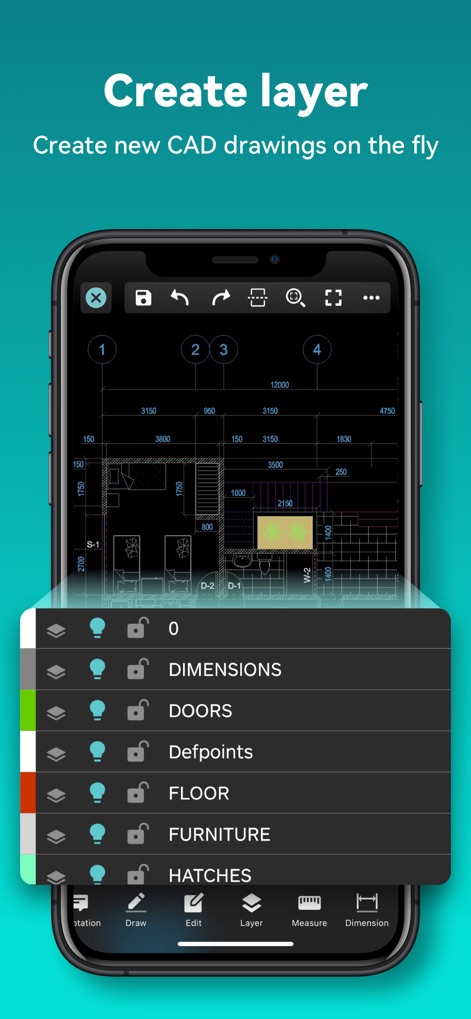
高度なレイヤー管理
このアプリは、図面内の要素(例: 寸法、ドア)ごとにレイヤーを管理する機能を提供し、表示・非表示の切り替えやロック設定によって、複雑な図面も整理して作業できます。

クラウド連携
DropboxやGoogle Driveなどの主要なクラウドサービスとシームレスに連携し、DWGファイルやPDF、JPGといった複数の形式のファイルをどこからでもアクセス・管理できます。
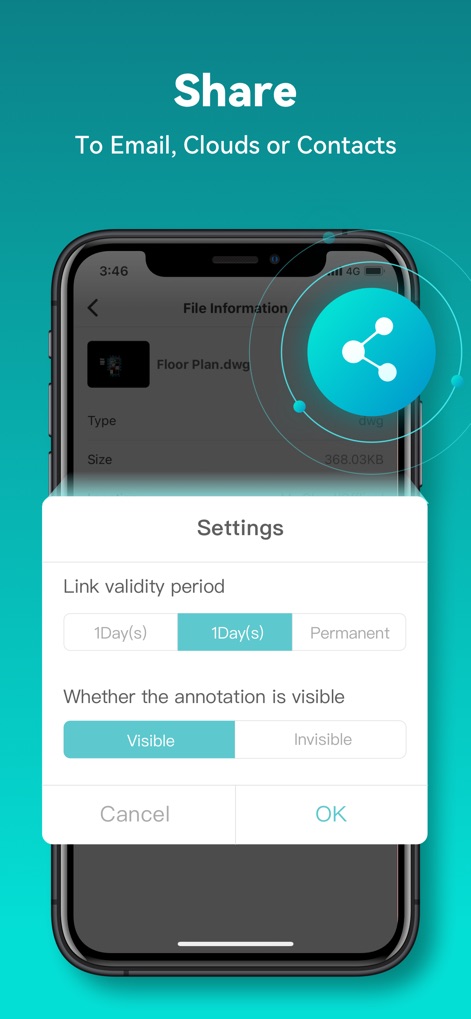
セキュアな共有
完成した設計図はメールやクラウド経由で簡単に共有可能で、リンクの有効期限設定や注釈の表示/非表示の選択により、共有の柔軟性とセキュリティを両立します。
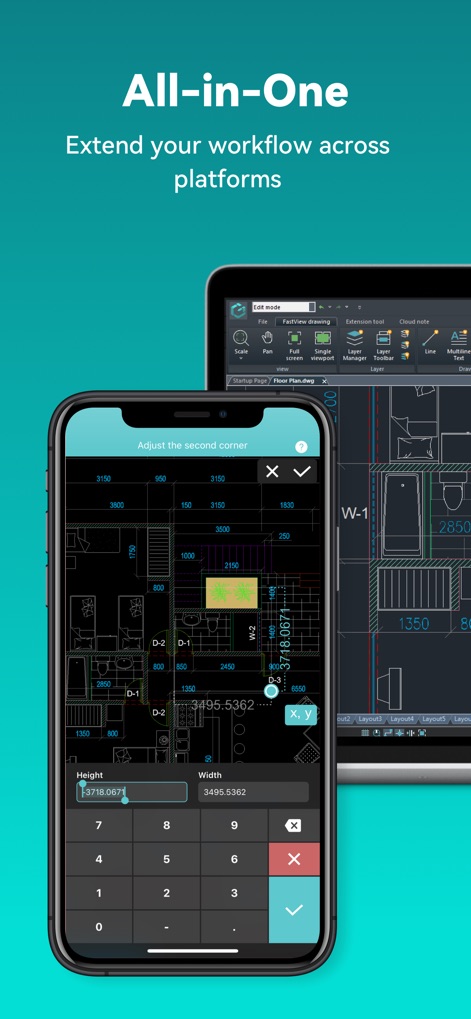
クロスプラットフォーム対応
スマートフォンとタブレット間でシームレスに連携し、正確な数値入力による寸法調整や座標設定を通じて、場所を選ばずに専門的なCAD作業を継続できます。
説明
Download
類似アプリ
似た機能とユーザー体験を持つアプリ

Shapr 3D CAD modeling
Shapr 3D Zartkoruen Mukodo Reszvenytarsasag

CAD快速看图-dwg手机快速看图,设计图纸工程建筑
Shanghai Tantian Network Technology Co.,Ltd.

CAD快速看图-CAD手机看图软件
存旺 姜

ZWCAD Mobile - Mobile CAD
ZWCAD Software Co.,Ltd.

CAD快速看图- 手机快速查看cad图纸
嘉欣 朱

Draft Paper
Giles Goddard

CAD FastView King: DWG Viewer
镇源 余

AutoCAD
Autodesk

CAD Reader-View & Measure DWG
Beijing Honghu Yuntu Technology Co., Ltd.
このページはアプリまたはその開発者の公式ページではなく、情報提供および論評を目的として作成された独立した編集出版物です。明示的に別段の記載がない限り、アプリおよびその開発者は、MWM、Apple、Google Play、アプリのパブリッシャー、またはアプリの開発者と提携、承認、後援、認可、またはその他の公式的な関係はなく、このページのいかなる内容も、アプリがMWMのサービスを使用して開発されたことを意味するものではありません。すべての商標、ロゴ、スクリーンショット、その他のコンテンツはそれぞれの所有者の財産です。