
このページはアプリまたはその開発者の公式ページではなく、情報提供および論評を目的として作成された独立した編集出版物です。明示的に別段の記載がない限り、アプリおよびその開発者は、MWM、Apple、Google Play、アプリのパブリッシャー、またはアプリの開発者と提携、承認、後援、認可、またはその他の公式的な関係はなく、このページのいかなる内容も、アプリがMWMのサービスを使用して開発されたことを意味するものではありません。すべての商標、ロゴ、スクリーンショット、その他のコンテンツはそれぞれの所有者の財産です。


Files - File Manager & Browser
標準のiOSの壁を打ち破り、ファイル管理の真の力を解き放つ。これはただのファイルアプリではない。オフラインの世界を制覇するための、あなたのデジタル要塞だ。
ダウンロード
2.5M+ユーザー評価
評価数
41.3K開発元
カテゴリ
Productivity対応言語
1最新バージョン
8.3.1サイズ
34.0 MBリリース日
2010年1月8日高度なファイル管理とセキュアなブラウジング機能の評価
Files - File Manager & Browser アプリ分析
包括的ファイル管理
多様なファイル形式の表示に対応し、RAR/ZIPアーカイブの解凍、ファイル操作、フォルダ管理を提供します。技術に精通した個人やプロフェッショナルが非メディアファイルを効率的に整理・アクセスするために不可欠です。
高度なウェブブラウザ
タブブラウジング、オフライン表示のためのウェブページ保存、ブックマーク、履歴、自動補完、HTTP/フォーム認証、ユーザーエージェント偽装など、セキュアかつ多機能なブラウジング体験を提供します。調査や情報収集を頻繁に行う学生や専門家にとって極めて有用です。
信頼性の高いダウンロードマネージャー
中断されたダウンロードを確実に再開し、高速なファイル取得を可能にします。オフラインでの作業のためにドキュメントをダウンロードする必要があるユーザーにとって、その効率性と信頼性は非常に高い価値を持ちます。
Dropbox連携
Dropboxアカウントとのシームレスな連携により、クラウド上のファイルを直接管理、アップロード、ダウンロード、同期することが可能です。これにより、クラウドベースのワークフローを持つプロフェッショナルや学生のデータアクセスが簡素化されます。
高機能PDFビューア
大容量PDFファイルのスムーズな表示、テキスト検索、内部リンクによる移動に対応し、研究論文や報告書を扱う学生や専門家にとって重要な詳細なドキュメント閲覧機能を提供します。
柔軟なファイル転送オプション
Wi-Fiネットワーク経由、iTunes USBファイル共有、HTTP/FTPプロトコルを介して、コンピューターとの間でファイルを容易に転送することが可能です。多様な環境でのデータ交換に対応し、利便性を高めます。
パスコードロック
アプリ全体にパスコードを設定することで、保存されている機密文書や個人情報への不正アクセスを防ぎ、高いセキュリティレベルを維持します。
Mobile Safari連携ブックマークレット
Mobile Safariで閲覧中のウェブページやリンクを直接本アプリで開くことを可能にし、外部コンテンツの管理と保存のワークフローを効率化します。
アプリ間ドキュメント交換
他のiOSアプリ(例:メールアプリ)からファイルを直接本アプリに保存できる機能により、異なるアプリケーション間でのドキュメントの受け渡しと整理が簡素化され、生産性が向上します。
写真ビューア機能
フォルダ内の画像を効率的に閲覧し、拡大・縮小やカメラロールへの保存を可能にします。非メディアファイル管理が主ながらも、関連する画像資料を扱うユーザーにとって有用な補助機能です。
よくある質問
について知っておくべきこと Files - File Manager & Browser
What is Files App?
Files App is a mobile application for iPhone and iPod touch, serving as a web browser and file manager. It enables users to save documents for offline access and view various file types.
Can Files App download audio or video content?
No, Files App does not support the downloading of audio or video content. Its primary function is to save and manage documents, images, and web pages for offline viewing.
How do I download files from the web using Files App?
To download files from the web using Files App, navigate to the desired link in the built-in browser. Then, tap and hold on the link to activate the download option.
What file formats does Files App support for viewing?
Files App supports full-screen viewing of .pdf, .doc, .xls, .ppt, .txt, .html, and .rtf file formats. It also allows for extraction of RAR archives and unzipping ZIP files.
Does Files App integrate with Dropbox?
Yes, Files App offers full Dropbox integration. Users can upload, download, and manage their Dropbox files directly within the application, including syncing content to their device.
How can I secure my files in Files App?
Files App provides a passcode lock feature to secure your documents. This ensures that unauthorized users cannot access your saved files and personal data within the application.
Does Files App include a web browser for offline viewing?
Yes, Files App integrates a web browser enabling users to save web pages with images for offline viewing. It also features tabbed browsing, bookmarks, and integrated search.
以下のスクリーンショットと説明は、アプリの公式ストアリスティングから直接取得されたものであり、アプリ開発者の所有物です。
アプリストア
スクリーンショット

このアプリの統合されたブラウザ機能により、ウェブサイトから直接ファイルをダウンロードできます。特に、Firefoxのダウンロードページを表示し、ユーザーはポップアップメニューからダウンロードオプションを選択できます。
ウェブからファイル取得

内蔵ウェブブラウザを活用し、あらゆる種類のファイルを効率的に検索できます。例えば、ゴールデンゲートブリッジの画像ファイルの詳細と複数の解像度情報を表示し、統合されたウェブブラウザのインターフェースを通じて簡単にアクセスできます。
ブラウザでファイル検索

高速で強力なダウンロードマネージャーにより、複数のファイルのダウンロードを効率的に管理できます。進行中のダウンロードには進捗バーが表示され、PDF、JPEG、MP4など多様なファイルタイプに対応していることが確認できます。
高速ダウンロード管理
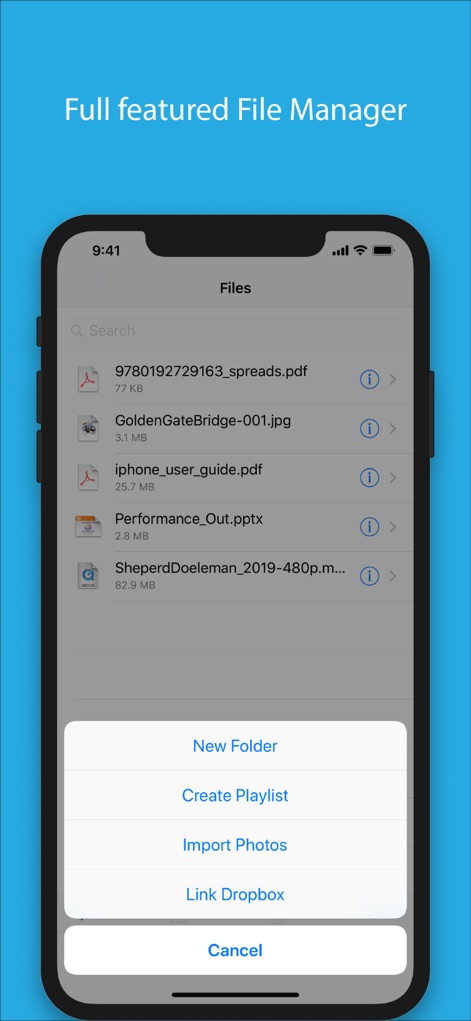
この包括的なファイルマネージャーは、ファイルの整理と管理を容易にします。ユーザーは「New Folder」オプションで新しいフォルダを作成したり、「Import Photos」で写真を取り込んだりでき、ファイルリストからは各ファイルの詳細情報にアクセス可能です。
多機能ファイル管理
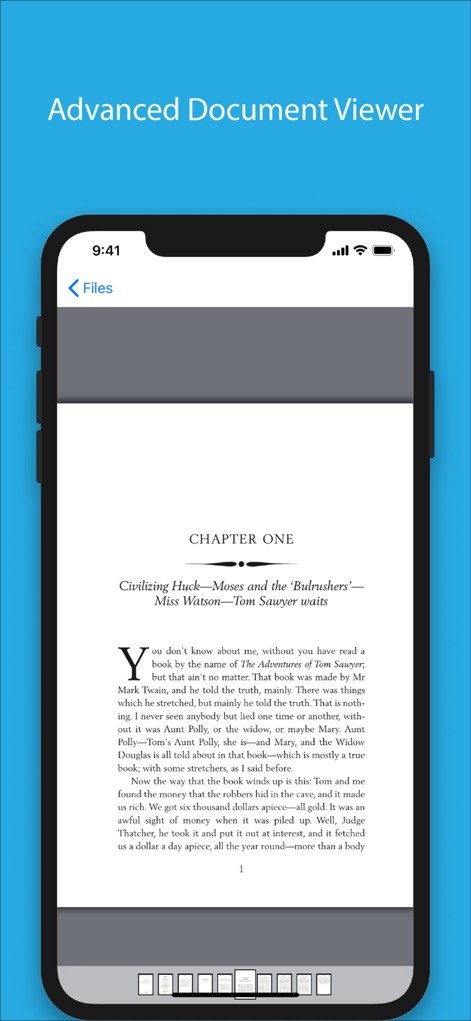
高度なドキュメントビューアは、さまざまなファイル形式の文書を快適に閲覧するための機能を提供します。例えば、書籍のようなテキストコンテンツが美しく表示され、画面下部のドット表示で現在のページ位置を直感的に把握しながらページ間を移動できます。
高度な文書閲覧
説明
Download
類似アプリ
似た機能とユーザー体験を持つアプリ



このページはアプリまたはその開発者の公式ページではなく、情報提供および論評を目的として作成された独立した編集出版物です。明示的に別段の記載がない限り、アプリおよびその開発者は、MWM、Apple、Google Play、アプリのパブリッシャー、またはアプリの開発者と提携、承認、後援、認可、またはその他の公式的な関係はなく、このページのいかなる内容も、アプリがMWMのサービスを使用して開発されたことを意味するものではありません。すべての商標、ロゴ、スクリーンショット、その他のコンテンツはそれぞれの所有者の財産です。