
このページはアプリまたはその開発者の公式ページではなく、情報提供および論評を目的として作成された独立した編集出版物です。明示的に別段の記載がない限り、アプリおよびその開発者は、MWM、Apple、Google Play、アプリのパブリッシャー、またはアプリの開発者と提携、承認、後援、認可、またはその他の公式的な関係はなく、このページのいかなる内容も、アプリがMWMのサービスを使用して開発されたことを意味するものではありません。すべての商標、ロゴ、スクリーンショット、その他のコンテンツはそれぞれの所有者の財産です。

ダウンロード
2.5M+ユーザー評価
評価数
32.2K開発元
カテゴリ
Lifestyle対応言語
4最新バージョン
1.13サイズ
30.1 MBリリース日
2020年2月1日Fire TV体験を向上させる主要機能
FireStick Remote Controlアプリの機能分析
キーボード入力機能
テキスト入力と検索プロセスを大幅に簡素化し、Fire TVでの煩わしい文字入力を解消します。
直感的なスワイプ操作
iPhone/iPadのタッチスクリーンを活かしたスワイプベースの操作により、Fire TVのナビゲーションをスムーズかつ直感的に行えます。
お気に入りへの迅速なアクセス
よく利用するアプリやチャンネルに素早くアクセスできる機能を提供し、コンテンツの起動時間を短縮します。
写真と動画のキャスト
iPhone/iPadに保存されている写真や動画をFire TVデバイスに直接キャストし、大画面でのメディア視聴を可能にします。
デバイスへの自動接続
Fire TVデバイスへの自動接続機能を備え、ユーザーは手動での設定なしに迅速にリモートコントロールを開始できます。
モダンで使いやすいインターフェース
洗練されたデザインと直感的なインターフェースにより、ユーザーは快適で効率的な操作体験を享受できます。
よくある質問
について知っておくべきこと FireStick Remote Control
How does Firestick Remote Control connect to my Fire TV?
The Firestick Remote Control app connects to your Fire TV by ensuring both your iPhone/iPad and the Fire TV or media player are on the same Wi-Fi network. This enables direct control.
Can I use the Firestick Remote Control app for text input?
Yes, the Firestick Remote Control app includes a keyboard feature. This feature simplifies text input and search functions directly from your iPhone or iPad.
What are the key features of the Firestick Remote Control app?
Key features of the Firestick Remote Control app include intuitive swipe-based control, a keyboard for text input, photo and video casting, quick access to apps and channels, and automatic device connection.
Is the Firestick Remote Control app free to download?
Yes, the Firestick Remote Control app is free to download. It offers auto-renewing subscription options for unlimited use of all features after download.
Does the Firestick Remote Control app support casting photos and videos?
Yes, the Firestick Remote Control app supports casting. Users can cast their photos and videos directly from their iPhone or iPad to their Fire TV device.
Is Firestick Remote Control an official Amazon app?
No, the Firestick Remote Control app is not an official Amazon product. The app's description explicitly states that it was not created or endorsed by Amazon.
How do I access my favorite apps and channels using Firestick Remote Control?
The Firestick Remote Control app provides quick access to your favorite apps and channels. You can navigate to the "Apps" section within the app for direct access.
How do subscriptions work for the Firestick Remote Control app?
The Firestick Remote Control app offers auto-renewing subscriptions for unlimited use. Payment charges to your iTunes Account, and auto-renewal occurs unless turned off 24 hours before the current period ends.
Where can I find the Privacy Policy for Firestick Remote Control?
The Privacy Policy for Firestick Remote Control is available online. You can access it via the link provided in the app's store description for full details.
以下のスクリーンショットと説明は、アプリの公式ストアリスティングから直接取得されたものであり、アプリ開発者の所有物です。
アプリストア
スクリーンショット
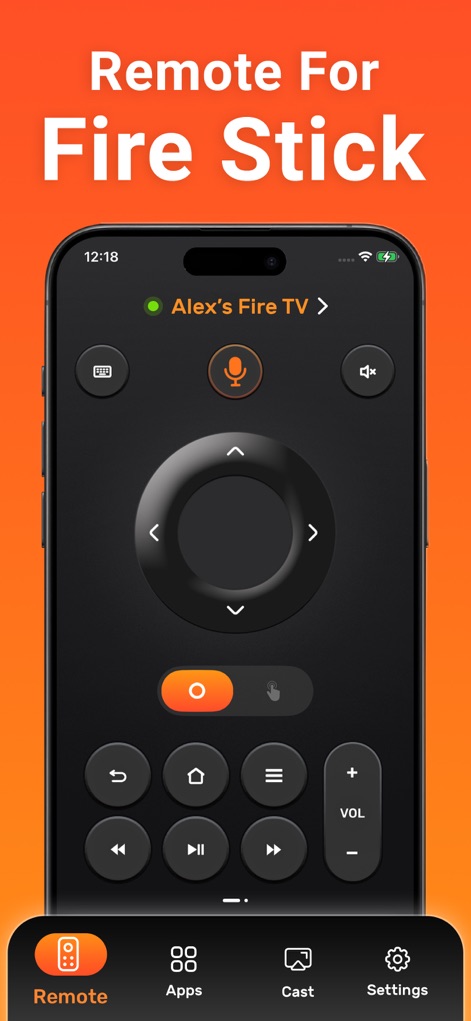
この画面は、Fire TVデバイスをiPhoneから直接操作できる洗練されたボタンレイアウトと、便利な音量調整機能を視覚的に強調しています。
スマートリモート
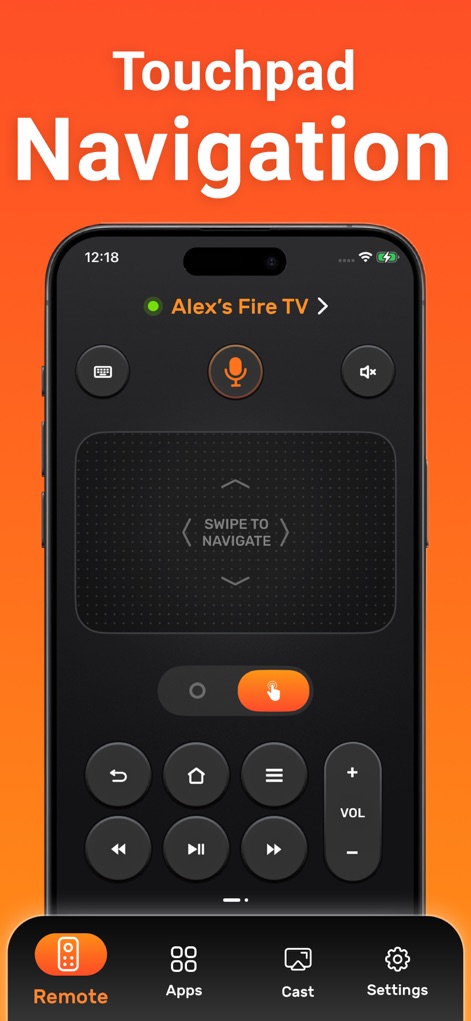
ユーザーは、中央の広々としたタッチパッドによるスワイプベースのナビゲーションと、指先での正確な操作が可能なタッチパッド機能でコンテンツを自在に選択できます。
直感タッチナビ
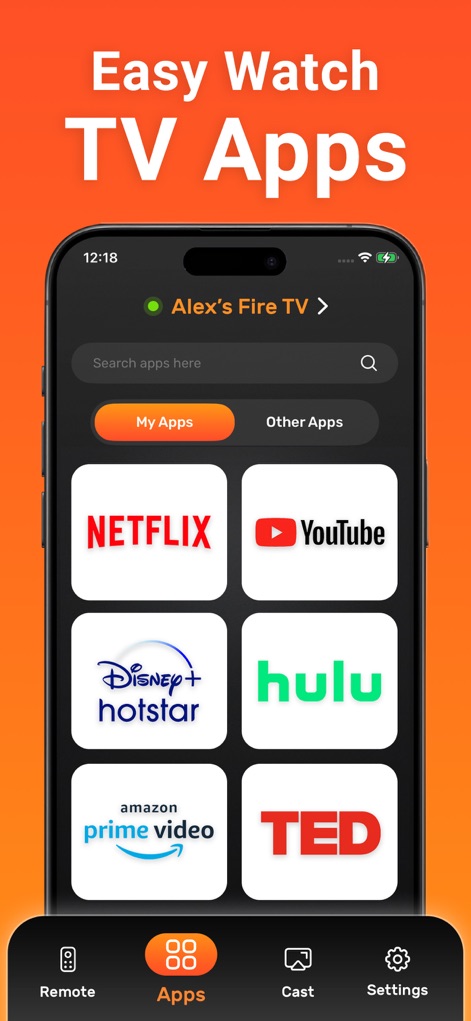
お気に入りのストリーミングアプリへのクイックアクセスと、目的のアプリを簡単に見つけるための検索機能により、エンターテイメント体験が向上します。
アプリを素早く起動
説明
Download
類似アプリ
似た機能とユーザー体験を持つアプリ

The Roku App (Official)
ROKU INC

TV Remote & Smart TV Control
To Ngoc Mai

Universal TV Remote Control .
Apps Venture Inc.

TV Remote, Universal Remote
Hangzhou Yingshitong Technology Co., Ltd.

TV Remote Control “Universo”
Nemo Apps LLC

TV Remote・Universal Control #1
Mihai Turlea

Remote Smart Tv Universal
clement gasner

Remote TV Control TCL Onn App
CEMAL CAGLAR KIRICI

TV Remote Control Universal AI
Anh Ngo
このページはアプリまたはその開発者の公式ページではなく、情報提供および論評を目的として作成された独立した編集出版物です。明示的に別段の記載がない限り、アプリおよびその開発者は、MWM、Apple、Google Play、アプリのパブリッシャー、またはアプリの開発者と提携、承認、後援、認可、またはその他の公式的な関係はなく、このページのいかなる内容も、アプリがMWMのサービスを使用して開発されたことを意味するものではありません。すべての商標、ロゴ、スクリーンショット、その他のコンテンツはそれぞれの所有者の財産です。