FitNotes 2 - Gym Workout Log
ダウンロード: App Store

このページはアプリまたはその開発者の公式ページではなく、情報提供および論評を目的として作成された独立した編集出版物です。明示的に別段の記載がない限り、アプリおよびその開発者は、MWM、Apple、Google Play、アプリのパブリッシャー、またはアプリの開発者と提携、承認、後援、認可、またはその他の公式的な関係はなく、このページのいかなる内容も、アプリがMWMのサービスを使用して開発されたことを意味するものではありません。すべての商標、ロゴ、スクリーンショット、その他のコンテンツはそれぞれの所有者の財産です。


ロゴ: FitNotes 2 - Gym Workout Log
ダウンロード: App Store

FitNotes 2 - Gym Workout Log

RPEトラッキング、1RM計算機、シームレスなApple Watch連携などの高度なツールでリフティングをレベルアップ。アカウント不要、データロックインなし—真の成果のための純粋なパフォーマンス追跡機能。

主要数値

ダウンロード

28K+

ユーザー評価

5.0/5

評価数

0

開発元

GINGER TECHNOLOGIES PTE. LTD.

カテゴリ

Health & Fitness

対応言語

2

最新バージョン

10

サイズ

23.6 MB

リリース日

2020年12月20日
機能

現代のストレングスアスリートのために構築

洗練されたプロフェッショナルグレードのワークアウトロガーで、トレーニングデータを成長に変換しましょう。精度を最優先し、無駄な機能はありません。

進捗を数値化

1RM計算機、RPEトラッキング、詳細なボリュームグラフでトレーニングをマスターし、停滞期を回避しましょう。

ネイティブAppleエコシステム

手首から直接セットを記録し、HealthKitと完璧に同期。アンバンドルされた、データ駆動型のジム体験を実現します。

以下のスクリーンショットと説明は、アプリの公式ストアリスティングから直接取得されたものであり、アプリ開発者の所有物です。

アプリストア

スクリーンショット
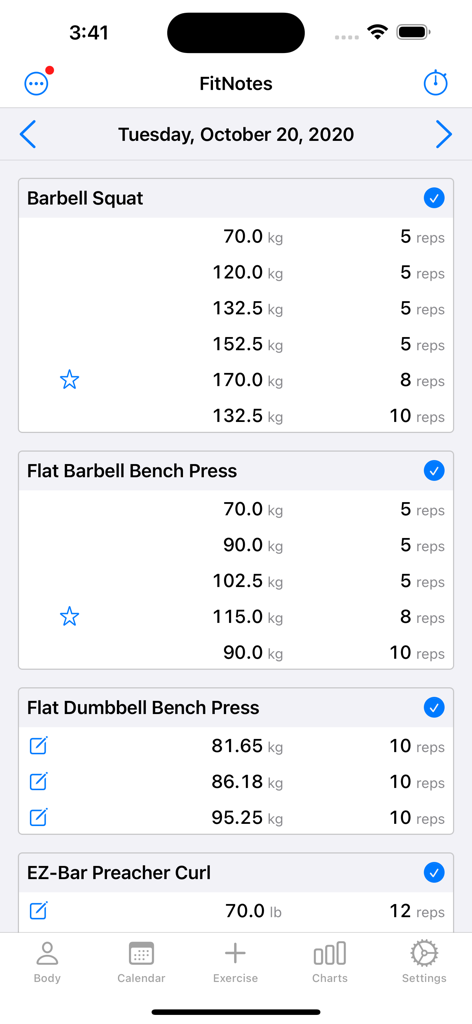
FitNotes 2 - Gym Workout Log - バーベルスクワットとベンチプレスの詳細なウェイトリフティングセットと自己ベストを示すインターフェース
バーベルスクワットとベンチプレスの詳細なウェイトリフティングセットと自己ベストを示すインターフェース

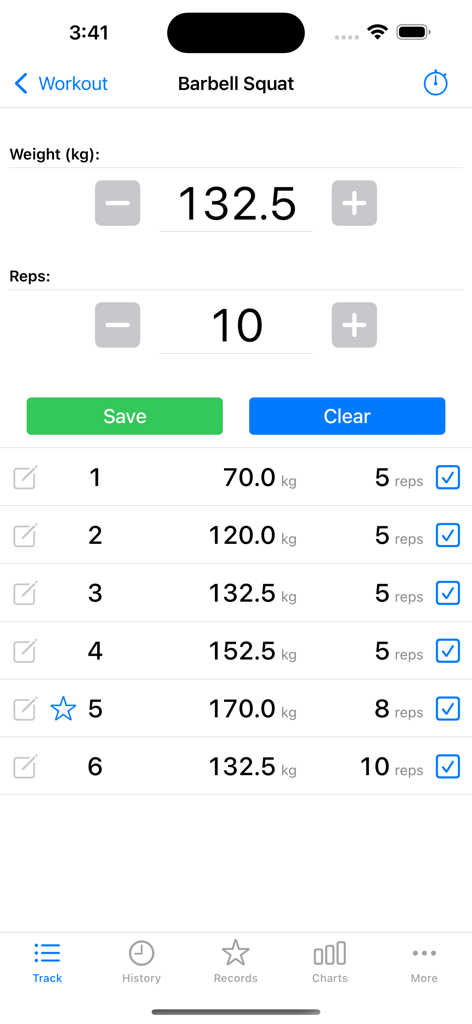
FitNotes 2 - Gym Workout Log - FitNotes 2アプリのインターフェース。複数のセットの重量とレップ数を記録するバーベルスクワットワークアウトログが表示されます。
FitNotes 2アプリのインターフェース。複数のセットの重量とレップ数を記録するバーベルスクワットワークアウトログが表示されます。

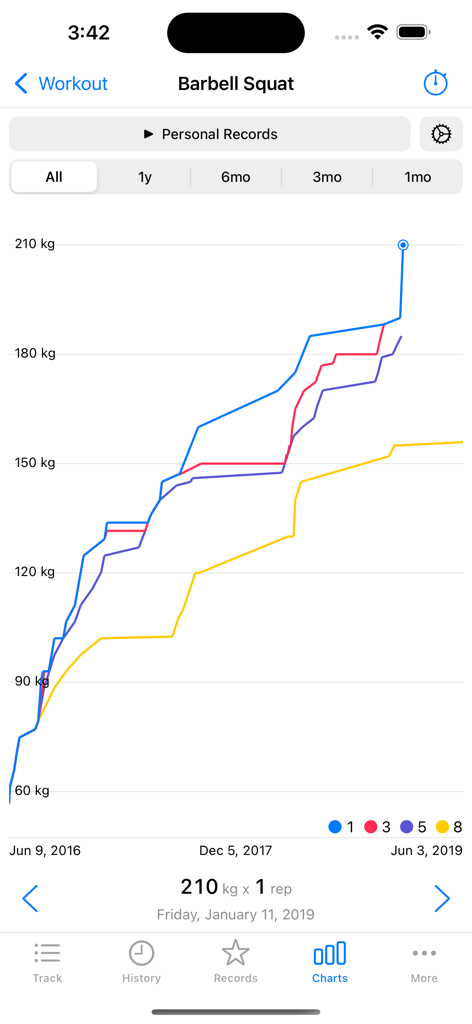
FitNotes 2 - Gym Workout Log - バーベルスクワットの自己ベストと筋力トレーニングの進捗を時系列で表示する折れ線グラフ
バーベルスクワットの自己ベストと筋力トレーニングの進捗を時系列で表示する折れ線グラフ

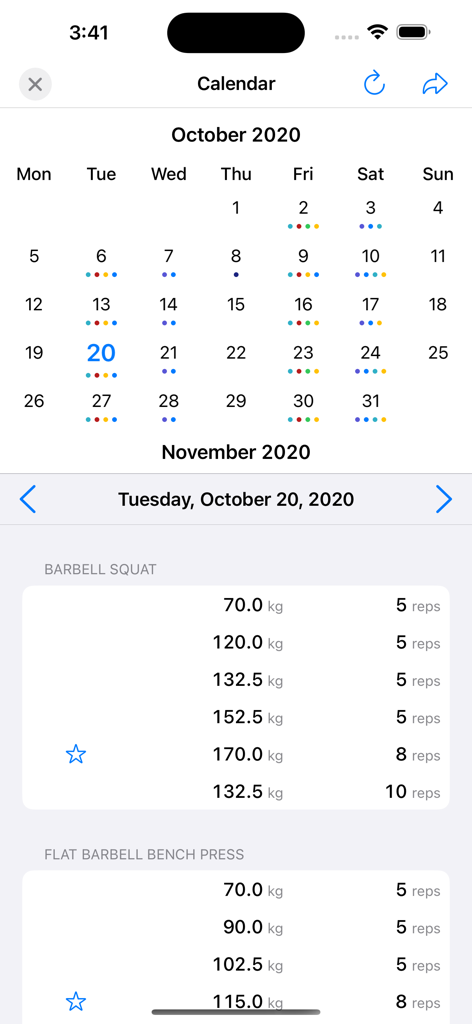
FitNotes 2 - Gym Workout Log - 月間ワークアウトカレンダーと、スクワットやベンチプレスの重量とレップ数を示す詳細なエクササイズログ画面
月間ワークアウトカレンダーと、スクワットやベンチプレスの重量とレップ数を示す詳細なエクササイズログ画面

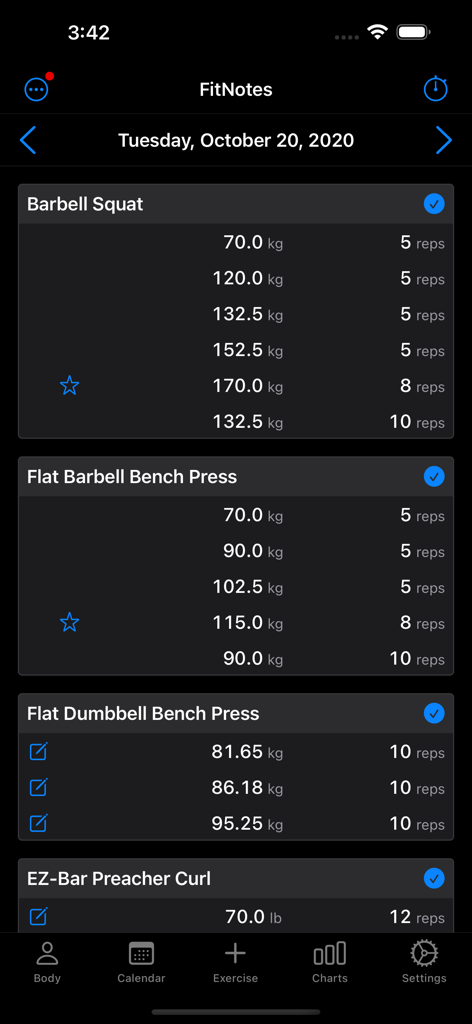
FitNotes 2 - Gym Workout Log - FitNotes 2のデイリーワークアウトログ。ダークモードで複数のエクササイズに対するセット、重量、レップ数が表示されます。
FitNotes 2のデイリーワークアウトログ。ダークモードで複数のエクササイズに対するセット、重量、レップ数が表示されます。

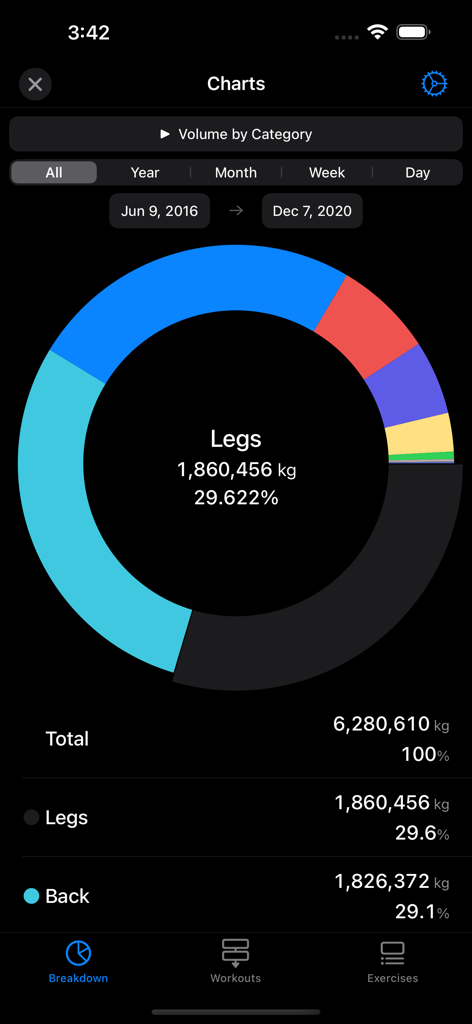
FitNotes 2 - Gym Workout Log - FitNotes 2アプリのドーナツチャート。脚や背中などの筋肉群別のワークアウトボリュームの詳細な内訳が表示されます。
FitNotes 2アプリのドーナツチャート。脚や背中などの筋肉群別のワークアウトボリュームの詳細な内訳が表示されます。

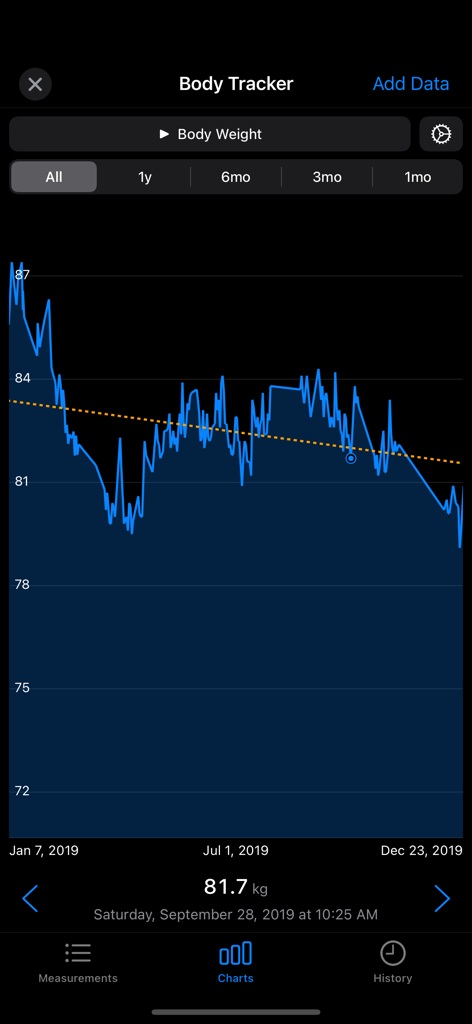
FitNotes 2 - Gym Workout Log - FitNotes 2アプリの体重トラッキングチャート。トレンドライン付きで、時系列の体重の進捗が表示されます。
FitNotes 2アプリの体重トラッキングチャート。トレンドライン付きで、時系列の体重の進捗が表示されます。

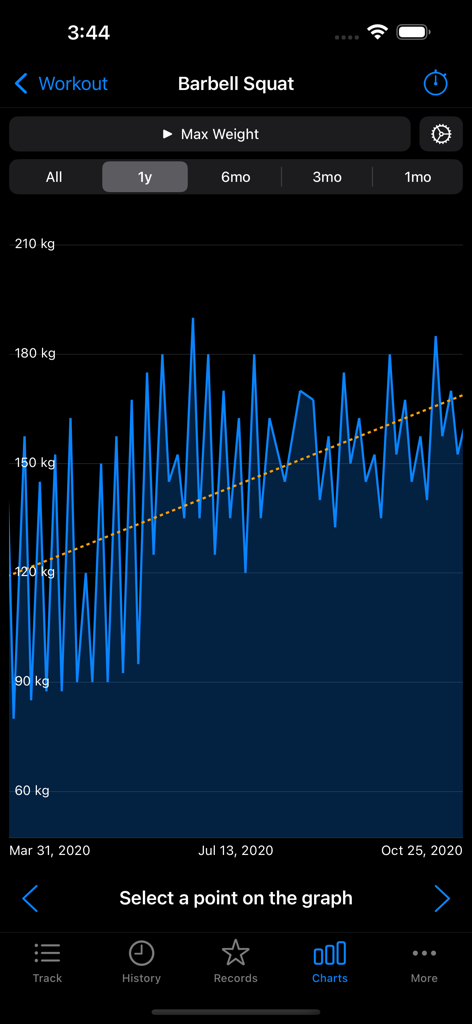
FitNotes 2 - Gym Workout Log - FitNotes 2アプリの折れ線グラフ。バーベルスクワットの最大重量の1年間の進捗が上向きのトレンドラインで表示されます。
FitNotes 2アプリの折れ線グラフ。バーベルスクワットの最大重量の1年間の進捗が上向きのトレンドラインで表示されます。

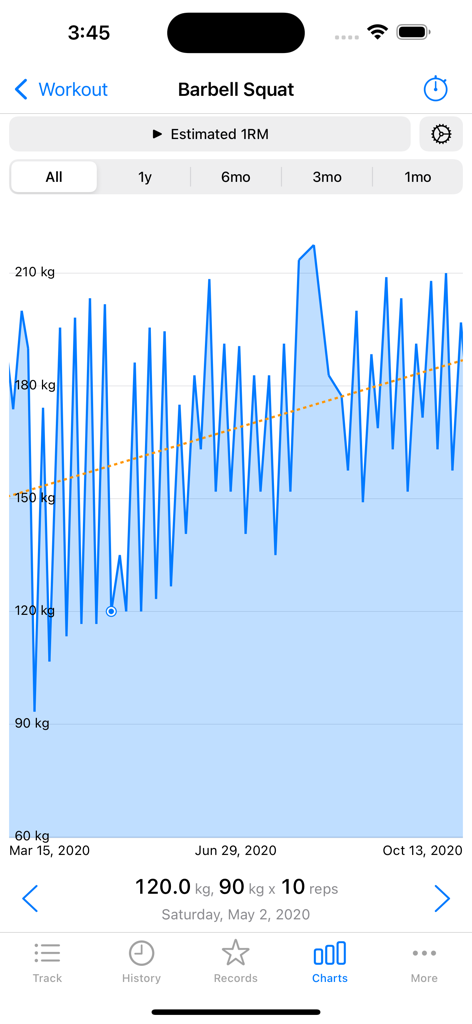
FitNotes 2 - Gym Workout Log - FitNotes 2アプリの折れ線グラフ。バーベルスクワットの推定1レップ最大値の進捗が時系列で表示されます。

FitNotes 2アプリの折れ線グラフ。バーベルスクワットの推定1レップ最大値の進捗が時系列で表示されます。

説明

Keep track of your progress in the gym with a workout tracker and planner. • Based on the popular FitNotes app, the best workout planner app ever made on any platform • Routines: Save your workout routines as templates, log them to a workout • Personal Records are automatically tracked • 1RM, Percents Calculator • Plate Calculator with profiles per gym and multiple barbells • Body Tracker: Record your weight, body fat and any other measurement. Integrates with Apple HealthKit. • Goal Tracker: Set personal goals for exercises, such as a 1RM. • Graphs: Helps to analyze your progress and plan your programming • Rest Timer, EMOM, AMRAP and Tabata timers • Notifications: Be notified when the rest timer ends for your next set • Supports every kind of exercise: weight, reps, distance, time • Use built-in exercises or create your own • Mix pounds (lbs) and kilograms (kg) easily • Add notes to workouts, sets, templates and body measurements • Dark Mode • Apple Watch app • Apple Workout integration with or without Apple Watch • Share workouts as text or an image • Warmup sets • RPE, RIR Data Management: • Import the original FitNotes database and FitNotes CSV files • Manual and automatic backups to iCloud • Export your workouts in a CSV • Export back to the original FitNotes. No lock-in. • No account required You can import CSVs from other fitness and workout log apps to bring your data over. The free version of FitNotes 2 can save up to 12 workouts. Delete older workouts to continue using for free. All features are available free, the number of workouts is the only restriction. To save more workouts, purchase FitNotes unlimited lifetime access or a subscription. Terms of Use: https://getfitnotes.com/termsofuse This app is not affiliated with other fitness apps. Purchase of FitNotes does not transfer to other platforms. FitNotes Changes: Version 8 - Add option to skip the rest timer for the final set - Fix HealthKit synced workout dates - Long press notes to show the menu - Update CSV format for the other FitNotes import Version 7 - Export and import templates - Added an option to copy previous sets when adding an exercise to a workout - Add 'Copy' to the long press menu on workout notes - Allow a negative RIR Version 6 - Fix decimal inputs for RPE and RIR - Fix the lockscreen timer text being black for some users Version 5 - Add the rest timer to the lock screen. You must enable it from the rest timer settings. - Restore lookback time ranges for the Exercise records - Add 'By Year' to statistics time groupings - Add an option to double an exercise's weight when calculating volume. You can use this for unilateral or dumbbell exercises. - Add 'Sort By Category' in the exercise list sorting options - Add RPE and RIR to workout sets - Add custom rest times to a single workout set - Add an option to show the workout set notes without opening the notes screen - Flag sets as 'warmup'. Warmup sets are excluded from graphs, statistics and goals. - Fix rest time settings not updating properly when deleted - Fix the rest timer buttons not working after uses EMOM/AMRAP timers - Don't send notifications for EMOM/AMRAP timers - Fix the 'next set' message that could be wrong sometimes when using supersets - Skip autobackup if the phone is too hot - Fix a layout issue with the settings menu for long settings names - Fix 'Y-Axis from Zero' graph option Version 4.1 - Fix number highlighting in the input fields on iOS 17.2 - Fix a crash when sharing a screenshot of the workout - Fix a crash that could happen changing the HealthKit Quantity Type for a measurement - Fix a crash and a bug that could happen when creating new exercises - Fix a crash that could happen when deleting a set that is a record

Download

ダウンロード: App Store

このページはアプリまたはその開発者の公式ページではなく、情報提供および論評を目的として作成された独立した編集出版物です。明示的に別段の記載がない限り、アプリおよびその開発者は、MWM、Apple、Google Play、アプリのパブリッシャー、またはアプリの開発者と提携、承認、後援、認可、またはその他の公式的な関係はなく、このページのいかなる内容も、アプリがMWMのサービスを使用して開発されたことを意味するものではありません。すべての商標、ロゴ、スクリーンショット、その他のコンテンツはそれぞれの所有者の財産です。








