
このページはアプリまたはその開発者の公式ページではなく、情報提供および論評を目的として作成された独立した編集出版物です。明示的に別段の記載がない限り、アプリおよびその開発者は、MWM、Apple、Google Play、アプリのパブリッシャー、またはアプリの開発者と提携、承認、後援、認可、またはその他の公式的な関係はなく、このページのいかなる内容も、アプリがMWMのサービスを使用して開発されたことを意味するものではありません。すべての商標、ロゴ、スクリーンショット、その他のコンテンツはそれぞれの所有者の財産です。


ダウンロード
1M+ユーザー評価
評価数
3.5K開発元
カテゴリ
Music対応言語
1最新バージョン
4.9.6サイズ
348.9 MBリリース日
2011年6月21日この分析は、プロデューサーやミュージシャンがモバイル環境で高品質な音楽を作成するために不可欠な機能に焦点を当てます。
FL Studio Mobile: モバイル音楽制作の革新
高品質なマルチトラック録音とオーディオインポート
ユーザーは、外部および内部ソースからのオーディオを録音し、トラック長のステムファイルやWAVファイルをインポートして、複雑な音楽プロジェクトを構築することが可能です。これにより、プロフェッショナルな楽曲制作の基盤が提供されます。
豊富な内蔵楽器とサウンドライブラリ
このアプリは、高品質なシンセサイザー、サンプラー、ドラムキット、スライスループビートなど、幅広い楽器モジュールを提供します。ユーザーは、ドラムサンプラー、DirectWaveサンプルプレイヤー、GMS、Transistor Bass、MiniSynth、SuperSawといった多様なサウンド源を活用し、創造的なサウンドデザインを実現できます。
プロフェッショナルなミキシング&マスタリングエフェクト
ユーザーは、アナライザー、オートダッカー、オートピッチ、コーラス、コンプレッサー、リミッター、ディストーション、EQ、リバーブなど、多岐にわたるエフェクトモジュールを使用して、トラックのミキシングとマスタリングを精密に行うことが可能です。これにより、サウンドに深みとプロフェッショナルな輝きを与えることができます。
柔軟なMIDI制御とシーケンシング
このアプリは、MIDIコントローラーのサポート、オートメーションの記録、ピアノロールでのノート編集、ステップシーケンサー、MIDIファイルのインポートとエクスポート機能を提供します。ユーザーは、外部MIDIデバイスを接続して演奏を記録したり、精密な編集を行ったりして、表現豊かな音楽を作成できます。
精密なトラックミキシング機能
各トラックに対してミュート、ソロ、エフェクトバスのルーティング、パン、ボリューム調整が可能なミキサーが備わっています。ユーザーは、プロジェクトのサウンドバランスを詳細にコントロールし、洗練されたミックスを作成することが可能です。
デスクトップFL Studioとのプロジェクト連携
ユーザーは、このアプリで作成したプロジェクトをFL Studioデスクトップ版の無料プラグインバージョンでロードし、デスクトップ環境でのさらなる編集や仕上げを行うことが可能です。これにより、モバイルとデスクトップ間でのシームレスなワークフローが実現します。
幅広いオーディオファイル形式のサポート
WAV、MP3、AAC、FLAC、MIDIといった主要なオーディオおよびMIDIフォーマットでの保存とロードに対応しています。ユーザーは、作成した楽曲を様々な形式でエクスポートし、他のアプリケーションやデバイスと共有することが可能です。
他の音楽アプリとの連携機能 (IAA/Audiobus)
IAA (Inter-App Audio)およびAudiobusの入出力サポートにより、他の対応する音楽アプリとシームレスに連携することが可能です。ユーザーは、FL Studio Mobileを他のアプリの拡張機能として活用し、さらに高度な音楽制作環境を構築できます。
容易な楽曲共有とプロジェクト同期
ユーザーは、Wi-Fiやクラウド、または他のMobile 3インスタレーションとの同期機能を通じて、作成した楽曲を他のデバイスや共同制作者と簡単に共有することが可能です。これにより、場所を選ばない共同作業やバックアップが容易になります。
高度なカスタマイズ性とバーチャル楽器
このアプリは、全ての画面解像度とサイズに合わせたユーザーインターフェース設定が可能であり、バーチャルピアノキーボードやドラムパッドが内蔵されています。ユーザーは、モバイルデバイスの特性に合わせて最適な操作環境を構築し、場所を選ばずに直感的な演奏と入力が可能です。
よくある質問
について知っておくべきこと FL Studio Mobile
What is FL Studio Mobile?
FL Studio Mobile is a comprehensive music production app for iPad, iPhone, and Mac, allowing users to record, sequence, edit, mix, and render multi-track songs.
Does FL Studio Mobile support audio recording?
Yes, FL Studio Mobile supports audio recording from external and internal sources, and track-length stem/WAV file import.
Can I use MIDI controllers with FL Studio Mobile?
Yes, FL Studio Mobile offers support for class-compliant MIDI controllers and also includes automation support.
What file formats does FL Studio Mobile support for saving and loading?
FL Studio Mobile saves and loads WAV, MP3, AAC, FLAC, and MIDI files, allowing flexible project management.
Are there in-app purchases within FL Studio Mobile?
Yes, FL Studio Mobile has in-app purchases for the DirectWave sample player. However, users can install their own samples without additional purchases.
Is there a trial version of FL Studio Mobile available?
Yes, users can try FL Studio Mobile by installing FL Studio 20 for macOS/Windows and using its identical free FL Studio Mobile Plugin.
Which effects modules are included in FL Studio Mobile?
FL Studio Mobile includes Analyzer, Auto Ducker, Auto-Pitch, Chorus, Compressor, Limiter, Distortion, Equalizers, Flanger, Reverb, Tuner, Filters, Delays, Phaser, and Stereoizer.
What instrument modules are available in FL Studio Mobile?
FL Studio Mobile provides Drum Sampler, DirectWave Sample Player, GMS (Groove Machine Synth), Transistor Bass, MiniSynth, and SuperSaw instrument modules.
Can I transfer FL Studio Mobile projects to desktop FL Studio?
Yes, FL Studio Mobile projects load into the FL STUDIO FREE Plugin version on macOS or Windows, allowing seamless transfer to the desktop environment.
Does FL Studio Mobile have a mixing console?
Yes, FL Studio Mobile features a mixer with per-track controls including mute, solo, effect bus, pan, and volume adjustment.
Is a piano roll available for editing in FL Studio Mobile?
Yes, FL Studio Mobile offers a piano roll interface to edit notes or capture recorded musical performances.
How do I share my music from FL Studio Mobile?
FL Studio Mobile allows sharing songs via Wi-Fi or Cloud to other Mobile 3 installations, and synchronization across other Mobile 3 devices.
Where can I find support for FL Studio Mobile?
Users access support via the in-app 'Help > Users & Support Forums' after registering FL Studio Mobile to their Image-Line account, enabling bug reports and feature requests.
以下のスクリーンショットと説明は、アプリの公式ストアリスティングから直接取得されたものであり、アプリ開発者の所有物です。
アプリストア
スクリーンショット
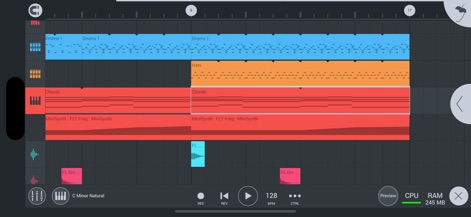
このアプリでは、直感的なインターフェースで複数のトラックを視覚的に配置し、ドラムやシンセサイザーの複雑なシーケンスをタイムライン上で編集できます。
マルチトラック編集

パワフルなドラムシーケンサーでリズミカルなパターンを構築し、FXアナライザーでサウンドの波形を詳細に視覚化・分析できます。
ビート制作&分析

ユーザーはオーディオ波形を詳細に編集し、FX Pitcher 2エフェクトを通じて、キー、スケール、速度などのピッチ関連パラメーターを自在に調整可能です。
オーディオ調整

ピアノロールエディターで精密なMIDIノートを打ち込み、DW Samplerモジュールでピッチやフィルターといったサンプルの詳細なパラメーターを設定できます。
サンプリング&MIDI

直感的なミキサーインターフェースを通じて各トラックのボリュームとパンを調整し、DuckerやReverbなどのエフェクトを適用してサウンドを洗練させます。
プロフェッショナルミキシング

このツールは視覚的なオートメーションカーブエディターを提供し、FX Tape Stopエフェクトのスタートタイムやワープといったパラメーターを正確に制御することで、ダイナミックなサウンド表現を実現します。
高度なオートメーション
説明
Download
類似アプリ
似た機能とユーザー体験を持つアプリ

Loopy Pro: Looper DAW Sampler
A Tasty Pixel

AUM - Audio Mixer
Kymatica AB

Drambo
Jaroslaw Jacek

Groove Rider 2
Dmitrij Pavlov

BandLab – Music Maker & Beats
BandLab Singapore Pte Ltd

Medly
Medly Labs Inc.

Cubasis 3 - DAW & Music Studio
Steinberg Media Technologies GmbH

KORG Gadget 3
KORG INC.
iMPC Pro 2 for iPhone
Akai Professional
このページはアプリまたはその開発者の公式ページではなく、情報提供および論評を目的として作成された独立した編集出版物です。明示的に別段の記載がない限り、アプリおよびその開発者は、MWM、Apple、Google Play、アプリのパブリッシャー、またはアプリの開発者と提携、承認、後援、認可、またはその他の公式的な関係はなく、このページのいかなる内容も、アプリがMWMのサービスを使用して開発されたことを意味するものではありません。すべての商標、ロゴ、スクリーンショット、その他のコンテンツはそれぞれの所有者の財産です。