FormatX - All Media Converter
ダウンロード: App Store

このページはアプリまたはその開発者の公式ページではなく、情報提供および論評を目的として作成された独立した編集出版物です。明示的に別段の記載がない限り、アプリおよびその開発者は、MWM、Apple、Google Play、アプリのパブリッシャー、またはアプリの開発者と提携、承認、後援、認可、またはその他の公式的な関係はなく、このページのいかなる内容も、アプリがMWMのサービスを使用して開発されたことを意味するものではありません。すべての商標、ロゴ、スクリーンショット、その他のコンテンツはそれぞれの所有者の財産です。


ロゴ: FormatX - All Media Converter
ダウンロード: App Store

FormatX - All Media Converter

プロレベルの精度で動画、音声、画像を変換、圧縮、編集できます。数秒で高品質な結果を求めるクリエイターやプロフェッショナル向けの究極のモバイルツールキットです。

主要数値

ダウンロード

1000

ユーザー評価

4.5/5

評価数

0

開発元

阳 刘

カテゴリ

Utilities

対応言語

18

最新バージョン

1.6

サイズ

87.2 MB

リリース日

2024年1月23日
機能

メディアワークフローをマスター

外出先でプロフェッショナルな結果を求めるクリエイターのために設計された、オールインワンコンバーターおよびエディターです。

インスタントユニバーサルコンバージョン

MP4、MOV、HEICなどに切り替えます。コンテンツがすべてのソーシャルプラットフォームやデバイスと即座に互換性があることを確認してください。

スマートビデオ圧縮

鮮明な品質を維持しながら、ファイルサイズを最大99%削減します。すばやく共有したり、貴重なiPhoneストレージを節約したりするのに最適です。

以下のスクリーンショットと説明は、アプリの公式ストアリスティングから直接取得されたものであり、アプリ開発者の所有物です。

アプリストア

スクリーンショット
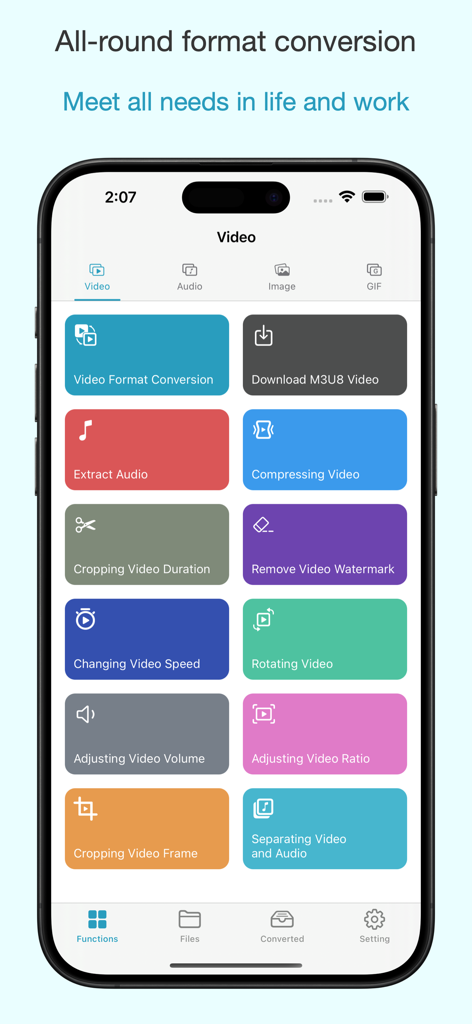
FormatX - All Media Converter - FormatXアプリのインターフェイス。ビデオ変換および編集ツールのグリッドが表示されています。
FormatXアプリのインターフェイス。ビデオ変換および編集ツールのグリッドが表示されています。

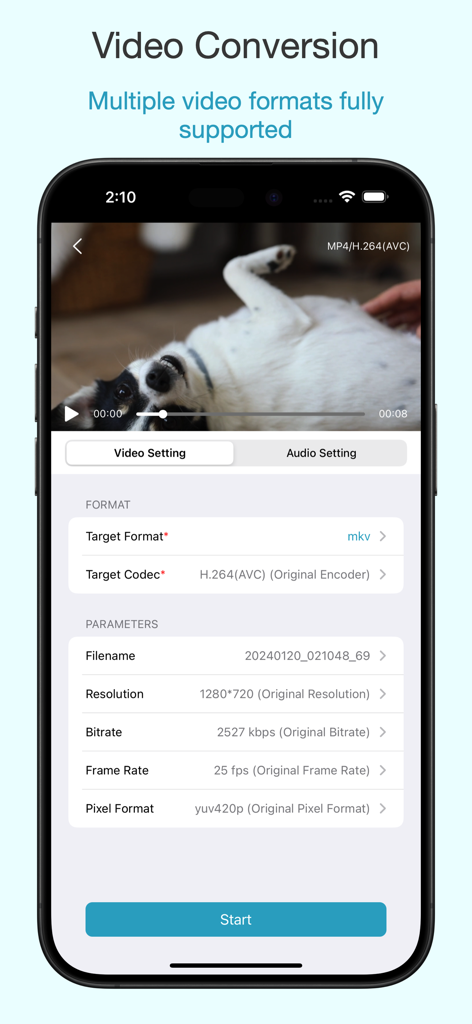
FormatX - All Media Converter - カスタム設定(フォーマットや解像度など)が表示される、ビデオ変換用のFormatXアプリのインターフェイス。
カスタム設定(フォーマットや解像度など)が表示される、ビデオ変換用のFormatXアプリのインターフェイス。

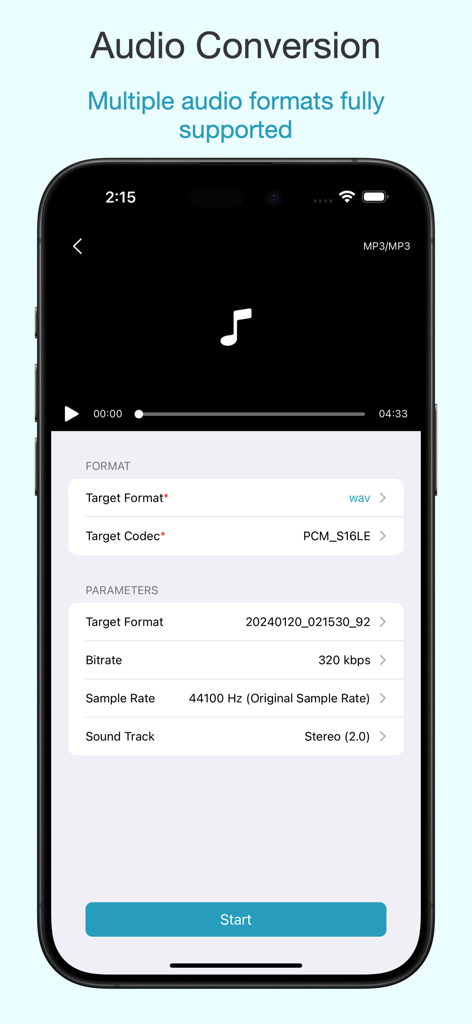
FormatX - All Media Converter - iPhone上のFormatXアプリのインターフェイス。フォーマット、ビットレート、サンプルレートオプションを含むプロフェッショナルなオーディオ変換設定が表示されています。
iPhone上のFormatXアプリのインターフェイス。フォーマット、ビットレート、サンプルレートオプションを含むプロフェッショナルなオーディオ変換設定が表示されています。

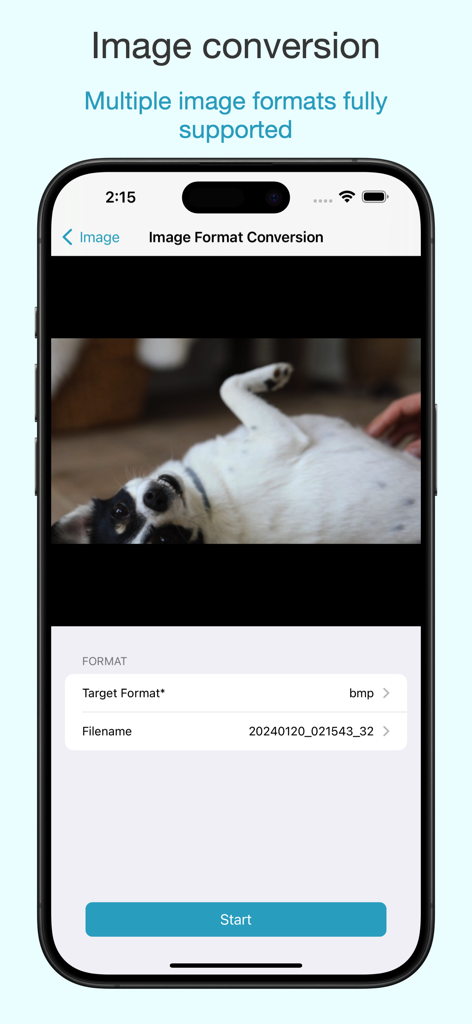
FormatX - All Media Converter - 犬の写真とターゲットフォーマットセレクターが表示された画像フォーマット変換画面のFormatXアプリのインターフェイス。
犬の写真とターゲットフォーマットセレクターが表示された画像フォーマット変換画面のFormatXアプリのインターフェイス。

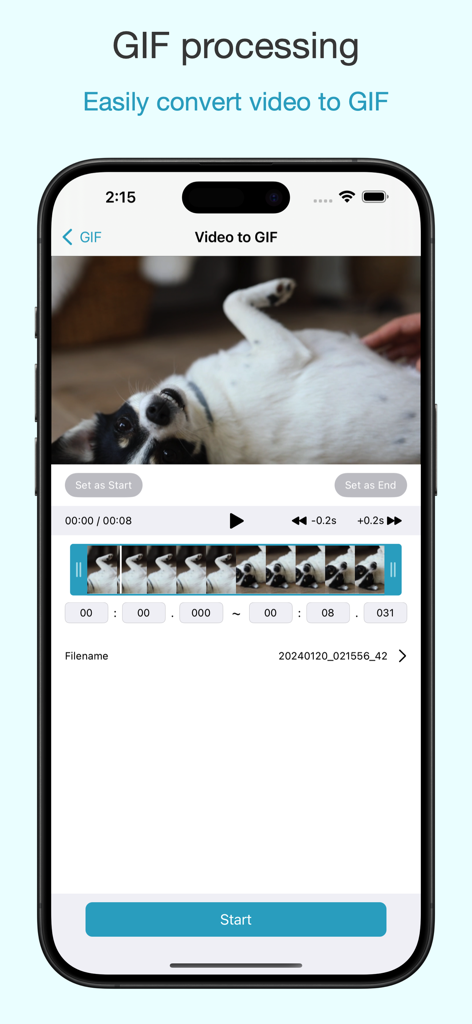
FormatX - All Media Converter - 編集中の犬のビデオが表示された、ビデオからGIFへのコンバーター機能を示すFormatXアプリのインターフェイス。

編集中の犬のビデオが表示された、ビデオからGIFへのコンバーター機能を示すFormatXアプリのインターフェイス。

説明

FormatX is an all-in-one format conversion tool that supports video, audio, and image format conversions, audio extraction, compression, cropping, merging, speed adjustment, rotation, aspect ratio adjustment, volume control, and more. Easily convert everything you want... FormatX has the following main features: Video Format Conversion: Supports conversion of videos in various formats with the freedom to customize settings like resolution, bitrate, frame rate, etc. Supported formats include mp4, mov, mkv, mpg, amv, ts, mpeg, m4v, wmv, asf, avi, vob, flv, etc. Audio Format Conversion: Professional audio format conversion settings to maintain the original audio quality. Supported formats include wav, mp3, aac, m4a, flac, etc. Image Format Conversion: Supports various image format conversions with the freedom to modify resolution and ratio. Supported formats include jpg, png, heic, jpeg, etc. Audio Extraction: Extracts various audio formats from videos with simple and convenient operations, maintaining the original sound sampling rate, bitrate, and supporting features like fade in and fade out. Video Compression: Supports limitless compression from 1% to 100%, compatible with multiple video formats. Video Editing: Features video cropping, merging, rotation, speed adjustment, volume control, and video denoising. Audio Editing: Supports audio cropping, merging, speed adjustment, volume control, and audio denoising. GIF Processing: Converts videos of various formats into high-definition GIFs, allowing personalized creation of desired GIFs. Subscription Auto-Renewal Instructions: -- Subscription Period: 1 week, 1 month, 1 year -- Subscription Price: Check iAP application information for details. -- Payment: Purchase confirmation and payment will be recorded in the iTunes account. -- Renewal: Apple iTunes account will be charged 24 hours before expiration, and the subscription period will be extended for one subscription cycle after successful payment. -- Cancel Renewal: To cancel the renewal, manually turn off the auto-renewal function in iTunes/Apple ID settings management at least 24 hours before the current subscription period is charged. -- Terms of Use: https://formatx-app.notion.site/formatx-app/Terms-of-use-37aaafcaef794d2d96c659595f243ac6 -- Privacy Policy: https://formatx-app.notion.site/formatx-app/Privacy-Policy-6920b3b28f944b60a977dc770b6c4c99

Download

ダウンロード: App Store

このページはアプリまたはその開発者の公式ページではなく、情報提供および論評を目的として作成された独立した編集出版物です。明示的に別段の記載がない限り、アプリおよびその開発者は、MWM、Apple、Google Play、アプリのパブリッシャー、またはアプリの開発者と提携、承認、後援、認可、またはその他の公式的な関係はなく、このページのいかなる内容も、アプリがMWMのサービスを使用して開発されたことを意味するものではありません。すべての商標、ロゴ、スクリーンショット、その他のコンテンツはそれぞれの所有者の財産です。








