Geofency - Time Tracking

Geofency - Time Tracking

ダウンロード: App Store
ロゴ: Geofency - Time Tracking

Geofency:手間いらずの自動時間追跡

手動での打刻はやめて、あなたの場所を仕事させましょう。iPhone、Apple Watch、Macのために設計された、最もバッテリー効率が高く、100%プライベートな時間追跡ツールを体験してください。

ダウンロード: App Store

開発元

Karl Heinz Herbel

カテゴリ

Utilities

ダウンロード

144K+

ユーザー評価

4.6/5

評価数

5K+

対応言語

10

動きの中での効率

このインターフェースを利用する 144K+ 人のユーザー.

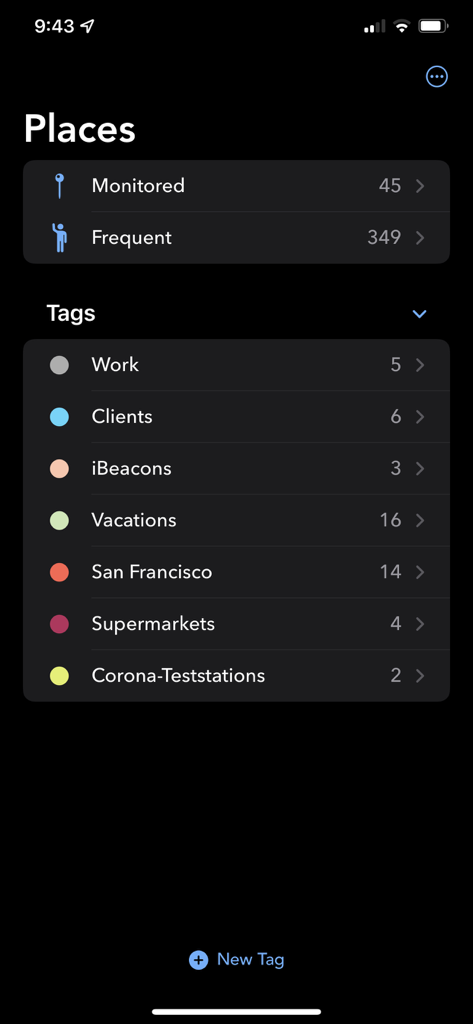
Geofencyアプリのインターフェース。場所追跡のために、カテゴリ分けされた場所とカスタムタグが表示されています。
Geofencyアプリのインターフェース。場所追跡のために、カテゴリ分けされた場所とカスタムタグが表示されています。

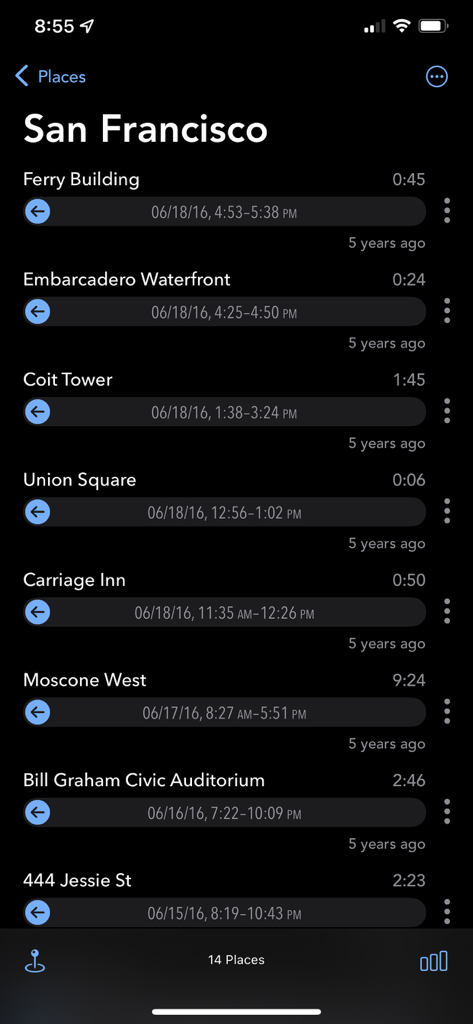
Geofencyアプリの画面。サンフランシスコでの自動追跡された場所と滞在時間の履歴が表示されています。
Geofencyアプリの画面。サンフランシスコでの自動追跡された場所と滞在時間の履歴が表示されています。

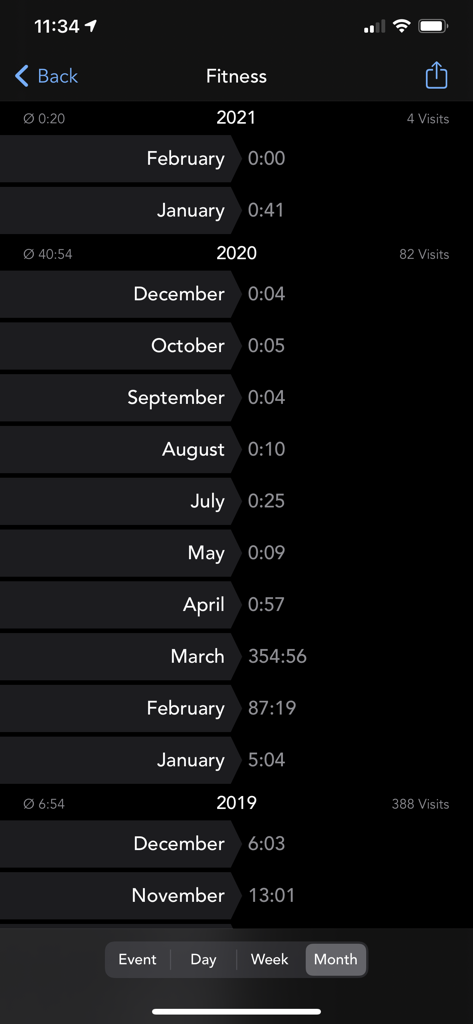
Geofencyアプリでのフィットネス場所の月間時間追跡統計。
Geofencyアプリでのフィットネス場所の月間時間追跡統計。

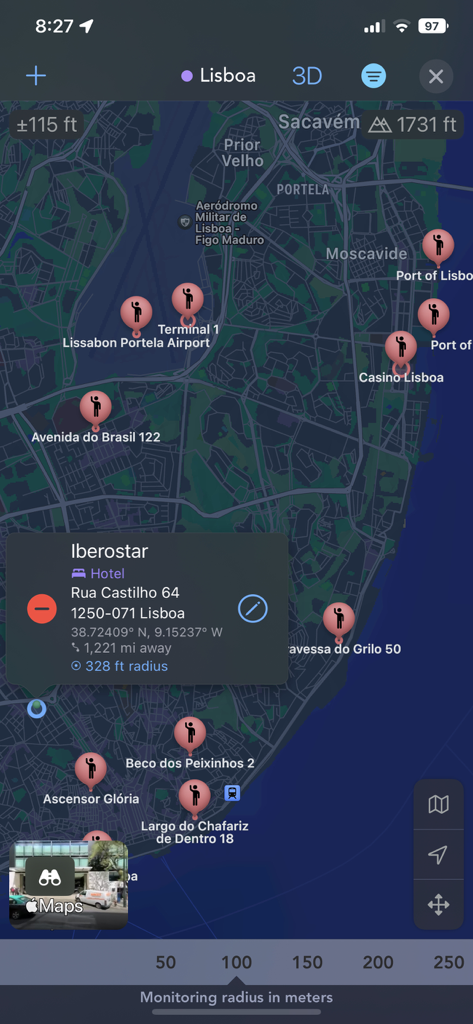
Geofencyアプリのマップビュー。リスボンの追跡されたさまざまな場所と監視半径設定が表示されています。
Geofencyアプリのマップビュー。リスボンの追跡されたさまざまな場所と監視半径設定が表示されています。

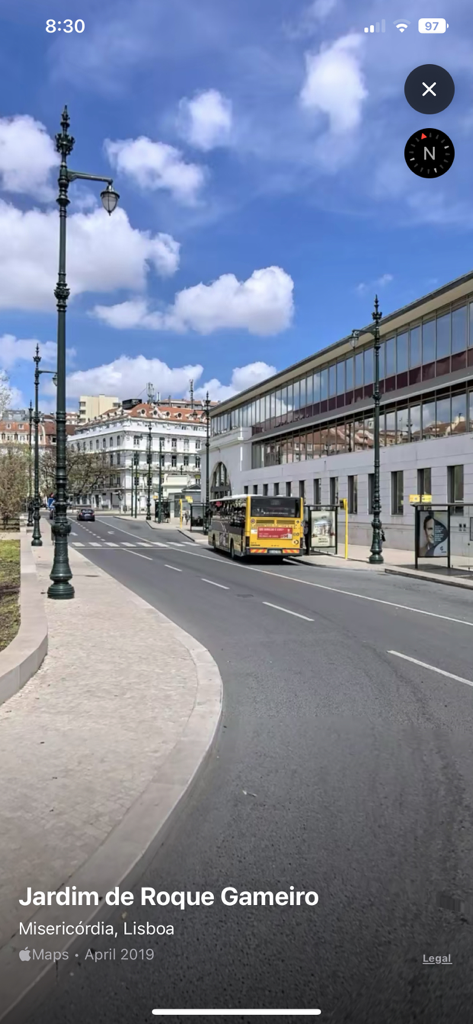
Geofencyアプリ。リスボンのJardim de Roque Gameiroのストリートビューを表示し、場所ベースの時間追跡を行っています。
Geofencyアプリ。リスボンのJardim de Roque Gameiroのストリートビューを表示し、場所ベースの時間追跡を行っています。

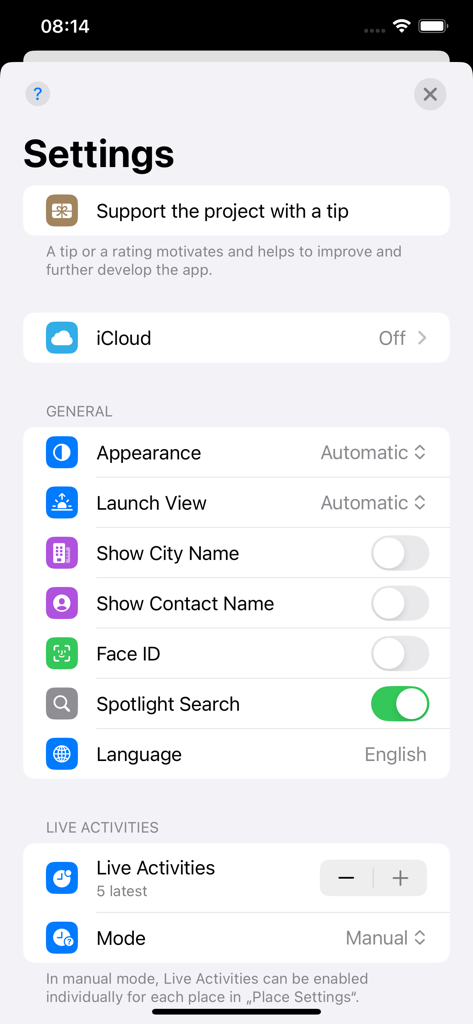
Geofencyアプリの設定メニュー。一般設定とライブアクティビティオプションが表示されています。
Geofencyアプリの設定メニュー。一般設定とライブアクティビティオプションが表示されています。

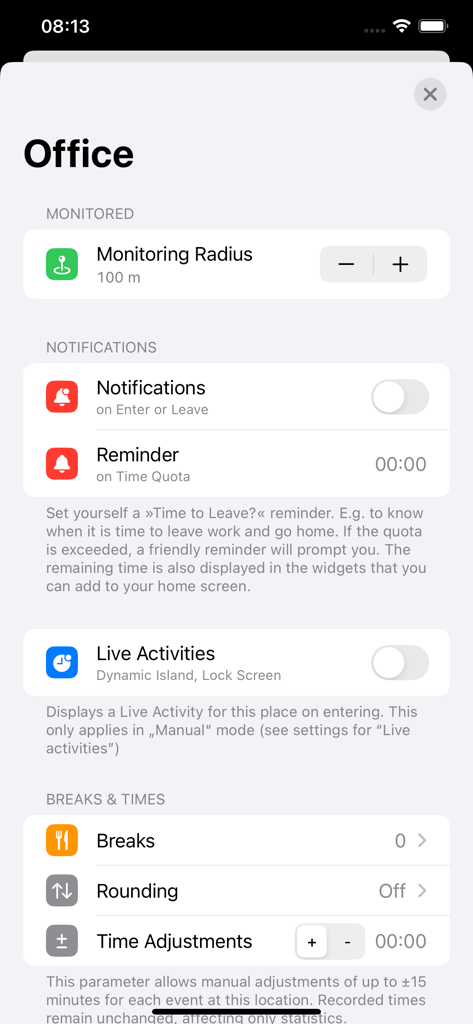
Geofencyアプリのオフィス場所監視と通知設定。
Geofencyアプリのオフィス場所監視と通知設定。

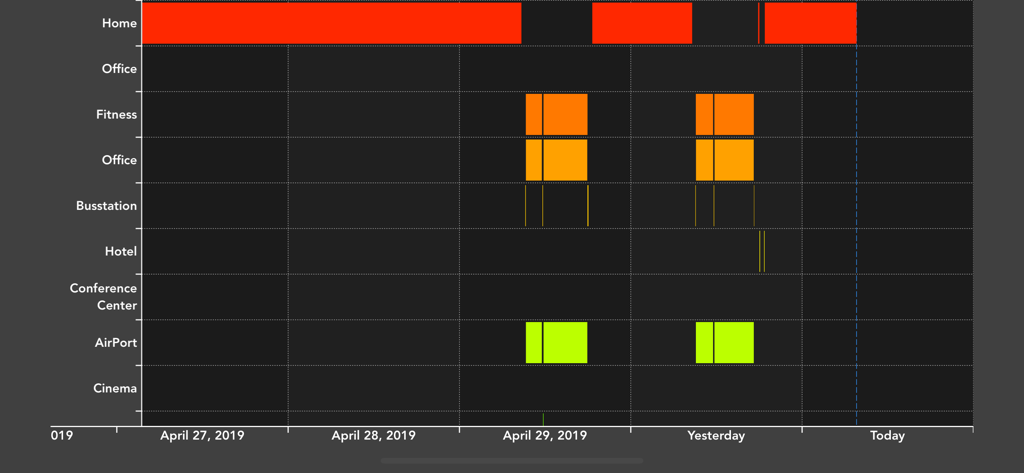
数日間にわたる自宅オフィスやフィットネスなどの異なる場所での滞在時間を示す、時間経過のグラフ表示。
数日間にわたる自宅オフィスやフィットネスなどの異なる場所での滞在時間を示す、時間経過のグラフ表示。

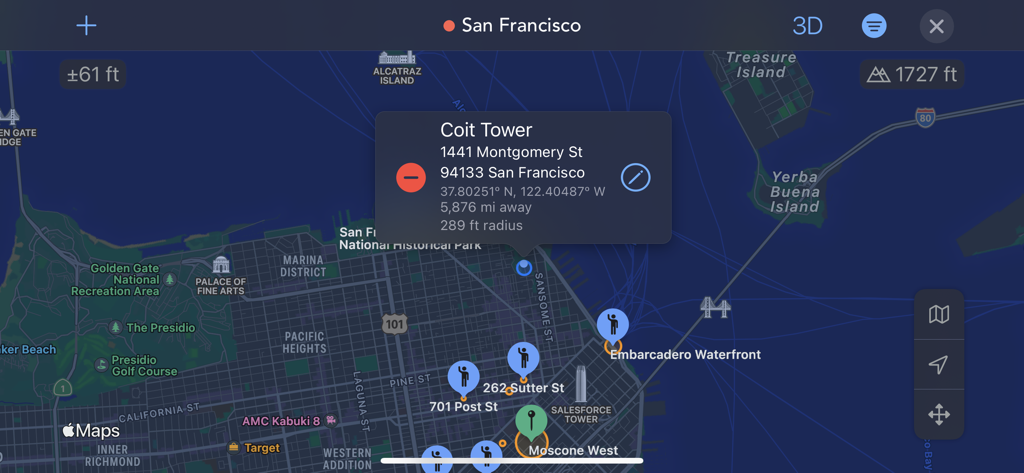
Geofencyアプリのマップインターフェース。サンフランシスコでの追跡された場所が表示されています。
Geofencyアプリのマップインターフェース。サンフランシスコでの追跡された場所が表示されています。

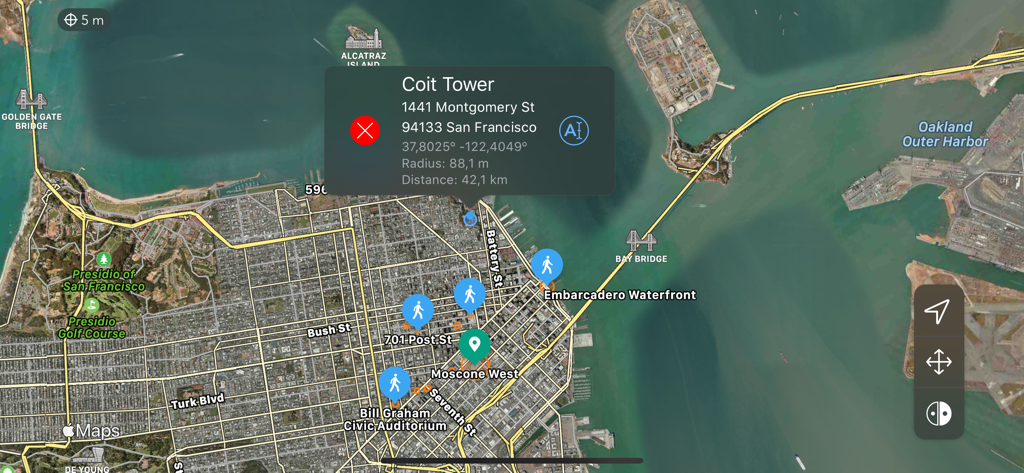
Geofencyアプリのマップインターフェース。サンフランシスコのいくつかの追跡された関心のある場所と、コイトタワーの詳細な場所カードが表示されています。

Geofencyアプリのマップインターフェース。サンフランシスコのいくつかの追跡された関心のある場所と、コイトタワーの詳細な場所カードが表示されています。

手間いらずの効率

このアプリを際立たせるツール、 144K+ 人のユーザーが選択.

🚀

ゼロタッチ記録

手動での打刻はもう不要です。ジオフェンシングとiBeaconを介して、バッテリー使用量を最小限に抑えながら、到着時刻と出発時刻が自動的に記録されます。

📊

プロフェッショナルのためのデータ

美しい統計情報を生成し、滞在時間をExcelまたはNumbersに直接エクスポートします。クライアントへの請求、税控除対象となる旅行の追跡、生産性監査に最適です。

🏠

スマートホームトリガー

追跡以上のことを。Webhookを使用して、自宅の自動化をトリガーします。たとえば、到着時に照明をオンにする、オフィスに入ったときにSlackステータスを更新するなどです。

アプリについて

について知っておくべきこと Geofency - Time Tracking.

説明

GEOFENCY enables fully automatic location-based time recording on iPhone, iPad, Mac & Apple Watch, where manual clock-in and clock-out becomes an absurdity of the past. Arrival and departure times are automatically recorded as soon as you enter or leave an interesting place – it works like magic! Of course all very energy efficient, thanks to the latest Geofencing & iBeacon technologies! With the integrated webhook feature you can even trigger your home automation system as you arrive or leave (e.g. switch on the lights when coming home)! Ideal for automatic monitoring of working hours, client visits, lunch breaks or the stays on your favorite places! GEOFENCY offers the easiest and most effective way to MONITOR your DURATION OF STAYS on interesting places. Unpleasant manual time recording was yesterday! • Are you tired of having to write down working hours again and again? • Fed up leaving the office absently, missed to check the clock? • Can't you remember when you came or left your favorite places? Let the iPhone take over this nerve-racking time monitoring for you! With GEOFENCY this is now possible in a smart and clever new way! Simply mark your points of interest on a map and leave the rest to Geofency! GEOFENCY automatically tracks the times when you enter or leave your points of interest. Simply carry your iPhone in your pocket or bag with you. You will automatically receive extensive statistics and graphics over time! Automatic Location-based Time Tracking – The (GEO)FANCY way! FEATURES • Automatic location-based time tracking - 24/7 time recording for your points of interest! • Graphical visualization of your dwell times - with zoom! • Rich statistics: Single-, Day-, Week- & Month-Summaries. • Map-View: Manage your points of interest directly on a beautiful fullscreen map view. • Add new locations in seconds – With just one tap! • Runs completely in the background while trying to maintain good battery life! • Automatic recognition when you enter or leave a place or region. • Tags: To group places into tags. • Webhook feature: Lets you control your home automation system to e.g. switch on lights as you arrive! • Journaling feature: Automatic recognition of frequent visited places – to know exactly when you've been where and how long! • Calendar-Export: Export events automatically into your calendar (iCloud, CalDAV & Exchange) – view your data comfortable even from Mac or PC! • Widgets: Time Clock widgets to quickly clock in or out from the Home- or Lockscreen. • Apple Watch App! • Export feature: Send time recordings via e.g. email in an Excel-friendly format! • Export time data and use it directly in Excel or Numbers! BENEFITS Simple to use daily timesaver! You don't have to fiddle around with time recordings on yourself. Free your mind and just don't bother about manual time tracking anymore! PRIVACY 100% Private: Only YOU can see your data. We will never collect or share any information about you. We respect and care about the privacy of our users! REQUIREMENTS For the best and most accurate monitoring results, Wi-Fi, carrier and location services should always be enabled for Geofency. iBeacon monitoring requires at least Bluetooth 4. BATTERY USE Continued use of GPS in the background can significantly reduce battery life. Geofency was designed to use GPS very sparingly and never in the background. The app relies mostly on cell tower + Wi-Fi locations. This has been carefully chosen to get the best battery life. WHAT PEOPLE SAY • "I had no idea that my iPhone could do such things!" • "Beautiful, polished and elegant designed. Extremely simple to use." • "Perhaps the most overall effective app available." Find out more on our landing page: www.geofency.com Sample-Scripts for easy webhook integration: www.geofency.com/geo.zip

最新バージョン

9.6.2

サイズ

10.6 MB

リリース日

2013年3月23日

打刻をやめて、自動的に生きよう。

すでに144,000人以上のプロフェッショナルが集中力を取り戻しています。今日からiPhone、Apple Watch、Macで、最もバッテリー効率が高く、100%プライベートな時間追跡マジックを体験してください。

ダウンロード: App Store

App information, icons, screenshots, and descriptions displayed on this page are sourced from the Apple App Store and are the property of their respective developers. Download estimates and rankings are based on MWM's proprietary models and may not reflect actual figures. This page is provided for informational and analytical purposes only.

Believe this page infringes your intellectual property? File a dispute