GstarCAD
GstarCAD
ダウンロード: App Store

このページはアプリまたはその開発者の公式ページではなく、情報提供および論評を目的として作成された独立した編集出版物です。明示的に別段の記載がない限り、アプリおよびその開発者は、MWM、Apple、Google Play、アプリのパブリッシャー、またはアプリの開発者と提携、承認、後援、認可、またはその他の公式的な関係はなく、このページのいかなる内容も、アプリがMWMのサービスを使用して開発されたことを意味するものではありません。すべての商標、ロゴ、スクリーンショット、その他のコンテンツはそれぞれの所有者の財産です。


ロゴ: GstarCAD
ダウンロード: App Store

GstarCAD

あらゆるデバイスで、プロフェッショナルグレードの3Dモデリング、リアルタイムのクラウド注釈、インスタントチームコラボレーションでAECワークフローを強化しましょう。

主要数値

ダウンロード

4K+

ユーザー評価

1.0/5

評価数

0

開発元

Gstarsoft Co., Ltd

カテゴリ

Business

対応言語

20

最新バージョン

1.5.0

サイズ

210.7 MB

リリース日

2024年7月10日
機能

オフィスから現場まで、プロジェクトをマスターする

コラボレーションを合理化し、プロジェクトデータを保護し、高性能3Dモデリングを手のひらにもたらす統合CADプラットフォームで、エンジニアリングおよび設計チームを強化します。

シームレスなクロスプラットフォーム同期

オフィスと現場のギャップをなくしましょう。単一の統合アカウントで、デスクトップ、Web、モバイル間でDWG図面にアクセス、編集、管理できます。

リアルタイムLiveCollab

音声同期されたビューポートとクラウド注釈を使用して、インスタント図面レビューを実施し、場所に関係なくプロジェクト関係者が連携できるようにします。

以下のスクリーンショットと説明は、アプリの公式ストアリスティングから直接取得されたものであり、アプリ開発者の所有物です。

アプリストア

スクリーンショット
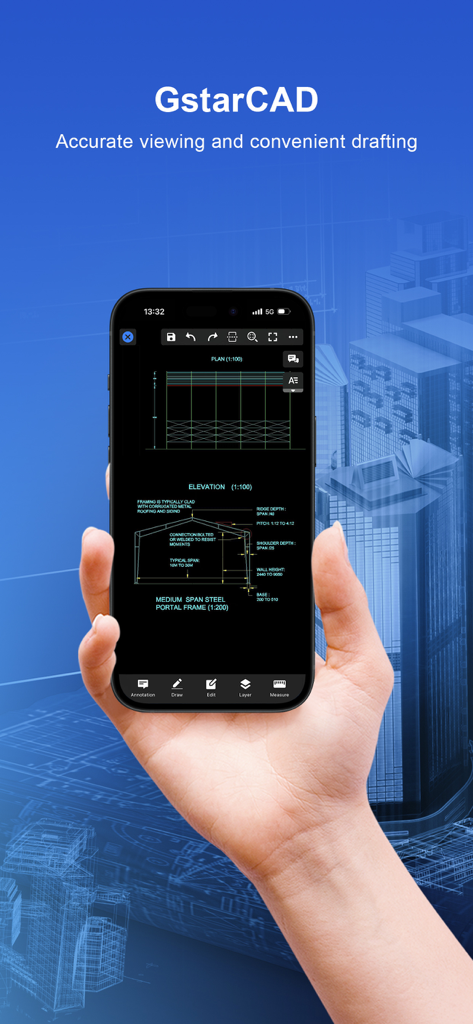
GstarCAD - GstarCADモバイルアプリ内で建築CAD図面を表示するスマートフォンを手にした様子。
GstarCADモバイルアプリ内で建築CAD図面を表示するスマートフォンを手にした様子。

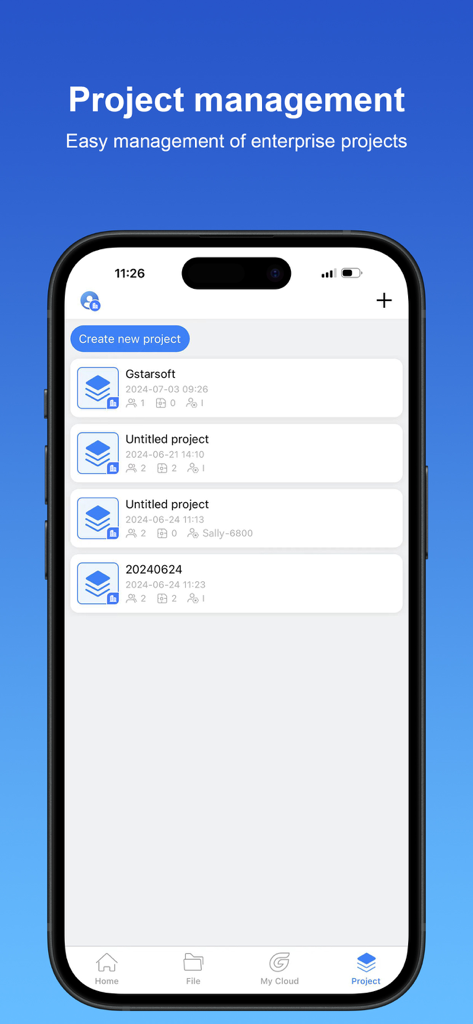
GstarCAD - GstarCADモバイルアプリのプロジェクト管理画面。CADプロジェクトのリストと新規プロジェクト作成ボタンが表示されています。
GstarCADモバイルアプリのプロジェクト管理画面。CADプロジェクトのリストと新規プロジェクト作成ボタンが表示されています。

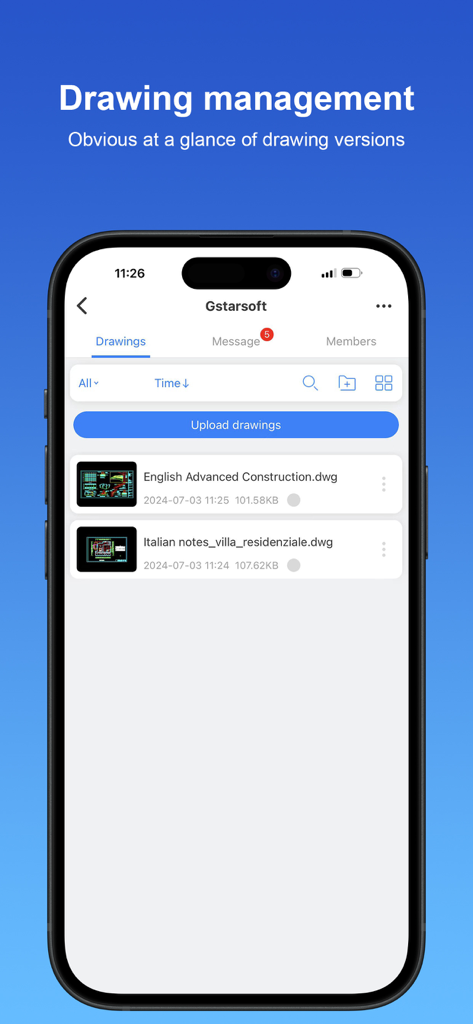
GstarCAD - GstarCADモバイルアプリのインターフェース。管理ダッシュボードに建築および建設図面のリストが表示されています。
GstarCADモバイルアプリのインターフェース。管理ダッシュボードに建築および建設図面のリストが表示されています。

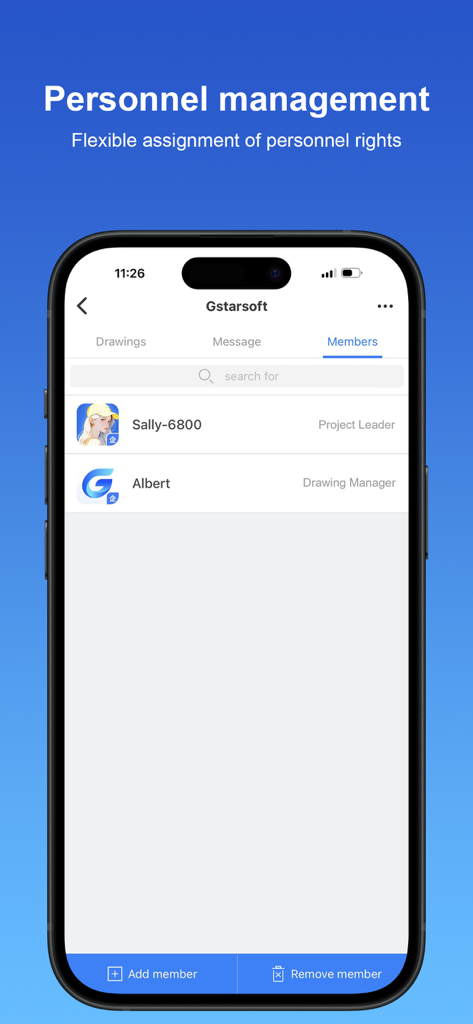
GstarCAD - GstarCADモバイルアプリの人員管理画面。プロジェクトメンバーとその割り当てられた役割が表示されています。

GstarCADモバイルアプリの人員管理画面。プロジェクトメンバーとその割り当てられた役割が表示されています。

説明

GstarCAD for Mobile is a CAD software with excellent performance, which constitutes GstarCAD 365 cloud solution in a cross-terminal way with GstarCAD View, GstarCAD for Web and GstarCAD Cloud Application. It provides multi-scenario CAD cloud applications and services, including but not limited to cloud design, cloud storage, cloud sharing, cloud annotation, cloud project, cloud cooperation, and cloud collaboration, creating an efficient collaborative office platform based on CAD drawings and models for users. 1. User system design realizes cross-platform interoperability The user system realizes cross-platform and multi-terminal account interoperability. It covers all kinds of GstarCAD professional software and GstarCAD for Mobile, GstarCAD View, GstarCAD for web and so on. Users can achieve seamless switch between terminals and log in freely with only one account. 2.Product collaboration module integration The products of each terminal have been integrated with the project collaboration module. After logging in, users can access the functions of cloud annotation, cloud storage and drawing management to efficiently collaborate on CAD projects and ensure data security and convenient management. 3. Data management during collaboration process is regarded as an enterprise asset, covering drawings, annotations, chat logs and other information. To ensure security and compliance, administrators can check and manage data according to permission rules through the management backend. 4. Cloud annotation supports project members to annotate directly on drawings, which automatically show others' annotations synchronously. This function meets the needs of instant feedback of on-site problems and accurate proofreading of drawings, effectively facilitating communication and collaboration among project team members. 5. LiveCollab allows users to organize drawing reviews at any time. The CAD viewport is synchronized during voice and graphic communication to ensure smooth communication. In addition, it supports multi-user annotations to improve the efficiency and accuracy of teamwork. 6.Shared Resource Library enables efficient sharing of fonts, frames, linetypes, print styles, profiles, fill files, templates, and material files, making it easy for team members to access standardized resources. 7. The system is fully compatible with dozens of 3D file formats such as SW, Creo, UG, RVT and SKP. Rotation, panning, zooming, exploded view, cutaway view and other functions are integrated to provide an efficient and comprehensive 3D model browsing experience.

Download

ダウンロード: App Store

このページはアプリまたはその開発者の公式ページではなく、情報提供および論評を目的として作成された独立した編集出版物です。明示的に別段の記載がない限り、アプリおよびその開発者は、MWM、Apple、Google Play、アプリのパブリッシャー、またはアプリの開発者と提携、承認、後援、認可、またはその他の公式的な関係はなく、このページのいかなる内容も、アプリがMWMのサービスを使用して開発されたことを意味するものではありません。すべての商標、ロゴ、スクリーンショット、その他のコンテンツはそれぞれの所有者の財産です。








