Home Theater SPL
Home Theater SPL
ダウンロード: App Store

このページはアプリまたはその開発者の公式ページではなく、情報提供および論評を目的として作成された独立した編集出版物です。明示的に別段の記載がない限り、アプリおよびその開発者は、MWM、Apple、Google Play、アプリのパブリッシャー、またはアプリの開発者と提携、承認、後援、認可、またはその他の公式的な関係はなく、このページのいかなる内容も、アプリがMWMのサービスを使用して開発されたことを意味するものではありません。すべての商標、ロゴ、スクリーンショット、その他のコンテンツはそれぞれの所有者の財産です。

ロゴ: Home Theater SPL
ダウンロード: App Store

Home Theater SPL

本格的なホームシアター愛好家やDIYキャリブレーターのために設計された精密デシベルメーターで、完璧なサウンドステージと非常にクリアなダイアログを実現します。

主要数値

ダウンロード

3K+

ユーザー評価

1.0/5

評価数

0

開発元

J.S. Technology Ltd.

カテゴリ

Utilities

対応言語

1

最新バージョン

1.26

サイズ

9.2 MB

リリース日

2015年6月24日
機能

ホームシネマ・オーディオを完璧に調整

音量レベルの推測はやめましょう。5.1および7.1サラウンドシステム用に設計された高精度SPLメータリングで、プロのようにスピーカーを調整。

精密なサウンド・バランシング

プロ仕様のデシベル精度で個々のスピーカーレベルを一致させ、究極の「センター・サウンドステージ」を実現します。

7.1システム・最適化

ホームシアター専用に構築されたインターフェースを使用して、センター、サラウンド、LFEチャンネルを含む複雑なレイアウトを簡単に調整できます。

以下のスクリーンショットと説明は、アプリの公式ストアリスティングから直接取得されたものであり、アプリ開発者の所有物です。

アプリストア

スクリーンショット
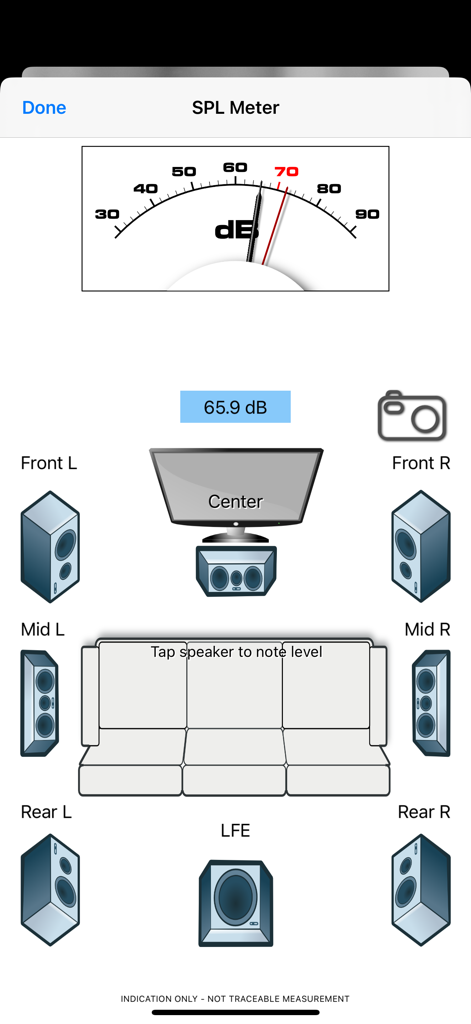
Home Theater SPL - デシベルメーターとオーディオキャリブレーション用の7.1サラウンドサウンドスピーカーレイアウトが表示されたHome Theater SPLアプリのインターフェース。
デシベルメーターとオーディオキャリブレーション用の7.1サラウンドサウンドスピーカーレイアウトが表示されたHome Theater SPLアプリのインターフェース。

Home Theater SPL - ヴィンテージの真空管とナビゲーションボタンが特徴のHome Theater SPLアプリのスプラッシュ画面。
ヴィンテージの真空管とナビゲーションボタンが特徴のHome Theater SPLアプリのスプラッシュ画面。

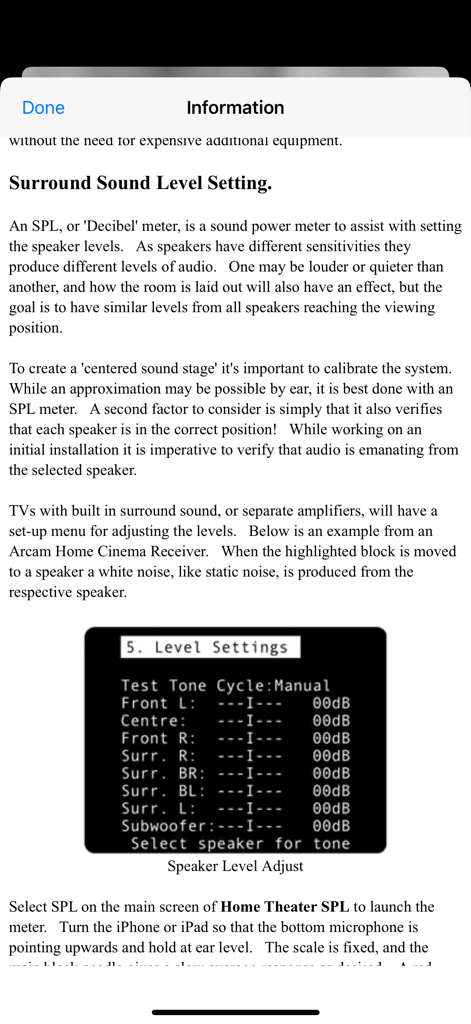
Home Theater SPL - AVアンプの設定メニュー例を用いて、サラウンドサウンドのスピーカーレベル調整について説明している情報画面。
AVアンプの設定メニュー例を用いて、サラウンドサウンドのスピーカーレベル調整について説明している情報画面。

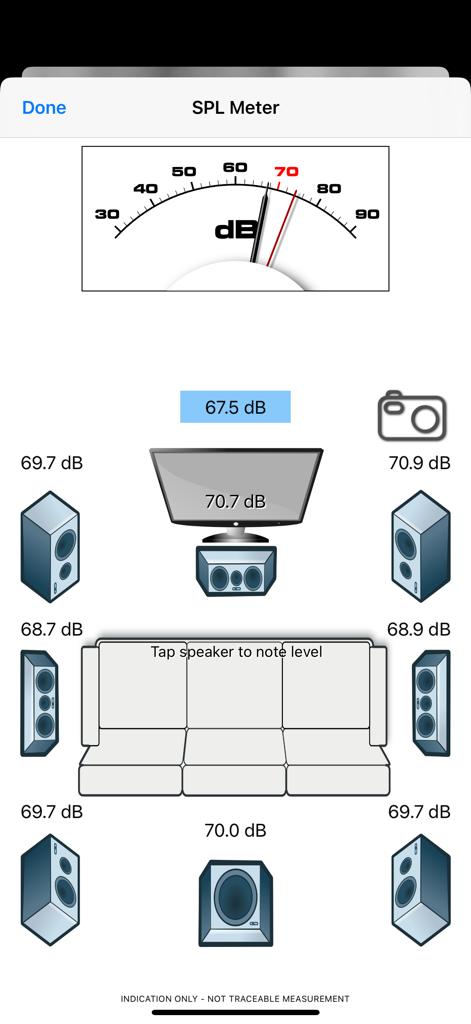
Home Theater SPL - デシベルメーターとスピーカーレベルの数値が表示された、7.1サラウンドサウンドシステム調整中のHome Theater SPLアプリインターフェース。

デシベルメーターとスピーカーレベルの数値が表示された、7.1サラウンドサウンドシステム調整中のHome Theater SPLアプリインターフェース。

説明

Home Theater SPL Information   Professionals use SPL meters to calibrate audio reproduction systems in cinemas, so why shouldn’t Home Theaters or Home Cinemas owners use them too? Now the very same SPL meter that’s in our TestCard ProHD app is available separately.   An SPL or “decibel” meter is an essential tool when setting up surround sound systems.   Home Theater SPL a solution for calibrating the audio level of surround sound systems within the home without the need for additional equipment. Our app TestCard ProHD is the innovative means to calibrating your screen and audio to ensure a consistent and correct representation of display media and surround sound and includes an SPL meter. If you wish to calibrate both audio and visual aspects of your Home Theater then please consider TestCard ProHD.   Surround Sound Level Setting.   An SPL, or “Decibel” meter, is a sound power meter to assist with setting the speaker levels.   As speakers have different sensitivities they produce different levels of audio.   One may be louder or quieter than another, and how the room is laid out will also have an effect, but the goal is to have similar levels from all speakers reaching the viewing position.   To create that “centered sound stage” it’s important to calibrate the system.   While an approximation may be possible by ear, it is best done with an SPL meter.   A second factor to consider is simply that it also verifies that each speaker is in the correct position!   While working on an initial installation it is imperative to verify that audio is emanating from the selected speaker.   Select SPL on the main screen of Home Theater SPL to launch the meter.   Turn the iPhone or iPad so that the bottom microphone is pointing upwards and hold at ear level.   The scale is fixed, and the main black needle gives a slow average response as desired.   A red needle is provided for peak noise level information and is not required during calibration. Start with the front left speaker and allow it to set the benchmark level; the target for all other speakers to be set to.   Typically the audio will be in the 70-80dB range and as a guide 70dB is marked in red on dial.   With Home Theater SPL it is possible to note the current sound level by tapping on respective speaker, making it easier to recall where individual speakers were.   Move to the center speaker and adjust its level to closely match the first.   It is normal for amplifiers to increase or decrease sound levels by 1dB increments and it may not be possible to get an exact match.   Move to the next speaker in the list and repeat.   Variance of 1 or 2dB during calibration is normal, but it will settle around a value.   Some systems will have 5 speakers and some will also have the LFE, or bass effects, speaker to give the “0.1” to make 5.1 audio.   With the SPL meter there are 7 main speakers shown with one LFE to make 7.1.   With a 5.1 system the Mid speakers will not be present and therefore can be skipped. To check it’s always advisable to run round checking the speaker levels again, perhaps even adjusting the initial left speaker if it was not possible to set others within the range allowed by the amplifier.   When complete ensure that you save the settings within the amplifier if they’re not automatically saved.   For reference a screen shot of the SPL meter on Home Theater SPL can be taken to record any stored audio level by pressing the camera button.

Download

ダウンロード: App Store

このページはアプリまたはその開発者の公式ページではなく、情報提供および論評を目的として作成された独立した編集出版物です。明示的に別段の記載がない限り、アプリおよびその開発者は、MWM、Apple、Google Play、アプリのパブリッシャー、またはアプリの開発者と提携、承認、後援、認可、またはその他の公式的な関係はなく、このページのいかなる内容も、アプリがMWMのサービスを使用して開発されたことを意味するものではありません。すべての商標、ロゴ、スクリーンショット、その他のコンテンツはそれぞれの所有者の財産です。








