Hudway Go: Navigation with HUD
ダウンロード: App Store

このページはアプリまたはその開発者の公式ページではなく、情報提供および論評を目的として作成された独立した編集出版物です。明示的に別段の記載がない限り、アプリおよびその開発者は、MWM、Apple、Google Play、アプリのパブリッシャー、またはアプリの開発者と提携、承認、後援、認可、またはその他の公式的な関係はなく、このページのいかなる内容も、アプリがMWMのサービスを使用して開発されたことを意味するものではありません。すべての商標、ロゴ、スクリーンショット、その他のコンテンツはそれぞれの所有者の財産です。


ロゴ: Hudway Go: Navigation with HUD
ダウンロード: App Store

Hudway Go: Navigation with HUD

道路から目を離さずに、未来的な3Dナビゲーションを体験してください。スマートフォンの力だけで、ジェット機のパイロットが使用するコックピット技術を駆使し、霧、雨、暗闇の中でもより安全に運転できます。

主要数値

ダウンロード

1M+

ユーザー評価

3.2/5

評価数

800

開発元

HUDWAY LLC.

カテゴリ

Navigation

対応言語

9

最新バージョン

6.0.3

サイズ

58.3 MB

リリース日

2016年6月14日
機能

フロントガラスをアップグレード

ダッシュボードをハイテクなコマンドセンターに変身させます。Hudway Goは、未来的な戦闘機のテクノロジーと、現代のドライバーにとって重要な安全機能を融合させています。

道路から目を離さない安全性

ルートをフロントガラスに直接投影することで、わき見運転をなくし、前方の道路に集中し続けることができます。

低視界での高い操作性

夜間ナビゲーションに最適化された高コントラストの3Dディスプレイにより、濃霧、豪雨、または完全な暗闇の中でも自信を持って運転できます。

以下のスクリーンショットと説明は、アプリの公式ストアリスティングから直接取得されたものであり、アプリ開発者の所有物です。

アプリストア

スクリーンショット
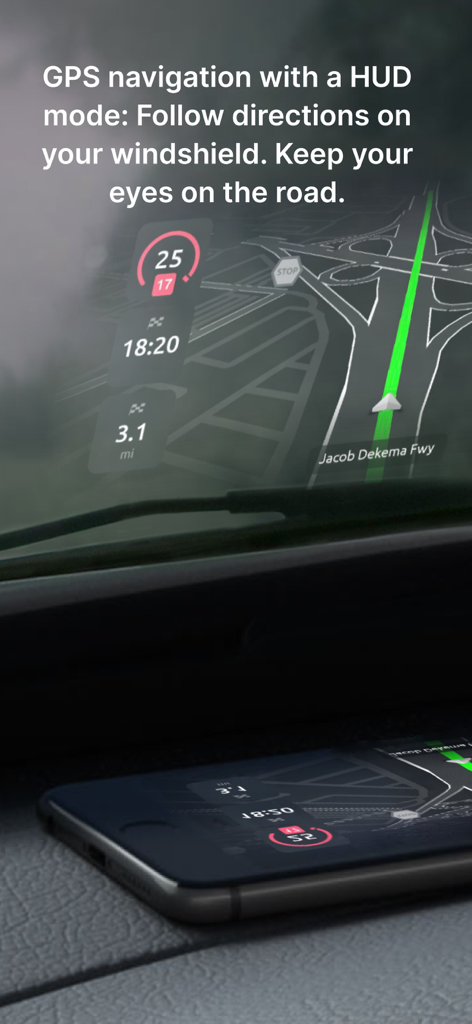
Hudway Go: Navigation with HUD - より安全な運転のために、HUDモードで車のフロントガラスにHudway GoのGPSナビゲーションを投影するスマートフォン
より安全な運転のために、HUDモードで車のフロントガラスにHudway GoのGPSナビゲーションを投影するスマートフォン

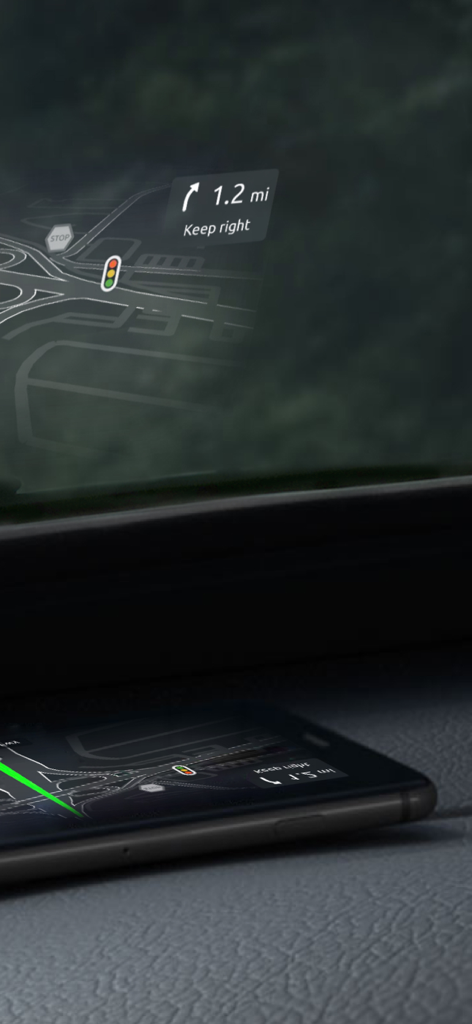
Hudway Go: Navigation with HUD - 車のダッシュボード上のスマートフォンが、道路の方向や交通標識を示すナビゲーション・ヘッドアップディスプレイをフロントガラスに反射させている様子。
車のダッシュボード上のスマートフォンが、道路の方向や交通標識を示すナビゲーション・ヘッドアップディスプレイをフロントガラスに反射させている様子。

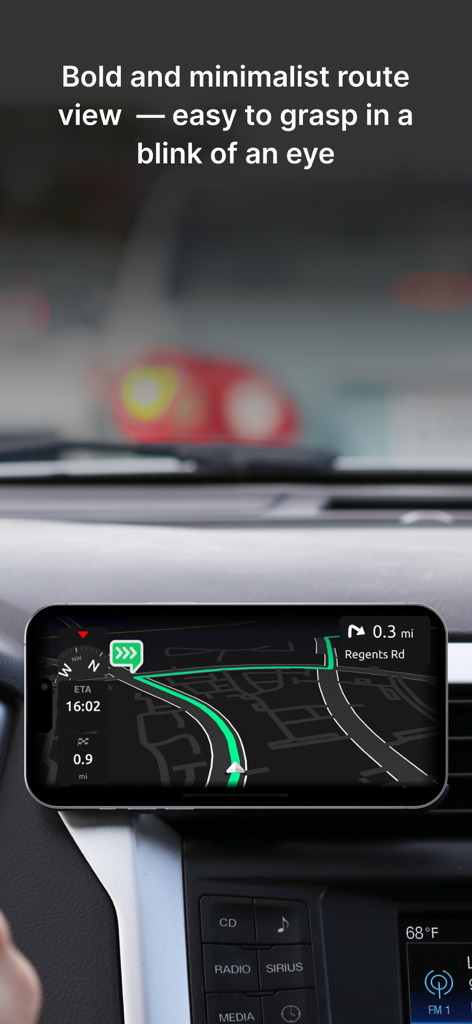
Hudway Go: Navigation with HUD - 車のダッシュボードに取り付けられ、Hudway Goのミニマリストな3Dナビゲーションルートを表示するスマートフォン
車のダッシュボードに取り付けられ、Hudway Goのミニマリストな3Dナビゲーションルートを表示するスマートフォン

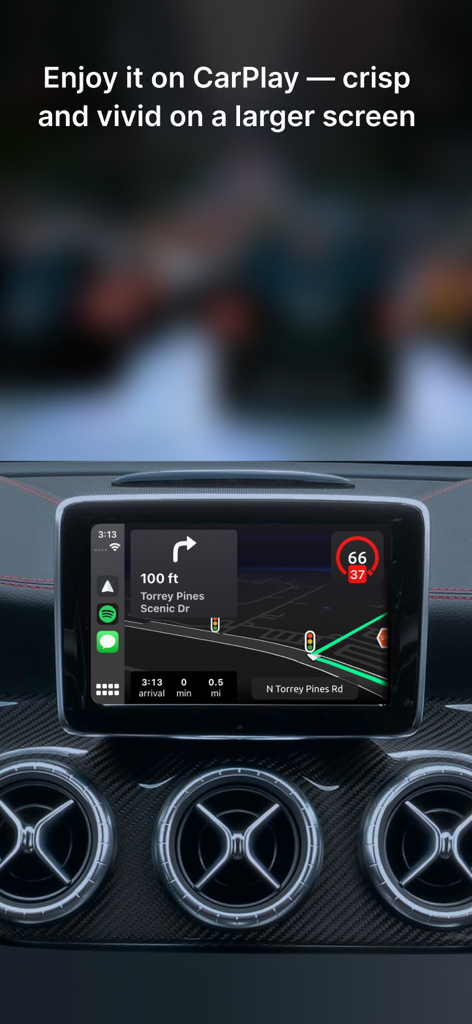
Hudway Go: Navigation with HUD - Apple CarPlayを介して車のダッシュボードに表示されたHudway Goナビゲーションインターフェース
Apple CarPlayを介して車のダッシュボードに表示されたHudway Goナビゲーションインターフェース

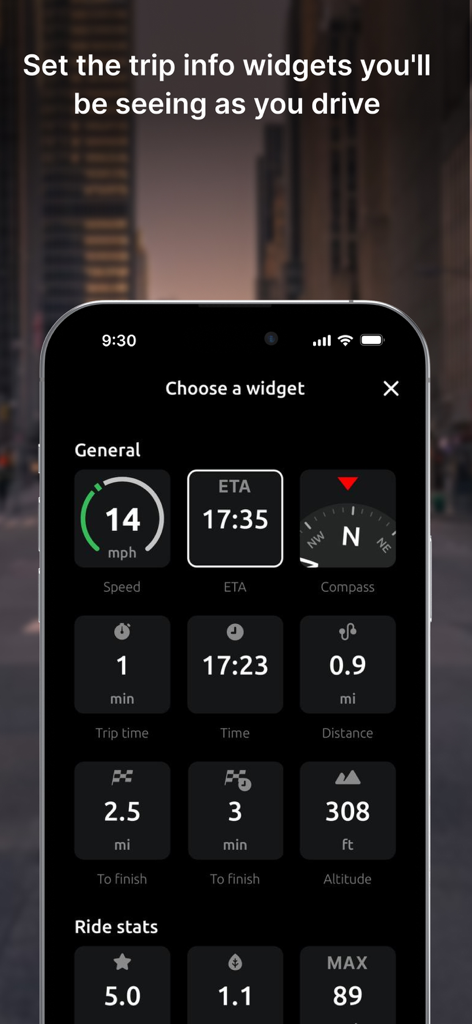
Hudway Go: Navigation with HUD - 速度、到着予定時刻、コンパス、高度などの運転用ウィジェットを選択するためのHudway Goアプリメニューを表示するスマートフォンの画面。
速度、到着予定時刻、コンパス、高度などの運転用ウィジェットを選択するためのHudway Goアプリメニューを表示するスマートフォンの画面。

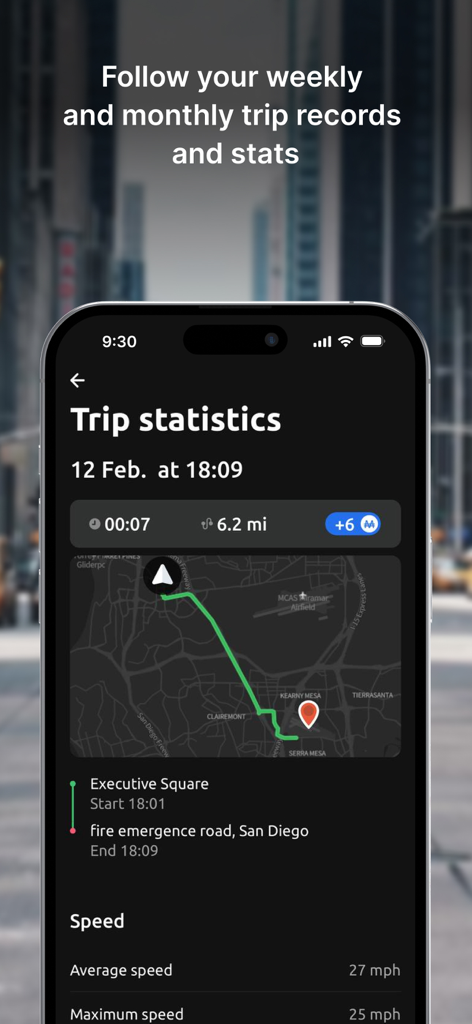
Hudway Go: Navigation with HUD - ルートマップと走行速度データを含む走行統計を表示するHudway Goアプリのスクリーンショット
ルートマップと走行速度データを含む走行統計を表示するHudway Goアプリのスクリーンショット

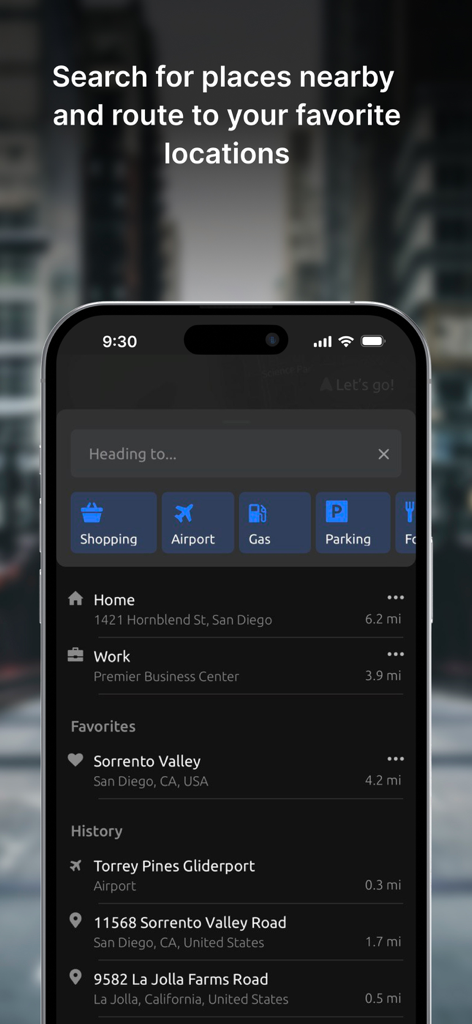
Hudway Go: Navigation with HUD - ガソリンスタンドや駐車場などの目的地カテゴリと、お気に入りや履歴の場所を表示するHudway Goアプリの検索インターフェース
ガソリンスタンドや駐車場などの目的地カテゴリと、お気に入りや履歴の場所を表示するHudway Goアプリの検索インターフェース

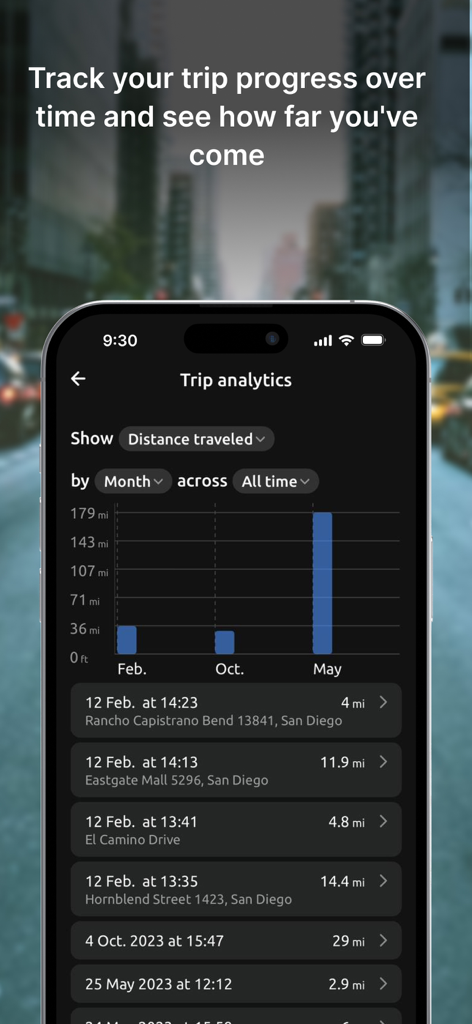
Hudway Go: Navigation with HUD - 走行距離の棒グラフと詳細な走行履歴ログを表示するHudway Goアプリの走行分析ダッシュボード。
走行距離の棒グラフと詳細な走行履歴ログを表示するHudway Goアプリの走行分析ダッシュボード。

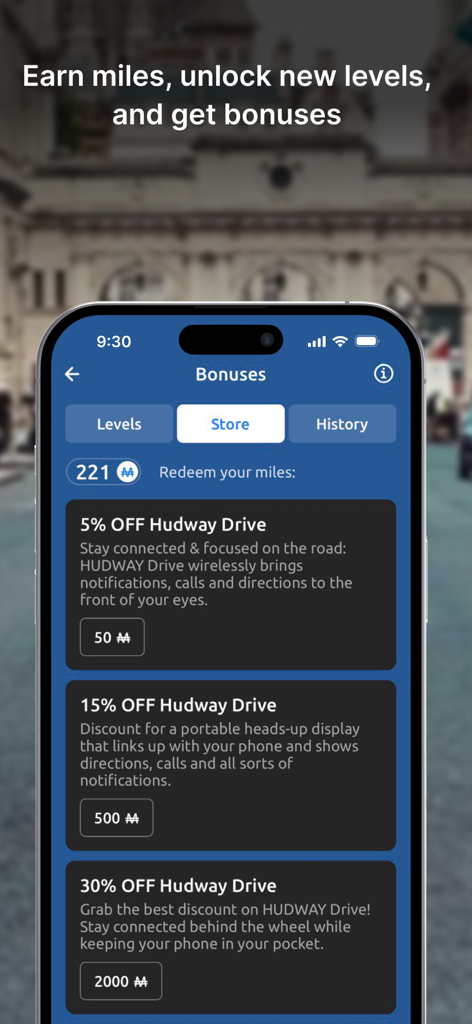
Hudway Go: Navigation with HUD - 獲得したマイルをハードウェアの割引に交換できるリワードストアを表示するHudway Goアプリのボーナス画面
獲得したマイルをハードウェアの割引に交換できるリワードストアを表示するHudway Goアプリのボーナス画面

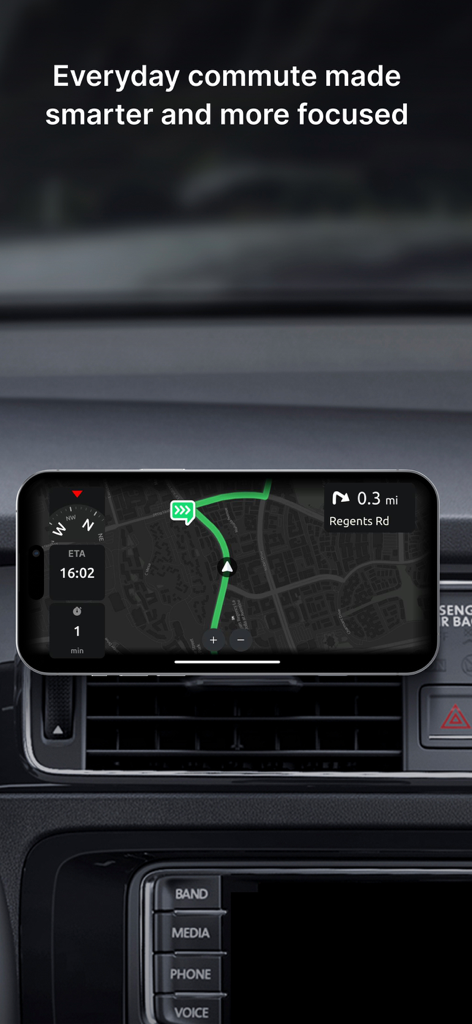
Hudway Go: Navigation with HUD - 車のダッシュボードに取り付けられたスマートフォン上のHudway Goナビゲーションアプリのインターフェース

車のダッシュボードに取り付けられたスマートフォン上のHudway Goナビゲーションアプリのインターフェース

説明

HUDWAY Go is a GPS navigation app which turns your smartphone into a heads-up display. Enjoy driving any car with a HUD powered by just your phone. *** "Hudway Go is one of the cleverest driving apps we've seen" — CNET "Hudway Go is unbelievably cool for one special reason: It actually lets you see your directions and route right on your windshield" — USA Today "Hudway HUD tools will remind you nothing less than a science fiction movie that you watched recently" — crazyengineers.com "HUDWAY Go turns your windshield into a jet fighter cockpit" — digitaltrends.com *** HUDWAY Go helps you drive safer in fog, rain, heavy snow, in dusk and darkness. Set your destination, select the route and place your phone on the dash — to see the route reflected on your windshield. Keep your eyes on the road and know in advance what’s ahead — a straight run, or a sharp turn. The dark windy unknown roads become more predictable this way. Features: - Easy-to-follow 3D route view - Classic map view - Heads-up (HUD) mode available for both the map and the 3D route iews - Customizable voice assistant - Speed limits and speed cam alerts - A sum-up of fuel consumption and cost for each trip - A selection of trip widgets, like ETA, speed, distance traveled, directions on the next manoeuvre, etc. - Alternative routes and stopovers - Favorite locations, personal records, driving score, weekly and monthly statistics, and more Note: Any issues found or suggestions you're willing to share — shoot us an email right from the app. We have auto-renewing subscriptions for the premium features in the app. And here's how they work: — We have 1-month, 3-months, 6-months, 1-year and lifetime subscriptions. — Your iTunes account is charged at confirmation of purchase — If you want to cancel the renewal, be sure to do it 24-hours before subscription expires: within 24-hours prior to the end of the current period your account is automatically charged for renewal — You can actually cancel the auto-renewal right after you've purchased the subscription: the subscription you've paid for won't cancel, but you won't be charged for the next period when it ends. We thought you'd like to know that: 1. On a clear day, your phone screen may not be able to produce a legible reflection. This is when you can use the app in a regular mode with the phone fixed in a mount. At night, in dusk, or in dull weather the reflection is normally well-discernible. 2. When driving, make sure that your smartphone or tablet is firmly fixed, and doesn't obstruct your view of the road. 3. Just as any other other navigation app, HUDWAY Go extensively uses GPS which may quickly drain your phone battery. If you're willing to get yourself a HUD that works day&night, shows your speed, directions, messenger notifications and incoming calls — all while your phone stays in your pocket, check out our HUDWAY Drive device at hudway.co/drive Privacy Policy hudway.co/privacy Terms of Use hudway.co/terms

Download

ダウンロード: App Store

このページはアプリまたはその開発者の公式ページではなく、情報提供および論評を目的として作成された独立した編集出版物です。明示的に別段の記載がない限り、アプリおよびその開発者は、MWM、Apple、Google Play、アプリのパブリッシャー、またはアプリの開発者と提携、承認、後援、認可、またはその他の公式的な関係はなく、このページのいかなる内容も、アプリがMWMのサービスを使用して開発されたことを意味するものではありません。すべての商標、ロゴ、スクリーンショット、その他のコンテンツはそれぞれの所有者の財産です。